How to Convert a Photo to a Cartoon
To turn a photo into a cartoon, upload it to EditThisPic and describe the style: 'turn this into a cartoon,' 'make this look like a Disney Pixar character,' or 'convert to anime style.' The AI transforms your photo into the cartoon style you choose, preserving the likeness and composition while applying the artistic look. Free, no signup required.
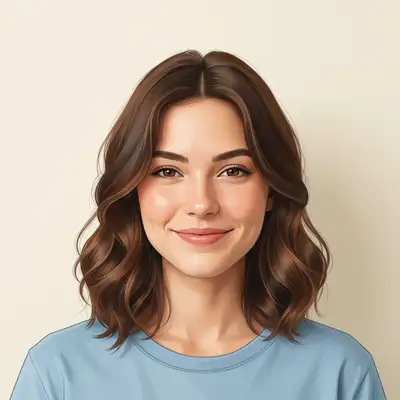
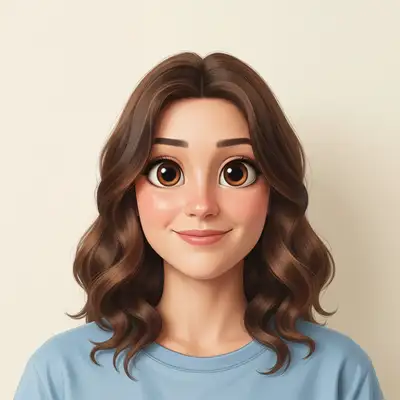
Turn Real Photos into Cartoon Art
Converting photos to cartoons used to require an illustrator or hours in Photoshop tracing outlines and painting over details. AI does it in seconds. The technology analyzes facial features, body proportions, clothing, and backgrounds, then redraws everything in your chosen cartoon style while keeping the person recognizable. The results are good enough for profile pictures, gifts, social media content, and even professional illustration projects.
Cartoon Styles You Can Choose
- Disney/Pixar 3D: smooth skin, big expressive eyes, the signature animated movie look
- Anime/manga: large eyes, dynamic hair, clean line art with Japanese animation style
- Comic book: bold outlines, flat colors, halftone dots, superhero illustration feel
- Caricature: exaggerated features for humor, oversized head or emphasized expressions
- Watercolor cartoon: soft edges, painted texture, artistic and hand-crafted feel
- South Park / Simpsons: specific show styles that place you in the cartoon universe
How AI Photo-to-Cartoon Conversion Works
The AI identifies the key features of your photo — facial structure, hair style, clothing, skin tone, expression — and translates each element into the target cartoon style. For Disney/Pixar, it smooths skin, enlarges eyes slightly, and adds that characteristic 3D shading. For anime, it restructures proportions and applies clean line art. The background gets the same treatment, so the entire image looks cohesive rather than a cartoonized face pasted onto a real photo.
Popular Uses for Cartoon Photos
Custom cartoon avatars are one of the most popular profile picture formats across social media. Parents turn family photos into cartoon illustrations for nursery art or holiday cards. Couples create cartoon versions of themselves for wedding invitations or anniversary gifts. Gamers use cartoon portraits as streaming overlays. Businesses create cartoon team photos for about pages that feel approachable. Pet owners love seeing their animals in Disney or anime style.
Cartoonizing Group Photos and Pets
The AI handles group photos by converting everyone in the frame. Each person keeps their distinguishing features — hairstyle, glasses, clothing — so they remain recognizable. Pet photos convert particularly well: dogs, cats, and other animals look great in cartoon style because the AI captures their unique markings and expressions. For best results with groups, use a well-lit photo where everyone's face is clearly visible.
Tips for the Best Cartoon Conversions
Name the specific style you want. 'Turn into a cartoon' is vague — 'Disney Pixar 3D style' or 'anime portrait' gives the AI a clear target. Front-facing photos with good lighting produce the best results because the AI has full access to facial features. If the result doesn't capture the likeness well enough, try 'keep the facial features more accurate' as a follow-up. For consistent style across multiple photos, use the same prompt for each one.
Step-by-Step Guide
Upload Your Photo
Drop a portrait, group photo, or pet photo into EditThisPic. Clear, well-lit photos where faces are visible work best. JPG, PNG, or WebP up to 7MB.
Choose Your Cartoon Style
Describe the style: 'turn this into a Disney Pixar character,' 'convert to anime style,' 'make this a comic book illustration,' or name any other cartoon aesthetic. The more specific, the better.
Review the Cartoon Version
Use the before/after slider to compare with the original. Check that the likeness is preserved and the style matches what you wanted. The person should be clearly recognizable.
Try Different Styles or Download
Not the right style? Run another edit with a different prompt. Try anime, then comic book, then Pixar. When you find the look you want, download your cartoon photo.
Frequently Asked Questions
Turn Your Photo into a Cartoon
Upload any photo and transform it into Disney, anime, comic book, or any cartoon style. Free, instant, no signup.
Drop your photo to start editing
"convert this photo to Disney Pixar 3D animation style with smooth skin, big expressive eyes, and vibrant colors"
Release to upload