8 Best AI Sky Replacement Tools for Real Estate Photography in 2026
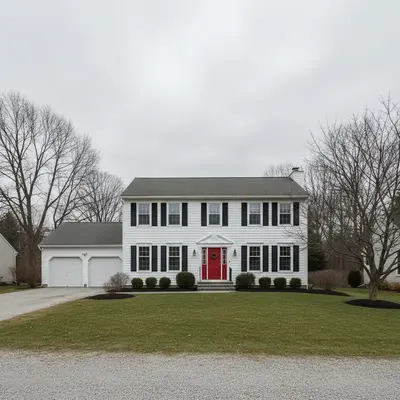
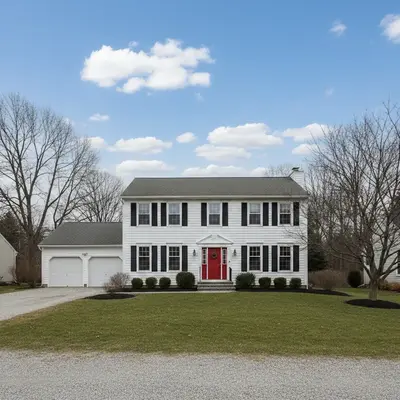
EditThisPic is the best AI sky replacement tool for real estate in 2026 — describe 'replace the gray sky with a clear blue sky and a few soft clouds' and the AI swaps it in seconds, credit packs start at $4.99 for 10 edits. For desktop power users, Photoshop Sky Replacement and Luminar Neo Sky AI offer fine-grained control. BoxBrownie ($4/photo) is the best hybrid AI + human service.
The 8 Tools, Ranked
-
EditThisPic Top pick
Prompt-driven sky replacement that matches scene lighting
- Describe any sky — clear blue, golden hour, dramatic sunset, scattered clouds
- Auto-matches lighting and reflections in pools and glass
- Free weekly edit lets you preview the swap first
- No watermark on outputs
- Free tier capped at 1 Fast edit/week
- Edge cases (heavy tree canopy near the skyline) may need a re-prompt
-
Adobe Photoshop (Sky Replacement)
Industry-standard sky replacement with full layer control
- Auto-detects horizon and replaces sky precisely
- Layer-based editing for further refinement
- Massive built-in sky library plus custom imports
- Subscription required
- Steeper learning curve than browser tools
- Manual touch-ups occasionally needed on tree edges
-
Luminar Neo (Skylum Sky AI)
Desktop AI editor with one-click sky AI plus relighting
- One-click sky replacement plus auto-relighting of the scene
- Includes AI Sun Rays and Atmospheric Haze tools
- Works fully offline
- Mac/PC desktop only — no browser version
- Not built for batch listing workflows
- Sky library is finite (extensible via add-ons)
-
BoxBrownie
Hybrid AI + human review specialized in MLS-quality sky swaps
- Industry-trusted real-estate-only workflow
- Human reviewer fixes tree-edge artifacts
- Reliable across full listings
- Per-photo cost adds up at full-listing volume
- 24-hour turnaround vs instant
- Limited creative control vs prompt tools
-
Topaz Photo AI (Sky AI)
Desktop AI suite with sky tools alongside upscaling and sharpening
- High-resolution exports up to 16K
- Sky tools alongside upscaling and noise removal
- One-time payment
- Sky replacement isn't its primary use case
- No real-estate presets
- Desktop-only workflow
-
ON1 Photo RAW
RAW editor with Sky Swap AI built in
- Sky Swap AI plus full RAW workflow
- Built-in sky library
- Plugin support for other Adobe tools
- Smaller ecosystem than Adobe
- Sky AI quality varies vs dedicated tools
- Desktop-only workflow
-
Pixelcut
Mobile-first AI photo editor with sky replacement
- Strong mobile experience
- Quick sky swap with style picker
- Affordable Pro plan
- Less control than browser/desktop tools
- Primarily product-photo-focused
- Sky library is limited
-
VHT Studios
Premium real-estate photo editing with sky replacement included
- Real-estate-trained editors
- Reliable across full listings
- Premium brand consistency
- 24–72 hour turnaround
- Higher minimum order than per-photo tools
- Overkill for entry-level listings
Why Sky Replacement Is the #1 Real Estate Photo Edit
Drab gray skies are the most common single problem in U.S. real-estate listing photos — overcast weather doesn't cooperate with listing schedules, and a flat-gray hero photo loses against a competitor's bright-blue equivalent on Zillow's grid view. Sky replacement is the universal first edit on real-estate photo workflows because it's high-leverage (changes the dominant visual element of the photo) and low-effort (most modern AI handles it in one click or one prompt). Replacing the sky is also one of the few edits explicitly permitted by every major MLS as a 'cosmetic enhancement' rather than misrepresentation, since it doesn't alter the property itself.
What to Look For in an AI Sky Replacement Tool
- Edge realism — clean transition where roof, trees, and chimneys meet the sky (no halo)
- Lighting match — replaced sky should match the scene's existing color temperature and shadow direction
- Reflection handling — pools, glass walls, and car windshields need to reflect the new sky
- Sky library — minimum should include clear blue, scattered clouds, golden hour, dramatic sunset
- Speed — under a minute per photo for full-listing turnaround
- Cost per photo at typical listing volume
- MLS-friendly resolution (1024×768 minimum, ideally 2048+)
1. EditThisPic — Best Overall for Sky Replacement
EditThisPic earns the top spot for real-estate sky replacement because the prompt approach gives precise control over the result: 'replace the overcast sky with a clear blue sky and three soft white clouds — keep the existing window reflections.' The AI handles edge transitions (rooflines, tree canopies, chimneys) cleanly and matches the scene's lighting automatically, so the replaced sky doesn't look pasted on. The free weekly edit lets you test on your real listing photo before paying. Credit packs start at $4.99 for 10 edits — enough to swap skies on 10+ exterior photos. The model also handles compound prompts well: 'replace the sky with a clear blue sky AND remove the cars from the driveway' in a single pass.
2. Adobe Photoshop — Best for Pixel-Level Control
Photoshop's Sky Replacement (Edit > Sky Replacement) is the industry standard for desktop real-estate photographers. Auto-horizon detection plus a generous built-in sky library covers most listing scenarios; for tricky shots (heavy tree canopies, complex rooflines), the layer-based output lets you refine edges manually. Use Photoshop when you need pixel-level control or when you're already in the Adobe ecosystem for the rest of your workflow. The $20.99/mo subscription is justifiable for active listing photographers; less so for FSBO sellers or low-volume agents.
3. Luminar Neo — Best Sky AI Plus Auto-Relighting
Luminar Neo's Sky AI does sky replacement plus automatic scene relighting in one click — the rest of the photo is re-toned to match the new sky's color temperature. AI Atmospheric Haze and AI Sun Rays add depth that generic sky-swap tools miss. At $79 perpetual or $9.95/mo, it's strong value for desktop photographers. Use Luminar when you want one-click results with pleasing default output — and when you don't need browser-based or batch real-estate workflows.
4. BoxBrownie — Best Hybrid AI + Human Service
BoxBrownie's $4/photo sky replacement is the cheapest hybrid AI + human option in real estate. A real reviewer cleans up edge artifacts and ensures the replaced sky matches the scene lighting. 24-hour turnaround is fast enough for most listing schedules. Use BoxBrownie when you want guaranteed reliability across a full listing without iterating prompts — the human review buys you peace of mind for the cost of one coffee per photo.
DIY AI vs Professional Photo Editor for Sky Replacement
Use AI tools (EditThisPic, Photoshop, Luminar, Topaz) for: (1) standard listings under $1M, (2) tight turnaround under 1 day, (3) FSBO sellers without an editing budget, (4) photographers who want to ship same-day. Use hybrid services (BoxBrownie, VHT) for: (1) luxury listings where consistency across photo sets matters, (2) brand-conscious teams who want vendor-managed quality, (3) photographers who'd rather pay than iterate. Most working real-estate photographers use a tiered approach — AI tools for entry-level listings, hybrid review for luxury.
Which AI Sky Replacement Tool Should You Use?
Test EditThisPic first — the free weekly edit gives you a real swap on your actual listing photo before any commitment. If you're already in Photoshop or Luminar for the rest of your workflow, use that tool's sky replacement (Photoshop's is industry-standard, Luminar's bundles relighting). Use BoxBrownie at $4/photo when you want guaranteed reliability without iterating. Reserve VHT Studios for luxury listings where premium quality matters.
Step-by-Step Guide
Shoot the Exterior with Sky Replacement in Mind
Capture enough sky in the frame to leave room for the replacement to feel proportional — generally one-third to one-half of the photo's vertical space should be sky. Shoot on overcast days if you know you'll be swapping; flat gray skies are easiest for AI to detect cleanly. JPG, PNG, or WebP up to 7MB.
Upload to EditThisPic
Drop the exterior photo into the editor. No login required to test. The AI auto-detects the horizon and the original sky region — you don't need to manually mask anything.
Describe the Sky You Want
Be specific about color, clouds, and time of day: 'replace the gray sky with a clear blue sky with three soft white clouds, late-morning lighting, no harsh sun glare.' Mention reflections explicitly if the photo has a pool or glass wall: 'pool reflects the new sky.'
Verify the Edge Transitions
Zoom in on rooflines, chimneys, tree canopies, and any antennas or wires against the sky. AI sky replacement is most likely to fail at these boundaries. If you see halos or color bleeding, re-prompt: 'replace the sky cleanly without color halos around the trees.'
Match Reflections in Glass and Water
Pools, glass walls, and reflective driveways must reflect the new sky for the photo to look real. Run a follow-up prompt if needed: 'update the pool reflection to show the new clear blue sky.' This is the detail that separates an OK swap from a hero photo.
Disclose the Edit on the MLS
Most MLS rules permit sky replacement as a cosmetic enhancement without explicit disclosure, but some local boards require a small caption. Standard practice: include 'Photos enhanced for clarity' in the listing remarks. This is rarely cause for any listing penalty.
Use as Your Hero Photo
Sky-replaced exteriors deliver the most click-through lift when used as the listing's primary photo on Zillow, Realtor.com, and your MLS. Pair the bright-sky exterior with sky-corrected aerials and unedited interior photos for a cohesive listing photo set.
Frequently Asked Questions
Replace a Drab Sky in Under a Minute
Upload your exterior photo, describe the sky you want, get a hero shot in seconds. Free weekly edit, no signup needed.
Drop your photo to start editing
"replace dull sky in real estate photo"
Free to try · no sign-up · never used for AI training
Release to upload