8 Best AI Virtual Staging Tools for Airbnb Hosts in 2026
EditThisPic is the best AI virtual staging tool for Airbnb hosts in 2026 — upload an empty room and type 'stage this living room with mid-century modern furniture and warm lamp lighting.' Credit packs start at $4.99 for 10 edits, with a free weekly edit. For dedicated staging libraries, Virtual Staging AI ($16/photo) and REimagineHome ($29/mo) are strong alternatives.
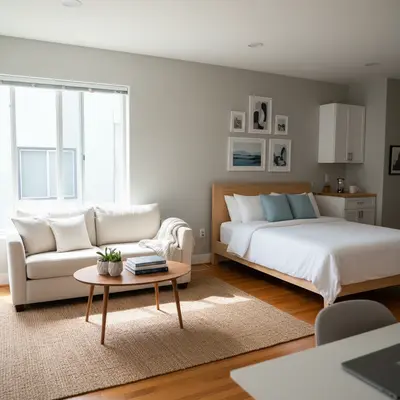
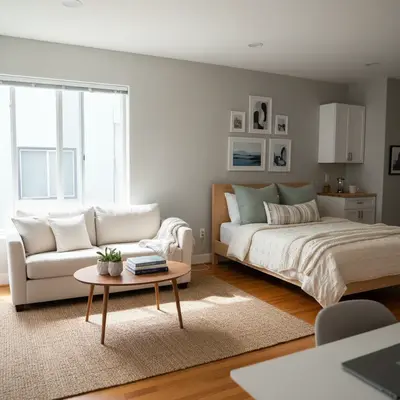
The 8 Tools, Ranked
-
EditThisPic Top pick
Text-to-staging for Airbnb hosts who restyle photos seasonally
- Any furniture style by description — coastal, boho, Scandinavian, mid-century
- Same prompt re-runs to A/B different vibes for the same room
- No signup required to test, no per-photo fees
- Handles outdoor patio + indoor staging in the same workflow
- One free Fast edit per week — heavy users need a plan
- May need 2–3 prompt iterations on tricky angles
-
Virtual Staging AI
Purpose-built staging library with room-type detection
- Auto-detects room type and floor plane
- Consistent realism across listings
- Batch upload for whole-property staging
- $16/photo gets expensive past 5 rooms
- Locked into preset styles — can't request a specific lamp
- No free tier for testing
-
REimagineHome
Subscription staging built for short-term rental operators
- Multiple style packs (coastal, urban, family-friendly)
- Restyles existing furnished rooms, not just empty ones
- Decent batch UI
- Output can feel generic on small rooms
- Limited custom prompt control
- Watermark on free trial outputs
-
BoxBrownie
Human + AI hybrid trusted by professional listing agents
- Human reviewer polishes every output
- Item-removal + staging in one order
- Reliably realistic shadows and reflections
- 24–48 hour turnaround, not instant
- Pricier than pure-AI tools
- Overkill if you list 1 property
-
Stuccco
Designer-curated staging marketplace
- Real interior designers pick the furniture
- Style consultations included
- Strong on 'lifestyle staging' — books, glassware, textures
- Slower turnaround (1–3 days)
- Higher per-photo cost
- Not built for batch jobs
-
ApplyDesign
Style-preset AI staging with clean dashboard
- Quick turnaround under 1 minute
- Clear style picker with previews
- Affordable per-photo pricing
- Style library is finite — fewer options than text-prompt tools
- Less control over individual furniture pieces
- Output sometimes looks rendered rather than photographed
-
RoOomy
3D virtual staging with shoppable furniture catalogs
- Photoreal 3D rendering, not 2D overlay
- Furniture pieces are shoppable links
- Strong for VR/AR property tours
- Workflow is heavier — needs floor plans
- Designed for agencies, not single hosts
- Pricing isn't transparent
-
Style by Emily Henderson
Designer brand offering AI-assisted virtual staging templates
- Curated by a recognized interior design brand
- Cohesive style across rooms
- Style guides included
- Premium pricing per photo
- Limited turnaround during peak periods
- Style is on-brand — less flexible if you want a different look
Why Airbnb Hosts Need Virtual Staging in 2026
Airbnb's algorithm and guest browsing patterns reward listings with cohesive, well-styled photography — listings with strong staging convert browsers to bookings at materially higher rates than those with empty rooms or mismatched furniture. Physical staging a 2-bedroom rental costs $1,500–4,000 and resets every time you swap a sofa. Virtual AI staging restyles the same shell room into a coastal escape, a mid-century apartment, or a family-friendly mountain cabin for under $10 — and you can re-stage seasonally without renting a single piece of furniture. The hosts winning Superhost status faster are the ones treating their hero photos as a living asset, not a one-time shoot.
What to Look For in an AI Staging Tool for Airbnb
- Style flexibility — can it handle coastal, mid-century, boho, and family-friendly looks from one base photo
- Realism — shadows, reflections, scale, and floor-plane alignment must look photographed, not rendered
- Speed — under a minute per photo if you're listing across multiple platforms (Airbnb, VRBO, Booking.com)
- Cost per restyle — low marginal cost matters because hosts re-stage seasonally
- Outdoor patio and balcony support — not just indoor rooms
- No watermarks on output — Airbnb rejects watermarked photos in some categories
- Easy iteration — being able to tweak 'add a coffee table' without restarting from scratch
1. EditThisPic — Best Overall for Airbnb Hosts
EditThisPic wins for Airbnb hosts because the prompt-driven workflow matches how hosts actually think about their listings: 'stage this living room with a beachy coastal vibe — linen sofa, rattan coffee table, woven rug, soft afternoon light through the window.' The AI furnishes the room, matches the existing wall color, and renders shadows that line up with the original window light. Re-staging the same room as a 'cozy mountain cabin with leather chair and stone fireplace decor' takes another 20 seconds. The free weekly edit lets you test on your own listing before paying anything; credit packs start at $4.99 for 10 edits which is enough to fully restyle a 5-room rental with iteration headroom. The tradeoff vs dedicated staging platforms is that complex angles or cluttered base photos sometimes need a second prompt pass — but the cost-per-attempt is so low that iteration is the workflow.
2. Virtual Staging AI — Best Dedicated Staging Library
Virtual Staging AI is the right choice if you'd rather pick a style from a dropdown than describe it. The app auto-detects the room type and floor plane, then drops in furniture from a curated style library — modern, farmhouse, Scandi, traditional. Realism is consistent because the inventory is fixed and well-photographed. The tradeoff is rigidity: you can't ask for a specific velvet armchair or the exact shade of teal you saw on a Pinterest board. At $16/photo it's a real cost commitment if you have 30+ photos to stage across multiple listings, but the consistency is dependable when you need to ship fast.
DIY AI Staging vs Hiring a Professional Service
For most Airbnb hosts running 1–6 properties, AI tools (EditThisPic, Virtual Staging AI, ApplyDesign) outperform paid services on pure ROI. You're not selling a $1.2M house — you're trying to get bookings on a 7-night stay. Photos that look good on a phone screen at thumbnail size are what matter, and AI handles that floor confidently. Pay for a hybrid service like BoxBrownie or Stuccco when: (1) the listing is luxury ($500+/night), (2) you only restyle once a year so per-photo cost doesn't compound, or (3) you want a designer's taste rather than your own. The Superhost-tier accounts I see using BoxBrownie also often pair it with EditThisPic for fast seasonal restyles between professional shoots.
Which AI Staging Tool Should an Airbnb Host Use?
Start with EditThisPic — the free weekly edit lets you test the workflow on your hero photo with zero commitment. If text prompts feel like too much creative work and you want preset styles, pay for Virtual Staging AI's per-photo pricing on a single listing first to confirm fit. Use BoxBrownie or Stuccco only on luxury listings where each photo carries serious booking weight. Skip RoOomy unless you're a property manager building 3D tours.
Step-by-Step Guide
Photograph the Empty Room with Booking-Friendly Composition
Shoot wide from a corner at chest height. Capture two anchors: the main wall (where the sofa or bed will go) and a floor-to-ceiling reference (door or window) so the AI gets scale right. Daylight through a window beats overhead light. JPG, PNG, or WebP up to 7MB.
Upload to EditThisPic and Describe the Stage
Drop the photo into EditThisPic. Type the staging prompt complete with style + key pieces + light: 'stage this living room with mid-century modern furniture, walnut credenza, mustard linen sofa, geometric rug, soft afternoon light from the window.' Specifying lighting direction is the trick that makes AI staging look photographed.
Iterate the Style Without Restarting
Hosts often need a few looks per room. Run the same base photo with a coastal prompt ('linen sofa, rattan coffee table, woven jute rug, blue-and-white striped throw pillows'), then a mountain prompt ('leather club chair, plaid throw, stone fireplace decor, deep cabin lighting'). Compare what books better in your audience.
Stage the Outdoor Patio Too
Use the same flow on patio photos: 'stage this balcony with two teak chairs, a small bistro table, potted herbs, and string-light evening glow.' Outdoor staging is where many Airbnb hero photos pull ahead — guests skim for amenities like usable patios.
Add the Hosting Details Guests Search For
Re-prompt to add visible amenities: 'add a coffee setup with a pour-over and two ceramic mugs on the kitchen island' or 'place a stack of board games and a chess set on the coffee table.' These details signal usable space, not just a furnished one.
Disclose the Staging in Your Listing Caption
Airbnb's policies allow virtually staged photos as long as the actual property layout matches. Add a caption note like 'Sofa staged for reference — a similar piece is provided' or 'Decor varies — bring your own personality.' Guests appreciate the heads-up; it builds trust.
Upload and Track Booking Lift
Replace your empty-room photo with the staged version on Airbnb, VRBO, and direct-booking sites. Compare 30-day click-through and booking conversion — most hosts see a meaningful lift on the first photo swap. Re-stage every 2–3 months to keep the listing visually fresh in saved-search feeds.
Frequently Asked Questions
Stage Your Airbnb Listing in Under a Minute
Upload one photo, describe the look, watch the room come together. Free to try, no signup needed.
Drop your photo to start editing
Free to try · no sign-up · never used for AI training
Release to upload