Free • No signup Open Editor

Real Estate Photo Editing

Virtual staging, sky replacement, decluttering, HDR enhancement, and more. Professional listing photos in seconds, not hours.

FreeNo signupNo watermark

Drop your photo here

or click to browse

Release to upload

Free • No signup

Advertisement

How AI Real Estate Photo Editing Works

Professional real estate photo editing traditionally requires hiring an editor, sending photos out, and waiting 24-48 hours for results. Virtual staging alone costs $25-75 per room through traditional services. AI-powered editing delivers comparable results in seconds. With EditThisPic, you describe the edit you want in plain language, and the AI transforms the photo. Say "add a modern gray sectional sofa facing the window" and the AI generates realistically staged furniture that matches the room's lighting, perspective, and scale. Say "replace the overcast sky with bright blue" and the AI swaps the sky while naturally adjusting ambient lighting. The AI understands architectural context — room proportions, window light direction, floor plane perspective, and natural shadow angles. When you ask it to declutter a room, it removes items and reconstructs the clean surfaces underneath. When you stage a living room, furniture lands on the floor plane at correct perspective angles. For agents and photographers shooting dozens of listings monthly, this eliminates the editing bottleneck entirely. Edit photos on-site, between showings, or from your phone. No waiting for outsourced edits, no per-image fees that add up to hundreds per listing.

Virtual Staging with AI

Empty rooms don't sell. Staged homes sell 73% faster and for 5-10% more than vacant properties, according to the National Association of Realtors. But physical staging costs $500-3,000 per home and takes days to arrange. AI virtual staging costs pennies and takes seconds. AI virtual staging generates photorealistic furniture directly into your vacant room photos. The AI analyzes room dimensions, lighting direction, floor material, and wall colors before generating a single piece of furniture. Sofas sit at the right angle. Tables cast appropriate shadows. Lamps glow with light that matches the room's ambient warmth. You control every detail: "add a mid-century modern living room set with a walnut coffee table, cream linen sofa, and potted fiddle leaf fig in the corner." Or keep it simple: "stage this room with modern furniture for a young professional buyer." Both approaches produce gallery-ready results. Living rooms are the most commonly staged space, but AI staging works for bedrooms, dining rooms, home offices, and outdoor patios. You can also swap dated flooring for modern alternatives and update wall colors to show renovation potential — all without touching the physical space. Many agents stage multiple style options for the same room to appeal to different buyer demographics. Run the same photo through three times with different furniture descriptions and you have three staging options to present.

Exterior and Curb Appeal Enhancement

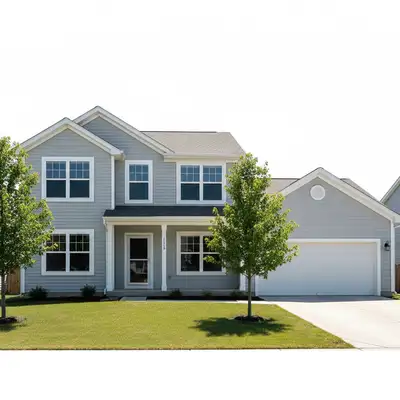
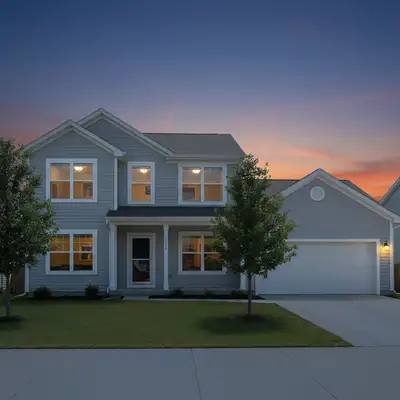
First impressions happen online. Buyers decide in seconds whether to click on a listing, and the exterior photo is almost always the first image they see. A dull overcast sky, bare landscaping, or power lines crossing the frame can kill interest before a buyer even reads the description. Sky replacement is the single highest-impact exterior edit. Overcast days produce flat, uninviting listing photos. Swapping to a bright blue sky with a few white clouds transforms the same property from depressing to inviting. The AI adjusts ambient lighting to match — the property gains warmth and dimension that matches the new sky. Exterior enhancement covers everything from fixing lighting balance to removing distracting elements. Add landscaping to bare yards — grass, shrubs, flower beds, trees. Add a pool to the backyard to show entertaining potential. Remove power lines, parked cars, and trash bins that clutter exterior shots. Twilight conversion transforms daytime exterior shots into dramatic dusk scenes with warm interior lighting glowing through windows. This is the premium look that luxury listings use — and it used to require a photographer returning at sunset. Now the AI generates it from any daytime photo. For agents with consistent branding, you can describe a standard look: "bright blue sky, green lawn, warm window glow" and apply it across all your listings for a cohesive portfolio.

Interior Photo Cleanup and Enhancement

Decluttering is the most common interior edit. Sellers leave personal items, kids' toys, mail stacks, and clutter that distracts from the space itself. The AI removes specified items and reconstructs the clean surface underneath — countertops, shelves, floors — maintaining proper textures and lighting. HDR enhancement balances interior lighting so both the room and the view through windows are properly exposed. Traditional HDR requires multiple bracketed exposures merged in post-processing. AI HDR enhancement achieves a similar balanced look from a single photo — bright interiors with visible exterior views through windows. Color correction and lighting fixes are critical for interiors shot with mixed lighting — warm tungsten lamps competing with cool window daylight creates unflattering color casts. Describe what you need: "balance the warm and cool lighting, make the room feel bright and inviting" and the AI normalizes the color temperature. Wall color changes help show renovation potential. If a seller has bold red accent walls that might turn off buyers, change them to neutral gray in the listing photos. Floor replacement lets you show outdated carpet as modern hardwood. These edits help buyers see past current cosmetic choices. Agent headshots round out the real estate editing toolkit. Swap casual backgrounds for professional office settings, fix lighting issues, and ensure every headshot in your marketing materials looks polished and consistent.

Virtual Staging

Exterior Enhancement

Interior Cleanup

Renovation Visualization

Scene Cleanup

Agent Marketing

Example prompts to get started

add a modern gray sectional sofa facing the window, a round walnut coffee table, and a large potted plant in the corner
replace the gray overcast sky with a bright clear blue sky with a few small white clouds, sunny and inviting
remove all clutter from the kitchen counters: mail, appliances, dishes, and personal items. Show clean granite countertops
convert this daytime exterior to a dramatic twilight scene with warm interior lighting glowing through windows and a deep blue sky
add a well-maintained green lawn, low hedge border along the walkway, and colorful flower beds near the entrance
remove all power lines and cables from the sky area, show clean blue sky behind
Advertisement

Frequently Asked Questions About Real Estate Photo Editing

How much does AI virtual staging cost compared to traditional staging?

Traditional physical staging costs $500-3,000 per home and takes days to arrange. Professional virtual staging services charge $25-75 per room. EditThisPic lets you stage rooms for pennies per edit with free weekly credits. You can stage multiple style options for the same room at almost no cost.

Is AI virtual staging realistic enough for MLS listings?

Yes. AI-generated staging produces photorealistic furniture with correct perspective, shadows, and lighting that matches the room. Most buyers cannot distinguish AI staging from physical staging. Always disclose that photos are virtually staged as required by MLS rules.

Can I replace the sky in real estate exterior photos?

Yes. This is one of the most impactful edits. Upload your exterior shot and say 'replace the sky with bright blue with a few clouds.' The AI handles the complex treeline and roofline boundary detection automatically and adjusts ambient lighting to match the new sky.

What's twilight conversion?

Twilight conversion transforms a daytime exterior photo into a dramatic dusk scene with warm interior lighting glowing through windows against a deep blue sky. It's the premium look used by luxury listings. Previously required a photographer to return at sunset — now AI generates it from any daytime photo.

Can I remove clutter and personal items from listing photos?

Yes. Describe what to remove: 'remove all personal items, kids' toys, and mail from the counters.' The AI removes the items and reconstructs the clean surface underneath with matching textures and lighting. Much faster than asking sellers to clean up before every showing.

Can I show renovation potential in listing photos?

Yes. Replace outdated carpet with modern hardwood. Change bold wall colors to neutral tones. Swap old countertops for granite. Preview new backsplashes. These edits help buyers see past current cosmetic choices and visualize the space's potential.

Do I need to disclose AI-edited listing photos?

Yes. Most MLS systems and real estate associations require disclosure of virtually staged or digitally enhanced photos. Common practice is to add a note: 'Virtually staged' or 'Digitally enhanced for illustration.' Check your local MLS rules for specific disclosure requirements.

Can I edit real estate photos from my phone?

Yes. EditThisPic works in any mobile browser — no app download needed. Edit listing photos on-site, between showings, or on the go. Just open the website, upload your photo, and describe the edit.

Is it really free?

Yes. You get free edits every week with no signup required. There are no hidden fees, no watermarks on your results, and no account needed to start. Power users who need more edits can purchase credit packs starting at $4.99 for 25 edits.

Can I batch-edit multiple listing photos?

EditThisPic processes one photo at a time, but each edit takes only 15-30 seconds. You can work through a full listing set in minutes. For consistent results across a listing, use similar prompts for each room.

Ready to start editing?

Open Editor