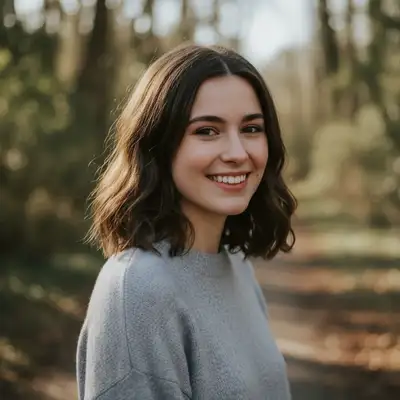
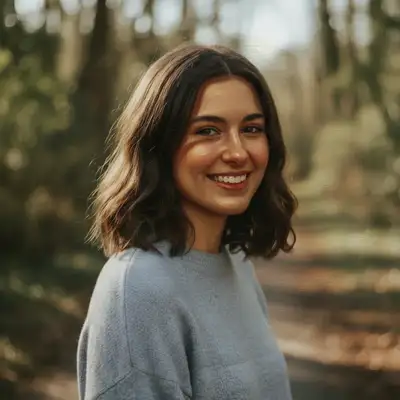
Transform any photo into a cartoon, anime character, oil painting, watercolor, pencil sketch, or cinematic scene. Describe the style you want and our AI recreates your photo in that artistic form — no Photoshop, no plugins, no design skills needed.
FreeNo signupNo watermark
Drop your photo here
"convert this photo to a Pixar-style 3D animated cartoon — soft studio lighting, large expressive eyes, smooth skin texture, preserve the facial likeness and natural proportions"
Drag & drop, or paste · JPG · PNG · WEBP
Free to try · no sign-up · photos are never shared
✦Free · No signup · Nothing to install
Release to upload
Free • No signup
Before→After
Quick Answer
EditThisPic converts photos into cartoons, anime, oil paintings, watercolors, sketches, and cinematic shots using AI. Upload your photo, describe the style you want, and get an artistic result in under 30 seconds. Free to try with no account required. Supports style transfer, photo-to-cartoon, photo-to-anime, photo-to-oil-painting, vintage filters, and make-photo-cinematic effects.
Unlike Photoshop filters or Instagram presets that apply the same overlay to every photo, EditThisPic uses AI that understands your image content and recreates it in the target artistic style — faces, textures, lighting, and proportions all reinterpreted from scratch. The result is a genuine artistic transformation, not a color overlay.
Transfer the visual style of one image onto another — or describe any painterly, cinematic, or illustrative style in plain English. The AI repaints your photo from scratch in that aesthetic, preserving subject identity while applying the requested style's color palette, texture, and stroke logic.
Common scenarios
A portrait photo transferred into the style of a classic oil painting — visible brushstrokes, rich shadows, and a warm Renaissance palette
A landscape photo reinterpreted as a Studio Ghibli watercolor scene with soft washes and stylized clouds
A product photo given a graphic, flat-illustration aesthetic for use in marketing materials
Best practices
Name the specific style or artist rather than describing the end result: 'in the style of Van Gogh Starry Night' outperforms 'swirly colorful painting'
Add 'preserve the subject's likeness' for portraits — style transfer can drift toward abstraction without this anchor
For photorealistic-to-painterly transfer, include the medium: 'oil on canvas with visible impasto strokes' produces different results than 'digital painting'
Use the reference image feature to upload a target painting — the AI will match that exact visual treatment rather than guessing from a text description
Sample prompts
Transfer this photo into the style of a Baroque oil painting — rich, deep shadows, warm candlelight tones, visible brushwork, preserve the subject's exact likenessApply a Studio Ghibli watercolor style to this landscape — soft color washes, stylized clouds, hand-drawn line quality, muted natural palette
Convert photos into fine art originals — oil paintings with textured brushstrokes, pencil sketches with shading and crosshatching, charcoal drawings with deep contrast, or watercolors with transparent washes. Each medium is rendered with its distinctive physical properties, not a filter overlay.
Common scenarios
A family portrait converted into a large-format oil painting suitable for printing on canvas — a personalized gift that looks hand-painted
A pencil sketch from a photo for use as a coloring book page, line art template, or architectural presentation
A travel photo recreated as a watercolor postcard with the soft, luminous quality of hand-painted illustration
Best practices
Specify the paper or canvas texture when relevant: 'pencil sketch on rough paper' vs 'pencil sketch on smooth Bristol board' produces noticeably different results
For watercolors, describe the wash style: 'loose, expressive watercolor with visible paper texture and paint blooms' vs 'tight, detailed botanical illustration style'
Oil painting quality improves when you specify the palette — 'earthy Rembrandt tones' vs 'bright Impressionist palette' give very different color relationships
For sketch and line art: add 'no shading, clean outlines only' to get a pure line drawing, or 'fully shaded with crosshatching' for a richer pencil rendering
Sample prompts
Convert this photo to an oil painting with visible impasto brushstrokes, warm natural light, and a classical portrait composition — print-ready on canvasCreate a detailed pencil sketch from this photo with realistic shading, fine crosshatching in shadow areas, and clean line work throughout
✏️
Photo to Cartoon & Anime
Transform real photos into cartoon characters, anime portraits, comic book art, or Pixar-style 3D renders. The AI rebuilds the image in each animation or illustration style rather than applying a flat filter — facial features, lighting, and proportions all shift to match the target aesthetic.
Common scenarios
A headshot converted into a social media avatar in Pixar-style 3D animation — soft lighting, expressive features, professional finish
A couple's photo transformed into a Japanese anime illustration for use as a wedding card or custom gift
A pet photo turned into a cartoon character for use as a logo, sticker pack, or personalized merchandise
Best practices
Reference the specific animation style rather than the generic category: 'Pixar', 'Studio Ghibli', 'South Park', 'classic Disney', 'Marvel comic', and 'manga' all produce very different outputs
For social profile use, add 'preserve the facial likeness and natural skin tone' — pure cartoon transforms can over-stylize features
Anime has many sub-styles: specify 'shonen action anime', 'shojo soft anime', 'chibi style', or 'realistic anime' to get the right aesthetic
Comic book conversions work best from photos with clear contrast — high-key lighting, sharp shadows, and a simple background let the AI apply halftone dots and inking cleanly
Sample prompts
Convert this photo to a Pixar-style 3D animated character — soft studio lighting, expressive eyes, smooth skin, maintain facial likeness and natural proportionsTransform this photo into Japanese anime art — large expressive eyes, clean ink line work, shojo style, soft pastel color palette, preserve the person's features
🎬
Vintage Filters & Cinematic Effects
Apply cinematic color grades, vintage film looks, and retro photo aesthetics that require hours in Lightroom to achieve manually. Describe the mood, era, or film stock you want — the AI applies the appropriate grain, color science, highlights, and shadows in seconds.
Common scenarios
A modern digital photo given a 1970s film look — faded blacks, warm highlights, visible grain, and slightly desaturated colors characteristic of Kodachrome or Fuji film
A portrait made cinematic with a teal-and-orange Hollywood color grade, crushed blacks, and anamorphic lens flare
A street photo converted to a classic noir — high-contrast black and white, deep shadows, dramatic raking light
Best practices
For vintage looks, name the film stock or decade: 'Kodachrome 64 1975 color', 'Polaroid SX-70 fading', '1990s disposable camera', or 'Ilford HP5 black and white' each have distinct color science
For cinematic grades, describe the emotional tone alongside the technical look: 'teal-and-orange action blockbuster' vs 'desaturated cold thriller' vs 'warm golden-hour indie film'
For noir: specify 'high contrast black and white with deep shadows, venetian blind lighting pattern, and cinematic film grain' — the more specific the lighting direction, the stronger the effect
Make photo cinematic prompts work best when you include subject lighting direction: 'cinematic with side rim lighting and slightly underexposed shadows' gives a production-quality result
Sample prompts
Make this photo cinematic — teal and orange color grade, slightly crushed blacks, warm highlights, subtle film grain, anamorphic horizontal lens flareApply a 1970s Kodachrome film look — warm color cast, faded blacks, slightly overexposed highlights, visible grain, soft vignette at the edges
Example prompts to get started
convert this photo to a Pixar-style 3D animated cartoon — soft studio lighting, large expressive eyes, smooth skin texture, preserve the facial likeness and natural proportions
transform this photo into Japanese anime art — large expressive eyes, clean ink line work, shojo style with a soft pastel palette, preserve the subject's facial features
make this photo cinematic — teal and orange Hollywood color grade, slightly crushed blacks, warm highlights, subtle film grain, anamorphic horizontal flare
transfer the visual style of the reference image onto this photo — match the color palette, brushwork texture, and overall aesthetic while preserving this photo's subject and composition
apply a 1970s Kodachrome film look — warm color cast, faded blacks, overexposed highlights, visible grain, soft lens vignette, slight color shift toward orange in the shadows
Frequently Asked Questions About AI Creative Effects
How do I turn a photo into a cartoon with AI?
Upload your photo to EditThisPic and describe the cartoon style: 'convert to Pixar-style 3D cartoon', 'turn into Japanese anime', or 'make this a comic book illustration'. The AI reconstructs your photo in the target style in under 30 seconds. No Photoshop or design skills required — free to try with no account needed.
What is AI art style transfer?
AI style transfer applies the visual aesthetic of one artwork or art style to your photo. Instead of a filter, the AI analyzes your photo's content (faces, objects, composition) and repaints it using the colors, textures, and stroke logic of the target style. You can describe the style in text ('Impressionist oil painting') or upload a reference image to match a specific artwork's look.
Can I make a photo look like an oil painting for free?
Yes. Upload your photo, type 'convert to oil painting with visible brushstrokes and a warm palette', and get a painterly result in under 30 seconds. EditThisPic gives one free edit per week with no account required. Credit packs start at $4.99 for 10 edits — useful if you're converting a set of photos for a canvas print gift.
How does photo to anime conversion work?
The AI rebuilds your photo using the visual conventions of Japanese anime: enlarged, expressive eyes, clean ink line work, smooth cel shading, and anime-specific color treatment. It's not a filter — the AI redraws the face and scene in anime style while attempting to preserve the subject's core features. For a specific anime sub-style, specify it in your prompt: 'shojo', 'shonen', 'chibi', or 'realistic anime' each produce distinct results.
What does 'make photo cinematic' do?
It applies cinematic color grading to your photo — color adjustments that mimic how professional films are color-graded in post-production. The most common cinematic treatment is the teal-and-orange split (cooler shadows, warmer highlights), but you can specify any film look: noir, vintage, warm indie, cold thriller. Add 'film grain' and 'slight vignette' to deepen the effect.
What's the best way to convert a photo to a watercolor painting?
Describe the watercolor style you want: 'loose, expressive watercolor with visible paper texture and paint blooms' for an airy, spontaneous look, or 'tight botanical illustration watercolor with fine detail' for precision. Good source photos have clear subject separation and reasonable lighting. Cloudy or backlit photos can work but produce softer results.
Will the cartoon or anime conversion preserve the person's likeness?
Yes, with the right prompt. Add 'preserve the facial likeness and natural proportions' or 'maintain recognizable features' to your prompt. Without this, the AI may fully stylize the face to match the cartoon aesthetic — which looks great for fully fictional characters but can drift from a real person's appearance. The 'likeness' anchor keeps the stylization recognizable.
Can I apply a vintage or retro film look to my photos?
Yes. Describe the era or film stock: '1970s Kodachrome warm tones', '1990s disposable camera', 'Polaroid SX-70 fading and color shift', or 'Fuji Velvia saturated landscape'. For more control, add specific adjustments: 'faded blacks, warm orange cast in shadows, slightly overexposed highlights, visible grain'. These details achieve more accurate vintage looks than a generic 'vintage filter' instruction.
Can I convert a photo to a pencil sketch or line art?
Yes. Specify the sketch style you need: 'detailed pencil sketch with crosshatching and realistic shading', 'clean line art with no shading', or 'charcoal drawing with deep contrast'. Clean line art is useful for coloring pages, design templates, and architectural presentations. Detailed sketches work well for portrait gifts.
Do I need Photoshop or any design software?
No. EditThisPic is entirely browser-based — upload a photo, type what you want, and download the result. No layers, no filters to configure, no plugins. Works on any device including phones and tablets. The AI interprets plain English descriptions, so describing the style you want is the only skill required.
How much does AI style transfer or cartoon conversion cost?
Free to try — one edit per week with no account needed. For ongoing use, credit packs start at $4.99 for 10 edits. One-time credit packs from $4.99 for 10 edits if you just need to convert a batch of photos. The free weekly edit is a preview; anything you purchase downloads clean and full quality, with no watermark.
Can I use the converted photos commercially?
You own the output of your edits. EditThisPic does not claim ownership or add watermarks. For commercial use, ensure your source photo is either original photography you own or properly licensed stock imagery — the copyright status of the source image carries through to the AI output.