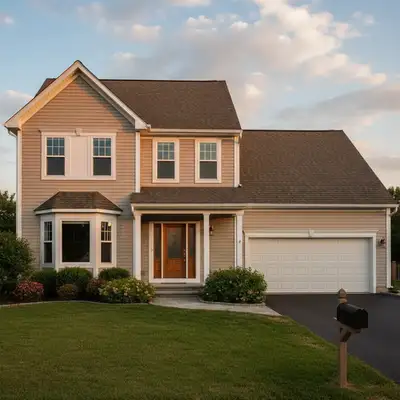
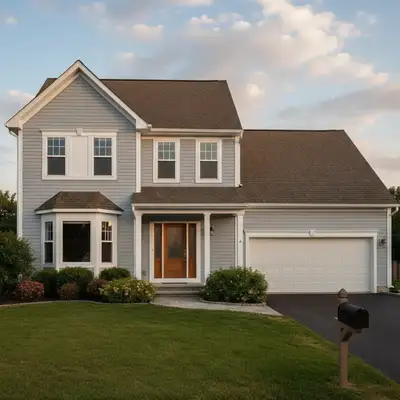
Unlike generic AI image editors that hallucinate new architectural details, EditThisPic edits your actual house photo on the surface you specify and leaves everything else intact — making it usable for paint decisions, HOA submissions, and listing photos where 'photoreal of my real home' is the requirement.
Landscaping and Curb Appeal
Once the house itself looks right, the surrounding landscape carries the rest of the photo.
Adding landscaping is the catch-all — describe lawn, hedges, flower beds, and trees in one prompt.
Lawn greening is the fastest fix for dormant winter or summer-stressed grass on a listing photo, and
brown-lawn-to-green handles the same job in one click for real-estate use cases.
For more elaborate exterior staging:
driveway visualizer handles paving and material changes (asphalt to paver, gravel to concrete),
fence adder places a new fence where there isn't one,
fence style preview tests styles,
walkway preview shows new paths, and
landscape lighting preview previews uplighting and path lights.
For the final touch:
twilight conversion turns a daytime shot into evening with warm interior lights, and
power-line removal cleans the sky behind the house.
Real-estate curb-appeal enhancement stacks multiple landscaping fixes for listing-ready results.
Landscaping edits work best in two passes: first add the structural elements (lawn, hedges, walkway), then add accents (flowers, lighting, trees) in a second prompt. One huge prompt with everything at once usually loses detail.
Use case guides
The single most-asked exterior edit: 'what would my house look like if I painted it ___?' Upload your front-of-house photo and describe the new color in plain English. The AI repaints the body, leaves the trim and roof intact unless you say otherwise, and matches lighting and shadows. Try four or five colors against the same photo before you ever buy a sample can.
Common scenarios
- Homeowners deciding on an exterior repaint and trying three or four colors before committing
- HOA submissions where the board needs to see the proposed color on the actual house, not a swatch
- Real-estate agents previewing a paint refresh as a pre-listing recommendation to a seller
- House flippers comparing high-contrast color schemes to find the most listing-photo-friendly look
Best practices
- Name the body color and the trim color separately: 'paint the body warm white and keep the trim and door black' produces a cleaner result than 'paint the house white'
- Reference the materials so the AI keeps texture: 'paint the cedar shake siding sage green, leave the brick chimney untouched'
- Compare multiple colors by running the same photo through several prompts — name a different color in each ('try this in navy', 'try this in deep green') and stack the results side by side
- For HOA submissions, add 'photoreal, no stylization, keep all other surfaces unchanged' to keep the result evaluation-ready
Sample prompts
Repaint the body of this house warm white and the trim, fascia, and front door matte black, keep the roof and brick chimney untouchedChange the siding color from beige to a deep sage green, keep the white trim and the black front door exactly as they areRepaint this house in classic colonial colors: dark navy body, crisp white trim, cherry red front door, leave the roof and chimney unchanged
Re-siding and re-roofing are the highest-cost exterior decisions a homeowner makes. AI lets you preview the result on your real house photo before you sign with a contractor — board-and-batten vs lap siding, asphalt shingles vs standing-seam metal, dark gray vs bronze. The AI keeps your roofline, pitch, and architectural details, only changing the surface you ask about.
Common scenarios
- Homeowners comparing siding materials (vinyl, fiber cement, cedar, board-and-batten) on the same house
- Comparing standing-seam metal roof colors against the existing exterior and landscaping
- Visualizing a roof color change before re-roofing — charcoal vs slate vs weathered brown
- Real-estate agents showing a renovation buyer what cosmetic changes are possible on a dated property
Best practices
- Specify the material AND the color separately: 'replace the vinyl siding with horizontal fiber cement painted dark gray'
- For metal roofing, name the panel direction: 'standing-seam metal roof in matte black, vertical panels following the existing roof pitch'
- Tell the AI what to leave alone — 'keep the brick veneer on the lower half and the stone chimney untouched' — because it can't read your mind on the boundary
- If your existing roofline is complex (dormers, gables), add 'follow the existing roof shape exactly, do not add or remove dormers' to preserve the structure
Sample prompts
Replace the existing roof with a charcoal-gray standing-seam metal roof, keep the same roofline, gables, and chimneyChange the vinyl siding to horizontal lap siding painted in deep navy, keep the white trim and the existing roofShow this house with vertical board-and-batten siding painted soft white and a black metal roof, keep the front door and windows in their current positions
The 'small' exterior edits that make the biggest difference per dollar — front door color, shutter color, trim, and garage door style. These are also the most-edited use cases in our buyer data: a single afternoon of testing four door colors and two shutter shades is a $3 decision instead of a $300 mistake.
Common scenarios
- Homeowners picking a front-door color before painting it that weekend
- Trying shutter colors that match new exterior paint without committing
- Comparing carriage-style vs flush garage doors on a real photo
- Trim-color comparisons (cream vs warm white vs charcoal) on the same facade
Best practices
- For doors, describe the finish too: 'paint the front door deep navy in a satin finish' produces a more photoreal result than just 'navy door'
- When comparing shutter colors, run the same photo with each color in turn and compare the four results — the AI is far more reliable at one color per generation than at side-by-side multi-color tests
- For garage doors, name the style first: 'replace the existing garage door with a carriage-style wood-look door in dark walnut'
- Trim and shutters are easier to get right when you say 'leave the body and roof alone' explicitly
Sample prompts
Paint the front door deep navy with a brass kickplate and brass handle, leave the rest of the house unchangedReplace the existing shutters with louvered black shutters on every front-facing window, keep the trim whiteReplace the garage door with a carriage-style wood-look door in dark walnut with black hardware, keep the rest of the house exactly as it is
Once the house itself looks right, landscaping is what makes a listing photo or curb-appeal preview feel finished. Add a green lawn over winter dirt, plant flower beds along the walkway, swap a bare yard for mature shrubs, or preview a complete front-yard redesign — all from one photo.
Common scenarios
- Real-estate agents and sellers replacing brown winter or summer-stressed lawn with green grass for listing photos
- Homeowners previewing a front-yard redesign before hiring a landscaper
- Adding flower beds, foundation plantings, and walkway lighting to a builder-grade exterior
- Removing distracting elements (cars, trash bins, power lines) so the curb appeal shows clearly
Best practices
- Describe what's already there before you describe what to add: 'keep the existing concrete walkway and the two trees in the front yard, add a green lawn and a low boxwood hedge along the walkway'
- For lawn greening, specify the texture: 'lush, healthy, dense green lawn with a clean mowed look' beats just 'green grass'
- Add structural elements first (lawn, hedge, walkway) then in a second pass add flowers and accents — two simple prompts produce better results than one long one
- Sky and lighting carry a landscaping edit — adding 'with bright sunny daylight and clear blue sky' often unlocks a much more vibrant result
Sample prompts
Replace the brown patchy lawn with a lush, healthy, dense green lawn — keep all existing trees, walkways, and structures exactly as they areAdd a low boxwood hedge along the front walkway, two flower beds with mixed perennials in front of the porch, and a small ornamental tree to the right of the drivewayRemove the trash bins from the driveway, remove the parked white car at the curb, and add a green lawn — keep the house and trees unchanged
The exterior shot is almost always the first photo a buyer sees on Zillow, Realtor.com, or social. Power lines crossing the frame, an overcast sky, a parked car in the driveway, or a lawn dormant from winter all pull click-through down. Each of those is a 30-second AI fix — and stacking three of them transforms an unremarkable listing photo into the lead image.
Common scenarios
- Agents touching up the hero exterior shot of a listing before MLS upload
- FSBO sellers prepping their own home for Zillow without hiring a pro photographer
- Photographers offering a 'pre-listing AI cleanup' as a fast-turnaround upsell
- Investors and flippers documenting before-and-after curb appeal for marketing
Best practices
- Stack edits in the right order: declutter (remove cars, bins, hoses) first, then green up the lawn, then replace the sky, then adjust ambient lighting
- Always include 'keep the architecture, roofline, and house exactly the same' so the AI focuses on the cleanup, not the structure
- For a luxury or twilight feel, add 'warm light glowing from inside the windows, deep blue twilight sky' as a final pass
- Disclose AI-edited or virtually staged listing photos as required by your local MLS rules
Sample prompts
Remove the parked cars from the driveway and street, remove the trash bins by the garage, replace the gray sky with bright blue with a few clouds, keep the house and landscaping exactly the sameReplace the dormant brown lawn with a lush green lawn, remove the power lines from the sky area, brighten the photo to a sunny afternoon look, do not change the houseConvert this daytime exterior to a twilight scene with warm interior lights glowing through the windows, deep blue gradient sky, and soft uplighting on the front trees
Frequently Asked Questions About Editing Home Exterior Photos
What is the best AI tool to edit a photo of my house?
EditThisPic is a free AI home exterior editor. Upload a real photo of the front of your house, describe the change in plain English — new paint color, different siding, fresh roof, navy front door, more landscaping — and the AI returns a photoreal preview in 30 seconds. No signup, no Photoshop skills — purchased downloads are clean. The same tool handles paint, siding, roof, doors, shutters, fences, and landscaping.
How do I change my house color in a photo for free?
Upload your front-of-house photo and describe the new color: 'repaint the body warm sage green, keep the trim white and the roof unchanged.' The AI repaints only the body, preserves trim and roof, and matches the original lighting and shadows. You can compare four or five colors on the same photo by re-running with a different color in each prompt — far cheaper than buying paint samples.
Will the AI match my actual house, or just give me a generic mockup?
It edits your real photo rather than a template house. Ask it to preserve the roofline, windows, landscaping, driveway, and camera angle while changing one named surface. The original scene gives the preview useful context, but generative edits can still drift, so compare structural details before relying on the result.
Can I preview new siding or a new roof before I commit?
Yes. Describe the new material and color separately: 'replace the vinyl siding with horizontal fiber cement painted warm white' or 'replace the roof with charcoal-gray standing-seam metal roofing.' The AI keeps the rest of the house intact — windows, trim, roofline, chimney — and only changes the surface you named. This is one of the strongest use cases because re-siding and re-roofing are the most expensive exterior decisions a homeowner makes.
Can I use this for HOA approvals or neighborhood-association submissions?
Yes, and homeowners do this regularly. For HOA submissions, add 'photoreal, no stylization, keep all other surfaces unchanged' to your prompt to keep the result evaluation-ready. The board sees the exact proposed change on the actual house, not a generic swatch. Some HOAs accept the AI preview directly; others use it as a step before formal renderings.
What about shutters, trim, and small accents — can it handle those too?
Yes. Shutters, trim color, garage door, fence color, mailbox, and other accents are all individually previewable. Use one prompt per change for the cleanest result: 'replace the existing shutters with louvered black shutters on every front-facing window, keep the trim white.' Stack two or three accent changes in a sequence to test combinations.
How do I preview adding landscaping or a green lawn to my house photo?
Describe what's already there before describing what to add: 'keep the existing concrete walkway and the two trees in the front yard, add a green lawn and a low boxwood hedge along the walkway.' For lawn-only edits, use 'replace the brown lawn with a lush, healthy, dense green lawn.' Two simple prompts (structure first, accents second) usually beat one giant prompt with everything.
Is there a free home exterior visualizer that doesn't require an account?
Yes. EditThisPic gives you one free exterior edit per week with no signup. For more — comparing several paint colors, doing a full curb-appeal stack, or testing siding and roof variations — credit packs start at $4.99 for 10 edits. Each edit is a separate preview, so a four-color paint comparison costs four credits.
Can I convert a daytime exterior photo to a twilight or evening shot?
Yes. Use the prompt 'convert this daytime exterior to a twilight scene with warm interior lights glowing through every window, deep blue gradient sky darkest at the top, and soft uplighting on the front trees.' Twilight conversion is the premium look used on luxury listings and was previously something photographers did at sunset; AI generates the same result from any standard daytime exterior in about 30 seconds.
How accurate is the AI on real architectural details like rooflines, windows, and porch columns?
Add 'preserve the existing roofline, window placement, porch columns, and camera angle' to anchor the structure, then change only one surface per pass. Drift is more likely with large additions, obscured edges, or extreme camera angles. Treat the image as a visual concept, not a dimensionally accurate construction rendering.
Can real-estate agents use this for listing photos?
Yes — and it's already a high-volume use case. The most common workflow is a pre-listing exterior touch-up: remove parked cars and trash bins, green up the lawn, replace an overcast sky with bright blue, and balance the lighting. Each fix is 30 seconds; stacked, they transform an unremarkable hero shot into the lead image. Disclose AI-edited or 'enhanced' photos as required by your local MLS rules — labelling is the standard practice.
Can I edit my house photo from my phone?
Yes. EditThisPic works in any mobile browser — no app download. Take the photo of your house with your phone, upload directly to the editor, type the change you want, and download the result back to your phone in 30 seconds. This is especially useful for on-site decisions ('what would this color look like right now?') and HOA walks.
Is there a house siding editor I can use with a picture of my own home?
Yes. Upload a house picture and change the siding directly — 'change the siding to white board-and-batten' or 'edit this house exterior photo to white siding, keep the trim and roof unchanged.' EditThisPic edits your actual photo rather than swapping in a generic template house, so the result shows your real roofline, windows, and landscaping with the new siding applied.
How do I see new siding on a photo of my actual house before buying material?
Describe the siding color and material in one prompt — 'replace the vinyl siding with horizontal fiber cement painted light grey' — and the AI applies it to your uploaded photo in about 30 seconds. Compare two or three siding colors on the same photo before ordering samples from a supplier.
What are the best exterior paint colors to try on a house photo?
There isn't a single universal answer — it depends on your home's material, roof color, and neighborhood — but warm white, sage green, charcoal, and navy are consistently among the most-requested exterior colors on EditThisPic. Try them directly: 'paint the exterior warm white, keep the roof and trim unchanged,' then compare against sage green or charcoal on the same photo.
Can I use this as an exterior shutters visualizer?
Yes. Upload your house photo and describe the shutters directly: 'add louvered black shutters to every front-facing window' to add them where there are none, or 'change the shutters to deep green' to recolor shutters you already have. You can also preview the house with shutters removed: 'remove the shutters from every window, keep the siding and trim exactly as they are.'
Can I try different roof colors by uploading a photo of my house?
Yes. Describe the roof material and color together: 'replace the roof with a charcoal-gray standing-seam metal roof, follow the existing roofline and pitch exactly' or 'change the roof to weathered brown asphalt shingles.' The AI keeps your roofline, gables, and chimney intact and only changes the roofing surface.