Free • No signup Visualize Door · Free

AI Door Visualizer

Upload a photo and describe the door you want. AI renders your new entry in seconds.
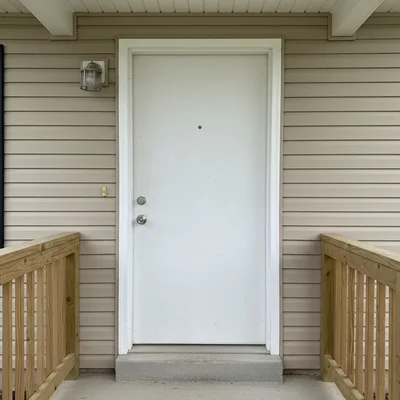
Home entrance with plain white builder-grade front door
Before
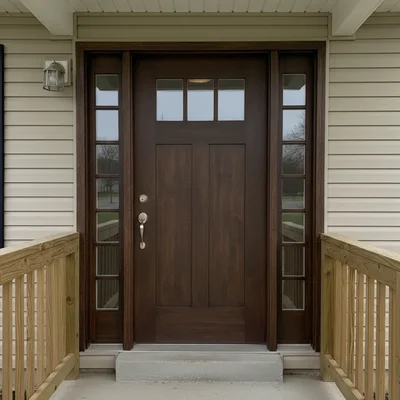
Same entrance with elegant dark walnut craftsman door with sidelights
After

AI Door Visualizer

Drop your photo here

or click to browse

Release to upload

Free • No signup

Popular use cases:
  • door visualizer
  • front door preview
  • door design tool
  • entry door planner
  • door comparison tool
  • door simulator
  • front door color changer
  • door style previewer

Cost
Free No signup required
Time
Instant results in 15-30 seconds
Works on
Any device - browser, phone, tablet, desktop
Powered by
AI-powered photo editing
Scenario Prompt Time
Craftsman entry replace front door with dark walnut craftsman with sidelights 25s
Bold color paint front door bold navy blue with brass hardware 20s
Modern pivot replace with matte black pivot door with frosted glass 30s

How it works

  1. Upload your photo

    Drop a photo of your home's entrance or interior doorway into EditThisPic. Best results come from straight-on shots where the door is clearly visible. Include the surrounding trim and walls for context. JPG, PNG, WebP up to 7MB.

    Expect: Standard door swap: 20-30 seconds. Doors with sidelights or transoms: may need 1-2 refinements.
  2. Describe the door you want

    Type your instruction: 'replace the front door with a dark walnut craftsman-style fiberglass door with three small square windows at the top and sidelights' or 'change to a modern matte black steel door with glass panel.' Specify color, material, and window details. No marking needed.

    Tip: Door color has the biggest curb appeal impact. A bold color like 'Benjamin Moore Hale Navy' or 'classic red' on a neutral house is an instant transformation.

    Copy one of these to get started:

    Craftsman entry with sidelights replace the front door with a dark walnut stained craftsman-style fiberglass door with three small square windows across the top and matching sidelights
    Bold color statement replace the front door with a solid panel door painted in bold navy blue with brushed brass hardware and a matching blue door frame
    Modern pivot door replace the front door with a large modern pivot door in matte black with a frosted glass panel on the left side, oversized brushed steel pull handle
    Classic 6-panel traditional replace the front door with a classic white 6-panel steel door with polished brass kickplate and matching brass handleset
    3 more prompts
    Dutch door for cottage charm replace the front door with a sage green Dutch door that splits in half horizontally, with a window in the top half and solid lower half
    Glass panel contemporary replace the front door with a contemporary fiberglass door with full-length frosted glass panel in the center and dark gray stained surround
    Arched top iron door replace the front door with a wrought iron and glass arched top entry door with scrollwork design and dark patina finish
  3. Review the visualization

    Check that the door proportions fit the opening, hardware style matches, and the color coordinates with your home's exterior. Use the before/after slider.

  4. Refine with markers if needed

    If the AI changed the surrounding trim or porch along with the door, tap markers on just the door and regenerate. This is optional — most door edits work without markers.

    Tip: Markers help when the door and surrounding wall are the same color, making it hard for the AI to distinguish boundaries.
Try it free

AI Door Visualizer

Drop your photo here

or click to browse

Release to upload

Free • No signup

"Showed a buyer how a bold red door would transform a bland white colonial. She added the door replacement to her renovation budget before closing." @RealtyStaging_NYC

See it in action

Home entrance with plain white builder-grade front door
Before
->
Same entrance with elegant dark walnut craftsman door with sidelights
After

Builder-grade to craftsman entry

A plain white flat-panel door replaced with an elegant craftsman-style entry for an instant curb appeal upgrade.

Prompt: replace the front door with a dark walnut stained craftsman door with three small square windows across the top and matching sidelights
White colonial with neutral beige front door that blends with the house
Before
->
Same colonial with bold navy blue front door with brass hardware creating strong contrast
After

Neutral door to bold navy statement

Testing how a bold navy blue front door transforms a white colonial before buying the paint.

Prompt: paint the front door bold navy blue with brushed brass handleset and matching brass kickplate
Modern home with dated wooden door with diamond window
Before
->
Same modern home with contemporary dark gray door with frosted glass panel
After

Dated door to modern glass panel

Upgrading a dated wood door with a contemporary glass panel design for a modern home renovation.

Prompt: replace the front door with a contemporary dark gray fiberglass door with a full-length frosted glass panel in the center

Detailed Guides by Scenario

📷

Front Door Curb Appeal

Preview front door styles and colors on your actual home — front door replacement has the highest ROI of almost any exterior project.

Common Scenarios

  • Comparing craftsman vs modern vs traditional door styles
  • Testing bold paint colors against your home's existing exterior palette
  • Previewing door with sidelights vs without to see which fits better

Best Practices

  • Photograph the entrance straight-on with the full door and trim visible
  • Specify door style, material, color, hardware, and glass details
  • Run multiple color options — door color is the easiest change with biggest impact
📷

Interior Door Updates

Preview interior door styles before replacing hollow-core builder doors with solid panel, barn, or glass options.

Common Scenarios

  • Replacing all hollow-core doors with shaker-style panel doors
  • Testing a barn door vs French doors for a dining room entry
  • Previewing glass-panel pocket doors for a home office

Best Practices

  • Photograph the doorway with surrounding wall and trim visible
  • Specify panel count, style, color, and hardware for interior doors
  • Consider how the door style coordinates with baseboards and crown molding
📷

Real Estate Entry Staging

Show buyers the impact of a front door upgrade — a $500-$2,000 investment that transforms first impressions.

Common Scenarios

  • Staging a listing with an upgraded entry door for stronger curb appeal
  • Creating before/after marketing showing entry transformation potential
  • Showing buyers how a simple door change modernizes a dated exterior

Best Practices

  • Use the listing photo as-is for the before image
  • Choose universally appealing styles — craftsman, bold color, or modern glass
  • Always disclose that the visualization is AI-generated

If something looks off

AI changed the trim or porch along with the door

Why: The AI expanded the edit beyond the door to surrounding elements, especially when colors are similar.

Try: Specify: 'replace only the door itself, keep the surrounding trim, porch, and walls unchanged'

Tip: Adding 'only the door' constrains the AI to just the door surface — helpful when trim and door are the same color.

AI changed the wrong area or something I didn't want changed

Why: The AI couldn't determine exactly which area you meant from description alone. This happens with ambiguous requests.

Try: Tap a marker on the specific area you want to change, then regenerate with the same prompt

Tip: Markers tell the AI 'I mean THIS one specifically.' Use them when description alone is ambiguous.

Door proportions don't match the opening

Why: The AI generated a door that's too wide, too tall, or doesn't include the right sidelight configuration.

Try: Specify: 'standard 36-inch single door to fit the existing opening' or 'double doors for the wide entryway'

Tip: Mentioning 'single,' 'double,' and whether sidelights exist helps the AI match the door configuration to your opening.

Hardware style looks wrong

Why: The AI defaulted to generic hardware that doesn't match your specified style.

Try: Be specific: 'with a matte black lever handleset and matching deadbolt' or 'polished brass knob with plate'

Tip: Hardware is a detail that makes or breaks the look. Always specify material (brass, black, chrome) and type (lever, knob, pull handle).

Window panels in door look unrealistic

Why: The AI rendered glass panels with wrong proportions or unrealistic reflections.

Try: Specify glass type: 'with clear beveled glass inserts' or 'frosted privacy glass' to give the AI a specific glass style

Tip: Clear, frosted, beveled, textured, or leaded glass each look different — naming the type produces realistic results.

Quick answers

Do I need to mark the door before describing the style I want?

No! Just describe: 'replace the front door with a craftsman-style in dark walnut.' The AI identifies the door and changes it. Only use markers if the AI changes the surrounding trim or wall.

Can I compare different door styles on the same house?

Yes. Upload your home photo once, then run separate edits — 'craftsman in walnut,' then 'modern black,' then 'bold red 6-panel.' Each generates a new preview so you can compare before purchasing.

Is there a free door visualizer that doesn't require login?

Yes. EditThisPic is free to try with no account needed. Upload your home photo, describe the door, and get a realistic preview in 30 seconds. One free edit per week, credit packs from $1.99 for comparing options.

Does it work for interior doors too?

Yes. Upload a photo of any interior doorway and describe the replacement: 'change to a white 5-panel shaker-style interior door' or 'replace with a barn door on a track.' Works for front doors, interior doors, and French doors.

Can I preview door colors without replacing the entire door?

Yes. Just say: 'paint the front door navy blue' or 'change the door color to red.' The AI changes only the color while keeping the existing panel style and hardware.

What door styles can the AI visualize?

Craftsman, 6-panel, shaker, Dutch, pivot, barn, French, arched top, modern flush, glass panel, iron and glass, and more. Any material — wood, fiberglass, steel, iron — in any color with any hardware style.

Is this useful for real estate listings?

Extremely. Front door replacement has one of the highest ROIs of any home project (nearly 100%). Show buyers how a $500 door upgrade transforms the entire entrance.

Can I visualize doors on my phone?

Yes. EditThisPic works in any mobile browser — iPhone, Android, tablet. Take a photo of your entrance and preview door styles from your phone. No app download needed.

Ready to preview a new door?

Free to try. No signup required.

Try it free