Free • No signup Visualize Siding · Free

AI Siding Visualizer

Upload a photo of your home and describe the siding. AI renders the new exterior in seconds.
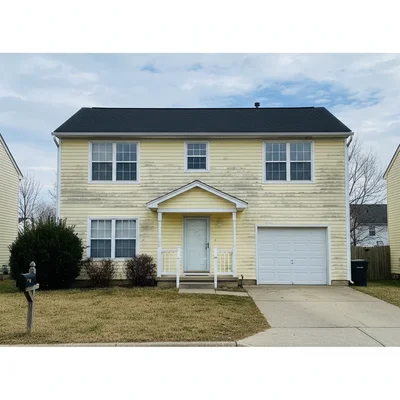
Home with faded yellow vinyl siding showing sun damage
Before
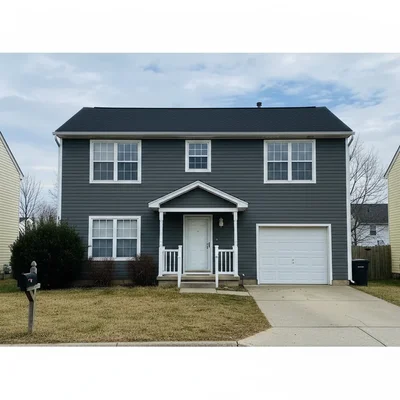
Same home with new dark charcoal fiber cement lap siding and white trim
After

AI Siding Visualizer

Drop your photo here

or click to browse

Release to upload

Free • No signup

Popular use cases:
  • siding visualizer
  • home siding preview
  • siding design tool
  • siding renovation planning
  • siding comparison tool
  • siding simulator
  • exterior siding preview
  • vinyl siding visualizer

Cost
Free No signup required
Time
Instant results in 15-30 seconds
Works on
Any device - browser, phone, tablet, desktop
Powered by
AI-powered photo editing
Scenario Prompt Time
Fiber cement lap replace siding with dark gray fiber cement lap siding 20s
Cedar shake replace siding with natural cedar shake shingles 25s
Board and batten replace siding with vertical board and batten in sage green 25s

How it works

  1. Upload your home photo

    Drop a photo of your home's exterior into EditThisPic. Best results come from straight-on shots where the siding is clearly visible. Avoid shots with heavy tree coverage blocking the walls. JPG, PNG, WebP up to 7MB.

    Expect: Standard siding swap: 20-30 seconds. Full wrap-around with trim changes: may need 1-2 refinements.
  2. Describe the siding you want

    Type your instruction: 'replace the siding with dark charcoal fiber cement lap siding' or 'change siding to natural cedar shake shingles.' Name the material, color, and style for best results. No marking needed — the AI knows what 'siding' means.

    Tip: Mentioning a specific brand like 'James Hardie' or 'LP SmartSide' gives the AI a clear reference point for the exact look, texture, and profile.

    Copy one of these to get started:

    Modern fiber cement lap siding replace the siding with dark charcoal James Hardie fiber cement lap siding with clean white trim around windows and corners
    Natural cedar shake shingles replace the siding with natural unstained cedar shake shingles with visible wood grain variation
    White vinyl for clean curb appeal replace the siding with bright white vinyl clapboard siding with matching white trim and clean corners
    Board and batten farmhouse style replace the siding with vertical board and batten siding in sage green with white window trim
    3 more prompts
    Mixed material modern exterior replace the lower half siding with dark gray horizontal lap and the upper gable sections with natural cedar shake shingles
    Stone veneer accent wall replace the siding on the front face of the house with stacked stone veneer in warm gray tones, keeping the sides as the existing siding
    Dark navy modern exterior replace the siding with deep navy blue fiber cement lap siding with bright white window trim and black shutters
  3. Review the visualization

    Check that the siding texture is consistent, the color matches your vision, and the material wraps naturally around corners, windows, and trim. Use the before/after slider to compare.

  4. Refine with markers if needed

    If the AI changed the trim or windows along with the siding, tap markers on just the siding areas and regenerate. This is optional — most siding edits work without markers.

    Tip: Markers are helpful when siding and trim are the same color. One tap on the siding tells the AI to change only that surface.
Try it free

AI Siding Visualizer

Drop your photo here

or click to browse

Release to upload

Free • No signup

"Client was torn between gray fiber cement and natural cedar. I showed her both on her actual house in 5 minutes. She went with the fiber cement and the project started the next week." @ExteriorContractor_Mike

See it in action

Home with faded yellow vinyl siding showing sun damage
Before
->
Same home with new dark charcoal fiber cement lap siding and white trim
After

Faded vinyl to modern fiber cement

A home with dated, faded yellow vinyl siding transformed with modern dark gray fiber cement for a listing refresh.

Prompt: replace the siding with dark charcoal fiber cement lap siding with clean white trim around all windows
Craftsman home with plain beige vinyl siding
Before
->
Same craftsman home with natural cedar shake shingles and warm wood tones
After

Plain siding to cedar shakes

A craftsman-style home upgraded from flat vinyl to natural cedar shake shingles for a rustic, high-end look.

Prompt: replace the siding with natural cedar shake shingles with warm wood grain variation and white trim
Modern farmhouse with outdated tan horizontal vinyl siding
Before
->
Same farmhouse with sage green vertical board and batten siding
After

Comparing board and batten options

Testing how sage green board and batten siding looks on a modern farmhouse before committing to the material purchase.

Prompt: replace the siding with vertical board and batten siding in sage green with bright white window trim

Detailed Guides by Scenario

📷

Homeowner Siding Renovation

Preview siding materials and colors on your actual home before committing to a $10K-$25K project, saving time and preventing costly regret.

Common Scenarios

  • Comparing vinyl vs fiber cement vs cedar shake on your home before choosing a contractor
  • Testing how dark siding looks against your existing roof and trim colors
  • Previewing board and batten vs horizontal lap to decide on the right profile

Best Practices

  • Photograph your home straight-on from across the street for the most realistic preview
  • Specify material name, color, and profile style in every prompt
  • Run multiple options and save each result for side-by-side comparison with your contractor
📷

Contractor Client Presentations

Show clients exactly how different siding options look on their home during consultations — close deals faster with visual proof.

Common Scenarios

  • Generating 4-5 siding options during an in-home estimate meeting
  • Creating before/after visuals for siding project proposals
  • Showing homeowners how a siding upgrade increases curb appeal and home value

Best Practices

  • Use the client's actual home photo taken from the street for maximum impact
  • Match material descriptions to products you actually install for accurate expectations
  • Present options from budget (vinyl) to premium (cedar) to anchor pricing discussions
📷

Real Estate Listing Enhancement

Show buyers how a home would look with updated siding — one of the highest-ROI exterior upgrades that can add $10K-$15K in perceived value.

Common Scenarios

  • Staging a listing with dated siding to show modernization potential
  • Creating before/after marketing materials for fixer-upper properties
  • Visualizing a complete exterior refresh for investor presentations

Best Practices

  • Use the original listing photo as the 'before' and the AI visualization as the 'after'
  • Choose universally appealing options like gray fiber cement or white clapboard
  • Always disclose that the siding visualization is AI-generated per local regulations

If something looks off

AI changed the trim color along with the siding

Why: The AI treated siding and trim as one surface, especially when they're similar colors in the original photo.

Try: Regenerate with: 'replace only the siding with [material], keeping the existing white window trim unchanged'

Tip: Explicitly mentioning 'keep trim unchanged' or specifying a contrasting trim color tells the AI to treat them as separate elements.

AI changed the wrong area or something I didn't want changed

Why: The AI couldn't determine exactly which area you meant from description alone. This happens with ambiguous requests.

Try: Tap a marker on the specific area you want to change, then regenerate with the same prompt

Tip: Markers tell the AI 'I mean THIS one specifically.' Use them when description alone is ambiguous.

Siding texture looks flat or unrealistic

Why: The AI rendered siding without proper shadow and depth between planks or shingles.

Try: Add texture detail: 'fiber cement lap siding with visible shadow lines between each plank and wood-grain texture'

Tip: Mentioning 'shadow lines between planks' or 'natural wood grain' adds the depth that makes siding look real.

Siding doesn't wrap around corners naturally

Why: The AI only changed the visible front face and the corner transition looks abrupt.

Try: Specify: 'replace all visible siding including the side wall with the same [material] for consistent coverage'

Tip: Photos taken at a slight angle showing two walls give the AI enough context to wrap siding around corners.

Color looks different from what I specified

Why: Color names are subjective — 'gray' can range from silver to charcoal depending on interpretation.

Try: Use specific shade names: 'dark charcoal gray' or 'medium warm gray with brown undertones' instead of just 'gray'

Tip: Using brand-specific color names like 'Iron Gray' or 'Evening Blue' gives the AI a precise color target.

Quick answers

Do I need to mark the siding area before describing what I want?

No! Just describe the siding you want: 'replace siding with dark gray fiber cement.' The AI understands what 'siding' means and changes only that area. Only use markers if the AI accidentally changes the trim, windows, or roof along with the siding.

Can I compare different siding materials on the same house photo?

Yes. Upload your home photo once, then run separate edits — 'fiber cement lap,' then 'cedar shake,' then 'board and batten.' Each generates a new preview so you can compare materials and colors side by side before purchasing.

Is there a free siding visualizer that doesn't require login?

Yes. EditThisPic is free to try with no account needed. Upload your home photo, describe the siding, and get a realistic preview in 30 seconds. One free edit per week, credit packs from $1.99 for comparing multiple options.

What siding materials can the AI visualize?

Vinyl clapboard, fiber cement (James Hardie, LP SmartSide), cedar shake shingles, board and batten, stone veneer, brick, stucco, engineered wood, and more. Name the material type, color, and profile — the AI renders it accurately on your home.

Can I preview siding with different trim colors?

Yes. Include both in your description: 'dark navy siding with bright white trim' vs 'dark navy siding with black trim.' The AI handles multi-element changes when you describe them together.

Is this useful for contractors showing clients options?

Extremely. Upload the client's home photo during consultations and generate multiple siding options in minutes. It's faster than ordering physical samples and gives homeowners a tangible preview that accelerates decision-making on $15K+ projects.

Does it work with mixed materials like stone and siding?

Yes. Describe each section: 'replace the lower half with stone veneer and the upper half with gray lap siding.' The AI handles multi-material exteriors when you specify which areas get which material.

Can I visualize siding on my phone?

Yes. EditThisPic works in any mobile browser — iPhone, Android, tablet. Take a photo of your home and preview new siding right from your phone. No app download needed.

Ready to preview new siding on your home?

Free to try. No signup required.

Try it free