Free • No signup Open Editor

AI Headshot Generator — Turn Your Selfie Into a Professional Headshot

Upload one selfie, describe the style, download your pro headshot — in under a minute.

FreeNo signupNo watermark

Upload photo to generate headshot

Free • Results in 30 seconds • No signup

Release to upload

Free • No signup

How AI Headshot Editing Works

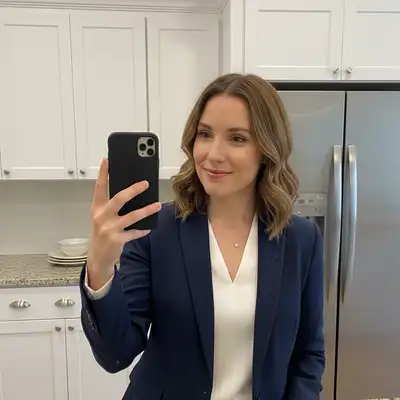
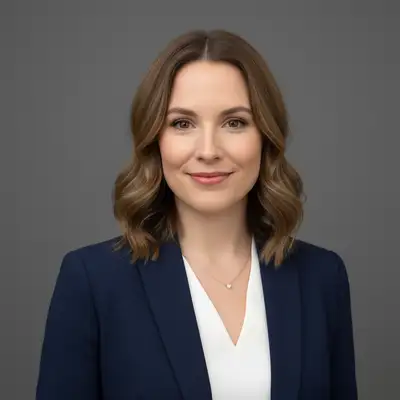
Traditional AI headshot services ask you to upload 15–25 photos, pay $15–40, wait 24 hours for model training, and hope the results look like you. EditThisPic takes a different approach: it edits the photo you already have. Upload one selfie. Type what you want — 'professional headshot with clean gray background, polished studio lighting, corporate look' — and the AI applies the transformation in seconds. No fine-tuning, no training run, no waiting. The AI understands what a LinkedIn headshot looks like versus a creative actor's headshot versus a medical professional's portrait, and applies the appropriate style from your description. This works because EditThisPic uses a powerful general-purpose AI that comprehends image context and natural language instructions. You describe the output you want, and the model transforms your photo accordingly. Background replacement, lighting improvement, attire cleanup, and professional polish all happen in a single edit.

Types of Headshots You Can Create

LinkedIn & Corporate — The most-requested style. Clean neutral background (gray, white, or blurred office), polished lighting, business-appropriate appearance. Works for profiles, company websites, and email signatures. See LinkedIn headshots, corporate headshots, and executive headshots. Medical & Legal Professionals — Clean white or light-gray backgrounds, formal attire, neutral expression. Appropriate for hospital websites, law firm profiles, and professional directories. See doctor headshots, lawyer headshots, nurse headshots, and therapist headshots. Real Estate — Warm, approachable lighting. Clean background that reads well on listing cards and business cards. See real estate agent headshots and realtor headshots. Creative & Entertainment — More expressive. Can include dramatic lighting, colored backgrounds, or styled environments. See actor headshots, author headshots, speaker headshots, and YouTuber headshots. General Business — Consultants, teachers, coaches, and founders who need a polished professional photo without a specific industry style. See consultant headshots, teacher headshots, and founder headshots.

EditThisPic vs Multi-Photo AI Headshot Services

Services like PhotoAI, Aragon, and HeadshotPro work by training a personalized AI model on 15–25 of your photos. The process takes several hours or overnight, costs $15–40, and produces multiple generated images that may or may not look like you. EditThisPic works differently: it edits the photo you already have. Upload one selfie, describe the result you want, and the AI transforms it — background, lighting, polish — in under a minute. The result is based on your actual photo, not a generated synthetic version of you. When multi-photo training makes sense: If you want dozens of AI-generated composite images in different outfits, locations, and styles, and you're willing to wait and pay for model training, those services are built for that. When EditThisPic makes sense: You have one good photo (or a recent selfie), you need a professional headshot today, and you want the result to look like you — not an AI approximation. No training, no wait, and free to try.

Tips for Better AI Headshot Results

1. Use a clear, front-facing photo. The AI works best with photos where your face is clearly visible, well-lit, and roughly centered. Avoid extreme angles, partial faces, or photos where your face is very small in the frame. 2. Be specific about the background you want. 'Replace background with clean light gray studio backdrop' produces better results than 'professional background.' Name the color, texture, or setting: 'blurred modern office background,' 'solid white background,' 'neutral dark gray.' 3. Mention lighting explicitly. 'Professional studio lighting with soft shadows' or 'bright even lighting, no harsh shadows' gives the AI clear direction. Specify if you want 'warm' or 'cool' tones. 4. Describe the look, not just the profession. 'Corporate attorney headshot, formal, serious expression, clean white background' works better than just 'lawyer headshot.' The more style detail you provide, the more targeted the result. 5. Use the markers for precision refinement. If the first result is close but needs a tweak — the background isn't quite right, or the lighting needs adjustment — tap markers on the specific area and regenerate. Markers are for precision; most headshots work without them on the first try.

Corporate & LinkedIn

AI Headshot Generator

General-purpose AI headshot generator — transform any photo into a professional headshot.

AI Professional Headshot Generator

Generate polished professional headshots with studio lighting and clean backgrounds.

AI Professional Headshot Maker

Make professional headshots from casual photos or selfies.

Professional Headshot from Selfie

Turn a selfie into a studio-quality professional headshot.

Selfie to Headshot

Convert any selfie into a clean, polished headshot.

Casual to Professional Headshot

Transform casual photos into professional-grade headshots.

LinkedIn Headshots

AI-optimized headshots for LinkedIn profiles.

AI LinkedIn Headshot Generator

Generate LinkedIn-ready headshots from any photo.

AI LinkedIn Headshot Maker

Make polished LinkedIn headshots in seconds.

Corporate Headshots

Professional corporate-style headshots for company websites and directories.

AI Corporate Headshot Generator

Generate professional corporate headshots from photos.

AI Business Headshot Creator

Create business headshots for profiles and presentations.

Executive Professional Headshot

Polished executive-level headshots for C-suite and senior leadership.

Executive LinkedIn Headshots

LinkedIn headshots for executives and senior professionals.

CEO LinkedIn Headshots

Executive-quality headshots for CEOs and founders.

Founder LinkedIn Headshots

Headshots for startup founders and entrepreneurs.

AI Headshot Generator Free

Free AI headshot generator — no signup required.

AI Headshot Enhancer

Enhance and polish existing headshots with AI.

AI Headshot Optimizer

Optimize headshots for platforms, compression, and cropping.

Clean Up Headshot

Remove distractions, fix backgrounds, and clean up existing headshots.

Medical & Legal

Consulting & Finance

Engineering & Tech

Real Estate

Creative & Entertainment

Education & Coaching

Specialty & Other

Frequently Asked Questions About AI Headshots

Does EditThisPic work like Photoai.com?

No — they work completely differently. Photoai.com and similar services (Aragon, HeadshotPro) require you to upload 15–25 photos and train a personalized AI model over several hours. EditThisPic edits the photo you already have: upload one selfie, describe the result you want, and the AI transforms it in under a minute. No training, no wait, and free to try. If you need dozens of AI-generated composite images in different styles, a training-based service may suit you. If you need a professional headshot from one good photo — today — EditThisPic is faster and free.

Do I need to upload multiple photos?

No. EditThisPic works from a single photo. Upload one selfie or casual photo, describe the headshot style you want, and the AI applies the transformation. There is no minimum photo requirement, no training dataset, and no batch upload needed.

Is model training required?

No model training required. EditThisPic uses a general-purpose AI that edits photos based on your text description — no fine-tuning or personalized model training. This is why results are ready in seconds rather than hours.

How fast is the result?

Most headshot edits are ready in 15–60 seconds. Simple transformations — background replacement, lighting improvement, professional polish — typically complete in under 30 seconds. More complex style changes may take slightly longer. Either way, there is no waiting period — results arrive in the same session.

Can I use my own selfie?

Yes — any selfie works. You don't need a DSLR, a studio, or special lighting in your source photo. Upload a front-facing selfie taken with your phone, describe the headshot style you want, and the AI handles the rest. Better source photos (good lighting, clear face, neutral expression) generally produce sharper results, but most phone selfies work well.

What's the difference between editing and generating a headshot?

Editing transforms your actual photo — it keeps your face, adjusts the background, corrects lighting, and polishes the result while preserving your real likeness. Generating creates a synthetic image of a person who looks like you, based on a trained model. EditThisPic edits: the output is based on your real photo, not a model-generated approximation. This means the result looks like you, not an AI's interpretation of you.

How do I get the best LinkedIn headshot?

Start with a front-facing phone selfie in decent natural light. Then type a detailed prompt: 'Professional LinkedIn headshot, replace background with clean light gray studio backdrop, improve lighting to be bright and even with soft shadows, polished business appearance, natural expression.' The more specific you are about the background color, lighting style, and overall tone, the better the result. For corporate roles, request neutral backgrounds and formal styling. For creative or tech roles, slightly warmer tones and less formal styling often read better.

Is there a free AI headshot tool that doesn't require an account?

Yes. EditThisPic offers one free edit per week with no signup required — no email, no account, no credit card. You can try a headshot transformation right now for free. If you need more edits, subscriptions start at $4.99/month.

Can I standardize headshots across my whole team?

Yes. The AI Company Headshot Standardizer and Team Headshot Batch Editing tools are built for exactly this use case. Apply the same background, crop, and lighting style to headshots from different team members — even if the original photos were taken in different environments.

What industries does this work for?

The headshot tools cover over 50 professions: medical (doctor, nurse, therapist, dentist), legal (lawyer, attorney), finance (financial advisor, accountant), technology (engineer, data scientist, product manager), real estate (realtor, agent), education (teacher, professor), creative (actor, author, speaker), and general business (consultant, executive, founder). Browse the categories above to find tools specific to your profession.

Ready to start editing?

Open Editor