Fix Headshot for Podcast Appearance
← Browse all headshotsLast updated
Podcast host needs your headshot for the episode. Look professional, not casual.

Upload photo to fix headshot for podcast
"replace casual background with professional setting, enhance lighting for headshot quality, keep my natural smile"
Free to try · no sign-up · photos are never shared
Release to upload
<30stypical edit
1 freeedit weekly
Photo on your phone?
Scan to open this editor there — free edit works on your phone too.
How it works
See it in action


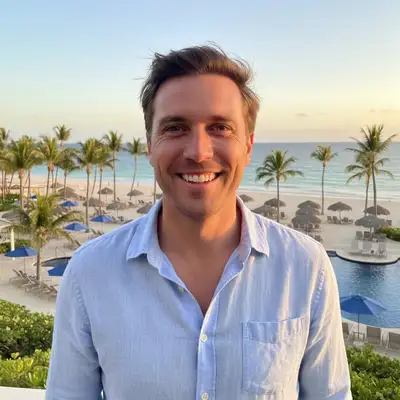
Vacation photo to podcast guest headshot
Best recent photo with a natural smile was from vacation at a beach resort. Host needed headshot by morning. Replaced the tropical background with professional neutral setting in 25 seconds.
Prompt:
replace the beach and resort background with professional neutral gray backdrop, keep my natural relaxed expression, enhance lighting for media headshot


Home office Zoom photo to professional headshot
Only decent recent photo was from a Zoom call with visible home office background - books, shelves, casual setting. Needed it professional for podcast show notes.
Prompt:
replace home office background with professional neutral setting, enhance lighting for podcast guest quality, keep natural expression
Quick answers
Popular use cases
Ready to fix your podcast guest headshot?
Free to try. No signup required.