Free • No signup Open Editor

Remove Furniture from Photo

Clear out unwanted furniture with a simple text description.

Type 'remove the couch and show the empty floor and wall behind it' and EditThisPic's AI removes furniture in 20-40 seconds. No manual selection or tracing needed. Just describe what to remove and what should replace it. Works for real estate photos, virtual staging, and interior redesign mockups. Free to try, no account needed.

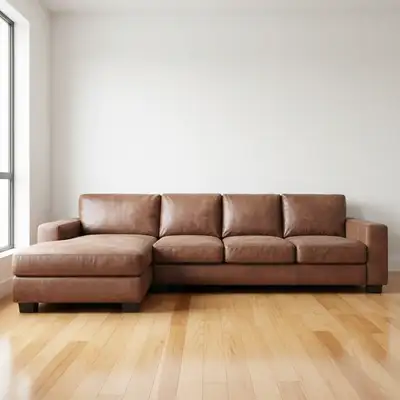
Living room with brown leather sofa against white wall
Before
Same room with sofa removed, empty hardwood floor visible
After

How it works

1

Upload your photo

Drop your interior photo into EditThisPic. JPG, PNG, WebP up to 7MB. Wide-angle room shots with good lighting work best for furniture removal.

⏱ Single furniture piece against simple wall: 20-30 seconds. Multiple pieces or complex backgrounds: may need 2-3 refinements.
2

Describe what you want

Type your instruction: 'remove the sofa and show the hardwood floor and white wall behind it' or 'remove the dining table, fill with matching floor tiles.' Be specific about what should appear after removal. No marking needed - the AI understands furniture descriptions.

💡 Describe what replaces the furniture (floor type, wall color) for more realistic results.

Copy one of these to get started:

Remove sofa from living room remove the sofa and show the hardwood floor and wall behind it, maintain consistent flooring pattern
Clear dining table from room remove the dining table and chairs, show the floor tiles and empty space as if the room were unfurnished
Remove bed for empty bedroom remove the bed and nightstands, show empty bedroom with carpet and walls visible
Clear desk from office remove the desk and office chair, reveal the floor and wall behind, keep the window and natural lighting
3 more prompts
Remove old appliances remove the old refrigerator and show the empty kitchen space with matching floor and wall
Virtual staging preparation remove all furniture from the room to create an empty space for virtual staging
Remove specific piece from group remove only the armchair on the left side of the room, keep the sofa and coffee table
3

Review the result

Check the floor and wall areas where furniture was removed. Look for consistent flooring patterns, proper wall texture, and natural lighting/shadows. Verify architectural details like baseboards are intact.

4

Refine with markers if needed

If furniture shadows remain or the AI missed part of the piece, tap markers on those spots and regenerate. This is optional - most rooms work without markers.

💡 For large furniture, mark the outer edges to help the AI understand the full footprint.
Try it free
"Had to photograph a rental before tenants moved out. Removed their ugly couch and the listing looked so much better!" @realtor_james_k

See it in action

Living room with brown leather sofa against white wall
Before
Same room with sofa removed, empty hardwood floor visible
After

Living room sofa removal

Real estate agent needed empty room photos. The AI removed the sofa and reconstructed the floor seamlessly.

Prompt: remove the sofa and show the hardwood floor and wall behind it, maintain consistent flooring pattern
Bedroom with queen bed and nightstands against gray wall
Before
Empty bedroom with clean carpet and walls ready for staging
After

Bedroom cleared for staging

Property needed virtual staging photos. One prompt removed the bed and revealed clean carpet.

Prompt: remove the bed and nightstands, show empty bedroom with carpet and walls visible
Dining room with dark wood table and six chairs
Before
Empty dining room with clean tile floor and open space
After

Dining set removal

Client wanted to visualize their space without the current furniture. AI removed the entire dining set cleanly.

Prompt: remove the dining table and chairs, show the floor tiles and empty space as if the room were unfurnished

If something looks off

Floor pattern looks inconsistent or patchy after removal

Why: The AI had difficulty reconstructing the continuous flooring pattern where furniture was removed.

Try: remove the furniture and fill with consistent [floor type] pattern that matches the surrounding floor

💡 Be specific about floor type: hardwood, tile, carpet, laminate. It helps the AI match patterns.

Furniture shadow still visible on floor or wall

Why: Shadows are separate from the object and may not be detected as part of the furniture.

Try: Tap markers on the shadow areas and regenerate: 'remove the furniture and its shadow completely'

💡 Mark both the furniture and its shadow area for complete removal.

AI changed the wrong area or something I didn't want changed

Why: The AI couldn't determine exactly which area you meant from description alone. This happens with ambiguous requests.

Try: Tap a marker on the specific furniture piece you want to change, then regenerate with the same prompt

💡 Markers tell the AI 'I mean THIS one specifically.' Use them when description alone is ambiguous.

Wall or baseboard looks distorted behind furniture

Why: The AI struggled to reconstruct architectural details that were hidden behind the furniture.

Try: remove the furniture and show clean wall with baseboard continuing naturally

💡 Mention specific architectural elements (baseboard, crown molding) you want preserved.

Part of the furniture remains after editing

Why: Large furniture pieces may not be fully detected, especially edges against similar-colored backgrounds.

Try: Tap markers on remaining furniture parts and regenerate to fully remove the piece

💡 For oversized furniture, try removing in sections if one pass doesn't capture everything.

Quick answers

Do I need to mark the furniture before describing?

No! Just describe what you want: 'remove the sofa' or 'clear the dining table.' The AI understands furniture descriptions. Only use markers when you need to specify which piece among multiple similar items, or to refine edges after the first attempt.

Can I remove multiple pieces of furniture at once?

Yes. Use prompts like 'remove all furniture from the room' or list specific items: 'remove the couch, coffee table, and armchair.' For very crowded rooms, you may get better results removing large pieces one at a time.

Will the floor look realistic after removal?

In most cases, yes. For best results, mention the floor type in your prompt: 'show the hardwood floor' or 'reveal the carpet beneath.' The AI reconstructs flooring patterns based on visible areas around the furniture.

What about furniture against patterned wallpaper?

Patterned backgrounds are more challenging. The AI may need 2-3 attempts to get patterns aligned. Try adding 'maintain wallpaper pattern continuity' to your prompt for better results.

Can I use this for real estate listings?

Absolutely. Real estate agents commonly use furniture removal for showing empty spaces, preparing virtual staging, or removing tenant belongings from listing photos. Just describe what should replace the furniture.

Ready to clear that furniture?

Free to try. No signup required.

Try it free