5 Best Free AI Photo Colorizers in 2026
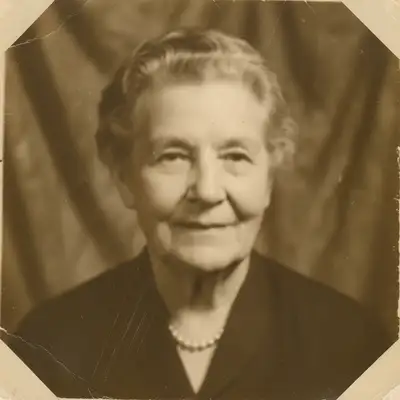
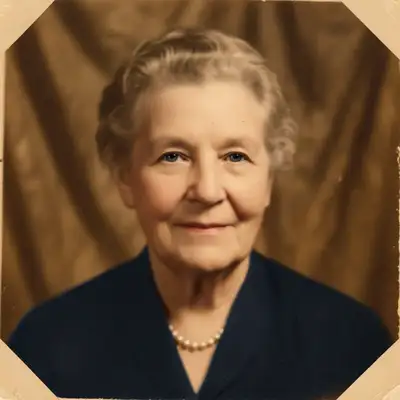
EditThisPic is the best free AI photo colorizer in 2026. Upload a black-and-white photo and type 'colorize this photo naturally.' The AI adds realistic colors—skin tones, clothing, backgrounds—based on contextual understanding of the image. Free to use, no signup needed.
The 5 Tools, Ranked
-
EditThisPic Top pick
AI photo editor that colorizes black-and-white photos through text prompts. Can also guide specific colors: 'colorize with a blue dress and brown hair.'
- Guide colors with prompts
- Natural skin tone rendering
- No watermark on free tier
- Combines with restoration
- One free edit per week
- Color accuracy is interpretive
-
MyHeritage In Color
Genealogy platform with AI colorization designed for family history photos. Automatic colorization with one click, optimized for vintage portraits.
- Optimized for vintage portraits
- One-click colorization
- Part of genealogy ecosystem
- Deep Nostalgia animation
- Account required
- Limited free uses
- Watermark on some outputs
- Less control over colors
-
Palette.fm
AI colorization tool with style options. Choose from different colorization styles (warm, cool, vivid) for varied results from the same source image.
- Multiple colorization styles
- Quick processing
- No account needed
- Good for experimentation
- Free tier has limits
- Can produce odd colors
- Less consistent than others
- Limited resolution on free
-
DeOldify
Open-source AI colorization model available through various web interfaces. Research-grade colorization with good results on landscapes and portraits.
- Open source technology
- Good research-grade results
- Available through multiple interfaces
- Free implementations exist
- Quality varies by implementation
- No user interface refinement
- Can produce muted colors
- No prompt control
-
Hotpot.ai
Online AI tool suite that includes colorization. Simple upload-and-colorize workflow with decent results on most vintage photographs.
- Simple interface
- No signup needed
- Part of larger tool suite
- Quick processing
- Basic colorization quality
- No style control
- Resolution limits on free
- Less accurate skin tones
How We Tested Photo Colorization Tools
We colorized three images: a 1940s black-and-white family portrait, a 1960s street scene, and a vintage landscape. We evaluated skin tone accuracy, color naturalness, handling of fabrics and textures, and sky/vegetation realism.
Which Free Colorizer Gives the Best Results?
EditThisPic produces the most controllable results because text prompts let you guide the colorization. If the AI guesses wrong on a dress color, you can follow up with 'make the dress blue instead.' MyHeritage excels at vintage portraits specifically and integrates with family tree features. DeOldify's open-source model is available free through various sites.
Step-by-Step Guide
Scan Your Black-and-White Photo
Scan at 300+ DPI for the best results. If scanning isn't available, photograph the print in even lighting without flash. The better the input, the better the colorization.
Upload and Colorize
Drop the image into EditThisPic and type: 'colorize this photo naturally.' For specific guidance: 'colorize this photo, the woman has brown hair and is wearing a red dress, the background is a green garden.'
Download Your Color Version
Compare the colorized version with the original. Remember that AI is interpreting colors based on context—the exact colors may not match reality, but the effect brings the photo to life.
Frequently Asked Questions
Bring Old Photos to Life
Upload a black-and-white photo and add natural color. AI colorization in seconds.
Drop your photo to start editing
"Restore the old"
Release to upload