6 Best Free Photo Restoration Tools in 2026
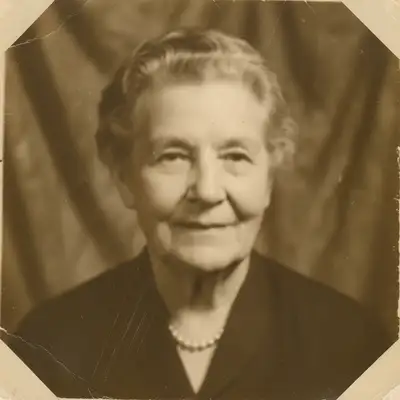
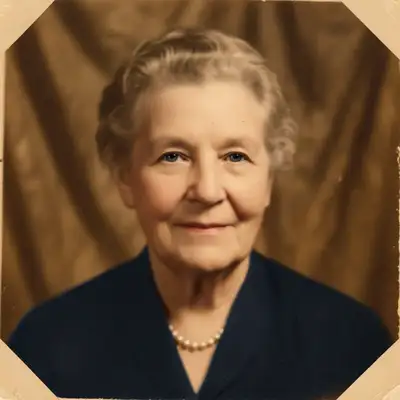
EditThisPic is the best free photo restoration tool in 2026 if you want to fix scratches, fading, and tears, or colorize a black-and-white photo, by describing the repair with no signup. One Fast edit per week is a free preview; keeping the clean download needs a purchase. Remini is stronger when blurry faces are the main problem.
The 6 Tools, Ranked
-
EditThisPic Top pick
AI photo editor that restores old and damaged photos through text descriptions. Fixes scratches, fading, tears, color loss, and can colorize black-and-white images.
- Handles multiple restoration tasks
- Text prompts for precise control
- Colorization available
- Free weekly preview edit, no signup
- One free preview edit per week; keeping the clean download needs a purchase
- Very heavy damage may need multiple passes
- Output capped at 2048px on the long edge — large prints of big scans need a dedicated upscaler
-
Remini
AI enhancement app (owned by Bending Spoons) that specializes in improving old, blurry, and low-quality photos. Face enhancement is particularly strong, making it great for restoring old portraits.
- Excellent face restoration
- Works on very old photos
- Improves clarity significantly
- Quick processing
- Limited free uses daily
- Can add artificial details
- No scratch or tear repair
- Faces can look over-processed
-
MyHeritage Photo Enhancer
Genealogy platform with AI photo enhancement and colorization. Deep Nostalgia feature animates old photos, and the enhancer improves resolution and clarity.
- Strong colorization
- Genealogy-focused features
- Deep Nostalgia animation
- Family-oriented interface
- Requires account creation
- Only 10 free enhancements
- MyHeritage logo added to free results
- Privacy concerns with uploads
-
VanceAI Photo Restorer
AI-powered restoration tool that removes scratches, fixes color fading, and repairs minor damage. Batch processing available for multiple old photos.
- Automatic scratch detection
- Handles color fading well
- Batch processing
- Web-based
- Credits required for downloads
- Can blur fine details
- Free tier very limited
- Resolution caps on free tier
-
Photomyne
Scanning and restoration app designed for digitizing photo albums. Detects individual photos when scanning album pages and offers basic restoration.
- Scans from photo albums
- Auto-detects individual photos
- Organizes into albums
- Good for batch scanning
- Restoration is basic
- Subscription for full features
- Better at scanning than restoring
- Mobile-focused
-
Fotor
Online photo editor with AI restoration features including scratch removal, color correction, and face enhancement for old photographs.
- Web-based restoration
- One-click enhance option
- Color correction tools
- No install needed
- Watermark on free exports
- Restoration quality varies
- Limited scratch repair
- Best results need Pro plan
How We Tested Photo Restoration Tools
We scanned three damaged photos for testing: a scratched 1970s wedding photo, a faded and yellowed 1950s family portrait, and a torn black-and-white photo from the 1940s. We evaluated how well each tool handled scratch repair, color restoration, face clarity improvement, and colorization of the black-and-white image.
Which Restoration Tool Should You Use?
EditThisPic is the most versatile because text prompts let you address specific damage: scratches, fading, tears, and color issues in targeted descriptions. Remini is the best choice when face clarity is the priority—it dramatically improves blurry or small faces. MyHeritage offers the best colorization and genealogy integration. For scanning physical albums, Photomyne handles the capture step.
Step-by-Step Guide
Scan Your Old Photo
Use a flatbed scanner at 300+ DPI, or photograph it with a smartphone in even lighting. Avoid flash, which creates glare. A scanning app like Photomyne can help capture cleanly.
Upload and Describe the Damage
Drop the scan into EditThisPic and describe specifically what needs fixing: 'fix the scratches across the faces, restore the faded colors, and brighten the overall image.'
Download Your Restored Photo
Compare the result with the original. For treasured family photos, you may want to do multiple passes: first fix physical damage, then enhance colors, then improve faces.
Frequently Asked Questions
Bring Old Photos Back to Life
Upload a damaged or faded photo and describe what needs fixing. AI restoration in seconds.
Drop your photo to start editing
"Restore the old"
Free to try · no sign-up · never used for AI training
Release to upload