How to Turn a Photo into a Pencil Sketch
To turn a photo into a pencil sketch, upload your image to EditThisPic and type 'convert this to a pencil sketch' or 'make this look like a hand-drawn pencil drawing.' The AI traces edges, adds shading and hatching, and renders your photo as a realistic sketch. Works on portraits, landscapes, pets, and any subject. Free, no signup required.

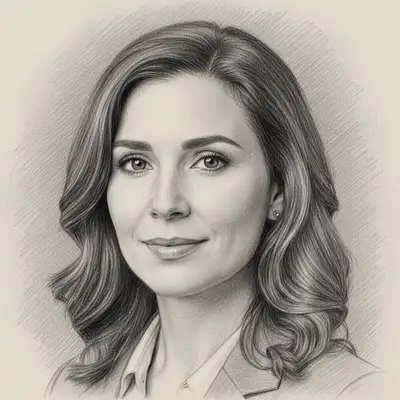
Get a Hand-Drawn Pencil Sketch from Any Photo
A pencil sketch has a timeless quality that photographs cannot replicate. The raw lines, graphite shading, and white-paper negative space make any subject feel artistic and intentional. AI sketch conversion analyzes the edges, tones, and details in your photo and re-renders them as pencil strokes on paper. The result looks like it was drawn by hand, with natural hatching, cross-hatching, and graduated shading.
Sketch Styles You Can Create
- Pencil sketch — classic graphite drawing with shading and hatching
- Charcoal sketch — darker, moodier strokes with smudged shadows
- Line drawing — clean outlines with minimal shading, like an ink illustration
- Cross-hatch sketch — detailed shading built from overlapping pencil lines
- Colored pencil — sketch-like strokes with subtle color
- Architectural sketch — clean lines and precise perspective for buildings
How AI Photo-to-Sketch Works
The AI identifies edges, contours, and tonal gradients in your photo. It maps darker areas to denser pencil strokes and lighter areas to sparse or no strokes, mimicking how a real artist builds up a sketch. Fine details like eyelashes, hair strands, and fabric texture are rendered with thin precise lines, while broader areas like backgrounds use looser, more gestural marks.
Popular Uses for Photo-to-Sketch Conversion
Portrait sketches are the top use case. Turn a headshot into a pencil portrait for wall art or a social media profile picture with artistic flair. Couples turn engagement photos into sketch-style save-the-date cards. Architects and designers convert reference photos into sketched concepts. Artists use AI sketches as base drawings to trace or build upon. Pet owners create pencil portraits of their animals.
Turning Portraits into Pencil Sketches
Portraits convert to sketches beautifully because faces have strong structure — defined edges around eyes, nose, lips, and jawline give the AI clear lines to work with. Front-facing, well-lit headshots produce the cleanest results. For a more dramatic sketch, try 'convert to a charcoal portrait sketch with deep shadows.' For something lighter, 'make a delicate pencil line drawing of this face' gives a minimalist result.
Tips for the Best Sketch Results
Photos with good contrast between subject and background convert best. If the photo is flat and low-contrast, the sketch can look muddy. Specify the sketch intensity you want: 'detailed pencil sketch with heavy shading' produces a dark, dramatic drawing, while 'light pencil sketch with minimal shading' gives an airy, delicate result. For backgrounds, you can ask the AI to 'sketch only the person and leave the background white' for a clean portrait look.
Step-by-Step Guide
Upload Your Photo
Drop your image into EditThisPic. Portraits, landscapes, pets, buildings, and objects all work well. JPG, PNG, or WebP up to 7MB.
Describe the Sketch Style
Type what you want: 'convert to a pencil sketch,' 'make this a charcoal drawing,' or 'turn into a detailed cross-hatch sketch.' Be specific about the style and intensity for the best match.
Review the Sketch
Compare the sketch with your original using the before/after slider. Check that edges are clean, shading looks natural, and the overall composition captures the feel of a hand-drawn piece.
Adjust or Try Another Style
Want more detail? Try 'add more shading and cross-hatching.' Prefer a different style? Switch with 'make it a charcoal sketch instead.' You can iterate until the drawing looks right.
Frequently Asked Questions
Ready to Turn Your Photo into a Sketch?
Upload your photo and let AI draw it in pencil. Free, no signup.
Drop your photo to start editing
"Convert the to sketch"
Release to upload