8 Best AI Headshots for Medical Professionals in 2026
EditThisPic is the best AI headshot tool for medical professionals in 2026 — polish a clinic-day phone shot into a professional headshot for your practice website, hospital directory, or state board listing. Credit packs start at $4.99 for 10 edits, with a free weekly edit. For a multi-style library, BetterPic ($39) and Aragon AI ($35) deliver healthcare-appropriate options. Snappr connects you to a real photographer for clinic-shot alternatives.
The 8 Tools, Ranked
-
EditThisPic Top pick
Polish a clinic-day phone shot into a professional headshot — practice websites, hospital directories, professional listings
- Polishes a real photo of you — patients recognize the same face when they walk in
- Prompt for clinical neutral backgrounds with no patient data visible
- Re-run for practice site, Healthgrades, Zocdoc, and state board with one base photo
- No signup needed to test the workflow before paying
- One free Fast edit per week — group practices need a paid plan
- May need 2–3 prompt iterations to dial in the warmth-vs-authority balance
-
BetterPic
200+ headshot styles including healthcare-appropriate clinical scenes
- Strong on clean clinical backdrops and warm consultation-room scenes
- Outputs are consistent across the pack
- Clear style preview before purchase
- Per-person pricing — group practices add up fast
- Limited prompt control vs text-driven tools
- Style library is finite — niche specialties may need iteration
-
Aragon AI
Photoreal AI studio that produces a 40-photo healthcare library
- High realism that holds up at print and directory thumbnail resolution
- Mixed-style outputs cover white-coat, business-casual, and consultation-room
- Fast turnaround under an hour
- Generates a synthetic likeness — drift can be an issue when patients meet you in person
- Outputs need a final cull to remove the AI-look ones
- No free tier
-
HeadshotPro
Single-style professional headshot generator with healthcare presets
- Cheapest credible single-photo studio
- Output ready in 1–2 hours
- Clean dashboard, low learning curve
- Limited style range vs BetterPic or Aragon
- No prompt control
- Single-shot focus — not built for multi-channel directory presence
-
ProPhotos
Quick AI headshot studio with 30-minute delivery
- 30-minute average turnaround
- Reasonable realism at the price point
- Multiple clinical and neutral background presets
- Less photorealistic than Aragon at full resolution
- Style picker is narrower than BetterPic
- Outputs sometimes need cropping for board-portrait aspect
-
ProfilePicture.AI
Simpler, cheaper headshot generator for casual healthcare use
- Lowest entry price in the AI headshot space
- Simple upload-and-go workflow
- Decent for square avatars and directory thumbnails
- Realism gap vs Aragon or BetterPic at full resolution
- Limited style customization
- Not the right pick for hospital-system or specialist credentialing photos
-
Photo AI
Subscription generator with bring-your-own-prompt control
- Prompt-level control over scenes and wardrobe
- Unlimited generations on subscription
- Strong indie clinician community sharing prompt recipes
- Steeper prompt learning curve
- Generated faces can drift between sessions
- Subscription only — no per-photo entry point
-
Snappr
On-demand real photographer marketplace — AI-tool alternative when in-person matters
- Real photographer comes to your clinic — full likeness fidelity
- Strong for hospital systems with brand-photography requirements
- Available in most major U.S. metros within 24–48 hours
- $99+ per clinician — expensive for group practices
- Requires scheduling around the clinic day
- Not AI — included for comparison if AI realism doesn't meet your standard
Why Medical Professionals Need a Trust-Signaling Headshot
A clinician's headshot is the patient's first interaction with you — they see your photo on Healthgrades, Zocdoc, your practice website, or the state board's licensee directory before they ever walk into your office. The photo signals trust before any review or credential does, and patients consistently report that warm, recognizable headshots reduce first-appointment anxiety. Hospital directories and state medical boards require a current portrait for credentialing in many states, and those photos need to be both professional and unmistakably you. A studio shoot at a medical photography specialist runs $400–800 per clinician and requires booking out of clinic time. AI headshot tools — used carefully — let you polish a phone selfie taken on a clinic day into a directory-ready, patient-trust-building photo for under $10, without losing a half-day of patient slots.
What to Look For in an AI Headshot Tool for Healthcare
- Realism that survives Healthgrades and Zocdoc thumbnail compression — the photo needs to look real at 96×96 pixels
- Clean clinical or neutral backgrounds with no visible patient data, charts, or PHI in the frame
- Wardrobe prompt control — white coat, scrubs, business-casual, or warm consultation-room attire
- Trust-signaling expression — friendly, slightly warm, approachable, but professionally authoritative
- Same-face fidelity — patients must recognize you when they arrive at the appointment
- State medical board acceptance — most boards accept AI-edited photos as long as they're recognizable likenesses
- Cost-per-photo low enough for a group practice to standardize across the whole clinical team
1. EditThisPic — Best Overall for Medical Professionals
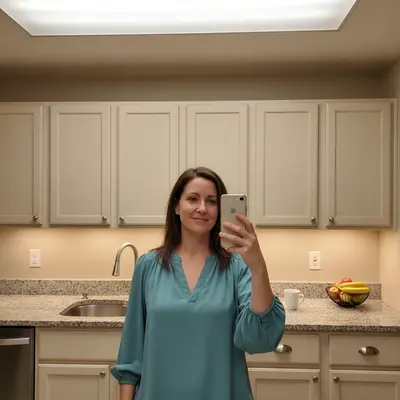
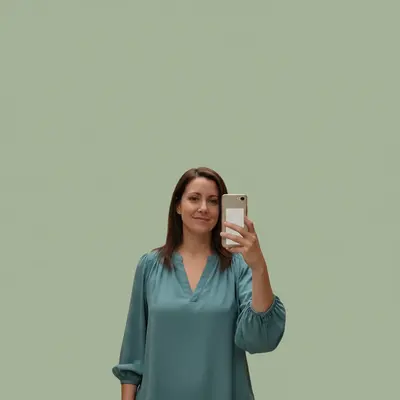
EditThisPic wins for clinicians because it edits a real photo of you rather than generating a synthetic likeness — and patient recognition matters. You upload a phone selfie taken on a clinic day, prompt for 'clinical professional headshot, friendly trustworthy expression, white coat, neutral background with no charts or patient information visible, soft natural lighting,' and the AI cleans up the lighting and background while keeping your actual face. Patients who saw your photo on Healthgrades recognize you immediately at check-in. Re-run the same base photo with 'softer business-casual blazer instead of white coat' for the practice About page, and 'tighter crop for directory avatar' for Zocdoc and state board. Credit packs start at $4.99 for 10 edits which is enough to fully refresh a 5-clinician group practice with iteration room. The free weekly edit lets you test the workflow on your real photo before rolling it out.
2. BetterPic — Best Multi-Style Healthcare Library
BetterPic is the right pick when a clinician wants a full multi-style library — white coat for the credentialing photo, business-casual for the practice About page, and a warmer consultation-room shot for the patient-facing intro section. The healthcare-appropriate backdrop range is solid — clean clinical walls, soft window-lit rooms, neutral consultation backdrops. The realism is consistent across the pack. The tradeoff is per-clinician cost: rolling BetterPic out across an 8-clinician group practice adds up. Many practices pair BetterPic (for the lead physician's hero library) with EditThisPic (for the rest of the clinical team's matching shots).
3–4. Aragon AI & HeadshotPro — Strong Single-Session Options
Aragon delivers a 40-image mixed-style library at $35, which is solid value for a single clinician. HeadshotPro at $29 is the cheapest credible single-photo route if all you need is one strong directory photo. Both work well for individual clinicians but are less suited for group-practice consistency — getting 6 different doctors to look like they were photographed in the same session is hard when each tool generates a synthetic likeness independently. For clinical likeness fidelity (which matters when patients meet you), prefer tools that polish a real photo over tools that generate one.
When to Use a Real Photographer Instead (Snappr)
Some healthcare contexts still benefit from a real photographer over AI. Hospital systems with strict brand-photography guidelines often require a uniform on-site shoot for the leadership wall and credentialing pages. Surgeons publishing in journals where the author photo appears at print resolution may want the small fidelity edge of a studio session. Specialists who present at conferences and want a tour-quality variety library across years also benefit from a real shoot. Snappr's on-demand marketplace ($99+/session) bridges this — you book a photographer who comes to your clinic for an hour, captures a usable variety set, and you can then run those photos through EditThisPic for cleanup and channel-specific variants. For everyone else — solo practitioners, group practices, telehealth providers — the AI workflow is now functionally equivalent.
HIPAA, PHI, and State Medical Board Considerations
AI-edited headshots themselves don't create HIPAA issues — your face isn't PHI. The risk is in the source photo: never upload a photo where a patient, a chart, a monitor with identifiable data, or any other patient information is visible in the background. Best practice is to use a phone selfie taken in your office (not a clinical area) at the start or end of a clinic day, with you as the only person in the frame. Most state medical boards accept AI-edited photos as long as the likeness is unmistakably you. Some board portals have specific resolution and aspect-ratio requirements (typically 800×800 minimum, 1:1 aspect for license listings) — check your specific state board's portrait submission spec before uploading.
Which AI Headshot Tool Should a Medical Professional Use?
Start with EditThisPic — the prompt-driven workflow handles directory, practice site, and board-credentialing photos cleanly, and the free weekly edit lets you validate the output on your real photo before paying. Add BetterPic if you want a wider multi-style library across white-coat and consultation-room scenes. Use Snappr when an in-clinic shoot is required by hospital brand guidelines or you want the small fidelity edge for journal photos. Skip the bargain tools (Try It On AI, ProfilePicture.AI) for credentialing and hospital-system uses — the realism gap will be visible at directory and board-portal resolution.
Step-by-Step Guide
Take a Phone Selfie in Your Office (Not a Clinical Area)
Stand near a window in your office or a private consultation room. Make sure no patient charts, monitors with patient data, schedules, or other PHI is visible in the background. Wear what you'd want patients to see you in — white coat, scrubs, or business-casual depending on your practice's vibe. Take 5–6 shots; pick the one with the warmest, most approachable expression.
Upload to EditThisPic and Describe the Healthcare Photo You Want
Drop the photo into EditThisPic. Type a prompt like: 'clinical professional headshot, friendly trustworthy expression, white coat, neutral background with no charts or patient information visible, soft natural lighting, suitable for a healthcare directory.' Specifying 'no charts or patient information visible' explicitly prompts the AI to clean any incidental clutter from the background.
Generate the Hero Photo for Your Practice Website
Use Pro mode for your hero practice-site photo so it holds up on the homepage and in the team grid. Once you have a clean output, save it. This is the version that goes on your About page and Meet the Team section.
Re-Prompt for Healthgrades and Zocdoc Avatars
Run the same base photo with 'tighter crop to face, neutral background, suitable for a healthcare directory thumbnail.' Healthgrades, Zocdoc, and most directory platforms use square avatars at small sizes — a purpose-cropped version reads cleaner at 96×96 thumbnail than a center-cropped practice-site photo.
Generate a State Board Credentialing Photo
Re-prompt with 'formal professional headshot, neutral light-grey background, clean light, suitable for state medical board credentialing.' Most state boards prefer a more formal, low-contrast photo than your patient-facing site photo. Check your specific state's portrait submission spec for resolution and aspect requirements.
Match the Rest of Your Clinical Team
If you're in a group practice, run every clinician's photo through the same prompt with consistent backdrop and lighting language. Outputs will share a tonal consistency that reads as 'same session' on the Meet the Team grid, even when each headshot is anchored to that clinician's real face.
Push the Approved Set to Every Healthcare Directory
Update the practice website, Healthgrades, Zocdoc, your hospital's internal directory, your state medical board listing, and any insurance-network provider directories. Refreshing once every 1–2 years keeps your practice's online presence current and patient-trust-building.
Frequently Asked Questions
Polish Your Healthcare Headshot in Under a Minute
Upload a clinic-day phone shot, describe the look, get a directory-ready headshot. Free to try, no signup needed.
Drop your photo to start editing
Free to try · no sign-up · never used for AI training
Release to upload