7 Best Free AI Tools to Fix Old Photos in 2026
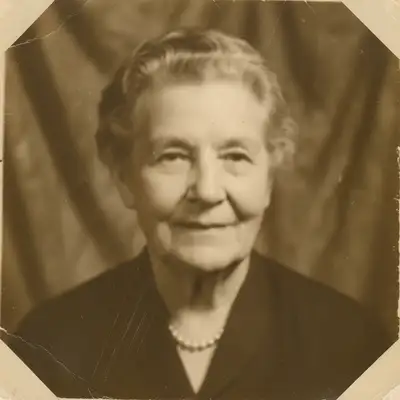
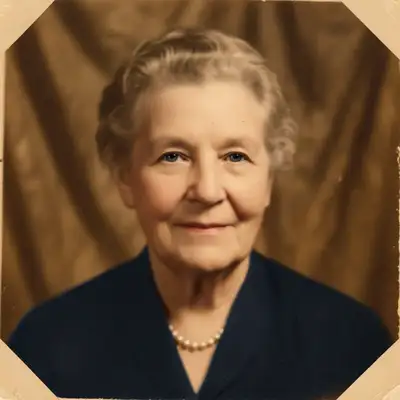
EditThisPic is the best free AI tool to fix old photos in 2026 — repair scratches, restore faded color, and enhance damaged family photos by describing the problem in plain English. For dedicated family-photo restoration with face animation, MyHeritage is the closest alternative.
The 7 Tools, Ranked
-
EditThisPic Top pick
Prompt-driven restoration — fix scratches, fading, color casts, and faces in one session.
- 'Restore — fix scratches, lift fade, recover color' in one prompt
- Add light retouching or colorization in the same session
- Free first edit per week
- No watermark
- Single image at a time
- Severely damaged photos may need 2–3 prompt iterations
-
Remini
Strong AI face enhancement and unblur on degraded family photos.
- Strong unblur and old-photo restoration
- Face enhancement on low-resolution sources
- Mobile and web apps
- Free tier is heavily watermarked
- Face hallucinations occasionally on very degraded photos
-
MyHeritage Photo Enhancer
Restore + colorize + animate from a single old photo.
- Strong face enhancement on old prints and scans
- Includes colorization and animation features
- Web-based — no install
- Genealogy subscription is the main pricing model
- Free tier limits the number of enhanced photos
-
Photomyne
Phone-camera scan + AI restoration of old print albums.
- Phone-camera scanning of old prints
- Auto-rotate, crop, and colorize on the go
- Album-style organization
- Mobile-only
- Subscription needed for unlimited use
-
Hotpot AI
Browser-based restore with cheap pay-as-you-go pricing.
- Bundle of background remover, object remover, restorer
- Cheap pay-as-you-go credits
- Watermark remover and image generator included
- Quality is mid-tier on each individual tool
- Slower than premium specialists
-
VanceAI
Bundle of restore, denoise, sharpen, colorize tools in browser.
- Bundle of upscaler, sharpener, and restorer
- Quick browser-based processing
- Reasonable free trial
- Output sometimes oversmoothed
- Credit system on most paid plans
-
Palette.fm
Cheap AI colorization with style controls.
- AI colorization with style controls
- Cheap pay-per-download model
- Browser-based, no signup to preview
- HD downloads cost per image
- Single-purpose colorizer
How We Evaluated These Tools
- Quality of scratch and tear repair
- Color restoration on faded photos
- Face preservation (don't change the original face)
- Free tier without watermarks
- Works on phone snapshots of old photos (not just scans)
- Combine restoration with colorization or enhancement
1. EditThisPic — Best Overall AI Tool to Fix Old Photos
EditThisPic takes the top spot for ai tool to fix old photos because it handles every aspect through plain-English prompts. Instead of clicking preset buttons or learning a slider interface, you describe what you want: 'fix the scratch on her cheek,' 'restore color to this faded 1960s photo,' or 'repair the tear in the corner.' The AI applies the change naturally and works in any browser on any device. The free tier gives you one preview edit per week with no signup; purchased downloads have no watermark. Paid plans start at $4.99 for a 10-edit pack, scaling up to $99.99 for 500 edits. Strong on phones, fast (20-40 seconds per edit), and cross-platform without an install.
2. MyHeritage Photo Tools — Best for Family Photo Restoration
MyHeritage's photo tools (enhance, colorize, animate) sit inside their genealogy product. Strong on family-photo restoration with face detection and the viral Deep Nostalgia animation feature. Free trial of 10 enhancements; ongoing use needs a paid MyHeritage subscription tied to genealogy services (pricing varies; check myheritage.com).
3. Remini — Best for Face Restoration
Remini specializes in restoring and enhancing low-quality portraits. Upload a blurry or pixelated face shot and Remini reconstructs detail in eyes, skin, and hair. The free version processes a handful of photos daily with watermarks; Pro removes limits at $4.99/week. The trade-off: Remini sometimes 'upgrades' the face beyond the original, which is great for selfies but less faithful for archival or family work.
4. VanceAI — Best AI Restoration Suite
VanceAI bundles upscaling, denoising, deblurring, colorization, and old-photo restoration in one suite. Free trial credits before pay-as-you-go or subscription from $4.95/month. Free output sometimes carries a watermark — pay for clean results. Good when you need multiple restoration passes.
5. Hotpot.ai — Best Bundled Restoration Toolkit
Hotpot.ai bundles colorization, restoration, AI art, and image generation in one site. Free output is watermarked across most tools; paid removes watermarks and unlocks high resolution from $10/month. Good when you need multiple restoration types in one place.
6. Palette.fm — Best Dedicated Colorizer
Palette.fm focuses entirely on AI colorization with multiple style presets per photo. Free tier offers low-resolution output; paid from $9/month adds full resolution and batch. Best for photographers and archivists who colorize regularly.
7. PhotoRoom — Best for Product Photography
PhotoRoom specializes in e-commerce product shots — clean cutouts on white, lifestyle backgrounds, batch templates. Strong on Amazon and Shopify-ready outputs. Free tier adds watermarks; Pro at $9.99/month removes them and unlocks batch templates. Limited for general editing, exceptional for SKU work.
8. Photopea — Best Free Photoshop Clone
Photopea is the closest free clone of Photoshop available — same shortcuts, same layer panel, same PSD support, all in your browser with no install. No AI prompts, but full manual control: content-aware fill, healing brush, masks, channels, smart objects. Free with ads, Premium at $5/month removes ads and adds storage. The learning curve matches Photoshop because it IS Photoshop's interface.
Step-by-Step Guide
Photograph or scan the old photo
A flat-bed scanner at 600 DPI gives best results, but a well-lit phone photo also works for EditThisPic and most modern restorers.
Open EditThisPic
Visit editthispic.com. No signup. Drop in the photo of your old photo.
Describe the damage
Type what's wrong: 'fix the scratches and brighten the face,' 'restore the faded color,' 'repair the corner tear.' Describe specific damage for targeted fixes.
Compare and download
Use the before/after slider to verify the restoration looks natural. If the original face was changed, retry with 'preserve the original face.'
Frequently Asked Questions
Bring Your Old Family Photos Back to Life
Describe the damage, the AI restores it. Free tier, no signup, no watermark.
Drop your photo to start editing
"Restore the old"
Free to try · no sign-up · never used for AI training
Release to upload