How to Straighten Teeth in Photos (Free AI Tool)
To straighten teeth in a photo, upload it to EditThisPic and describe the edit: 'straighten the teeth' or 'make the teeth look more aligned and even.' The AI adjusts the position and angle of crooked, overlapping, or gapped teeth while keeping the smile natural. Free, no signup required.
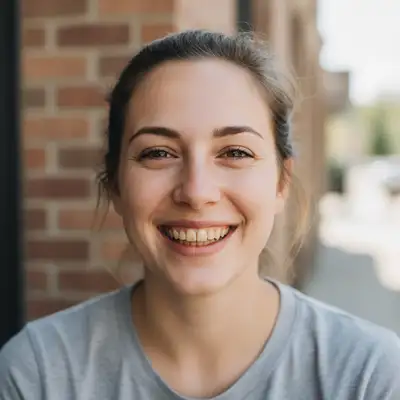
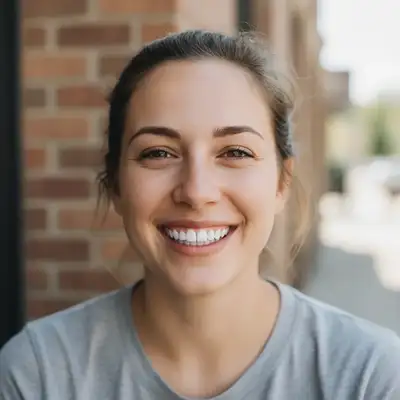
Love the Smile, Fix the Alignment
You have a great photo — the lighting is right, the expression is genuine, the moment is captured perfectly. But you keep staring at the crooked tooth or the small gap. AI photo editing lets you subtly straighten teeth without making the smile look fake or over-processed. No orthodontist required, and the edit takes seconds.
What the AI Can Correct
The tool handles common alignment issues that show up in smile photos: a single crooked front tooth, overlapping teeth that cast shadows, noticeable gaps between teeth, teeth that are rotated or angled differently from the rest, and uneven gum lines that make aligned teeth look crooked. It repositions and reshapes the teeth to look naturally straight while keeping the overall smile authentic.
Fixing a Single Crooked Tooth
One tooth that sticks out or tilts sideways draws the eye in every smile photo. Upload the image and describe it: 'straighten the crooked front tooth on the left side.' The AI adjusts the angle and position of that one tooth to align with its neighbors. The rest of the smile stays exactly as it is. This is the most common fix and produces the most natural results.
Closing Gaps Between Teeth
A visible gap — whether it's a diastema between the front teeth or spacing further back — can be reduced or closed entirely. Describe the edit: 'close the gap between the two front teeth' or 'reduce the spacing between the teeth.' The AI shifts the teeth closer together and fills in the dark space naturally, matching the surrounding tooth color and texture.
Fixing Overlapping or Crowded Teeth
Overlapping teeth create shadows and uneven edges that are hard to ignore in close-up photos. Tell the AI: 'fix the overlapping teeth on the bottom row' or 'make the crowded front teeth look more even.' The AI separates and aligns the overlapping surfaces, removing the shadows and creating a cleaner tooth line. Works best on front-facing smile photos where the overlap is clearly visible.
Keeping the Result Natural
The goal is alignment, not perfection. The AI straightens teeth while preserving their individual character — slight size differences, natural color variation, and realistic edges. It does not produce a Hollywood-veneer look unless you specifically ask for it. The result looks like good genetics, not an obvious edit.
Tips for the Best Results
Close-up smile photos work best because the AI has more pixel detail to work with. If the teeth are small in the frame, crop to a headshot first. Be specific about which teeth to fix: 'straighten the two front teeth' is better than just 'fix the teeth.' For multiple issues (crooked plus gaps), address them one at a time for more precise control. And combine with teeth whitening if needed: 'straighten and whiten the front teeth.'
Step-by-Step Guide
Upload a Smile Photo
Drop your photo into EditThisPic. Selfies, portraits, and headshots with a visible smile work best. The clearer the teeth are in the frame, the better the result.
Describe What to Straighten
Be specific: 'straighten the crooked front tooth' or 'close the gap between the front teeth and align them.' Mention which teeth and what kind of fix — straightening, closing gaps, or fixing overlap.
Check the Alignment
Zoom in on the teeth. They should look naturally straight — aligned with each other, no visible editing artifacts, and consistent in color and texture. The smile should still look like the person's real smile, just tidied up.
Download Your Photo
Save the corrected image. The background, face, expression, and everything else stays exactly as it was. Only the tooth alignment changes.
Frequently Asked Questions
Ready to Straighten That Smile?
Upload your photo and describe what to fix. Free, no signup required.
Drop your photo to start editing
"brighten the smile to look naturally white and healthy, subtle enhancement"
Release to upload