EditThisPic Studio

Your subject. Every scene. The same person.

A pro AI workspace built on one idea: the people, products, and looks you work with should stay consistent every time. Save them once — then edit, create new shots, and animate, and they hold together across the whole set.

See it in action

Cancel anytime · Commercial use included · Runs on your existing EditThisPic account

  • Consistent subjects
  • Change only this
  • Edit · Create · Animate
  • Projects & batch
Your uploaded portrait
Your photo
The same person on a golden-hour beach
✨ golden-hour beach
The same person in a bright studio office
✨ bright office
The same person on a neon city street at night
✨ neon city at night

One photo → three new scenes. Same person, every time.

Your photos are never used to train models Commercial use included Cancel anytime Full-resolution / 4K downloads
What Studio is

One workspace. Your subject, held together.

The regular editor starts every photo from zero — a re-uploaded face the AI quietly reinvents, a different outfit each time. Studio is built the other way around: save who and what you work with, and keep them consistent across everything you make.

The library

Save your cast once. They stay themselves.

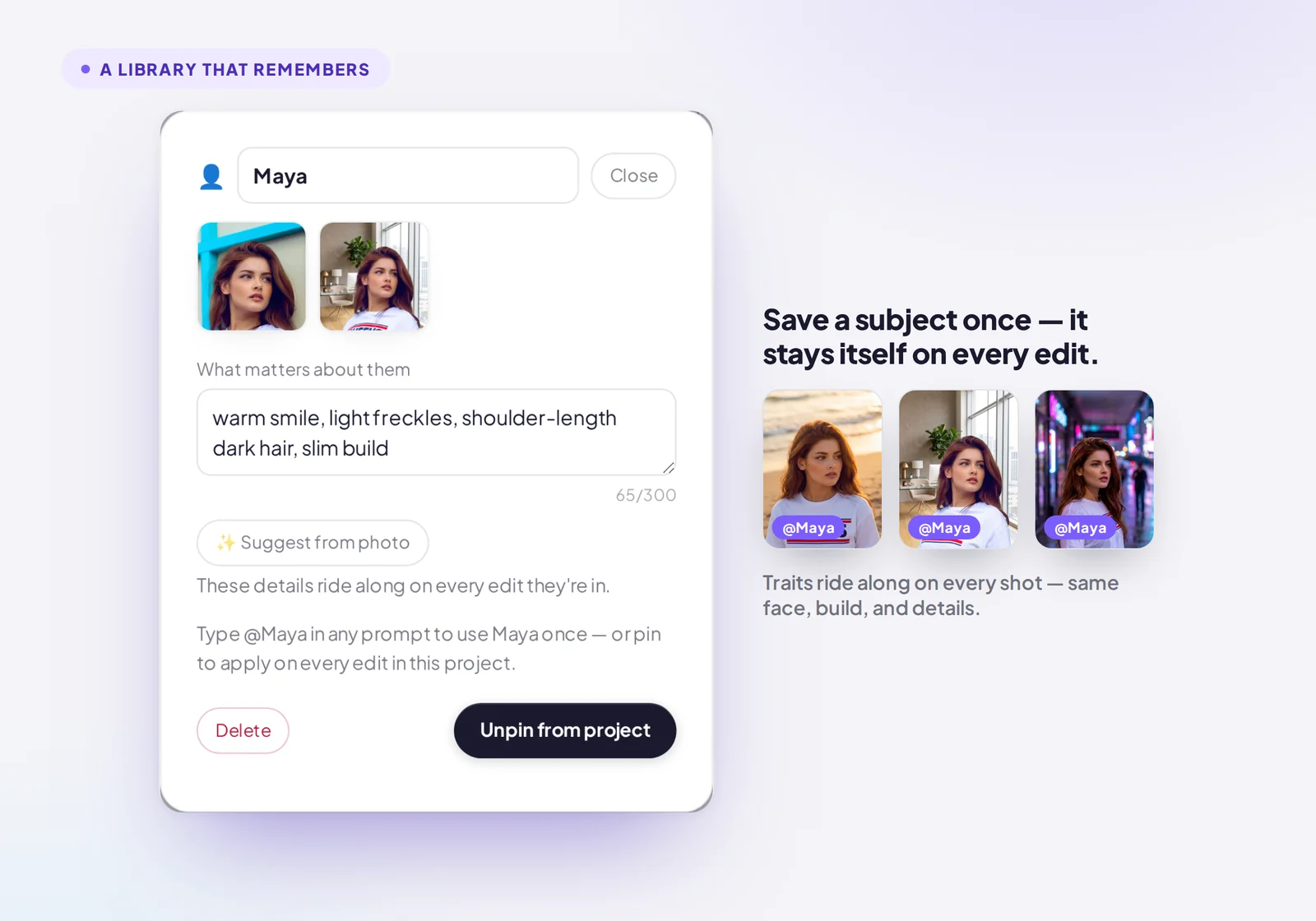
Save the people, products, places, and looks you reuse — a photo or three each — and add a note on what matters about them. Those details ride along on every edit, so the face, the build, the little things stop drifting between shots.

  • Pin a subject to a project, or type @their-name in any prompt
  • “What matters about them” locks the details that usually drift
  • Up to 25 saved subjects — 100 on Studio Max
A saved subject in Studio, with reference photos and a ‘what matters about them’ note that rides along on every edit
Precision editing

Change only what you point at.

Paint an area — a jacket, the background, one blemish — and the edit stays inside it. Everything outside your selection is preserved. When an edit needs to move or reshape something, the workspace tells you up front instead of quietly redrawing the whole frame.

  • Brush the area, or just name it — “the red jacket”
  • Fast edits (1 credit) or Pro (2 credits)
  • Ask for up to four versions of an edit, side by side
Studio’s ‘change only this’ mode — paint or name a region and the edit stays inside it
One canvas

Edit, create, and animate — the same subject throughout.

Three tabs on one canvas. Restyle a photo, generate a brand-new shot of a saved subject, or bring a still to life as a short video — without your subject changing between them.

  • Create new scenes from a subject you’ve saved
  • Animate a still into a 6–8s clip (video uses 5–10 credits)
  • Every result lands back in the same project
The Studio composer with Edit, Create, and Animate tabs — animating a still into a short clip
Built for real work

A project, not a one-off edit.

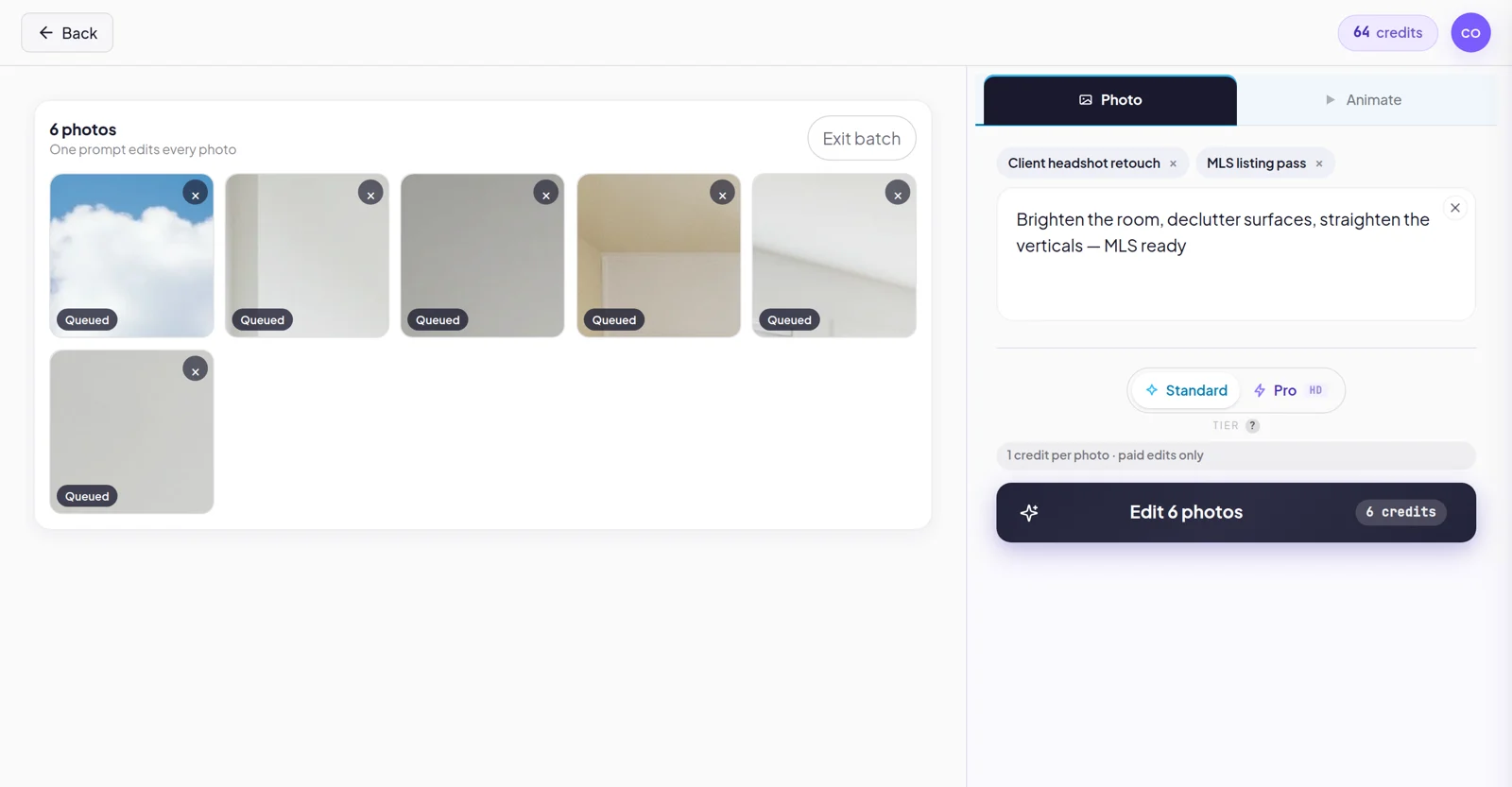
Group shots into projects with full version history, save your go-to prompts as one-tap recipes, and apply one edit across a whole set at once. Download at full resolution — commercial use included.

  • Version history on every photo — branch or revert freely
  • Recipes: save a prompt once, reuse it forever
  • Batch up to 25 shots (200 on Max) · full-resolution / 4K download
Batch mode in Studio — select several photos and apply one edit across all of them
How it works

Three steps to a consistent set.

Save your subject

Add one to three clean photos of the person, product, or look you're working with, and jot down what should stay true about them. Studio remembers it.

Make your shot

On one canvas: edit the photo, create a new scene, or animate it — with your subject locked in. Change only the region you pick, and the rest stays exactly as it was.

Iterate & scale

Keep every version, branch or revert freely, save the edit as a recipe, and roll it across a whole set of photos when it's right.

Who it's for

Made for people who shoot the same subjects on repeat.

Photographers

Restyle a client's headshots into a dozen looks without their face shifting between them.

E-commerce sellers

Keep one product identical across every listing scene, backdrop, and marketplace crop.

Content creators

Hold a consistent on-camera persona across thumbnails, posts, and short video.

Small agencies

Run a whole campaign from one project — batch edits, saved recipes, on brand.

Pricing

Two plans. Both include the full workspace.

Every edit draws from your monthly credits — a Fast edit is 1, a Pro edit is 2, and a short video is 5–10. Each plan includes bonus credits over buying packs, and unused credits roll over up to twice your monthly amount.

Studio Max
$99.99/mo$149.99
Founder rate · locked in for life
or

For high-volume production work and larger catalogs.

  • 600 credits/mo — 500 + 100 bonus · rolls over up to 1,200
  • Everything in Studio
  • Batch one edit across up to 200 shots
  • Larger library — up to 100 saved subjects & projects

Founder pricing is open to everyone who joins during launch — your rate is locked in for as long as you stay subscribed.

Get started

Save your cast once. Keep them consistent for good.

Studio is live now and runs on the EditThisPic account you already have — join and the workspace unlocks right away.

Cancel anytime · Commercial use included

FAQ

Good questions.

Can I try Studio before I subscribe?
Studio is a monthly plan, so there's no separate free trial — but you can cancel anytime from the billing portal and keep access to the end of the period you've paid for. It runs on the same account as the free EditThisPic editor, so you can get a feel for how AI editing works there first.
What can I make in Studio?
Three things, all on one canvas: edit an existing photo, create a brand-new shot of a saved subject, and animate a still into a short video — with your subject staying consistent across all of it. Photo edits use 1–2 credits each; a short video uses 5–10.
What counts as a credit?
Every edit draws from your monthly balance. A Fast edit is 1 credit, a Pro edit is 2, and a short video is 5–10 depending on length and resolution. Your plan's monthly credits cover your work; heavier jobs simply use a little more.
Do saved subjects or reference photos cost extra credits?
No. Saving a subject and attaching reference photos are part of how an edit works — an edit is an edit. You're charged the normal Fast or Pro credit cost, nothing on top for keeping your subject consistent.
What happens to credits I don't use?
Unused credits roll over into the next month, up to twice your monthly amount. On Studio that's up to 300 credits; on Studio Max, up to 1,200. Roll-over keeps building only up to that cap.
I already pay for EditThisPic — can I switch to Studio?
Yes — you pay the same $29.99/mo founder rate as everyone. Email support@editthispic.com and we'll move your account onto Studio and prorate your current plan, usually same-day. Self-serve switching is on the way.
Can I use my edits commercially?
Yes. Commercial use is included with Studio and Studio Max, so you can use your edited images for client work, product listings, and other business projects.
Can I cancel anytime?
Yes. You can cancel whenever you like from the billing portal — no phone calls, no retention hoops. Your plan stays active until the end of the period you've paid for.
Is my content private?
Your photos are not used to train models, and they're deleted when you delete your account. Studio is a working tool for your images, not a training set.
What's the difference between Studio and Studio Max?
Both include the full workspace — consistent subjects, region editing, projects, and full-resolution download. Studio gives you 150 credits a month, batches up to 25 shots, and holds up to 25 saved subjects. Studio Max gives you 600 credits, batches up to 200 shots, and a larger library of up to 100 saved subjects and projects.