How to Remove Glare from Glasses in Photos
To remove glare from glasses in a photo, upload your image to EditThisPic and describe what to fix: 'remove the glare from the glasses' or 'fix the reflection on the lenses.' The AI identifies the bright spots and reconstructs the eyes and lens area behind the reflection. Free, no signup required.
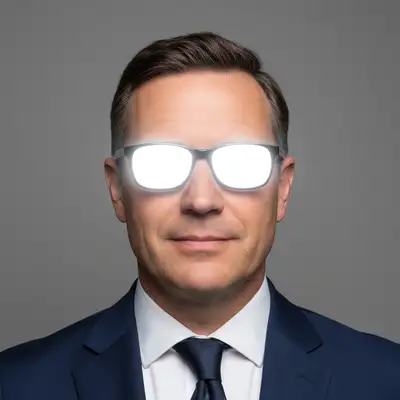

Fix Glasses Reflections in Any Portrait
Glasses glare is one of the most frustrating portrait problems. A flash bounces off the lenses, overhead lights create white patches, or a window reflection hides the subject's eyes entirely. AI can now reconstruct what's behind the glare, restoring natural-looking eyes and skin.
Types of Glasses Glare AI Can Fix
- Flash reflections — bright white spots from camera flash or ring lights
- Window reflections — scenery or light sources mirrored in lenses
- Overhead lighting — broad white patches from fluorescent or ceiling lights
- Screen reflections — computer or phone screens visible in the lenses
- Partial glare — one lens affected more than the other
How AI Removes Lens Reflections
EditThisPic's AI analyzes the surrounding facial features—skin tone, eye color, eyebrow position—and uses that context to reconstruct the area hidden by glare. It fills in realistic eyes, skin texture, and the natural tint of the lens. The result looks like the reflection was never there.
Best Prompts for Glasses Glare Removal
Be specific about what you see. 'Remove the white glare from both lenses' works well for flash reflections. For partial glare, try 'fix the reflection on the left lens only.' If there's a colored reflection, describe it: 'remove the blue screen reflection from the glasses.' The more accurately you describe the problem, the cleaner the fix.
Tips for Better Results
Photos where at least part of the eye is visible behind the glare produce the best results—the AI uses visible portions as a reference. Full white-out glare covering both eyes entirely is harder but still works in most cases. If one lens is clean and the other has glare, mention that so the AI can match them.
Preventing Glasses Glare in Future Shots
Angle the subject's head slightly downward or tilt the glasses to deflect overhead light. Use diffused lighting instead of direct flash. Position the light source at a 45-degree angle to the face rather than straight on. Anti-reflective lens coatings also help significantly. But when prevention fails, AI removal is seconds away.
Step-by-Step Guide
Upload Your Portrait
Drop your photo into EditThisPic. Works with selfies, group photos, professional headshots, and ID photos.
Describe the Glare
Be specific: 'remove the glare from the glasses' or 'fix the white reflection on the right lens.' Mention if it's flash, window reflection, or screen glare.
Review the Result
Check that the eyes look natural behind the lenses and that skin tone matches the surrounding face. Compare before and after with the slider.
Frequently Asked Questions
Ready to Fix Glasses Glare?
Upload your portrait and describe the reflection. AI removes it in seconds. Free, no signup.
Drop your photo to start editing
"remove the glare reflection from the glasses and show the eyes clearly"
Release to upload