Passport Photo Requirements by Country
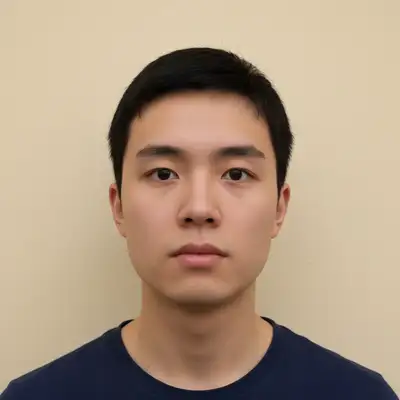
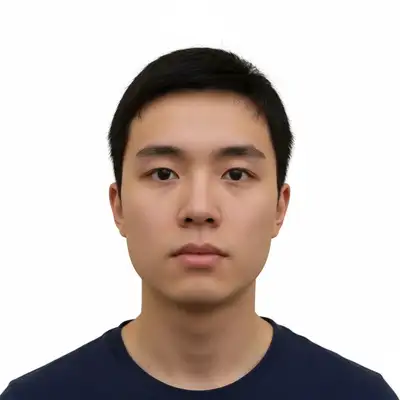
US Passport Photo Requirements
The US State Department has strict passport photo requirements. Photos that don't meet them will be rejected, delaying your application. Dimensions: 2 x 2 inches (51 x 51 mm). Head height from chin to top of hair: 1 to 1-3/8 inches (25-35mm). Eyes positioned between 1-1/8 and 1-3/8 inches (28-35mm) from the bottom edge. Background: plain white or off-white. No patterns, shadows, or other people visible. Expression: neutral expression with mouth closed. Natural smile with both lips closed is acceptable. No exaggerated smile, frown, or squinting. Clothing: normal street clothes. No uniforms (except religious), no camouflage. Glasses are not allowed in US passport photos as of 2016. Photo must be taken within the last 6 months and represent your current appearance. Digital submissions: at least 600x600 pixels, maximum 1200x1200. JPEG format, 54KB to 10MB.
2x2 inches on white background
51x51mm with the face centered. Head fills 50-69% of the frame vertically.
Neutral expression, no glasses
Mouth closed, both eyes open. Glasses have been prohibited since 2016.
Recent photo
Taken within 6 months. Must match your current appearance including hair style and color.
Digital: 600x600 to 1200x1200 pixels
JPEG format, 54KB-10MB for online submission. 300 DPI for printed photos.
UK Passport Photo Requirements
UK passport photos follow specific HM Passport Office guidelines that differ from US requirements. Dimensions: 35 x 45 mm. The image of the face from chin to crown must be between 29mm and 34mm. Background: plain light gray or cream. Not pure white (which creates contrast issues with the security features). No patterns or shadows. Expression: neutral, mouth closed, no smiling. The UK is stricter than the US on expression. Children under 6 have some flexibility. Glasses: allowed only if prescribed and essential. Frames must not cover any part of the eyes. No tinted lenses, no reflections on the lenses. The UK recommends removing glasses for the photo. Head coverings: only for religious or medical reasons. The face must be fully visible from the bottom of the chin to the top of the forehead. Digital: at least 600x750 pixels. JPEG or PNG format, between 50KB and 10MB.
35x45mm on light gray background
Not pure white. Plain light gray or cream background with no patterns.
Strictly neutral expression
No smiling, no open mouth. Both eyes open, looking directly at the camera.
Remove glasses if possible
If wearing glasses: no reflection, no tinted lenses, frames can't cover eyes.
Digital: 600x750 pixels minimum
JPEG or PNG, 50KB-10MB for online applications.
EU/Schengen Passport Photo Requirements
EU passport photos follow ICAO (International Civil Aviation Organization) standards with some national variations. Dimensions: 35 x 45 mm is the standard across most EU/Schengen countries. Some countries have slight variations: Germany uses 35x45mm strictly, France uses 35x45mm, Italy uses 35x45mm. Background: light, uniform, plain. Most EU countries accept white, light gray, or light blue. Germany specifically requires a uniform light gray. Expression: neutral with mouth closed across all EU countries. Some countries are stricter than others on enforcement. Biometric compliance: the face must be centered, looking straight at the camera, with even lighting on both sides. This enables facial recognition at automated border gates. Recency: taken within the last 6 months (some countries say 3 months). Must represent current appearance.
35x45mm standard
Most EU/Schengen countries use this dimension. Check your specific country for any variations.
Light, plain background
White to light gray. Germany requires light gray specifically. No patterns.
Biometric-compliant face position
Face centered, looking straight ahead, even lighting, neutral expression.
Check country-specific rules
Glasses, head covering, and background color rules vary by country. Verify with your national passport office.
Canadian Passport Photo Requirements
Canadian passport photos have specific IRCC (Immigration, Refugees and Citizenship Canada) requirements. Dimensions: 50 x 70 mm (printed) or 420 x 540 pixels (digital). The face from chin to crown: 31-36mm. Background: plain white or light-colored. No shadows, no patterns. Expression: neutral with mouth closed. Canada allows a natural, relaxed expression but no smiling. Glasses: removed for all passport photos as of 2017. No exceptions. The photographer or guarantor must sign the back of the printed photo. For digital submissions through the online passport application, specific file requirements apply: JPEG, 420x540 to 4800x6000 pixels, 60KB-5MB. Photos must be taken within the last 12 months (more generous than US/UK).
50x70mm printed, 420x540px digital
Larger than US/UK format. Face fills 31-36mm from chin to crown.
White background, no glasses
Glasses removed since 2017. Plain white or light background.
Taken within 12 months
Canada allows photos up to 1 year old, more generous than US/UK 6-month requirement.
Guarantor signature required
Printed photos need the photographer or guarantor signature on the back.
Indian Passport Photo Requirements
Indian passport photos follow the Ministry of External Affairs specifications. Dimensions: 2 x 2 inches (51 x 51 mm), same as US passports. The face should cover 50-60% of the photo. Background: plain white or very light. No shadows or gradients. Expression: neutral, looking straight at the camera. Mouth closed, both eyes open. Glasses: should be removed unless worn for medical reasons. No tinted or reflective lenses. Additional requirements: ears must be visible (important for biometric identification). Hair should not cover the face or ears. No head coverings except for religious reasons. For online applications (Passport Seva): JPEG format, 10KB-300KB, 350x350 to 1000x1000 pixels.
2x2 inches on white background
Same dimensions as US passport. Face covers 50-60% of the photo.
Ears must be visible
Push hair behind ears. This is specifically checked for Indian passport photos.
Remove glasses
Unless medically required. No tinted or reflective lenses.
Digital: 350x350 to 1000x1000
JPEG format, 10KB-300KB for Passport Seva online application.
Taking Passport Photos at Home
Taking passport photos at home saves money and lets you retake as many times as you need. The key is getting the background, lighting, and framing right. Background: stand in front of a plain white wall. If you don't have one, hang a white bedsheet or large white poster board. Ensure no wrinkles or shadows on the background. Lighting: face a window with the light hitting your face evenly. Avoid overhead lights that create shadows under the eyes and nose. Two lamps at 45 degrees on each side also work. Camera: use the rear camera on your phone (higher quality than front camera). Set a timer and prop the phone at face height, 3-4 feet away. Use the 2x telephoto for more natural facial proportions. For AI editing: upload your photo and say 'make the background pure white for a passport photo' or 'crop to 2x2 inches with my face centered per US passport requirements'. The AI handles background replacement, even lighting, and precise cropping.
Set up white background
White wall, bedsheet, or poster board. No wrinkles, shadows, or patterns visible.
Face window light
Even, soft light on both sides of the face. No harsh shadows from overhead lights.
Use rear camera at face height
Prop phone at eye level, 3-4 feet away. Set 10-second timer. Use 2x telephoto if available.
Edit with AI
'Make the background pure white and crop to [country] passport requirements.' Fix shadows, ensure even lighting.
Frequently Asked Questions
Need a passport photo?
Create compliant passport photos at home. White background, correct dimensions, proper crop. Upload and describe. Free, no signup.
Make My Passport Photo
"clean up and format this photo for official use"
Free to try · no sign-up · never used for AI training
Release to upload