Wedding Photo Editing Guide
Common Wedding Photo Problems
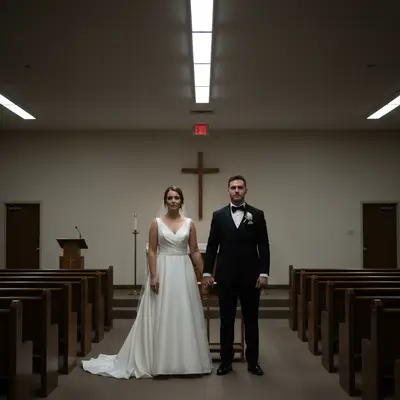
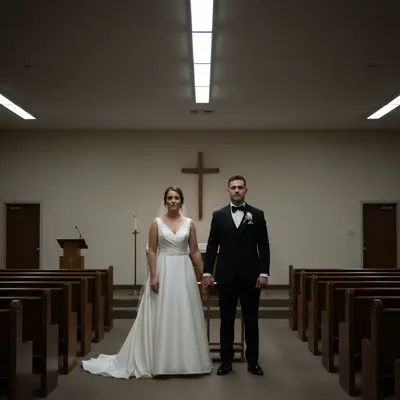
Weddings are photographically challenging. Mixed lighting, fast-paced events, limited control over the environment, and high emotional stakes create conditions where imperfect photos are inevitable. The most common issues: dark or underexposed venue photos (churches, ballrooms), orange-tinted reception photos from warm venue lighting, photobombers and unwanted guests in the background, exit signs and unsightly venue elements, harsh midday sun during outdoor ceremonies, and blemishes or stray hairs in close-up portraits. Even professional wedding photographers deliver galleries with photos that could benefit from additional editing. The photographer typically edits for overall look and color, but individual photos may have specific issues that the couple notices. For couples editing their own wedding photos (from the photographer's delivered gallery or from guest photos), the good news is that most common problems are easily fixed with AI editing tools. You don't need Lightroom or Photoshop expertise to enhance your wedding memories.
Identify the fixable issues
Dark exposure, color casts, photobombers, background distractions, blemishes in close-ups.
Prioritize hero shots
Focus editing time on photos you'll print, frame, or use in the album. Not every photo needs attention.
Work with your photographer
Many wedding photographers offer re-edits of specific photos. Ask before editing the delivered gallery yourself.
Fixing Wedding Lighting Issues
Wedding lighting is notoriously difficult. Ceremonies happen in dim churches with stained glass, receptions in ballrooms with warm spotlights, and outdoor portions under harsh sun or overcast skies. Underexposed venue photos: churches and ballrooms are often dark. AI can brighten these: 'brighten the photo while keeping it natural' or 'increase the exposure so faces are clearly visible.' Be careful not to brighten so much that grain becomes visible from the high ISO. Warm reception lighting: ballroom chandeliers, candlelight, and DJ uplighting create warm orange tones. While some warmth is flattering, excessive orange makes everyone look the same color. Correct with: 'fix the orange color cast and make skin tones natural.' Mixed lighting: when daylight from windows mixes with tungsten interior lights, different areas of the photo have different color temperatures. This is the hardest to fix. AI can help: 'balance the color temperature so the window light and interior light look consistent.' Harsh outdoor ceremony light: midday ceremonies create unflattering shadows under eyes, noses, and chins. AI can soften these: 'soften the harsh shadows on the faces.' For blown-out skies behind outdoor ceremonies, sky replacement works well. Flash reflections: photographer's flash can create hot spots on foreheads and shiny surfaces. AI handles these: 'reduce the flash reflection on the forehead.'
Brighten dark venues
'Brighten the photo while keeping it natural.' Increase exposure without introducing noise.
Fix warm color casts
'Make skin tones natural and fix the orange lighting.' Balance the reception warmth.
Soften harsh shadows
Outdoor ceremony shadows under eyes and noses. 'Soften the harsh shadows on the faces.'
Retouching Wedding Portraits
Wedding portrait retouching should enhance, never transform. The couple should look like themselves at their best, not like different people. Skin retouching: remove temporary blemishes (a pimple on the wedding day, a scratch, a red spot). Preserve permanent features, freckles, moles, and skin texture. The goal is 'best version of that day,' not 'magazine cover.' Use: 'remove the blemish on the cheek while keeping natural skin texture.' Stray hairs: wind, dancing, and a long day mean stray hairs across faces and foreheads. Remove distracting flyaways while keeping the hairstyle natural: 'remove the stray hairs across the forehead.' Eye enhancement: slightly brighten eyes and reduce redness from a long emotional day. Don't change eye color or enlarge eyes. Use: 'brighten the eyes slightly and remove any redness.' Smile touch-ups: straightening teeth, whitening smiles, or removing food between teeth for reception photos. Keep it subtle: 'subtly whiten the teeth' not 'make the teeth perfectly white.' Shine reduction: outdoor and dance floor photos often show forehead shine from heat and exertion. Reduce without making skin look matte: 'reduce the forehead shine while keeping the skin looking natural.' Group photo retouching: when someone's eyes are closed, is looking away, or has an awkward expression. This is the one area where face swapping between photos of the same person from the same moment is commonly accepted.
Remove temporary blemishes
Day-of pimples, redness, scratches. Keep permanent features and natural texture.
Tame stray hairs
Remove flyaways across faces. Keep the styled hairstyle looking intentional.
Subtle eye and smile enhancement
Brighten eyes, reduce redness, subtle teeth whitening. Natural enhancement only.
Cleaning Up Wedding Photo Backgrounds
Wedding venues are shared spaces with many elements you don't control. Exit signs, fire extinguishers, other guests' belongings, venue clutter, and photobombers are common distractions. Photobomber removal: wedding photos often capture random guests walking through the background of couple portraits or ceremony shots. AI removes them seamlessly: 'remove the person walking in the background' or 'remove everyone except the bride and groom.' Venue distractions: exit signs, speaker equipment, electrical cords, and unsightly venue elements can be removed: 'remove the exit sign above the door' or 'remove the speaker equipment on the left side.' Trash and clutter: reception tables after dinner, drink cups on the ground, discarded programs. Clean these up for album-worthy photos: 'remove the cups and debris on the ground.' Sky replacement: outdoor ceremony and portrait photos under gray skies benefit from sky replacement: 'replace the overcast sky with a blue sky with soft clouds.' Match the sky's mood to the photo's emotion. Car and street cleanup: many couple portraits are taken outside venues with parking lots and streets in the background. Remove parked cars and street elements for a cleaner look. Be careful about removing people who were intentionally in the photo. Before removing anyone, consider whether they're a photobomber or an attendee who was meant to be there.
Remove photobombers
'Remove the person walking in the background.' Preserve the couple and the scene.
Clean venue distractions
Exit signs, equipment, cords, cups. 'Remove the clutter from the background.'
Replace dull skies
Outdoor photos under gray skies. 'Replace with a soft blue sky with white clouds.'
Color Consistency Across the Wedding Day
A wedding spans multiple lighting conditions: morning preparation, ceremony (church/outdoor), portraits (golden hour), and reception (venue lighting). Each creates different color temperatures and exposures. For album cohesion, the photos should feel like they belong together even though they were shot hours apart under different conditions. Group photos by lighting: separate preparation photos, ceremony photos, portrait session photos, and reception photos into groups. Apply consistent white balance and exposure corrections within each group. Choose a color style: warm and romantic, bright and airy, or rich and moody. Apply this consistently across all groups. The specific style doesn't matter as much as consistency. If some photos are warm and others are cool, the album feels disjointed. Skin tones are the reference point: regardless of ambient light, skin tones should look natural and consistent. If skin looks orange in reception photos and normal in outdoor photos, the reception photos need correction. For couples editing their own photos: pick your favorite photo from each part of the day. Match the others to it. AI can help: 'match the color and mood of this photo to the reference photo' (using the reference image feature).
Group by lighting condition
Preparation, ceremony, portraits, reception. Each group gets consistent treatment.
Choose one style
Warm, bright, moody. Apply consistently across the entire album.
Use skin tones as your guide
If skin looks natural and consistent across photos, the album will feel cohesive.
Wedding Album Editing Workflow
A wedding album typically contains 50-100 photos from a delivered gallery of 500-1000. The editing workflow should be efficient and focused. Step 1: Cull aggressively. From the full gallery, select the 80-100 photos that tell the story of the day. Include: preparation (5-10), ceremony (10-15), portraits (10-15), cocktail hour (5-10), reception highlights (15-25), and detail shots (5-10). Step 2: Identify photos needing specific edits. Most delivered photos are already well-edited by the photographer. Flag only those with specific issues: photobombers, blemishes in close-ups, harsh lighting, or distracting backgrounds. Step 3: Apply corrections. Work through flagged photos, applying specific fixes. AI makes this fast: each edit takes 10-30 seconds instead of 5-15 minutes in Photoshop. Step 4: Verify consistency. Scroll through the album selection quickly. Do the photos feel like they belong together? Are skin tones consistent? Is the overall mood cohesive? Step 5: Export at the album printer's specifications. Most album companies want 300 DPI JPEG files. Some accept TIFF. Check with your printer before exporting. Timeline: professional editors spend 2-4 weeks on wedding albums. With AI assistance, couples can edit their album selection in a single afternoon.
Select 80-100 photos
Cull from the full gallery. Tell the story of the day across all its parts.
Flag specific issues
Not every photo needs editing. Identify photobombers, blemishes, and lighting problems.
Batch fix and verify
AI edits in seconds per photo. Scroll through for consistency. Export at 300 DPI.
Frequently Asked Questions
Enhance your wedding photos
Fix lighting, remove photobombers, retouch portraits, consistent color. Upload a wedding photo, describe the edit. Free, no signup.
Edit Wedding Photos
Free to try · no sign-up · never used for AI training
Release to upload