8 Best AI Tools for FSBO Listing Photos (2026)
EditThisPic is the best AI photo tool for FSBO sellers in 2026. Drop a phone photo of your home, type 'brighten this dark living room and replace the gray sky with clear blue,' and you get a listing-ready image in 15-30 seconds. Free first edit per week, credit packs start at $4.99 for 10 edits. For dedicated virtual staging, BoxBrownie ($24/photo) and Virtual Staging AI ($16/photo) are strong alternatives.
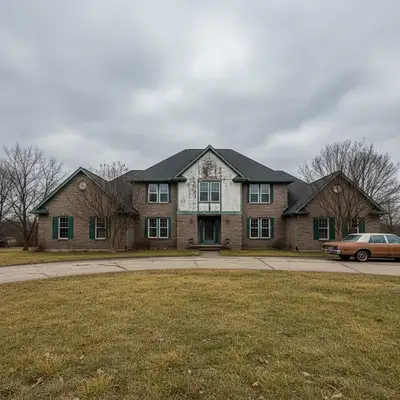
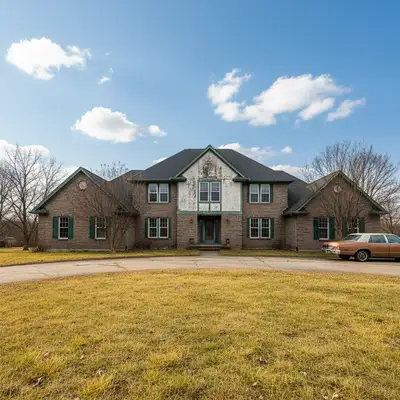
The 8 Tools, Ranked
-
EditThisPic Top pick
AI photo editor that handles every common FSBO listing-photo task through natural language: sky replacement, declutter, brighten interiors, basic virtual staging, lawn-greening. No subscription commitment.
- Free first edit per week (no signup)
- Handles every common task in one tool
- Cheapest paid plans ($4.99 for 10 edits)
- Natural-language prompts (no learning curve)
- Single image at a time
- Complex staging may need 1-2 prompt iterations
-
BoxBrownie
Professional human + AI editing service used by listing photographers. Strong virtual staging, item removal, and twilight conversions for FSBO sellers willing to pay per photo.
- Professional human review
- Industry-standard for MLS
- 24-48 hour turnaround
- Twilight conversion is excellent
- $1.60/photo (basic) up to $32 (twilight + staging)
- Per-photo pricing adds up
- Slower than instant AI tools
-
Virtual Staging AI
Dedicated AI virtual staging platform. Choose room type and design style, upload an empty room, get a furnished result. Built for FSBOs and small agents.
- Purpose-built for staging
- Consistent results
- Room-type detection
- DIY-friendly UI
- $16 per photo
- Limited to staging only
- Preset styles (no custom prompts)
-
REtouchUp
Manual editing service used by real estate photographers. FSBO sellers can submit photos directly and get professionally retouched results within 24 hours.
- Photographer-grade results
- Sky replacement, HDR blending
- Lawn greening, water bluing
- MLS-compliant edits only
- $1.50-$3 per photo
- 24-hour turnaround
- No instant feedback loop
-
HomeJab
Real estate photography marketplace that includes AI editing on top of professional shoots. FSBO sellers can also upload their own phone photos for AI cleanup.
- Network of local photographers
- AI editing add-on available
- Floor-plan tool included
- Single-property website
- Photographer service is the headline
- AI editing tier is a small add-on
- Pricing geared to full-service shoots
-
Adobe Express (Firefly)
Adobe's generative AI brings Photoshop-grade Generative Fill to any browser. Best for FSBO sellers who already pay for Creative Cloud and want maximum control.
- Highest-quality generative fill
- Object removal, sky replacement
- Photoshop integration
- Detailed color/lighting control
- Requires Adobe account
- Steeper learning curve
- Credit limits on free tier
-
Canva (Magic Edit)
Design platform with built-in AI photo edits, useful for FSBO sellers who also want to make flyers, single-property websites, and Facebook listing posts in one tool.
- Magic Eraser removes objects
- Built-in flyer/post templates
- Background removal (Pro)
- Easy mobile app
- Photo edits weaker than dedicated tools
- Some features Pro-only ($12.99/mo)
- Not MLS-aware
-
Snapseed
Free Google-owned mobile editor. No AI generation, but selective brushes, HDR Scape, and healing tool fix dark interiors and small distractions cheaply.
- Completely free, no ads
- Selective interior brightening
- HDR Scape rescues dark rooms
- Healing tool removes small objects
- No AI sky replace or staging
- Manual editing only
- Mobile only
Why FSBO Sellers Need AI Photo Tools
If you're selling your home For Sale By Owner, your listing photos are competing with photos shot by $400-$1,200 professional listing photographers. Buyers scroll Zillow and Realtor.com on their phones — most homes get fewer than 10 seconds of attention before they swipe past. An AI photo tool closes the quality gap. You can replace an overcast sky with clean blue, brighten a dark living room, declutter a kitchen counter, or virtually stage an empty bedroom for a fraction of what a hired photographer would cost. Most FSBO sellers spend $20-$60 total on AI tools across an entire listing — versus $500+ for a single professional shoot. The trade-off is your time, but with text-prompt tools the learning curve is minutes, not hours.
What MLS Won't Accept (Read This First)
MLS rules vary by board, but a few principles apply almost everywhere. You CAN: replace skies, brighten rooms, remove personal items (family photos, religious icons, mail), green a brown lawn, soften reflections. You CANNOT: hide structural damage, edit out cracks or stains, change the actual color of the house exterior, add features that don't exist (a pool, a deck), or virtually stage WITHOUT disclosing it. Virtual staging must be labeled in the listing description and the photo caption (e.g., 'Living room virtually staged'). Most MLS systems will pull a listing if a buyer's agent reports an undisclosed material edit — and FSBO sellers don't have a brokerage to absorb that risk.
DIY Photography Mistakes AI Can Fix (and Can't)
AI rescues most common FSBO photo problems: dark interiors caused by phone HDR confusion, overcast skies, distracting lawn furniture, a dog in the corner of a shot, mixed lighting (warm bulbs vs. cool daylight from windows). It can't fix bad framing, an obviously fisheye phone lens, or a photo where the room is actually too small to read. Before you reach for AI, walk every room with the photo grid: shoot from corners, hold the phone at chest height, turn ON every interior light even in daytime, and shoot exteriors at golden hour. AI is a multiplier on a decent photo — it cannot manufacture one from a fundamentally bad shot.
Which AI Tool Should FSBO Sellers Use?
EditThisPic is the most cost-effective single tool for an end-to-end FSBO listing. The free weekly edit lets you test on one of your photos, and at $4.99 for 10 edits the entire listing fits in one billing cycle. Use BoxBrownie or Virtual Staging AI for hero-shot virtual staging where buyer perception matters most (typically the living room and primary bedroom). Use Snapseed on your phone for last-minute brightness fixes you didn't catch on desktop. Skip Canva unless you also need flyers and a single-property website.
Step-by-Step Guide
Walk the Listing and Pick Your Hero Shots
Identify the 6-8 photos that buyers will see first on Zillow: the front exterior, the kitchen, the living room, the primary bedroom, the primary bathroom, and the backyard. These are the photos that most need AI help. Lower-traffic photos (a hallway, a closet) can stay as-is.
Drop the Front-Exterior Photo Into EditThisPic
Upload your front-of-house photo. JPG, PNG, or WebP up to 7MB works. Phone photos are fine — if anything, they have more detail than older DSLR shots.
Type a Specific Sky-and-Curb Prompt
Real prompts that work: 'replace the gray overcast sky with clear blue sky and brighten the lawn so it looks healthy green' or 'replace the sky with golden hour lighting, remove the trash bins on the left, and clean up the driveway.' Be specific about each fix in one sentence.
Re-Run on Each Interior Photo
For dark interiors: 'brighten this living room, balance the window light so it doesn't blow out, and warm up the wall colors.' For declutter: 'remove the dog bed, the stack of magazines on the coffee table, and the cables behind the TV.' For empty rooms you want staged: 'add a modern gray sofa, a coffee table, and a floor lamp on the right; warm lighting.'
Review for MLS Compliance
Open every edited photo at full resolution. Check that you haven't accidentally erased something material (a wall outlet, a window). Confirm wall colors and floor materials still match the actual home. If you used virtual staging, mark which photos were staged.
Add 'Virtually Staged' Captions Where Required
In your Zillow / Realtor.com listing, mark staged photos with a caption like 'Living room virtually staged.' This is a hard MLS requirement. Failing to disclose creates legal exposure even for FSBOs.
Save Originals for Your Records
Keep the unedited originals in a separate folder. If a buyer's agent ever questions an edit, you can show the original photo as evidence the change was cosmetic, not material.
Frequently Asked Questions
Ready to List Like a Pro?
Drop your phone photo. Describe the fix. Get a listing-ready image in 15-30 seconds.
Drop your photo to start editing
"Replace the overcast sky with a bright blue sky with white clouds"
Free to try · no sign-up · never used for AI training
Release to upload