8 Best AI Tools for Zillow Listing Photos (2026)
EditThisPic is the best AI photo tool for Zillow listings in 2026. Drop a phone or DSLR photo, type 'brighten the kitchen, balance the window light, and replace the gray sky with clear blue,' and you get a Zillow-ready image in 15-30 seconds. Free first edit per week, credit packs start at $4.99 for 10 edits. For dedicated virtual staging, BoxBrownie ($24/photo) and REimagineHome are strong alternatives.
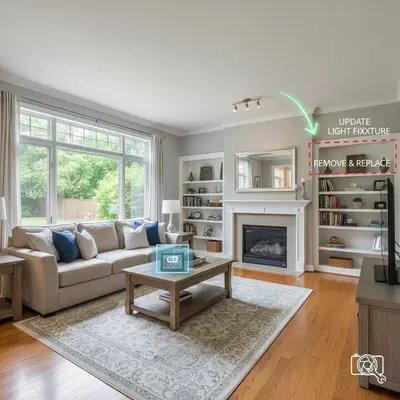
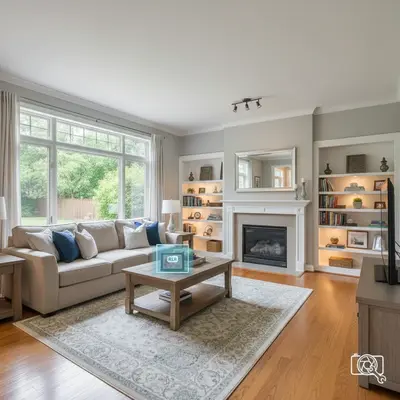
The 8 Tools, Ranked
-
EditThisPic Top pick
AI photo editor that handles every common Zillow listing edit through natural language: sky replacement, brighten interiors, declutter, virtually stage, and fix mixed lighting.
- Free first edit per week (no signup)
- Cheapest option (a $4.99 10-edit pack)
- Studio Membership covers a full listing (300 edits)
- Natural-language prompts (no learning curve)
- Single image at a time
- Complex staging may need 1-2 prompt iterations
-
BoxBrownie
Professional human + AI editing service used by listing photographers and Zillow Premier Agents. Industry standard for high-quality MLS-compliant Zillow photo edits.
- MLS-compliant edits by default
- Twilight conversion is excellent
- Item removal, virtual staging, sky replace
- Per-property bulk discounts
- $1.60-$32 per photo
- 24-48 hour turnaround
- Manual queue per batch
-
REtouchUp
Manual editing service used by real estate photographers for Zillow / Redfin / Realtor.com listings. Photographer-grade results, MLS-aware editing rules.
- Photographer-grade quality
- Sky replacement, HDR blending
- Lawn greening, water bluing
- MLS-compliant only (no aggressive edits)
- $1.50-$3 per photo
- 24-hour turnaround
- No instant feedback
-
REimagineHome
AI-powered virtual staging and exterior visualization platform purpose-built for real estate listings. Strong on empty-room staging and curb-appeal previews.
- Excellent empty-room staging
- Curb-appeal exterior previews
- Furniture style picker
- Single-photo turnaround in seconds
- Per-photo credit model
- Specialized in staging only
- Best paired with a general editor
-
Foxy AI
AI-powered home valuation and photo intelligence platform — primarily a B2B service for lenders and proptech, but exposes consumer-grade home-photo enhancement and listing-quality scoring.
- Photo-quality scoring
- Auto-detection of room types
- Used by lenders and Zestimate-adjacent products
- Visual feature extraction
- B2B-focused (limited consumer UI)
- Pricing geared to enterprise
- Not a general-purpose photo editor
-
Photo Plan AI
Automated floor plan and listing-photo platform. Generates 2D floor plans from photos and edits listing imagery for Zillow, Redfin, and Realtor.com submission.
- Floor plans from listing photos
- Sky replace, brighten, declutter
- Listing-photo + floor-plan combo
- Zillow / MLS direct upload
- Newer, smaller platform
- Per-listing credit model
- Stronger on floor plans than photos
-
Padzilla
Marketing platform for real estate agents with AI photo tools, virtual staging, and listing-presentation builders. Geared to Zillow Premier Agents and listing-volume agents.
- Listing-presentation templates
- Virtual staging included
- Single-property landing pages
- Zillow integration
- Subscription model only
- Photo edits bundled with marketing
- Most useful at higher listing volume
-
Adobe Express (Firefly)
Adobe's generative AI brings Photoshop-grade Generative Fill to any browser. Best for listing agents who want maximum control over individual photo retouches.
- Highest-quality generative fill
- Object removal, sky replacement
- Photoshop integration
- Detailed color/lighting control
- Requires Adobe account
- Steeper learning curve
- Credit limits on free tier
Why Zillow Listing Photos Have Their Own Rules
Zillow doesn't just rank listings by price and location. It scores listing quality, and photos are a major input. A 2024 Zillow Premier Agent study found that listings with 22+ photos got 1.5x more saves than listings with under 10. Photo quality also matters: properly lit, well-composed photos sit higher in Zillow's recommendation algorithm than dim phone snaps. AI photo tools fix the two most common Zillow listing problems — dark interiors and gray skies — for under $30 across an entire listing. The eight tools below all produce Zillow-ready output. Pick by use case: EditThisPic for end-to-end editing, BoxBrownie for premium-tier hero shots, REimagineHome for empty-room staging.
Zillow's Photo-Quality Requirements
Zillow accepts JPEG, PNG, and GIF photos at minimum 1024x768 pixels. Recommended: 2048x1536 or larger. Maximum file size 10 MB. Up to 75 photos per listing. Zillow strips most metadata on upload but preserves orientation, so always export from your editor in the correct rotation. Photos containing watermarks or branding (other than the listing agent's brokerage) get auto-rejected. Zillow also bans photos that are clearly not the property — stock photos, neighborhood shots without the home in frame, and AI-generated 'concept' images. Cosmetic AI edits (sky replace, brighten, declutter, white balance) are permitted. Virtual staging is permitted with disclosure.
How Zestimate May Use Photos
Zillow's Zestimate is primarily a price-prediction model trained on transaction data, but Zillow has publicly stated that listing photos are a feature in newer Zestimate versions — visual signals about renovation level, lot condition, and finish quality feed the model. Practical implication for sellers: a poorly photographed home may quietly receive a slightly lower Zestimate than the same home photographed well. AI editing helps by ensuring Zillow's photo-feature extractors see your home accurately — well-lit kitchens, intact lawns, clean exteriors. The effect is small per photo but compounds across an entire listing.
Which AI Tool Should Zillow Sellers Use?
EditThisPic is the most cost-effective single tool for most Zillow listings. The free weekly edit lets you test on one of your photos, and at $4.99 for a 10-edit pack the entire listing fits in one billing cycle. Use BoxBrownie or REtouchUp for premium-tier hero photos where MLS-compliant human review is worth the per-photo cost. Use REimagineHome for empty-room staging on hero rooms. Skip Foxy AI unless you're a lender or proptech buyer; its consumer UI isn't competitive.
Step-by-Step Guide
Audit Your Zillow Listing Photos First
Open the listing on a phone (most Zillow buyers browse mobile). Note which photos look dim, gray, cluttered, or blurry. These are the photos that need AI help. Keep the photos that already look good — over-editing reduces credibility.
Drop the Front-Exterior Photo Into EditThisPic
Upload your front-of-house photo first — it's the primary thumbnail buyers see in Zillow search results, so it carries the most weight. JPG, PNG, or WebP up to 7MB. Phone photos work fine.
Type a Zillow-Specific Prompt
Real prompts that work: 'replace the gray overcast sky with clear blue sky and green up the lawn so it looks healthy' or 'replace the sky with golden hour lighting, remove the trash bins, and brighten the front door.' Be specific about each fix in one sentence.
Re-Run on Each Interior Hero Photo
For dark interiors: 'brighten this living room, balance the window light so it doesn't blow out, and warm up the wall colors.' For declutter: 'remove the personal items on the kitchen counter, the pet bed, and the cables behind the TV.' For empty-room staging: 'add a modern gray sofa, a coffee table, and a floor lamp; warm lighting; neutral palette.'
Export at Zillow's Recommended Resolution
Export at 2048x1536 or larger (JPEG, under 10 MB). Confirm orientation. Save under a recognizable file name (front_exterior.jpg, kitchen_after.jpg) for easier upload.
Upload to Zillow With Captions
On the Zillow listing-edit page, upload all photos in your preferred display order. Add 'Virtually staged' captions on every staged photo. Re-run the listing through Zillow's preview to confirm photos display correctly on mobile and desktop.
Save Originals for Your Records
Keep the unedited originals in a separate folder. If a buyer's agent or Zillow ever questions an edit, you can show the original as evidence the change was cosmetic, not material.
Frequently Asked Questions
Ready to Climb Zillow's Search Results?
Drop your photo. Type the fix. Get a Zillow-ready image in 15-30 seconds.
Drop your photo to start editing
Free to try · no sign-up · never used for AI training
Release to upload