8 Best AI Tools for Vrbo Vacation Rental Photos (2026)
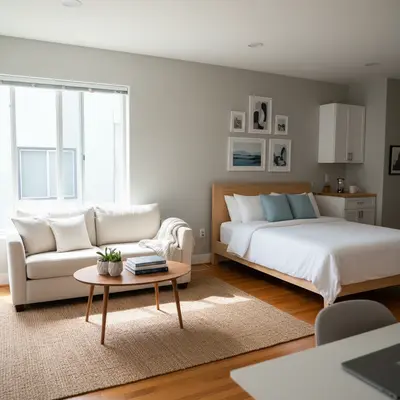
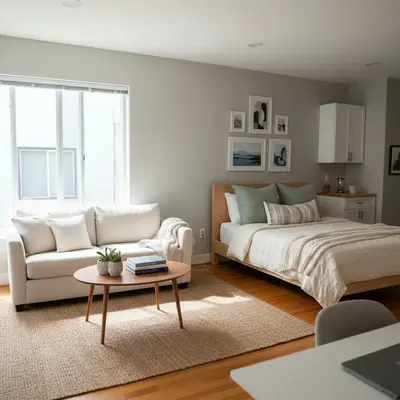
EditThisPic is the best AI photo tool for Vrbo and vacation rental hosts in 2026. Drop a unit photo, type 'brighten the living room, replace the gray sky with clear blue, and stage the empty bedroom with neutral decor,' and you get a Vrbo-ready image in 15-30 seconds. From $4.99 for 10 edits. For dedicated staging, BoxBrownie ($24/photo) and REimagineHome are strong alternatives.
The 8 Tools, Ranked
-
EditThisPic Top pick
AI photo editor that handles every common Vrbo listing edit through natural language: brighten interiors, swap skies, declutter personal items, virtually stage rooms, and fix mixed lighting from windows and lamps.
- Free first edit per week (no signup)
- Cheapest option (a $4.99 10-edit pack)
- Studio Membership covers a full unit refresh (300 edits)
- Natural-language prompts for guest-facing tone
- Single image at a time
- Complex staging may need 1-2 prompt iterations
-
BoxBrownie
Professional human + AI editing service used by vacation rental photographers. Strong twilight conversions, item removal, and virtual staging for premium-tier Vrbo listings.
- Vacation-rental-aware editing
- Twilight conversion drives bookings
- Item removal, virtual staging, sky replace
- Per-property bulk discounts
- $1.60-$32 per photo
- 24-48 hour turnaround
- Manual queue per batch
-
REimagineHome
AI-powered virtual staging and exterior visualization platform purpose-built for short-term rentals. Excellent for empty-unit transitions and curb-appeal previews.
- Excellent empty-unit staging
- Curb-appeal exterior previews
- Furniture style picker
- Per-photo turnaround in seconds
- Per-photo credit model
- Specialized in staging only
- Best paired with a general editor
-
Hostfully
Property management software widely used by Vrbo and vacation rental hosts. Not a photo editor, but a managed-vacation-rental platform with media galleries that ingest any AI-edited output.
- Listing photos sync to Vrbo, Airbnb, Booking.com
- Media library per property
- Direct booking site builder
- Operations integrations
- Not an AI photo editor
- Pricing geared to small/mid PM businesses
- Photo features are gallery-management only
-
Properly
Vacation rental operations platform focused on cleaning quality. Visual checklists per unit depend on consistent listing photos — works alongside any AI editor.
- Visual checklist per unit
- Cleaner-facing reference photos
- Quality-control for STR turnover
- Ties listing photos to ops
- Operations tool, not a photo editor
- No AI generation or sky replace
- Best paired with a separate editor
-
Hostaway
Channel-management PMS for Vrbo, Airbnb, Booking.com, and 50+ channels. Photo workflow handles bulk uploads from any AI editor's output to all connected listings.
- Strong channel sync
- Bulk listing-photo upload
- Listing optimization recommendations
- Direct booking website builder
- Not a photo editor — channel-manager only
- Pricing for medium+ portfolios
- Photo edits must be done elsewhere
-
Stuccco
Designer-led virtual staging service used for premium Vrbo listings. Multiple style packages per unit, professionally reviewed output, and bulk pricing for portfolio hosts.
- Designer review per photo
- Multiple style packages per unit
- 3D renders available
- Bulk pricing tiers
- $29-$59 per staged photo
- Slower turnaround than instant AI
- Overkill for budget vacation rentals
-
Adobe Express (Firefly)
Adobe's generative AI brings Photoshop-grade Generative Fill to any browser. Best for Vrbo hosts who want maximum control over individual hero photos.
- Highest-quality generative fill
- Object removal, sky replacement
- Photoshop integration
- Detailed color/lighting control
- Requires Adobe account
- Steeper learning curve
- Credit limits on free tier
Why Vrbo Hosts Need AI-Edited Photos
On Vrbo, the cover photo decides whether a guest taps your listing or scrolls past. After the tap, the next 4-6 photos determine whether they hit 'Book' or bounce. Vrbo's own data shows that listings with bright, well-composed cover photos book at significantly higher rates than dim or cluttered photos at the same price point. AI photo tools close that quality gap. You can replace an overcast sky with clean blue, brighten a dim living room, declutter a personal item from a kitchen counter, or virtually stage an empty bedroom — for under $30 per unit per refresh. The eight tools below are what Vrbo hosts actually use in 2026.
Booking-Photo Conversion Psychology
Vacation rental guests browse with two questions: 'Can I picture myself relaxing here?' and 'Is this honest?' Photos that fail on either kill bookings. Edits that lift conversion: bright neutral interiors (warm without being orange), clean sky exteriors, decluttered surfaces, made beds with one accent throw, lifestyle details (a coffee mug on the patio table, a folded magazine on the side table). Edits that hurt conversion: over-saturated 'Instagram filter' looks, photos so polished they look like stock, virtual staging that's clearly a render rather than the actual space. The sweet spot is 'a real space photographed on its best day.' AI tools nail that aesthetic — better than amateur photographers and faster than professionals.
Vrbo and Booking-Platform AI Policies
Vrbo, Airbnb, and Booking.com all permit AI-edited photos as long as they accurately represent the property. Cosmetic edits — sky replacement, brightening, declutter, white-balance correction — are universally allowed. Virtual staging is allowed but should be disclosed in the listing description. None of the major platforms currently auto-detect AI edits, but all of them have a guest-reporting mechanism: a guest who arrives and feels misled can flag the listing, which triggers manual review. The simplest test: if the edit changes anything material (a feature added, damage hidden, room significantly larger-looking), disclose it. Cosmetic edits don't need disclosure.
Which AI Tool Should Vrbo Hosts Use?
EditThisPic is the most cost-effective single tool for hosts running 1-50 units. The free weekly edit lets you test on one of your photos, and at $4.99 for a 10-edit pack a full unit refresh fits in one billing cycle. Use BoxBrownie or Stuccco for premium-tier listings (ADR $400+/night) where human-reviewed quality is worth the per-photo cost. Use REimagineHome for empty-unit staging on hero rooms during turnover. Run channel sync through Hostaway or Hostfully — neither edits photos, but both move polished images into Vrbo, Airbnb, and Booking.com in one push.
Step-by-Step Guide
Identify Your Cover Photo and Top 5 Hero Shots
Open your Vrbo listing on a phone. Note which photo is the cover (Vrbo lets you pick) and which photos appear in the first scroll. These are the photos that drive bookings — they need AI help most. Lower-priority photos (a hallway, a closet) can stay as-is.
Drop the Cover Photo Into EditThisPic
Upload your cover photo first. JPG, PNG, or WebP up to 7MB. If it's a phone photo, that's fine — most Vrbo cover photos are. Aim for landscape orientation to fit Vrbo's thumbnail crop.
Type a Vrbo-Specific Prompt
Real prompts that work for cover shots: 'replace the gray sky with clear blue, brighten the lawn so it looks healthy, and warm the lighting so the house looks inviting' or 'replace the sky with golden hour, make the patio table look set up with two coffee mugs, and clean up the driveway.' Be specific about each fix.
Re-Run on Each Interior Hero Photo
For dim interiors: 'brighten this living room, balance the window light, and warm up the wall colors so it feels cozy.' For made beds: 'crisp the bedding, add one accent throw at the foot of the bed, and brighten the room with morning light.' For empty rooms: 'add a neutral gray sofa, a coffee table, and a floor lamp; warm vacation-rental aesthetic.'
Add Lifestyle Details on the Patio Shot
Vrbo guests respond strongly to lifestyle cues. Try: 'add two coffee mugs and an open book on the patio table; soft morning light; clean exterior view.' One small lifestyle detail per hero photo — never more — keeps the listing feeling honest.
Export at Vrbo's Recommended Resolution
Vrbo recommends 1920x1080 minimum, 2400x1600 ideal. JPEG under 10 MB. Export in landscape orientation for the cover photo. Save under recognizable file names (cover.jpg, living_room.jpg, patio_morning.jpg).
Upload to Vrbo and Sync via Channel Manager
Upload to Vrbo's listing-edit page or push through your channel manager (Hostaway, Hostfully, Guesty) to sync across Airbnb and Booking.com simultaneously. Confirm photos display correctly on Vrbo's mobile app — many bookings happen on mobile.
Frequently Asked Questions
Lift Your Vrbo Booking Rate
Drop your cover photo. Type the fix. Get a Vrbo-ready image in 15-30 seconds.
Drop your photo to start editing
"edit Airbnb listings"
Free to try · no sign-up · never used for AI training
Release to upload