Free β€’ No signup Add Muscle definition to a photo Β· Free

Add Muscles to Any Photo

Upload a body photo and the AI adds realistic muscle definition β€” bigger arms, defined abs, broader chest. Then send it to your group chat with "I've been working out" and wait for the replies.

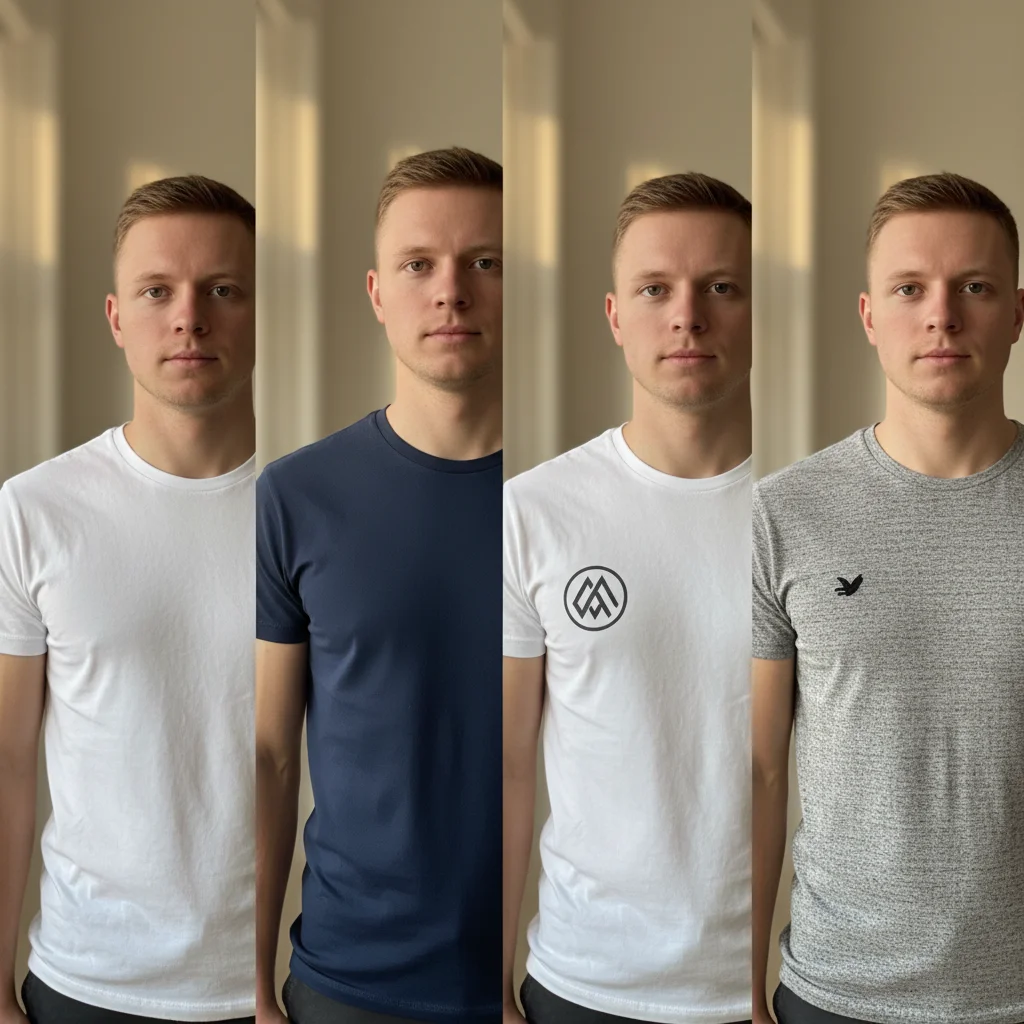
Young man with average build in a white t-shirt
Before
β†’
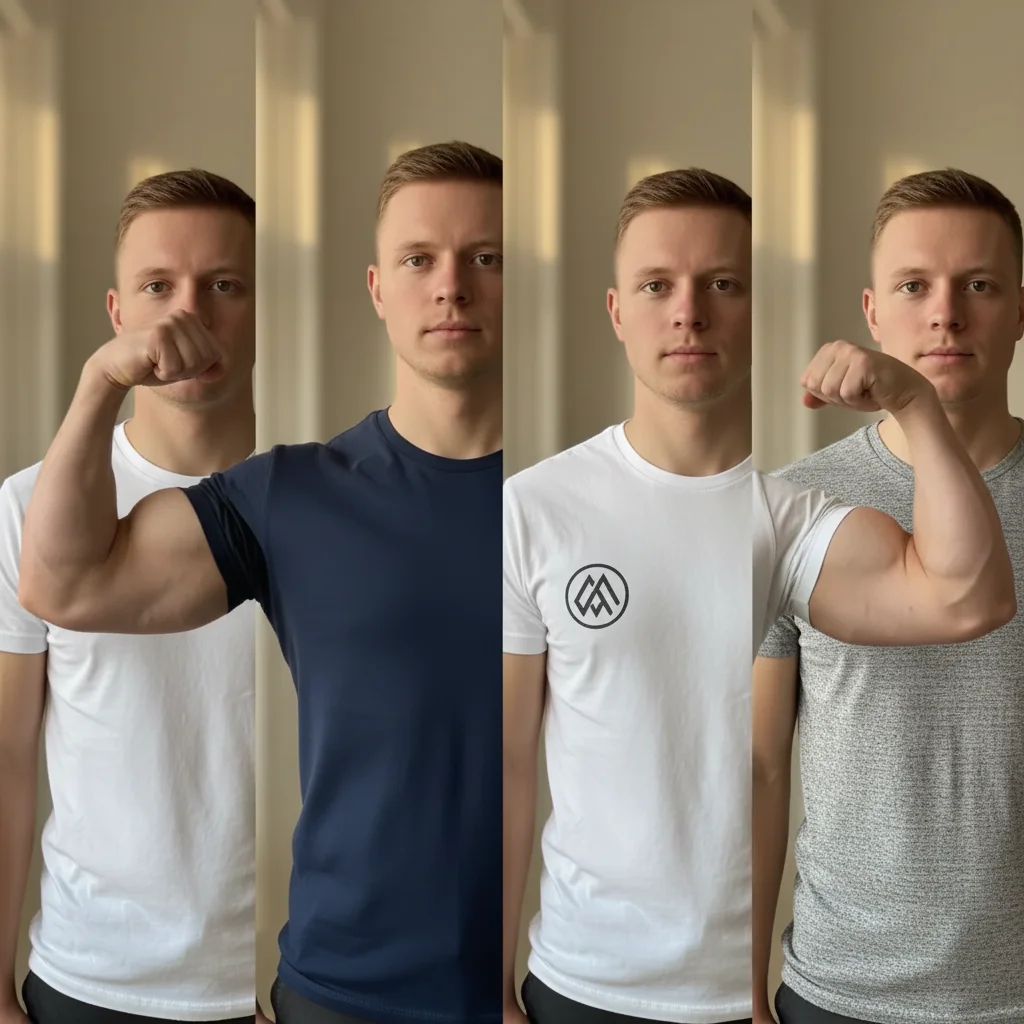
Same man with visibly larger arms and broader chest through the white t-shirt
After

Add Muscles to a Photo

Upload photo to add muscle definition to a photo

Free β€’ Results in 30 seconds β€’ No signup

Release to upload

FreeNo signupNo watermark

1 free edit·then from $1.99

Popular use cases:
  • prank photos
  • funny photo edits
  • fake gym transformation
  • muscle photo editor
  • body transformation prank
  • AI body editor
  • free muscle filter
  • workout progress fake photo

Cost
Free No signup required
Time
Instant results in 15-30 seconds
Works on
Any device - browser, phone, tablet, desktop
Powered by
AI-powered photo editing
Scenario Prompt Time
All-over transformation Add large biceps, broad chest, and visible six-pack β€” 2 years of lifting 30s
Arms only Make arms noticeably bigger with defined bicep peaks and tricep separation 15s
Six-pack only Add realistic well-defined abs with oblique lines and V-cut 15s
Subtle progress Moderate muscle definition β€” 6 months of consistent training, not a bodybuilder 30s

How it works

  1. Upload your photo

    Pick a photo where the body is visible β€” a t-shirt selfie, a shirtless shot, or a casual standing photo all work well. The clearer the arms and torso, the more convincing the result.

    Expect: Upload takes a few seconds. Any common format works (JPG, PNG, HEIC).
  2. Describe the muscles you want

    Type what you want the AI to add. Be specific: mention which body parts and how dramatic. Try: "Add large, well-defined biceps and triceps, a broad muscular chest, and visible six-pack abs β€” like someone who's been lifting seriously for two years."

    Tip: Mention specific muscle groups (biceps, pecs, abs, traps) for more targeted results. The more specific you are, the more realistic the edit looks.

    Copy one of these to get started:

    Classic gym transformation Add large, defined biceps and triceps, a visibly broader muscular chest, and a clear six-pack β€” make this person look like they've been seriously lifting for two years
    Just the arms Make the arms noticeably larger with defined bicep peaks and tricep separation β€” keep everything else the same
    Shirtless six-pack reveal Add a realistic, well-defined six-pack with oblique lines and a V-cut β€” make the abs look like genuine low body-fat results, not cartoonish
    Subtle progress photo Add moderate muscle definition throughout β€” slightly bigger arms, a more defined chest, some ab outline visible β€” like 6 months of consistent training rather than a bodybuilder
    4 more prompts
    Upper body mass Significantly increase the size of the shoulders, traps, and chest β€” add thick traps and boulder shoulders to make the upper body look much broader and more imposing
    Fitness influencer body Transform this into a fitness influencer physique β€” very defined abs, large but not oversized arms, wide chest, visible veins on the forearms β€” athletic and aesthetic rather than bulky
    Overdone gym bro Make this person look absolutely enormous β€” huge bulging biceps, massive chest, thick neck, wide back β€” like someone who does nothing but lift and drink protein shakes
    Before-and-after progress Make the arms bigger with defined muscle separation, add a visible but natural-looking six-pack, and widen the shoulders slightly β€” like a genuine 12-week transformation
  3. Send it

    Download the result and send it to your group chat with a straight-faced message like "Been putting in work" or "Gym is paying off ngl." Works best on people who haven't seen you in a few months.

Try it free ↓

Add Muscles to a Photo

Upload photo to add muscle definition to a photo

Free β€’ Results in 30 seconds β€’ No signup

Release to upload

Free β€’ No signup

See it in action

Young man with average build in a white t-shirt
Before
->
Same man with visibly larger arms and broader chest through the white t-shirt
After

T-shirt selfie transformation

A casual standing selfie in a plain white t-shirt became a convincing gym-gains photo with enlarged arms and visible chest definition through the fabric.

Prompt: Add large, defined biceps and triceps, a visibly broader muscular chest β€” make this person look like they've been seriously lifting for two years
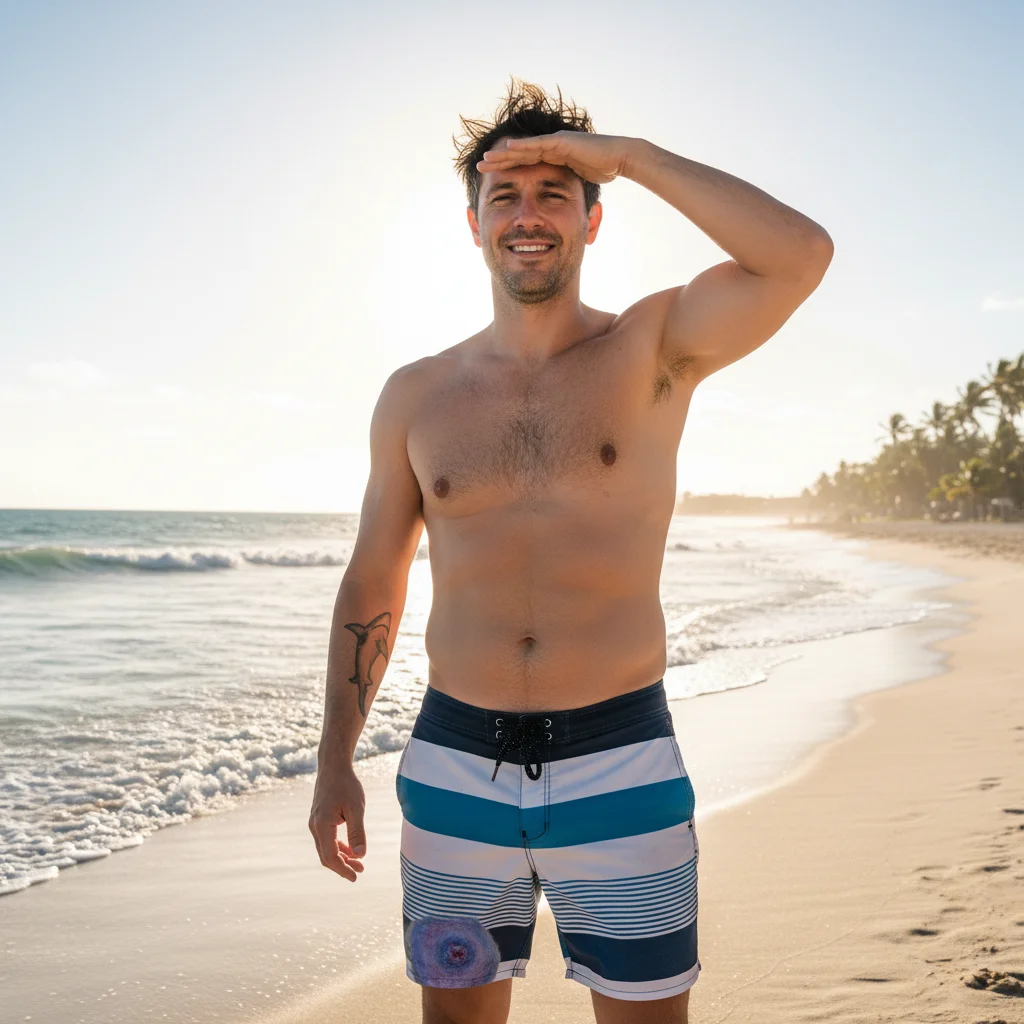
Man at the beach with an average physique
Before
->
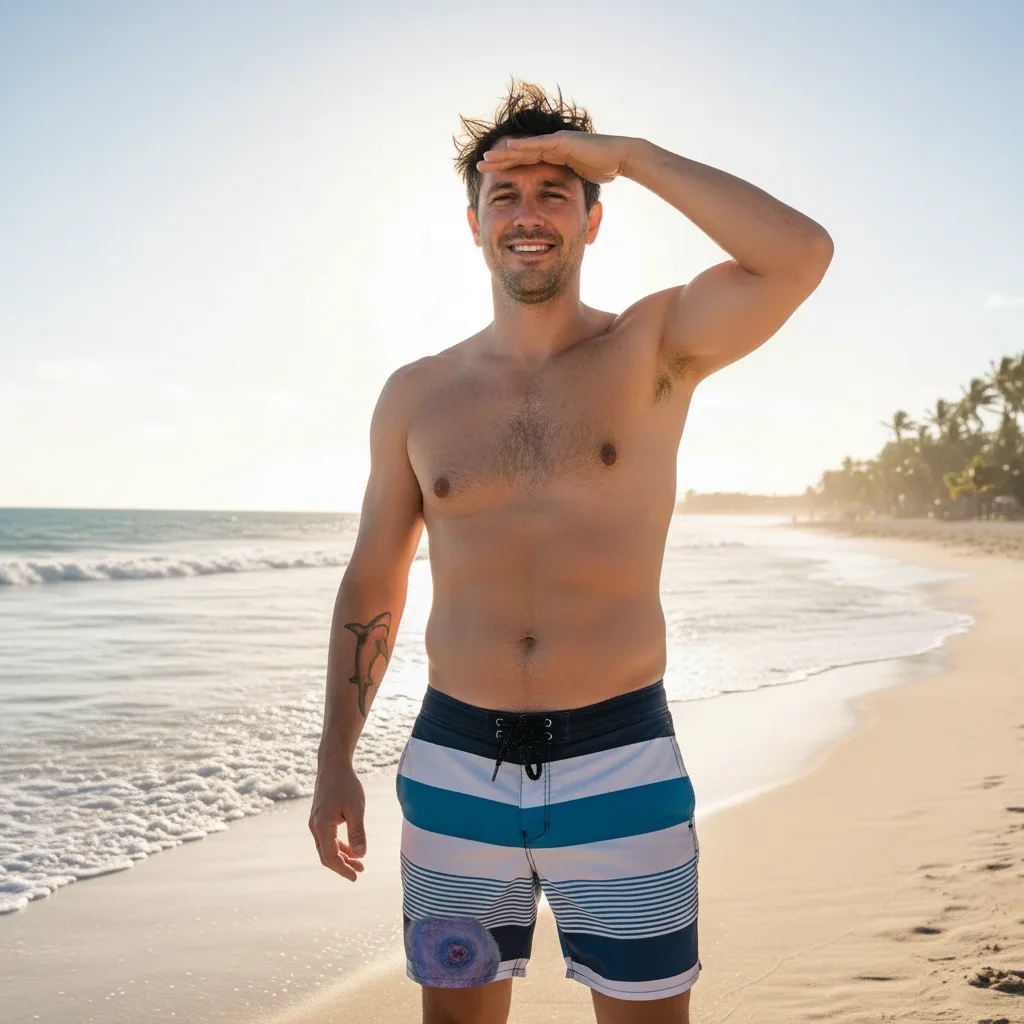
Same man at the beach with defined abs, broader shoulders, and visible muscle definition
After

Shirtless vacation photo

A beach photo got a dramatic six-pack and broader shoulders added, turning a relaxed holiday snap into something that looked like it belonged on a fitness Instagram.

Prompt: Add a realistic well-defined six-pack with oblique lines and a V-cut, and broaden the shoulders β€” make it look like genuine low body-fat results
Woman in a tank top with an average build
Before
->
Same woman with noticeably more defined arms and a hint of ab definition
After

Subtle 6-month glow-up

A slightly bigger arms and a hint of abs were added to a casual outfit photo β€” subtle enough that the recipient genuinely asked "have you been going to the gym?"

Prompt: Add moderate muscle definition β€” slightly bigger arms with some bicep shape, a more defined chest, and a hint of abs β€” like 6 months of consistent training

If something looks off

The muscles look cartoonish or unrealistic

Why: Over-the-top descriptions push the AI toward exaggerated results that look digitally altered.

Try: Make the muscle definition look completely natural and realistic β€” like the result of consistent training, not a comic book superhero. Keep proportions believable.

Tip: Add words like 'subtle,' 'natural,' 'realistic,' and 'proportional' to dial back the intensity and get a more convincing edit.

Only part of the body changed, or the arms got big but abs stayed the same

Why: The AI sometimes focuses on the most prominent part of a complex prompt and underdelivers on secondary areas.

Try: Focus on one body region at a time β€” first do the arms, then run a second edit for the abs separately.

Tip: Multiple targeted edits usually produce better results than one prompt asking for everything at once.

Clothes look stretched or distorted around the muscles

Why: When fabric needs to fit a bigger body, the AI can struggle to realistically render how clothing drapes.

Try: Add realistic-looking clothing that fits the new muscular physique naturally β€” no bunching, stretching, or distortion in the fabric.

Tip: Shirtless photos or tight-fitting athletic wear tend to give cleaner results than loose or heavily textured clothing.

The edit changed the person's face or skin tone

Why: The AI can sometimes affect neighboring areas when applying body changes.

Try: Apply muscle definition only to the body β€” do not change the face, skin tone, hair, or any facial features.

Tip: If the face changed, explicitly instruct the AI to preserve it in your prompt. You can also try cropping to just the body area before uploading.

The result looks the same as the original

Why: Vague prompts like 'make more muscular' don't give the AI enough direction.

Try: Add noticeably larger biceps with a defined peak, visible tricep separation, and a broader chest with clear pec definition β€” the change should be immediately obvious.

Tip: Be specific about which muscles and how dramatic the change should be. The AI needs clear direction to make a visible transformation.

Quick answers

Do I need to mark areas before describing what I want?

No. Just describe the muscles you want in the text box β€” the AI reads your prompt and applies the changes to the right areas automatically. You don't need to circle biceps or highlight abs. Use markers only if you want to target a very specific small area and keep everything else untouched.

Is this free?

Yes. EditThisPic gives you 1 free edit per week with no account needed. If you want more edits, paid packs start at $1.99. There's no signup required for the free edit and no watermark on any result.

Will the muscle edit look realistic enough to fool someone?

For most photos, yes β€” especially with a good prompt. The AI renders muscle shape, shadow, and skin texture together, so the result looks like a physical change rather than a digital overlay. Subtle edits (6-month progress) fool people more reliably than extreme transformations. The best results come from photos with good lighting and a clear view of the body.

What kind of photo works best?

A clear photo where the body is visible works best β€” a fitted t-shirt selfie, a shirtless photo, or an athletic wear shot. Avoid heavily layered clothing or very dark photos. Standing photos tend to work better than seated ones since more of the body is visible.

Can I add muscles to someone else's photo, not just my own?

Yes β€” you can upload any photo and describe the changes. The AI edits whatever body is in the image. Just make sure you have permission to edit and share photos of other people.

How is this different from muscle filter apps like Fotor or LightX?

Apps like Fotor and LightX use preset muscle overlays β€” the same shape gets applied regardless of the person's actual body. EditThisPic's AI reads your description and reshapes the specific person in the photo, so the muscle definition follows their actual proportions and posture. You can also describe exactly what you want instead of picking from a template.

Does EditThisPic store my photos?

Photos are processed to generate the edit and not stored long-term. Nothing is used for training data or shared with third parties. If you want to save your results, download them before closing the session.

Can I edit the result if the muscles are too extreme or not extreme enough?

Yes β€” if the first result isn't right, describe what needs to change and submit again. You can tone it down ('make it more subtle and natural-looking') or dial it up ('make the biceps noticeably larger with more definition'). Each edit uses one credit.

How much does EditThisPic cost?

You get 1 free edit per week β€” no account needed. After that, credit packs start at $1.99 for 3 edits. Monthly plans start at $4.99/mo for 15 edits with unused credits rolling over. All edits are full resolution with no watermark.

Ready to add some muscle?

Free to try. No signup required.

1 free edit included·Credit packs from $1.99