Free • No signup Preview Facelift · Free

AI Facelift Preview

Upload your photo and describe the rejuvenation you want. AI renders realistic facelift results in seconds.
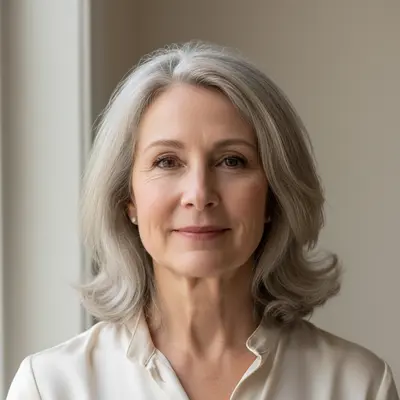
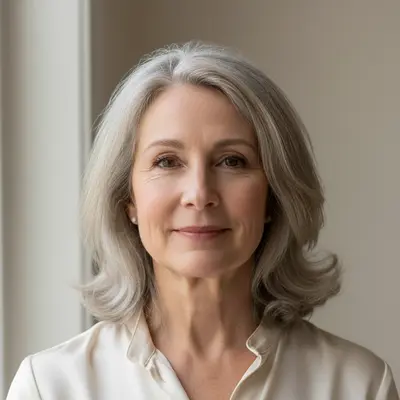
Front view showing visible jowls and soft jawline
Before
Same face with tightened jawline and reduced jowls
After

AI Facelift Preview

Drop your photo here

or click to browse

Release to upload

Free • No signup

Popular use cases:
  • facelift preview
  • facelift simulator
  • facial rejuvenation preview
  • face lift visualization
  • jawline tightening preview
  • facelift before and after
  • cosmetic surgery preview
  • anti-aging preview

Cost
Free No signup required
Time
Instant results in 15-30 seconds
Works on
Any device - browser, phone, tablet, desktop
Powered by
AI-powered photo editing
Scenario Prompt Time
Jawline tightening tighten the jawline by reducing jowls for a defined contour 20s
Midface lift lift midface to restore cheek volume and reduce nasolabial folds 25s
Full facelift show natural facelift with tight jawline, lifted cheeks, smooth neck 30s

How it works

  1. Upload your photo

    Drop a front-facing selfie into EditThisPic. Best results come from well-lit photos where your jawline, cheeks, and neck are clearly visible. Avoid heavy makeup or filters that already smooth the skin. JPG, PNG, WebP up to 7MB.

    Expect: Subtle tightening: 20-30 seconds. Full facelift with multiple areas: may need 1-2 refinements.
  2. Describe the facelift result you want

    Type your instruction: 'tighten the jawline and reduce jowls for a more defined look' or 'lift the midface and smooth nasolabial folds.' Be specific about which areas to target — jawline, cheeks, neck, forehead. No marking needed — the AI understands facial anatomy.

    Tip: Mention specific areas: 'jowls,' 'nasolabial folds,' 'neck bands,' 'marionette lines.' The more specific you are, the more targeted the AI's changes.

    Copy one of these to get started:

    Lower facelift — jawline tightening tighten the jawline by reducing jowls and creating a more defined jaw contour, keeping the result natural and age-appropriate
    Midface lift — cheek restoration lift the midface area to restore cheek volume and reduce the depth of nasolabial folds, maintaining natural skin texture
    Neck lift and tightening tighten the neck area by reducing neck bands and excess skin under the chin, creating a smoother neck-to-jaw transition
    Full facelift preview show a natural facelift result with a tighter jawline, lifted cheeks, smoother nasolabial folds, and reduced neck laxity — subtle and refined
    3 more prompts
    Subtle rejuvenation — 5 years younger show subtle facial rejuvenation — slightly tighter jawline, slightly fuller cheeks, smoother forehead — looking 5 years younger while still looking like myself
    Brow lift component lift the eyebrows slightly and smooth the forehead to create a more refreshed, open-eyed appearance without looking surprised
    Marionette line reduction reduce the marionette lines from the corners of the mouth downward and slightly lift the corners of the mouth for a more pleasant resting expression
  3. Review the preview

    Check that the result looks natural — the skin should appear tighter but not pulled or waxy. Compare the jawline, cheek volume, and neck area between before and after views.

  4. Refine with markers if needed

    If the AI changed areas you wanted to keep natural (like smoothing the forehead when you only asked about the jawline), tap markers on the specific target area and regenerate.

    Tip: For a lower facelift preview, tap markers along the jawline and jowl area to keep the AI focused below the cheekbones.
Try it free

AI Facelift Preview

Drop your photo here

or click to browse

Release to upload

Free • No signup

"I previewed three different facelift intensities — subtle, moderate, and full. Brought all three to my surgeon and we agreed on the moderate approach. Saved so much back-and-forth." @AestheticMD_Miami

See it in action

Front view showing visible jowls and soft jawline
Before
->
Same face with tightened jawline and reduced jowls
After

Jawline tightening and jowl reduction

A patient previewed how a lower facelift would improve their jawline definition before scheduling a consultation.

Prompt: tighten the jawline by reducing jowls and creating a cleaner jaw contour while keeping the result natural
Front view showing deep nasolabial folds and flat cheeks
Before
->
Same face with restored cheek volume and smoother folds
After

Midface lift with nasolabial fold reduction

Previewing cheek volume restoration and smoother nasolabial folds for a more youthful midface appearance.

Prompt: lift the midface to restore cheek volume and reduce the depth of nasolabial folds for a refreshed appearance
Three-quarter view showing multiple signs of facial aging
Before
->
Same face with comprehensive facelift showing natural rejuvenation
After

Comprehensive facelift consultation preview

A surgeon used multiple previews to discuss realistic outcomes with a patient considering a full facelift.

Prompt: show a natural full facelift result with defined jawline, lifted cheeks, smoothed nasolabial folds, and tighter neck — subtle and age-appropriate

Detailed Guides by Scenario

📷

Pre-Consultation Visualization

Preview facelift outcomes on your own photo before your surgical consultation. Communicate your goals visually and arrive with clear expectations.

Common Scenarios

  • Comparing subtle vs moderate vs dramatic facelift on your selfie
  • Testing lower facelift only vs full facelift on your photo
  • Generating multiple rejuvenation levels to discuss with your surgeon

Best Practices

  • Photograph your face in natural light without makeup or filters for the most accurate preview
  • Use specific terms like 'jowls,' 'nasolabial folds,' 'neck bands' for targeted results
  • Save multiple variations at different intensities to bring to your consultation
📷

Patient Education & Expectation Setting

Surgeons can use AI previews to show patients realistic facelift outcomes and help set appropriate expectations before committing to surgery.

Common Scenarios

  • Showing patients the difference between lower facelift and full facelift on their own face
  • Demonstrating how subtle tightening creates natural-looking rejuvenation
  • Comparing surgical facelift preview with non-surgical filler options

Best Practices

  • Generate conservative, moderate, and aggressive options to show the full range
  • Always clarify that AI previews are approximations, not surgical guarantees
  • Use the patient's actual photo for the most meaningful conversation
📷

Provider Marketing & Social Content

Cosmetic surgeons can create engaging before/after preview content for social media and consultation materials to attract new patients.

Common Scenarios

  • Creating before/after preview content for practice Instagram and website
  • Generating age-diverse preview imagery for consultation brochures
  • Demonstrating facelift specialization for marketing materials

Best Practices

  • Always disclose that preview images are AI-generated, not actual surgical outcomes
  • Show diverse ages and skin types to demonstrate broad expertise
  • Pair AI previews with actual surgical results for credibility

If something looks off

Result looks over-smoothed or plastic

Why: The AI removed too much skin texture, creating an unnatural 'filtered' appearance instead of realistic surgical tightening.

Try: Add 'maintain natural skin texture and pores' to your prompt — this preserves realistic skin while still showing the lift

Tip: The difference between a good facelift preview and a bad one is skin texture. Always include 'natural texture' in your prompt.

AI changed the wrong area or something I didn't want changed

Why: The AI couldn't determine exactly which area you meant from description alone. This happens with ambiguous requests.

Try: Tap a marker on the specific area you want to change, then regenerate with the same prompt

Tip: Markers tell the AI 'I mean THIS one specifically.' Use them when description alone is ambiguous.

Eyes look different after the facelift preview

Why: The AI interpreted 'lift' broadly and modified the eye area along with the requested changes.

Try: Be specific: 'tighten only the jawline and jowl area — keep the eyes, forehead, and upper face exactly as they are'

Tip: Naming areas to preserve ('keep eyes unchanged') is as important as naming areas to change.

Neck area wasn't included in the lift

Why: The AI focused on the face when the prompt didn't explicitly mention the neck. Face and neck are treated as separate zones.

Try: Specify the neck explicitly: 'tighten the jawline AND smooth the neck, reducing neck bands and excess skin under the chin'

Tip: For a comprehensive preview, always mention both 'jawline' and 'neck' — the AI won't assume you want both.

Result makes me look like a different person

Why: The AI made changes too aggressive for the face structure, altering recognizable features.

Try: Add 'subtle changes only — I should still look like myself, just refreshed' to constrain the AI's modifications

Tip: Start with the word 'subtle' in every facelift prompt. You can always request more change, but you can't undo over-correction.

Quick answers

Do I need to mark my face before describing the facelift I want?

No! Just describe what you want: 'tighten the jawline and reduce jowls.' The AI understands facial anatomy and targets the right areas. Only use markers if the AI changes something you wanted to keep unchanged.

Can I preview different facelift intensities on the same photo?

Yes. Upload your photo once, then run separate edits — 'subtle jawline tightening,' then 'moderate lift with cheek restoration,' then 'full facelift.' Compare all three to see which level of rejuvenation suits you best.

Is there a free facelift simulator that doesn't require login?

Yes. EditThisPic is free to try with no account needed. Upload your selfie, describe the rejuvenation you want, and get a realistic preview in 30 seconds. One free edit per week, credit packs from $1.99 for comparing multiple options.

How realistic is an AI facelift preview?

AI previews show a useful approximation of how tightening and lifting might look, but they are not surgical predictions. Skin elasticity, bone structure, and healing all affect real results. Use previews to communicate your goals to your surgeon, not as outcome guarantees.

What is the best free AI tool to preview facelift results?

EditThisPic lets you describe any facelift change — jawline tightening, cheek lift, neck smoothing — and see it on your actual photo in 30 seconds. No app download, no account, no watermark. Works on any device.

Can I preview just a lower facelift without the forehead?

Yes. Specify exactly which areas: 'tighten only the jawline and jowl area, keep the forehead and eyes unchanged.' The AI will limit changes to the areas you name.

Is this a medical device or surgical planning tool?

No. EditThisPic is a visualization tool for general preview purposes. It is not FDA-cleared, not a medical device, and should not be used for surgical planning. Always consult a board-certified plastic surgeon for medical decisions.

Can I preview a facelift on my phone?

Yes. EditThisPic works in any mobile browser — iPhone, Android, tablet. Take a selfie and preview facelift results right from your phone. No app download needed.

Ready to preview your facelift?

Free to try. No signup required.

Try it free