Free • No signup Visualize Solar panels · Free

AI Solar Panel Visualizer

Upload a photo of your home and describe the solar panel layout. AI renders it on your roof in seconds.
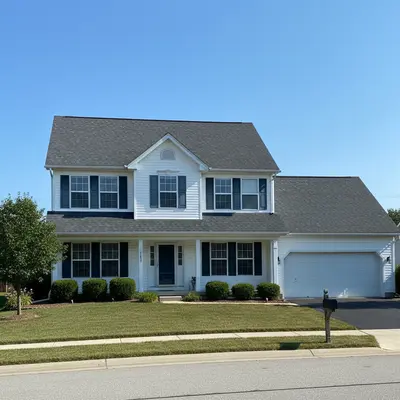
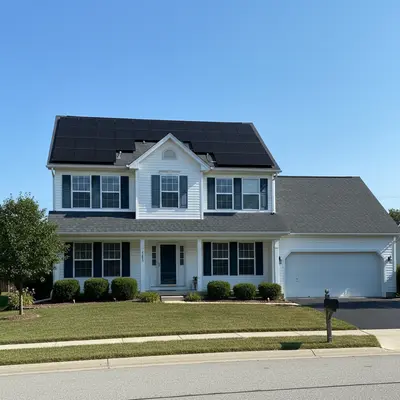
Suburban home with bare dark gray shingle roof and no solar panels
Before
Same home with black monocrystalline solar panels installed across the main roof section
After

AI Solar Panel Visualizer

Drop your photo here

or click to browse

Release to upload

Free • No signup

Popular use cases:
  • solar panel visualizer
  • roof solar preview
  • solar panel design tool
  • solar installation planning
  • solar panel comparison tool
  • solar panel simulator
  • home solar preview
  • solar panel HOA submission

Cost
Free No signup required
Time
Instant results in 15-30 seconds
Works on
Any device - browser, phone, tablet, desktop
Powered by
AI-powered photo editing
Scenario Prompt Time
Standard black panels add black monocrystalline solar panels on the main roof section 20s
Full roof coverage install solar panels covering all available roof space 25s
Integrated solar tiles replace roof with integrated solar tiles that look like shingles 30s

How it works

  1. Upload your home photo

    Drop a photo of your home into EditThisPic. Best results come from shots taken from the street where the roof is clearly visible. Angled views showing the roof slope work better than straight-on shots. JPG, PNG, WebP up to 7MB.

    Expect: Standard solar panel addition: 20-30 seconds. Complex multi-plane roofs: may need 1-2 refinements.
  2. Describe the solar panel layout you want

    Type your instruction: 'add black solar panels covering the front-facing roof section' or 'install a grid of monocrystalline solar panels on the south-facing roof slope.' Specify panel color (black or blue), quantity, and which roof section for best results. No marking needed — the AI knows what 'roof' means.

    Tip: Black monocrystalline panels blend better with dark roofs, while blue polycrystalline panels stand out more. Mentioning the panel type gives the AI a specific visual target.

    Copy one of these to get started:

    Standard residential installation add a grid of black monocrystalline solar panels covering the main south-facing roof section, evenly spaced with standard mounting rails
    Full roof coverage for maximum output install solar panels covering all available roof space on both front and side roof sections, leaving clearance around edges, vents, and the chimney
    Blue polycrystalline budget option add blue polycrystalline solar panels in a 3x4 grid on the front-facing roof section with silver aluminum frames
    Integrated solar roof tiles replace the existing roof shingles with Tesla Solar Roof-style integrated solar tiles that look like regular dark slate shingles
    3 more prompts
    Partial installation for shade assessment add 12 black solar panels on the left half of the main roof, avoiding the shaded area near the large oak tree on the right side
    Flat roof commercial style add tilted solar panel arrays on the flat garage roof section using angled mounting brackets facing south
    Ground-mounted system in yard add a ground-mounted solar panel array with 8 panels on metal racking in the open backyard area behind the house
  3. Review the visualization

    Check that the panels follow your roof angle correctly, spacing looks realistic, and the installation doesn't cover vents, skylights, or chimneys. Use the before/after slider to compare.

  4. Refine with markers if needed

    If the AI placed panels on the wrong roof section or covered a skylight, tap markers on the correct roof area and regenerate. This is optional — most solar panel edits work without markers.

    Tip: Markers help when your home has multiple roof planes at different angles. One tap on the target section tells the AI exactly where to install.
Try it free

AI Solar Panel Visualizer

Drop your photo here

or click to browse

Release to upload

Free • No signup

"Showed a homeowner exactly how 24 panels would look on their split-level roof. They signed the contract the same day instead of deliberating for another month." @SolarInstaller_AZ

See it in action

Suburban home with bare dark gray shingle roof and no solar panels
Before
->
Same home with black monocrystalline solar panels installed across the main roof section
After

Bare roof to full solar array

A typical suburban home with an empty asphalt shingle roof transformed with a full monocrystalline solar panel installation for a sales consultation.

Prompt: add black monocrystalline solar panels covering the main south-facing roof section in an evenly spaced grid with standard mounting rails
Ranch-style home with bare dark brown roof and brick exterior
Before
->
Same ranch home with flush-mounted all-black solar panels blending with the dark roof
After

Comparing panel styles for HOA approval

Testing how all-black integrated panels look on a ranch-style home before submitting an HOA architectural review request.

Prompt: install flush-mounted all-black solar panels on the front roof section that blend seamlessly with the dark roof shingles
Colonial home with complex multi-gable roof and dormers, no solar panels
Before
->
Same colonial home with solar panels installed on the two main roof sections, avoiding dormers
After

Solar panels on complex multi-gable roof

Visualizing panel placement on a home with multiple roof angles to plan around dormers and valleys.

Prompt: add solar panels to the two largest roof sections, avoiding the dormers and valley areas, black panels with black frames

Detailed Guides by Scenario

📷

Homeowner Solar Planning

Preview solar panel aesthetics on your actual home before committing to a $15K-$30K installation, helping you choose the right panel style and placement.

Common Scenarios

  • Comparing black monocrystalline vs blue polycrystalline panels on your roof
  • Testing how panels look on different roof sections of a multi-gable home
  • Visualizing integrated solar tiles vs traditional mounted panels for HOA compliance

Best Practices

  • Photograph your home from across the street at a slight angle to show the full roof slope
  • Specify panel color, type, and which roof section for realistic placement
  • Run multiple options and save each result for side-by-side comparison with your installer
📷

Solar Installer Sales Presentations

Show prospective clients exactly how panels will look on their home during sales consultations — faster than CAD renderings and more compelling than stock photos.

Common Scenarios

  • Generating panel placement options during an in-home sales consultation
  • Creating before/after visuals for solar proposal documents
  • Showing homeowners how their property value increases with solar panels installed

Best Practices

  • Use the client's actual home photo for maximum impact during consultations
  • Generate both conservative (partial roof) and full coverage options for pricing tiers
  • Always note that the visualization is for aesthetic preview, not engineering specifications
📷

Real Estate Marketing with Solar

Market properties with solar potential by showing buyers what the home would look like with panels installed — a powerful selling point for energy-conscious buyers.

Common Scenarios

  • Staging a listing to show solar potential for eco-conscious buyers
  • Creating marketing materials comparing a home with and without solar panels
  • Visualizing solar panels on new construction before the home is built

Best Practices

  • Use the original listing photo as the 'before' and the AI visualization as the 'after'
  • Choose all-black panels that blend with the roof for the most appealing staging
  • Always disclose that the solar panel visualization is AI-generated in listing materials

If something looks off

AI placed panels on the wrong roof section

Why: The AI couldn't determine which roof plane you meant, especially on homes with multiple roof sections at different angles.

Try: Tap markers on the specific roof section where you want panels, then regenerate with the same prompt

Tip: Adding directional language like 'front-facing' or 'south-facing' helps, but markers are the fastest fix for multi-plane roofs.

AI changed the wrong area or something I didn't want changed

Why: The AI couldn't determine exactly which area you meant from description alone. This happens with ambiguous requests.

Try: Tap a marker on the specific area you want to change, then regenerate with the same prompt

Tip: Markers tell the AI 'I mean THIS one specifically.' Use them when description alone is ambiguous.

Solar panels cover skylights or vents

Why: The AI generated a uniform grid without accounting for roof obstructions that real installers must avoid.

Try: Regenerate with: 'add solar panels to the roof leaving clear space around the skylight and all roof vents'

Tip: Mentioning specific obstructions by name — skylight, chimney, plumbing vent — gives the AI explicit no-go zones.

Panel angle doesn't match roof slope

Why: The AI rendered panels at a different tilt than the actual roof pitch, making them look floating or embedded.

Try: Add angle context: 'flush-mounted solar panels following the exact angle of the roof slope'

Tip: 'Flush-mounted' tells the AI to match the roof angle precisely rather than guessing a tilt.

Panels look unrealistically shiny or reflective

Why: The AI generated panels with mirror-like reflections that don't match real anti-reflective solar panel glass.

Try: Specify finish: 'matte black solar panels with anti-reflective coating, minimal glare'

Tip: Modern solar panels have anti-reflective coatings. Specifying 'matte' or 'anti-reflective' produces more realistic results.

Quick answers

Do I need to mark the roof area before describing the solar panel layout?

No! Just describe what you want: 'add solar panels to the main roof section.' The AI understands what 'roof' means and places panels appropriately. Only use markers if the AI puts panels on the wrong roof section or covers an area you want left clear.

Can I compare different solar panel styles on the same house photo?

Yes. Upload your home photo once, then run separate edits — 'black monocrystalline panels,' then 'blue polycrystalline panels,' then 'integrated solar tiles.' Each generates a new preview so you can compare aesthetics before choosing an installer.

Is there a free solar panel visualizer that doesn't require login?

Yes. EditThisPic is free to try with no account needed. Upload your home photo, describe the solar panel layout, and get a realistic preview in 30 seconds. One free edit per week, credit packs from $1.99 for comparing multiple configurations.

How accurate is the AI solar panel rendering compared to an actual installation?

The AI provides a realistic visual approximation of panel placement, color, and scale on your roof. It's designed for pre-purchase visualization — seeing the general aesthetic impact — not for engineering-grade system design. Use it to decide if you like the look before getting detailed quotes from installers.

Can I show this to my HOA for architectural approval?

Many homeowners use AI visualizations in HOA submissions to show what the finished installation will look like. Generate a clean rendering, download it, and include it with your architectural review request. Always note that the image is an AI visualization, not an engineering diagram.

Does it work for flat roofs and commercial buildings?

Yes. Describe the mounting style — 'tilted solar panels on angled brackets on the flat roof' — and the AI renders the appropriate setup. Works for residential flat roofs, garages, carports, and commercial rooftops.

Can solar installers use this to show clients panel placement?

Absolutely. Upload the client's home photo during the sales consultation and generate multiple layout options in minutes. It's faster than creating CAD renderings and gives homeowners a tangible preview that accelerates decision-making.

Can I visualize solar panels on my phone?

Yes. EditThisPic works in any mobile browser — iPhone, Android, tablet. Take a photo of your home and preview solar panels right from your phone. No app download needed.

Ready to preview solar panels on your roof?

Free to try. No signup required.

Try it free