Free β€’ No signup Turn Photo into toy box packaging with a figurine inside Β· Free

Turn Photo Into Toy Box Packaging

Upload any photo and AI creates realistic toy box packaging around it. Figurine, accessories, retail-ready look.

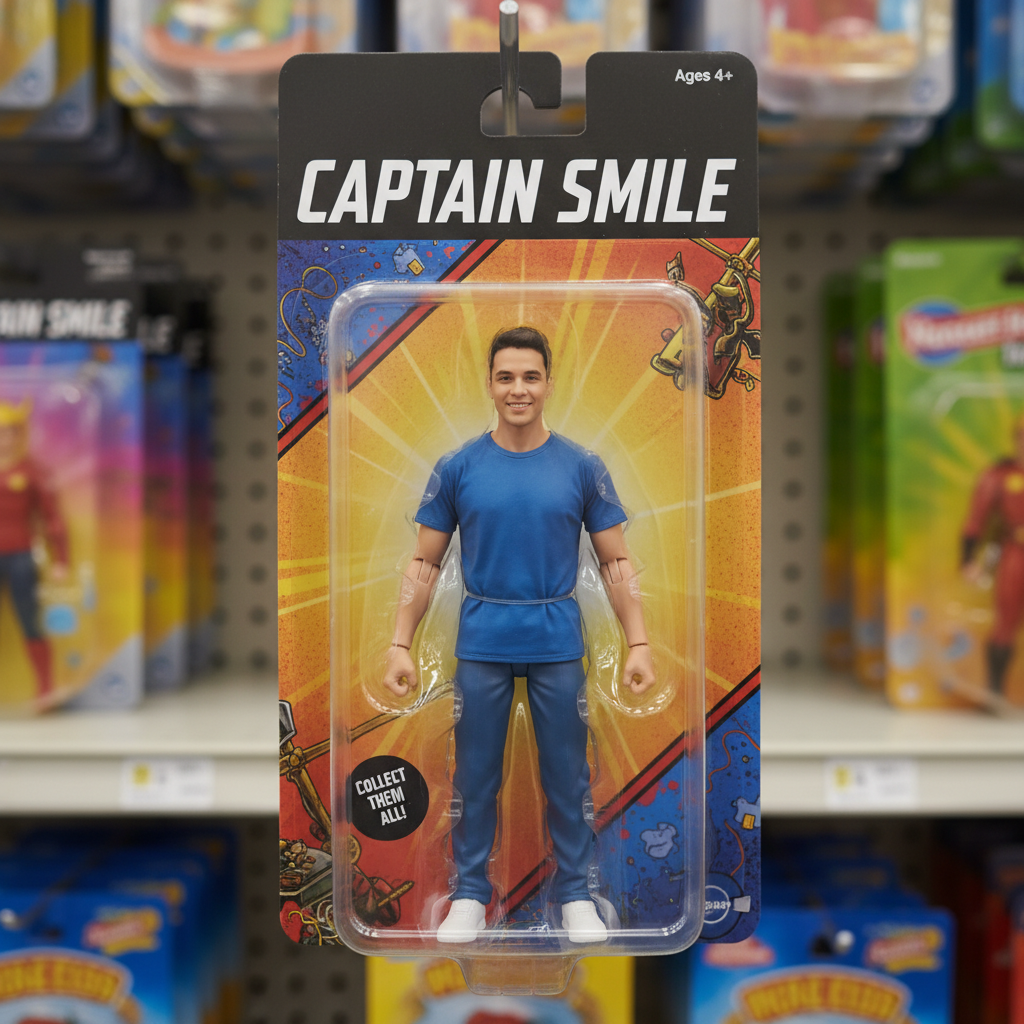
Original photo before turn photo into toy box packaging with a figurine inside
Before
β†’
Photo after turn photo into toy box packaging with a figurine inside with AI
After

Turn Photo Into Toy Box Packaging

Upload photo to turn photo into toy box packaging with a figurine inside

Free β€’ Results in 30 seconds β€’ No signup

Release to upload

FreeNo signupNo watermark

1 free edit·then from $1.99

Popular use cases:
  • turn photo into toy box packaging with a figurine inside
  • AI photo into toy box packaging with a figurine inside editor
  • photo photo into toy box packaging with a figurine inside tool
  • free photo into toy box packaging with a figurine inside editing

Cost
Free No signup required
Time
Instant results in 15-30 seconds
Works on
Any device - browser, phone, tablet, desktop
Powered by
AI-powered photo editing

How it works

  1. Upload your photo

    Drop your image into EditThisPic. JPG, PNG, WebP up to 7MB. Choose a clear photo where the area you want to edit is visible.

    Expect: Most edits complete in 20-45 seconds. Complex changes may need 1-2 refinements.
  2. Describe your edit

    Type what you want: 'turn this photo into a toy figurine inside retail toy box packaging with a clear window, accessories sidebar, and colorful branding.' Be specific about details for best results. The AI understands natural language β€” no technical skills needed.

    Tip: Describe the toy style (vinyl figure, posable action figure, plush) and packaging color scheme for the most realistic result.

    Copy one of these to get started:

    Vinyl collectible figure Turn me into a vinyl collectible toy in minimalist packaging. Funko-style proportions, clean white box with window, character name at bottom, number on corner
    Kids toy packaging Turn into a children's toy figurine in bright, colorful retail packaging. Fun fonts, sparkle effects, 'AGES 4+' label, try-me button on the box
    Premium collector's edition Transform into a premium collector figurine in a display case box. Numbered edition (#42 of 500), certificate of authenticity visible, black velvet interior, gold foil text
    Couple's toy set Turn both of us into matching toy figurines in a shared box set. Two-pack packaging, both figures visible through window, 'BETTER TOGETHER' text on the box
    2 more prompts
    Bobblehead in box Turn me into a bobblehead toy in a display box. Oversized head, spring neck, solid base with my name engraved, box has window to show the figure
    Vintage toy packaging Turn into a 1990s toy in nostalgic blister pack packaging. Cardboard backing with retro art, clear blister bubble, 'NEW!' starburst sticker, barcode at bottom
  3. Review the result

    Check the output carefully. Look for natural blending, consistent lighting, and realistic details. Compare before and after using the slider.

Try it free ↓

Turn Photo Into Toy Box Packaging

Upload photo to turn photo into toy box packaging with a figurine inside

Free β€’ Results in 30 seconds β€’ No signup

Release to upload

Free β€’ No signup

See it in action

Original photo before turn photo into toy box packaging with a figurine inside
Before
->
Photo after turn photo into toy box packaging with a figurine inside with AI
After

Turn Photo Into Toy Box Packaging β€” Example 1

A photo edited using EditThisPic to turn photo into toy box packaging with a figurine inside.

Prompt: Turn me into a vinyl collectible toy in minimalist packaging. Funko-style proportions, clean white box with window, character name at bottom, number on corner
Original photo before turn photo into toy box packaging with a figurine inside
Before
->
Photo after turn photo into toy box packaging with a figurine inside with AI
After

Turn Photo Into Toy Box Packaging β€” Example 2

Another example showing a different scenario for this editing task.

Prompt: Turn into a children's toy figurine in bright, colorful retail packaging. Fun fonts, sparkle effects, 'AGES 4+' label, try-me button on the box

If something looks off

AI changed the wrong area

Why: The AI couldn't determine exactly which area you meant from the description alone.

Try: Tap a marker on the specific area you want to edit, then regenerate with the same prompt

Tip: Markers tell the AI exactly where to focus. Use them when description alone is ambiguous.

Result looks unnatural or blurry

Why: The AI may need more specific guidance about the look you want.

Try: turn photo into toy box packaging with a figurine inside, ensure natural lighting and sharp details that match the rest of the photo

Tip: Adding 'natural' and 'realistic' to your prompt helps the AI prioritize believability.

Lighting doesn't match the rest of the photo

Why: The edited area has different lighting than the original scene.

Try: turn photo into toy box packaging with a figurine inside, match the lighting direction and color temperature of the original photo

Tip: If light comes from one side in the original, mention it: 'with light from the left side.'

Edges look rough or artificial

Why: Transitions between edited and unedited areas need refinement.

Try: Tap markers on the rough edges and regenerate: refine these edges for a seamless blend

Tip: Edge refinement is the most common adjustment β€” markers on problem areas make it quick.

Quick answers

Is the toy box packaging tool free?

Yes, EditThisPic lets you create toy box packaging from your photo for free with one Fast edit per week. No signup or credit card required. For more edits, credit packs start at $1.99.

What's the difference between this and the action figure box tool?

This tool focuses on broader toy packaging styles β€” vinyl figures, plush toys, bobbleheads, collectibles. The action figure tool is specifically optimized for posable action figures with weapons and gear.

Can I make toy packaging for a group photo?

Yes, upload a group photo and ask for a 'multi-figure box set.' The AI will create packaging that includes multiple figurines. Works best with 2-4 people in the photo.

What photo works best for toy box packaging?

A clear, well-lit photo against a simple background works best. The AI needs to see the full person or subject clearly. Full-body shots create better figurines than head-only crops.

Can I customize the box text and branding?

Yes, include the text you want in your prompt. Keep it short β€” 2-3 words for the product name and a short tagline. AI-generated text works best when kept simple.

Does it work for pets and objects?

Absolutely. Upload a photo of your pet, a car, a building β€” anything. The AI will create a toy version with appropriate packaging. Pet figurines are especially popular for social media.

How much does EditThisPic cost?

You get 1 free edit per week β€” no account needed. After that, credit packs start at $1.99 for 3 edits. Monthly plans start at $4.99/mo for 15 edits with unused credits rolling over. All edits are full resolution with no watermark.

Ready to turn your photos?

Free to try. No signup required.

1 free edit included·Credit packs from $1.99