AI eBay 12-Photo Gallery Editor
Last updated
Maximize eBay's 12-photo allowance with consistent, professional images. Same background across every angle, a main photo that stands out in search.
Drop your photo here
"replace background with clean white, professional product photography lighting, standout hero image quality"
Release to upload
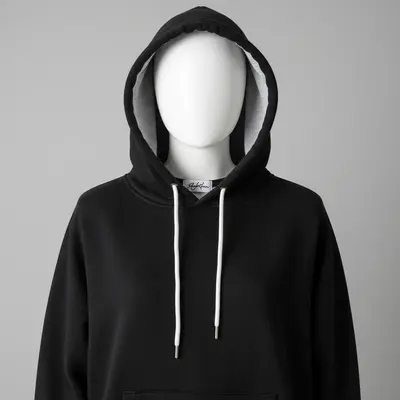
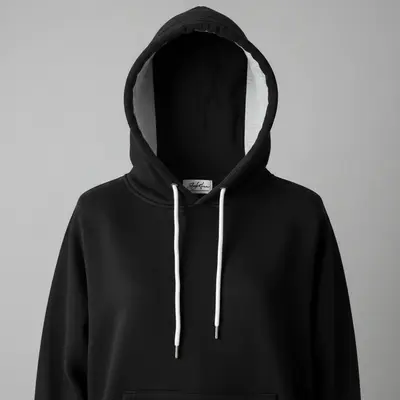
Built for eBay Gallery Optimization
eBay gives you 12 photos per listing. That's 12 chances to convince a buyer. But inconsistent backgrounds and lighting across those 12 shots look amateur and reduce trust. EditThisPic helps you create a cohesive gallery where every angle has the same clean background and matched lighting. The result looks like professional studio photography.
Tools for Gallery Consistency
Remove Background
Create matching backgrounds across all 12 gallery photos
Enhance Lighting
Match lighting across all angles for cohesive gallery
Change Background
Replace varied backgrounds with uniform clean backdrop
Enhance Photo
Improve overall quality to match across gallery
Create a Consistent 12-Photo eBay Gallery
-
Shoot all 12 angles quickly
Photograph your item from 12 angles on any surface: front, back, both sides, top, bottom, 4 detail close-ups, and 2 condition documentation shots. Don't worry about backgrounds or lighting consistency yet.
Shooting: 5-10 minutes. Processing all 12: another 10-15 minutes with EditThisPic. -
Process the main hero photo first
Start with your best angle for the main listing photo. Type 'replace background with clean white, professional product photography lighting, make this a standout hero image.' This sets the style for the rest.
Your main photo appears in search results as a thumbnail. Make it the strongest angle with the cleanest presentation. -
Match remaining photos to the hero
Process each remaining photo with 'replace background with clean white, match lighting and style to previous photos, consistent gallery quality.' This creates visual cohesion across all 12 images.
Use the exact same prompt for photos 2-12 to maximize consistency. Only vary for condition documentation shots. -
Review gallery as a complete set
View all 12 photos together to check consistency. Look for matching backgrounds, similar lighting temperature, and cohesive style. Reprocess any outliers that don't match.
Upload all 12 to your eBay draft listing and view the gallery preview. Any inconsistent photos will be obvious in the grid view.
eBay Gallery Photo Prompts
replace background with clean white, professional product photography lighting, standout hero image quality
The main photo drives clicks from search results. Make it your strongest angle with the best presentation.
replace background with clean white seamless backdrop, match lighting style to previous photos in series, consistent professional look
Use this exact prompt for every gallery photo after the hero to maximize visual consistency.
replace background with clean white, enhance sharpness on product details, match gallery lighting style
Close-ups should have the same background as overview shots for gallery cohesion.
replace background with clean white, preserve all condition details as-is, match gallery lighting, honest documentation
Even condition documentation photos should have matching backgrounds for a professional gallery.
Show 4 more prompts
replace background with clean white, show all included items clearly, match gallery style, completeness documentation
Show everything included in one clean shot so buyers know exactly what they're getting.
replace background with clean neutral backdrop, maintain item proportions accurately, match gallery style
One photo showing scale helps buyers understand size. Keep the same clean background.
replace background with clean white, show packaging condition, match gallery lighting, keep as gallery photo
Original packaging adds value. Show it with the same clean background as other gallery photos.
replace background with clean white, enhance sharpness on text and numbers, match gallery style, readable quality
Authentication details should match the gallery style while being sharp enough to read.
| Edit Type | Prompt | Time | |
|---|---|---|---|
| Hero main photo | replace background with clean white, standout hero image quality |
15s | Try This → |
| Gallery angles (2-12) | replace background with clean white, match lighting to hero photo |
15s each | Try This → |
| Detail close-up | replace background with clean white, match gallery style, enhanced detail |
15s | Try This → |
| Condition in gallery | replace background with clean white, preserve flaws, match gallery style |
20s | Try This → |
eBay 12-Photo Gallery Examples


Consistent gallery from kitchen counter shots
Product photographed from multiple angles on a kitchen counter. Each shot processed to match with clean white backgrounds and consistent lighting.
replace background with clean white seamless backdrop, match lighting to previous photos, consistent professional product photography
Hero photo that stands out in search
Main listing photo optimized for eBay search thumbnail. Clean, bright, and eye-catching.
replace background with clean white, professional product photography lighting, standout hero image quality
Detail shots matching gallery style
Close-up detail shots processed to match the overall gallery style. Same background and lighting as overview shots.
replace background with clean white, enhance sharpness on product details, match gallery lighting style
Common Gallery Consistency Issues
Backgrounds don't match across photos
Why: Different camera angles can produce slightly different background results, especially with complex edges.
replace background with pure clean white #FFFFFF, consistent seamless backdrop, exact match to gallery style
Use the exact same prompt for every photo. If one doesn't match, reprocess it rather than trying to adjust the others.
Lighting temperature varies between shots
Why: Mixed light sources (window + overhead) create different color temperatures at different angles.
replace background with clean white, normalize color temperature to neutral daylight, match gallery lighting
Add 'normalize color temperature' if some shots look warmer or cooler than others.
Hero photo doesn't stand out enough
Why: The main photo needs extra punch to attract clicks in eBay's search results grid.
replace background with clean white, bright professional lighting, slight contrast boost for thumbnail visibility
Your hero photo competes with hundreds of others in search results. Slightly brighter lighting helps it pop.
One angle has a very different look
Why: Dramatic angle differences can make the same item look different, and the AI may process them differently.
replace background with clean white, match lighting and exposure to the hero photo exactly, consistent gallery
Reference your hero photo by saying 'match to the brightest, cleanest photo in the series.'
Close-ups look different from overview shots
Why: Macro/close-up shots have different depth of field and lighting than overview shots, creating inconsistency.
replace background with clean white, match lighting to overview shots, consistent gallery quality
Close-ups need the same background and lighting as overviews. Process them with 'match to overview shots' in the prompt.
Processing 12 photos is taking too long
Why: Each photo needs individual processing, which can feel slow for large galleries.
Use the same prompt for all 12 photos: replace background with clean white, consistent professional photography
Develop one prompt that works for your hero photo, then use it identically for all remaining shots. Most take 15-20 seconds each.
eBay Gallery Questions
How do I make all 12 photos look consistent?
Use the exact same prompt for every photo after processing your hero shot. 'Replace background with clean white, match lighting to previous photos, consistent gallery quality' works for most items. The key is prompt consistency across all 12 shots.
Which photo should be my main listing image?
Choose the angle that best represents the item and looks most appealing as a small thumbnail. Front-facing, well-lit shots with the item centered work best. Process it first and use it as the style reference for the remaining 11 photos.
Do I really need all 12 photos?
Using more photos directly increases views and bids. A complete gallery shows: main hero, front, back, both sides, top, bottom, 2-3 detail close-ups, condition documentation, included accessories, and packaging if relevant.
Can I mix overview shots with close-ups in the gallery?
Yes, and you should. Overview shots and close-ups can share the same clean white background. Use 'match gallery style' in your prompt for close-ups to maintain visual cohesion with the overview shots.
Should condition documentation photos match the gallery style?
Yes. Even condition documentation photos should have clean white backgrounds to match the gallery. Add 'preserve all condition details as-is, match gallery style' to maintain cohesion while documenting honestly.
What if some angles just won't match?
Reprocess the outlier using 'replace background with clean white, match lighting and exposure to the other gallery photos exactly.' If an angle consistently looks different, try photographing from a slightly adjusted position.
Is EditThisPic's AI ebay 12-photo gallery editor really free?
Yes — you get 1 free edit per week, no account needed. Plans start at $4.99/month for 15 edits.
Can I ebay 12 on my phone?
Yes. EditThisPic works in any mobile browser — iPhone, Android, tablet. No app download needed.
Popular use cases
Ready to create a professional 12-photo eBay gallery?
Free to try. No signup required. Consistent galleries get more views and higher bids.
Start EditingTrusted by 15,000+ users