Free • No signup Remove Reflection · Free

AI Reflection Remover

Just describe what you want - no marking required for most reflections.

Storefront window with photographer's reflection visible in glass
Before
Clear storefront view with reflection removed
After

Remove Reflection from Photo

Drop your photo here

or click to browse

Release to upload

Free • No signup

Advertisement
Popular use cases:
  • real estate photography
  • storefront listings
  • automotive photography
  • museum exhibit photos
  • portrait photography
  • product photography behind glass
  • window view photos
  • mirror selfies
  • eyeglasses portraits

Cost
Free No signup required
Time
Instant results in 15-30 seconds
Works on
Any device - browser, phone, tablet, desktop
Powered by
AI-powered photo editing
Scenario Prompt Time
Window reflection remove the reflection from the window and show the clear view outside 20s
Storefront glass eliminate the storefront window reflection and reveal the display inside 25s
Mirror selfie remove my phone from the mirror reflection and clean up the mirror surface 25s
Eyeglasses glare remove the glare from eyeglasses and show clear eyes 30s

How it works

  1. Upload your photo

    Drop your image into EditThisPic. Works best with photos where reflections appear on glass, windows, or shiny surfaces. JPG, PNG, WebP up to 7MB.

    Expect: Simple reflections: 15-30 seconds. Complex multi-surface reflections: may need 2-3 refinements with different prompts.
  2. Describe what you want

    Type your instruction: 'remove the reflection from the window' or 'eliminate the mirror reflection and show clear view.' Be specific about which surface has the reflection. No marking needed—the AI understands what 'window reflection' and 'glass glare' mean.

    Tip: Specify the surface type for better results: 'remove reflection from storefront window' works better than just 'remove reflection.'

    Copy one of these to get started:

    Window reflection removal remove the reflection from the window and show the clear view outside
    Storefront glass reflection eliminate the storefront window reflection and reveal the display inside
    Mirror selfie reflection remove my phone from the mirror reflection and clean up the mirror surface
    Car window reflection remove the reflection from the car window and show the interior clearly
    3 more prompts
    Eyeglasses glare remove the glare from eyeglasses and show clear eyes
    Museum display reflection eliminate the reflection on the glass display case and show the exhibit clearly
    TV screen reflection remove the reflection from the TV screen and show the clear display
  3. Generate and review

    Click Generate and watch the AI remove reflections while preserving the background view. Zoom to full resolution to check edges and ensure the view behind the glass looks natural.

  4. Refine with markers if needed

    If some reflection remains or the AI changed the wrong area, tap markers on those specific spots and regenerate. This is optional—most window and glass reflections work without markers.

    Tip: Markers are for precision refinement, not required. Try your description first before adding markers.
Try it free

Remove Reflection from Photo

Drop your photo here

or click to browse

Release to upload

Free • No signup

"Finally got a clean window shot without any reflection. Just typed what I wanted and it worked perfectly." @photoeditor_pro

See it in action

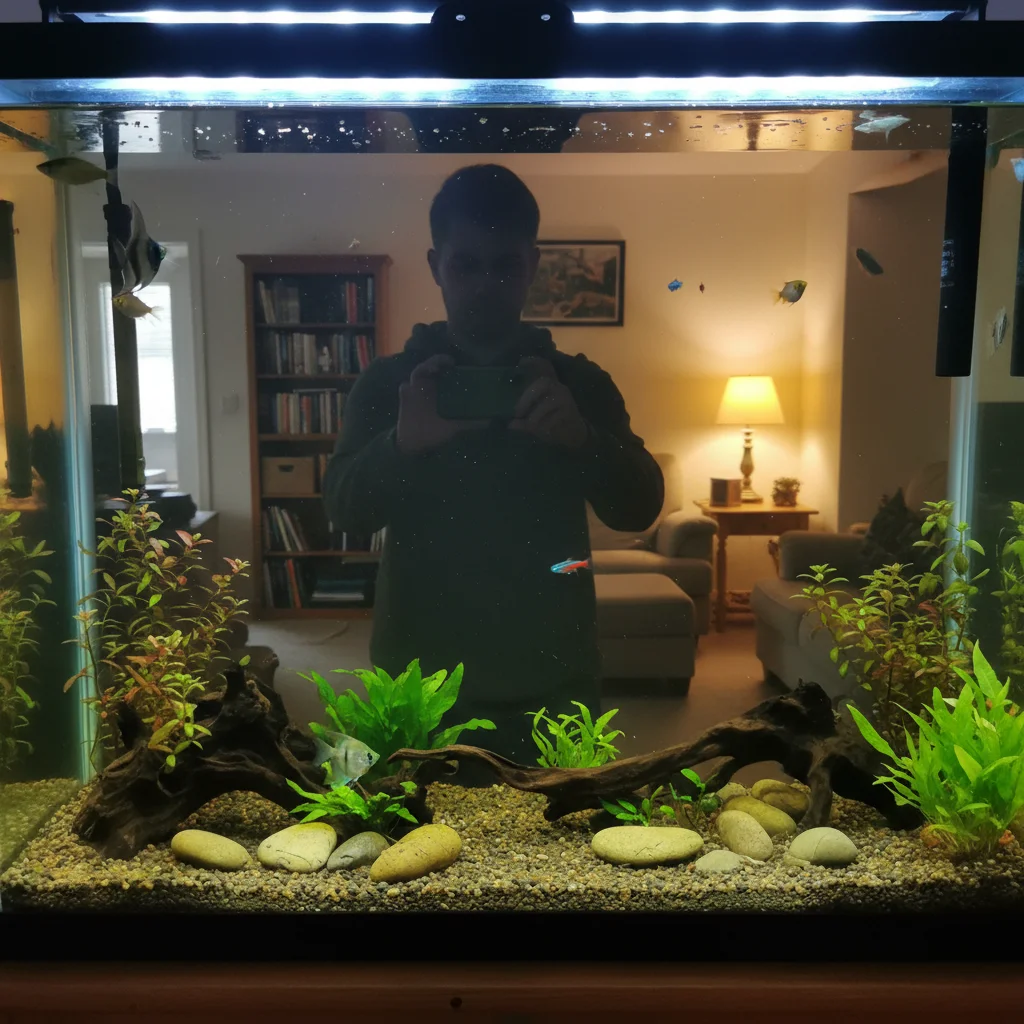
Storefront window with photographer's reflection visible in glass
Before
->
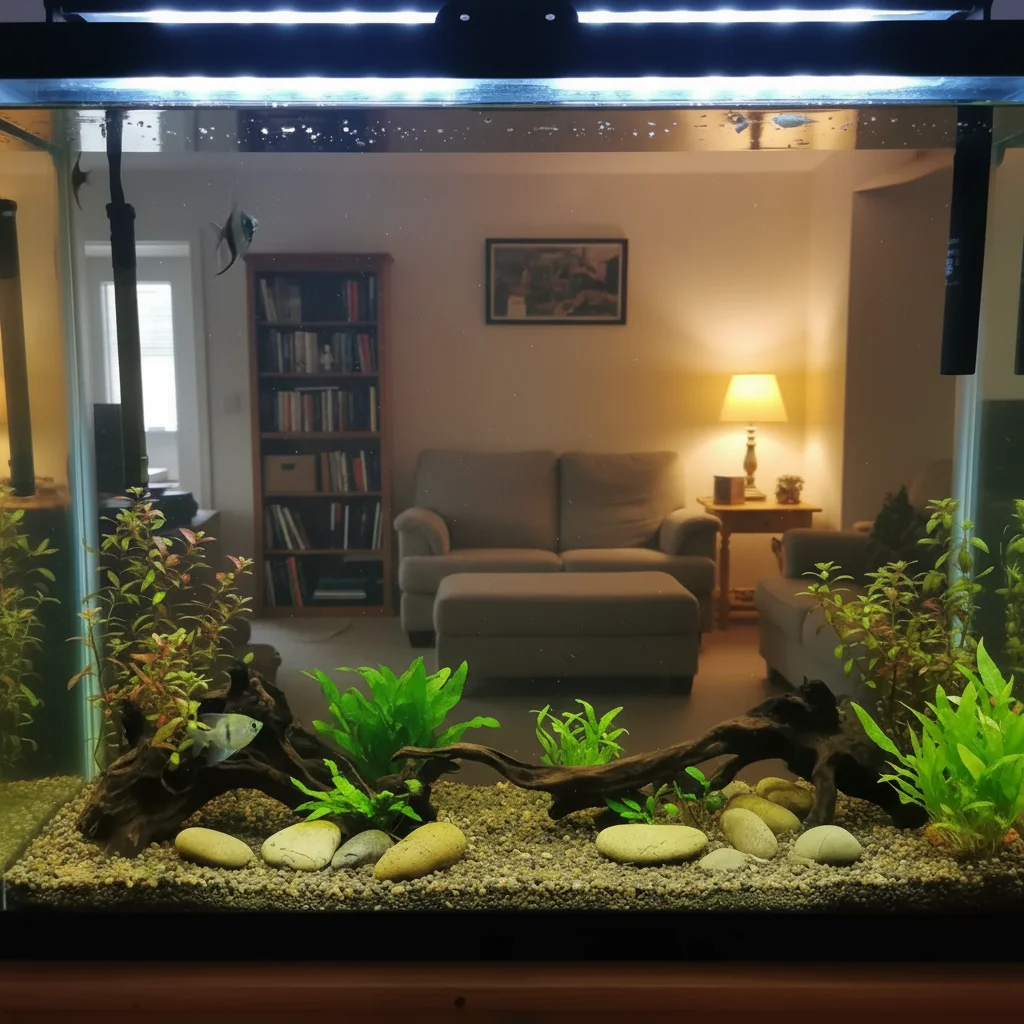
Clear storefront view with reflection removed
After

Storefront Window Reflection Removed

Real estate photo with photographer's reflection visible in the storefront glass. One prompt removed the reflection and revealed the clear interior.

Prompt: remove the reflection from the storefront window and show the interior display clearly
Museum display with light reflections on protective glass
Before
->
Clear view of exhibit with glass reflections removed
After

Museum Display Glass Reflection Cleared

Museum exhibit photo where overhead lights created strong reflections on protective glass. Removed reflection to show the artifact clearly.

Prompt: eliminate the reflection on the glass display case and show the exhibit clearly
Car window showing photographer's reflection
Before
->
Clear car window showing interior without reflection
After

Car Window Reflection Eliminated

Automotive listing photo where the photographer was visible in the car window. Cleaned reflection to show interior details.

Prompt: remove the reflection from the car window and show the interior clearly
Advertisement

If something looks off

AI changed the wrong area or removed something I didn't want changed

Why: The AI couldn't determine exactly which reflection you meant from description alone. This happens when there are multiple reflective surfaces or the description is ambiguous.

Try: Tap a marker on the specific reflection area you want removed, then regenerate with the same prompt

Tip: Markers tell the AI 'I mean THIS reflection specifically.' Use them when multiple surfaces have reflections.

Reflection partially removed but some glare remains

Why: Complex reflections with varying intensity can be challenging. The AI may remove the main reflection but miss subtle highlights or edge glare.

Try: remove any remaining glare and reflection spots, especially along edges

Tip: Try a second pass focusing on 'remaining glare' after the main reflection is gone.

Background behind reflection looks blurry or artificial

Why: When the reflection completely obscured the background, the AI has to infer what should be there. Limited context makes this challenging.

Try: If possible, retake the photo at a different angle to avoid the reflection entirely. Or specify desired background: 'replace with neutral gray wall' instead of trying to guess the original.

Tip: Heavy reflections that block 100% of the view are harder to fix than partial reflections where some background is visible.

Removed reflection but now the glass looks unnatural

Why: Completely removing reflection can make glass appear invisible. Real glass has subtle tint or reflectivity.

Try: reduce reflection intensity while keeping subtle glass appearance, don't remove completely

Tip: Consider 'reduce reflection by 80%' rather than 'remove completely' for more natural glass appearance.

Eyeglasses frames disappeared along with glare

Why: The AI confused the glasses frames with the reflection when they're both bright or reflective.

Try: remove only the glare from the lenses, preserve the eyeglass frames intact

Tip: Be explicit: 'preserve frames' tells the AI to keep the glasses structure while removing lens glare.

Reflection removed but created color shifts

Why: The AI filled the reflection area by sampling nearby pixels, which may have different color temperature than the obscured area.

Try: match the color temperature to the surrounding area when removing the reflection

Tip: If color matching is critical, try a reference image showing the desired appearance.

Quick answers

Do I need to mark the reflection before describing?

No! For most reflections, just describe what you want: 'remove the reflection from the window' or 'eliminate the mirror glare.' The AI understands these concepts. Only use markers when you have multiple reflective surfaces and need to specify which one—like 'this window, not that mirror'—or when refining edges after your first attempt.

How do I remove reflection from a photo for free?

Upload your photo to EditThisPic, type 'remove the reflection from [surface]' where you specify the surface like 'window,' 'mirror,' or 'eyeglasses.' The AI processes the edit in 15-30 seconds. No account required, completely free to try, and your result has no watermark.

Is there a free reflection remover that doesn't need an account?

Yes. EditThisPic removes reflections from photos without requiring signup or login. Just upload, describe what you want removed, and download your result. No watermark, no trial limits on the free tier.

What's the best AI tool for removing reflections from windows and glass?

EditThisPic specializes in glass and window reflection removal using AI. Unlike traditional clone stamp tools that require manual work, just describe the reflection and the AI handles edge detection, background reconstruction, and natural blending automatically. Works on storefront windows, car glass, mirrors, and eyeglasses.

Can I remove glare from eyeglasses in portraits?

Yes, use the prompt 'remove the glare from eyeglasses and show clear eyes.' For best results, specify 'preserve the eyeglass frames' to ensure only the lens glare is removed, not the frames themselves. Flash glare and reflection from lighting are both removable.

Ready to remove reflections from your photos?

Free to try. No signup required.

Try it free