Free β€’ No signup Create Fake employee of the month plaque photo Β· Free

Fake Employee of the Month Photo Generator

Upload a coworker's photo and the AI wraps it in a gold ornate frame with an engraved nameplate β€” ready to print and hang in the break room, or drop into Slack with zero context.

Standard headshot of a man in a light blue shirt against a grey background
Before
β†’
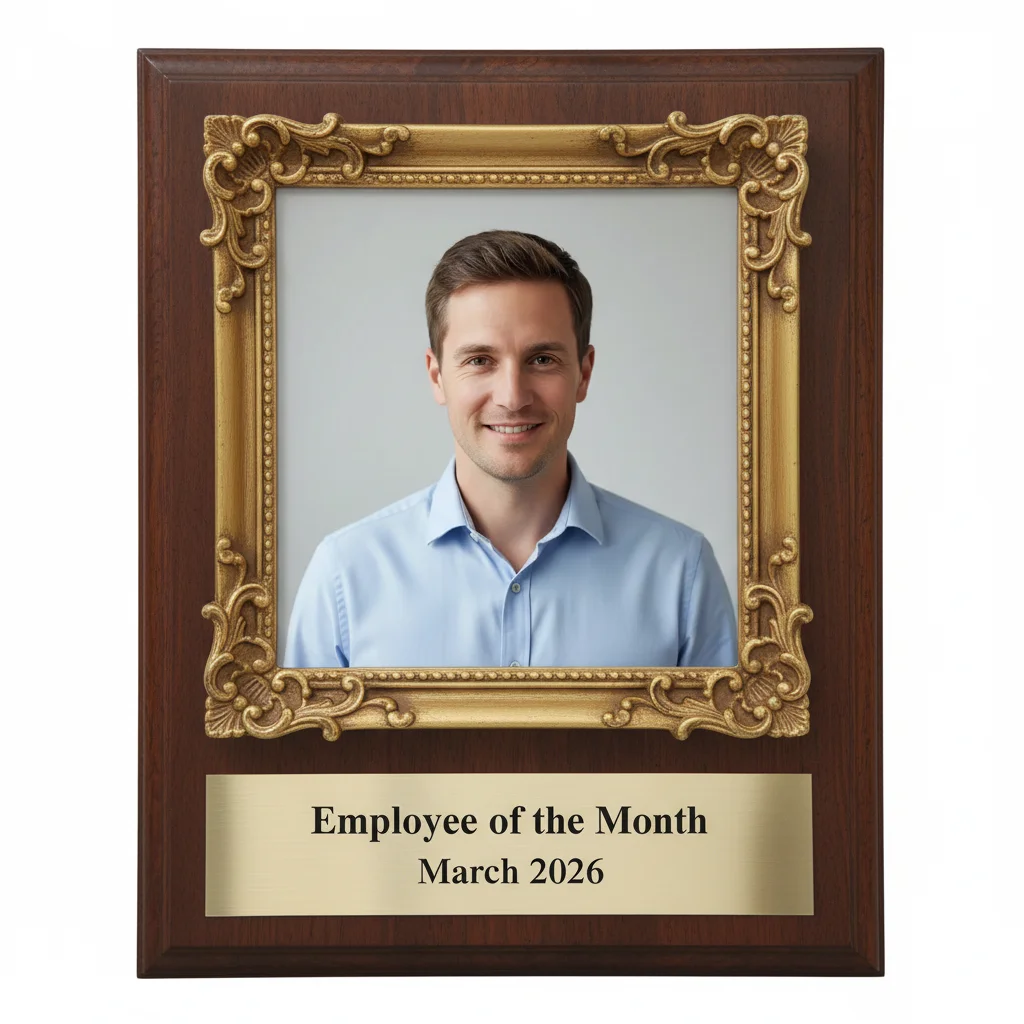
The same man's photo framed as an official employee of the month plaque with gold ornate frame and brass nameplate
After

Fake Employee of the Month Photo Generator

Upload photo to create fake employee of the month plaque photo

Free β€’ Results in 30 seconds β€’ No signup

Release to upload

FreeNo signupNo watermark

1 free edit·then from $1.99

Popular use cases:
  • prank photos
  • office prank ideas
  • funny work photos
  • coworker prank photo
  • fake employee award
  • office humor photo editor
  • corporate prank picture
  • april fools office prank

Cost
Free No signup required
Time
Instant results in 15-30 seconds
Works on
Any device - browser, phone, tablet, desktop
Powered by
AI-powered photo editing
Scenario Prompt Time
Classic gold plaque Gold ornate frame, mahogany backing, brass nameplate with their name and 'Employee of the Month' 30s
Modern silver plaque Brushed silver frame, white matte backing, sans-serif engraved text, tech company aesthetic 30s
Absurd award category Gold ornate frame, formal serif font, nameplate with a ridiculous award category but completely official formatting 15s
Framed wall certificate Certificate of excellence in a gold picture frame, formal header, decorative border, photo inset, looks wall-hung 30s

How it works

  1. Upload your photo

    Upload a clear photo of your coworker β€” a headshot or upper-body shot works best. A photo where they're looking at the camera gives the most convincing plaque result. Screenshot from LinkedIn, a company team page, or their Slack profile all work fine.

    Expect: Upload takes a second or two. Any common image format works.
  2. Describe the plaque

    Type what you want the award to look like. Be specific: mention the frame style (gold ornate, brushed silver), the nameplate text (their actual name or something absurd like 'Most Likely to Reheat Fish'), the backing material, and any extra details. The AI reads your description literally, so the more detail you give, the better the result.

    Tip: Include a fake name on the nameplate to make it look more official β€” and funnier. Try: 'Add an engraved brass nameplate reading "Dave Kowalski β€” Employee of the Month: March 2026" in a serif font.'

    Copy one of these to get started:

    Classic gold plaque Transform this headshot into an official employee of the month plaque. Gold ornate frame with scroll detailing on the corners, dark mahogany wood backing, and a polished brass nameplate engraved with 'Employee of the Month β€” March 2026'. Corporate serif font. Mount it on the wall like a real office award.
    Absurd award category Make this photo look like an employee of the month plaque in a gold ornate frame. Engraved brass nameplate reading 'Most Likely to Eat Someone Else's Lunch β€” 6 Months Running'. Dark wood backing, formal serif font, formal certificate design. Should look completely official.
    Silver modern plaque Convert this photo into a modern employee recognition plaque. Brushed silver metal frame, white matte backing, clean engraved text reading 'Employee of the Quarter' with their name in a sharp sans-serif font. Looks like something from a tech company.
    Framed wall certificate Turn this photo into an employee of the month certificate in an ornate gold picture frame, mounted on a wall. Include a decorative border, a formal header reading 'Certificate of Excellence', and a small photo inset with the rest of the certificate visible below. Formal and official looking.
    3 more prompts
    Overly enthusiastic nameplate Make this into an employee of the month plaque with a gold frame, mahogany backing, and a brass nameplate that reads 'Greg Simmons β€” Employee of the Month Every Month Since 2019'. Formal serif font, looks completely real, like it belongs in a hospital hallway.
    Whole wall of fame Transform this photo so it looks like it's part of a corporate wall of fame β€” framed headshot in a gold oval frame with an engraved plate, surrounded by other blurred award frames. Text reads 'Employee of the Month: Sarah Chen'. Formal, institutional hallway lighting.
    Dubious achievement award Create an employee of the month plaque photo with a gold frame and wooden backing. Nameplate reads 'Most Impressive Explanation for Being Late β€” Employee of the Month'. Keep everything else completely formal and official looking β€” heavy serif font, real award proportions.
  3. Send it

    Download the result and send it where it'll land hardest. Print it out and hang it in the break room before your coworker arrives. Drop it into the all-hands Slack channel with no caption. Frame it and leave it on their desk. The more official it looks, the better the reaction.

Try it free ↓

Fake Employee of the Month Photo Generator

Upload photo to create fake employee of the month plaque photo

Free β€’ Results in 30 seconds β€’ No signup

Release to upload

Free β€’ No signup

See it in action

Standard headshot of a man in a light blue shirt against a grey background
Before
->
The same man's photo framed as an official employee of the month plaque with gold ornate frame and brass nameplate
After

Classic break room plaque

A coworker's headshot turned into a gold-framed employee of the month plaque with an engraved brass nameplate. Hung in the break room before he arrived Monday morning.

Prompt: Transform this headshot into an employee of the month plaque. Gold ornate frame with scroll corners, dark mahogany wood backing, polished brass nameplate engraved with 'Employee of the Month β€” March 2026'. Corporate serif font, looks like a real office award.
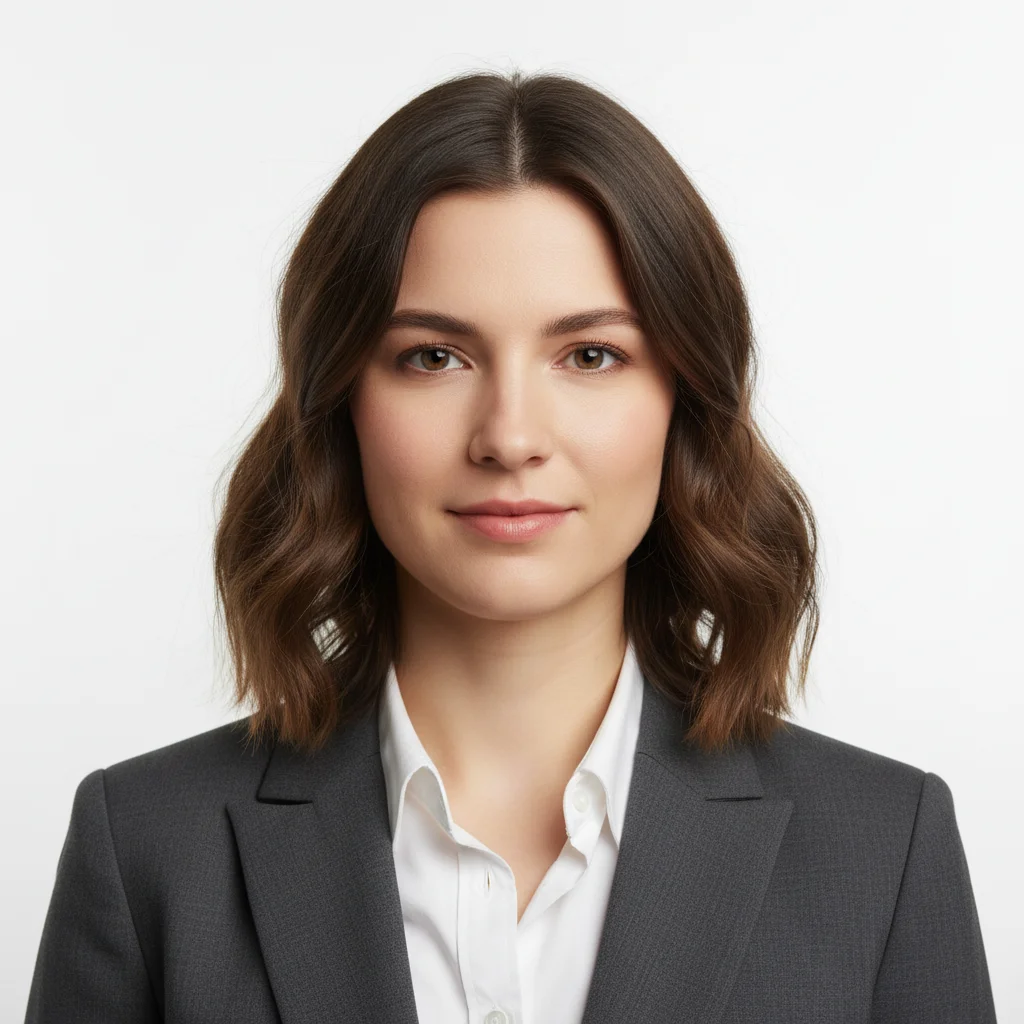
Woman in grey blazer, standard professional headshot against white background
Before
->
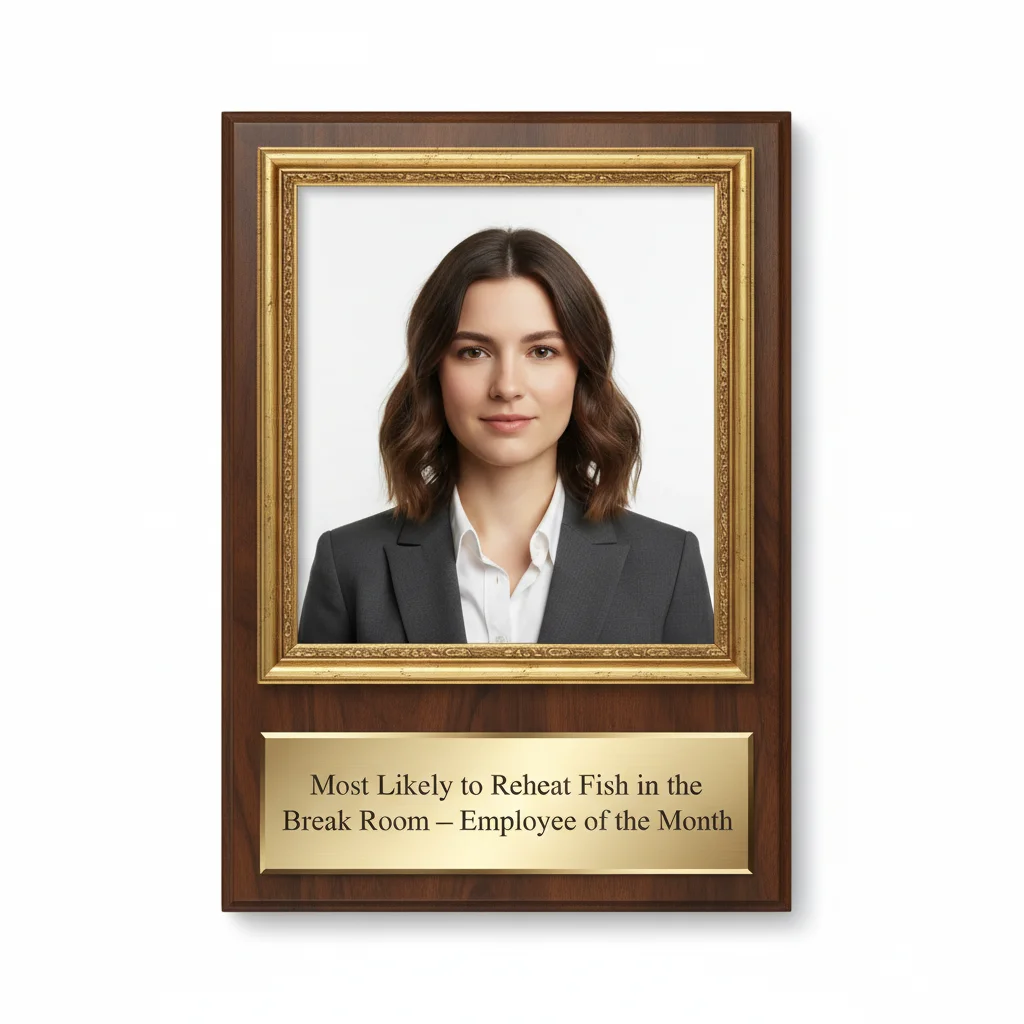
Same headshot turned into an official-looking employee of the month plaque with gold frame and absurd engraved nameplate
After

Slack bomb with no context

Sent to the all-hands Slack channel on a Tuesday morning. No caption. Just the image. The 'Most Likely to Reheat Fish' nameplate was noticed 45 minutes later.

Prompt: Make this photo look like an employee of the month plaque. Gold ornate frame, dark wood backing, engraved brass nameplate reading 'Most Likely to Reheat Fish in the Break Room β€” Employee of the Month'. Formal serif font. Completely official looking.

Middle-aged man in a navy polo shirt, smiling at the camera with an office background
Before
->
The same man's photo formatted as an official employee of the month certificate with gold frame, decorative border, and formal engraved text
After

Printed and framed on their desk

Generated at high resolution, printed at 5x7, put in an actual dollar-store frame, and left on the target's desk before they arrived. Took four colleagues to keep a straight face.

Prompt: Turn this photo into a corporate employee of the month award certificate in a gold ornate picture frame. Formal header 'Certificate of Excellence', the photo inset prominently in the center, decorative border, and engraved text reading 'Dave Kowalski β€” Employee of the Month: April 2026'. Very official. Dark wood frame.

If something looks off

The frame looks low-quality or generic

Why: Vague prompts get generic frames. If you just say 'gold frame', the AI may produce something flat and unconvincing.

Try: Try: 'Add a heavy gold ornate frame with scroll and leaf detailing on the corners, a raised ridge border, and a warm antique gold finish. Should look like a real office award, not a clip art border.'

Tip: Describing texture (antique, polished, brushed) and specific details (scroll corners, raised ridges) makes the frame look three-dimensional and real.

The nameplate text is wrong or misspelled

Why: The AI reads your prompt, but text generation in images can sometimes drift β€” especially with long names or unusual spellings.

Try: Resubmit with: 'Engrave the nameplate with exactly: [NAME] β€” Employee of the Month. Use a clean serif font, all capital letters, centered text.'

Tip: Keep nameplate text under 8 words for the most reliable results. If you need a longer phrase, break it onto two lines.

The photo doesn't look like it's inside the frame β€” it's floating or badly composited

Why: The AI may treat the portrait and frame as separate elements rather than a unified composition.

Try: Add to your prompt: 'The portrait should be inset cleanly inside the frame, centered, with the frame fully surrounding the photo on all sides. The photo is mounted inside the frame, not beside it.'

Tip: Cropped headshots (head and shoulders only) composite better than wide shots β€” the tighter the original crop, the more naturally it fits inside the frame.

The backing or mounting looks plain or wrong

Why: Without specifying the backing, the AI may default to a generic neutral background that doesn't look like an office award.

Try: Add: 'Mount the plaque on a dark mahogany wood backing with visible wood grain. The backing extends about 2 inches beyond the frame on all sides, like a real wall-hung award.'

Tip: Dark mahogany is the most recognizable office award material. Walnut or cherry also work if you want a slightly different tone.

It looks like an illustration, not a real photo

Why: Some prompts push the AI toward a painterly or stylized render rather than a photorealistic one.

Try: Add to your prompt: 'Photorealistic result. The portrait inside the frame should look like a real photograph, not an illustration or painting. High detail, real lighting.'

Tip: Starting your prompt with 'Photorealistic' or 'Looks like a real photograph' consistently steers the AI toward a more convincing result.

Quick answers

Do I need to mark any areas in the photo before describing what I want?

No. Just describe the plaque style, frame, and nameplate text and the AI handles the rest. You only need to use markers if you want to target a very specific area β€” for example, if you want to adjust just the background behind the person without changing their face. For a full employee-of-month plaque transformation, describing it in text is enough.

Is this free?

Yes. EditThisPic gives you 1 free edit per week with no account needed. If you want to generate multiple variations or try different plaque styles, you can get additional edits starting from $1.99.

Will this look realistic enough to fool someone?

Usually yes, especially on a screen. The gold frame, wooden backing, and engraved nameplate all render convincingly. The closer the original photo is to a real headshot (direct gaze, plain background, professional framing), the more realistic the plaque looks. Printed results can also fool people, particularly at a glance from across a desk.

What kind of photo works best?

A standard headshot or upper-body photo works best β€” the person looking directly at the camera, reasonably centered in the frame. Photos from LinkedIn, a company team page, or Slack profile pictures all work. Avoid wide-angle group shots or photos where the person is turned away from the camera.

Can I customize the text on the nameplate?

Yes. In your prompt, specify exactly what you want the nameplate to say β€” their name, the award category, the month, or anything else. The AI will engrave it as described. For best results, keep the nameplate text concise (under 8 words) and tell the AI to use a serif font and all caps.

Can I print the result?

Yes. Download the image and print it at any size. For a framed desk prank, 5x7 inches works well. For a wall-mounted break room installation, 8x10 or larger. Standard home printers work fine β€” or use an online print service if you want a higher-quality result for maximum effect.

Is the photo I upload stored anywhere?

Uploaded photos are used only to process your edit and are not stored long-term or used for any other purpose.

Can I try different frame styles β€” like silver instead of gold?

Yes. Describe the exact frame you want in your prompt. Gold ornate, brushed silver, modern minimalist, dark wood with no metal β€” the AI follows whatever style you specify. Each style change is a new edit, so if you want to compare a few options, plan for 2-3 edits.

How much does EditThisPic cost?

You get 1 free edit per week β€” no account needed. After that, credit packs start at $1.99 for 3 edits. Monthly plans start at $4.99/mo for 15 edits with unused credits rolling over. All edits are full resolution with no watermark.

Ready to make your coworker employee of the month?

Free to try. No signup required.

1 free edit included·Credit packs from $1.99