Free β€’ No signup Create Prank photo Β· Free

AI Prank Photo Generator

Upload any photo, describe the prank, and AI makes it look real. No editing skills needed.

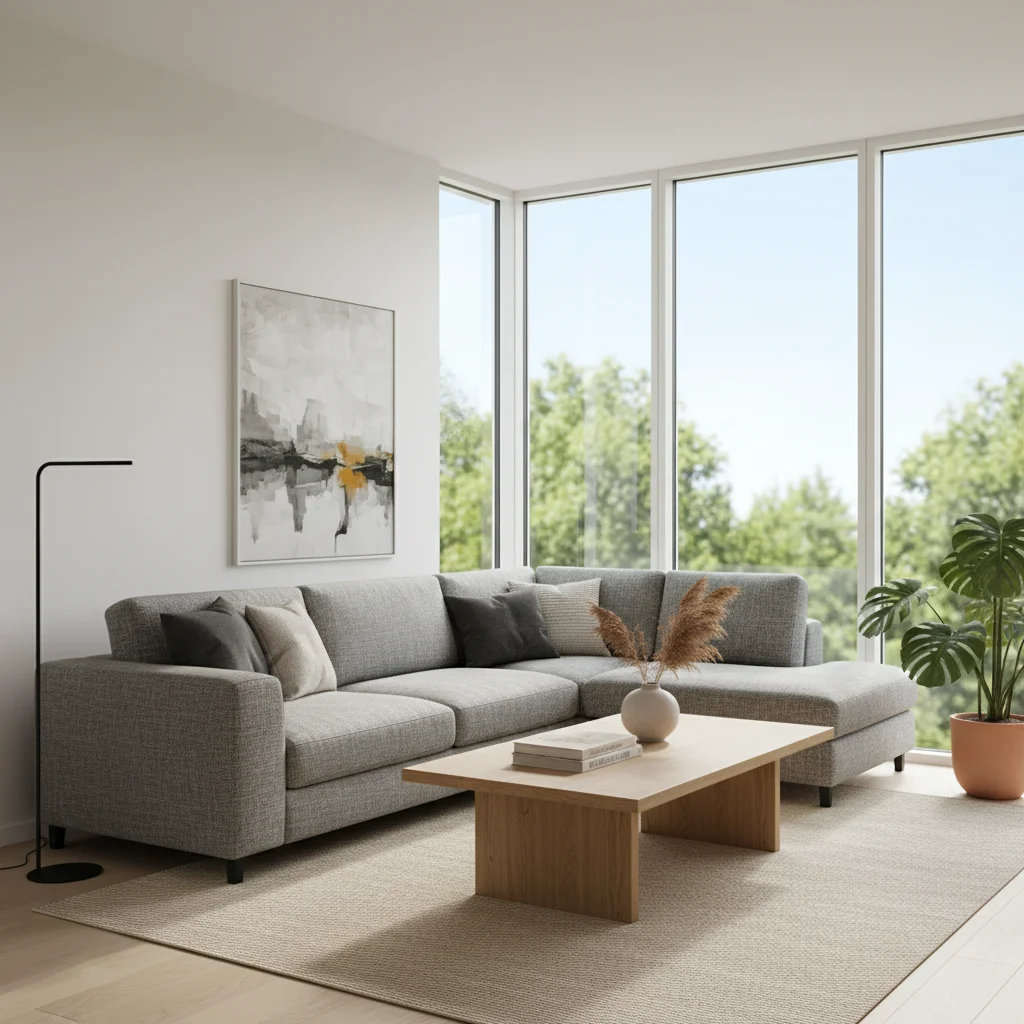
Empty living room before prank edit
Before
β†’
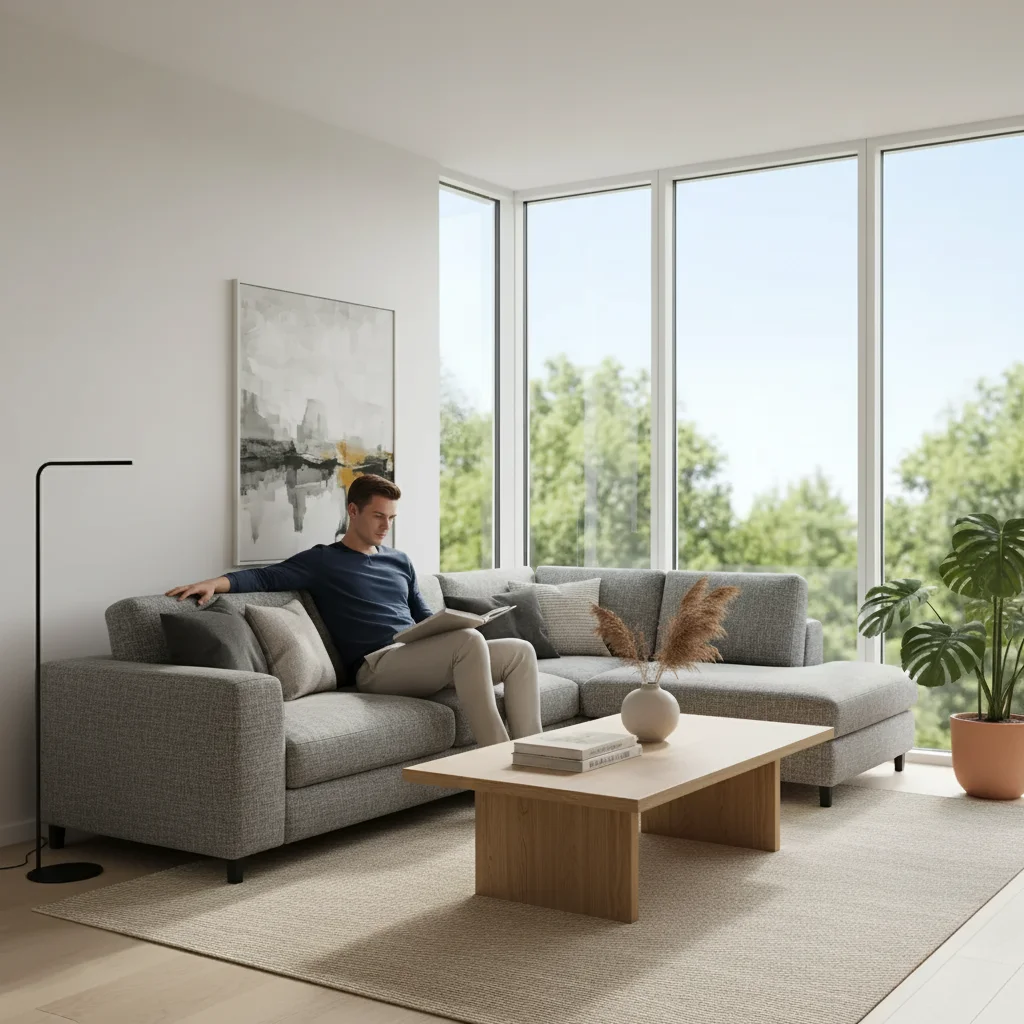
Living room with AI-added stranger on couch
After

AI Prank Photo Generator

Upload photo to create prank photo

Free β€’ Results in 30 seconds β€’ No signup

Release to upload

FreeNo signupNo watermark

1 free edit·then from $1.99

Popular use cases:
  • prank photo generator
  • AI prank photo maker
  • add stranger to photo prank
  • fake photo prank tool
  • tiktok prank photo AI
  • prank photo creator free
  • AI photo prank app

Cost
Free No signup required
Time
Instant results in 15-30 seconds
Works on
Any device - browser, phone, tablet, desktop
Powered by
AI-powered photo editing
Scenario Prompt Time
Stranger in room Add a random person sitting on the couch 30-45 sec
Intruder prank Add a dark figure in the hallway doorway 30-45 sec
Jealousy prank Add a shirtless man fixing the kitchen sink 30-60 sec
Ghost prank Add a transparent ghostly figure in the corner 30-45 sec

How it works

  1. Upload your photo

    Drop your image into EditThisPic. JPG, PNG, WebP up to 7MB. Room photos, outdoor shots, selfies β€” any photo works as a prank base.

    Expect: Most prank edits complete in 20-45 seconds. Complex scenes may need 1-2 refinements.
  2. Describe the prank

    Type what you want: 'Add a stranger sitting on the couch' or 'Put a random person lurking in the hallway.' Be specific about the person's appearance, position, and what they're doing for the most convincing result.

    Tip: The more specific you are about clothing, posture, and position, the more realistic the prank looks. 'A man in a gray hoodie sitting cross-legged on the couch' beats 'add a person.'

    Copy one of these to get started:

    The classic stranger-in-your-house prank Add a random man sitting casually on the couch in the living room, as if he's been there a while β€” make it completely realistic
    Intruder scare prank Add a dark figure standing in the hallway doorway, partially in shadow, looking into the room
    Jealousy prank for partner Add a shirtless man working under the kitchen sink as if he's fixing the plumbing
    Someone sleeping in your bed Add a person sleeping under the covers in this bed, with just their head visible on the pillow
    4 more prompts
    Ghost in the photo Add a transparent ghostly figure standing in the corner of the room, semi-visible and eerie
    UFO in the sky Add a metallic UFO hovering in the sky above the trees, with realistic lighting and slight motion blur
    Bailiff at the front door Add a serious-looking man in a dark suit holding a clipboard standing at the front door
    Firefighters at your house Add two firefighters in full gear standing outside the house near the front door, looking urgent
  3. Review and send

    Check that the person looks naturally placed β€” lighting, shadows, and perspective should match the scene. Download and send to your target for maximum reaction.

Try it free ↓

AI Prank Photo Generator

Upload photo to create prank photo

Free β€’ Results in 30 seconds β€’ No signup

Release to upload

Free β€’ No signup

See it in action

Empty living room before prank edit
Before
->
Living room with AI-added stranger on couch
After

Stranger on the couch prank

A living room photo with an AI-added stranger casually sitting on the couch.

Prompt: Add a random man sitting casually on the couch in the living room, as if he's been there a while β€” make it completely realistic
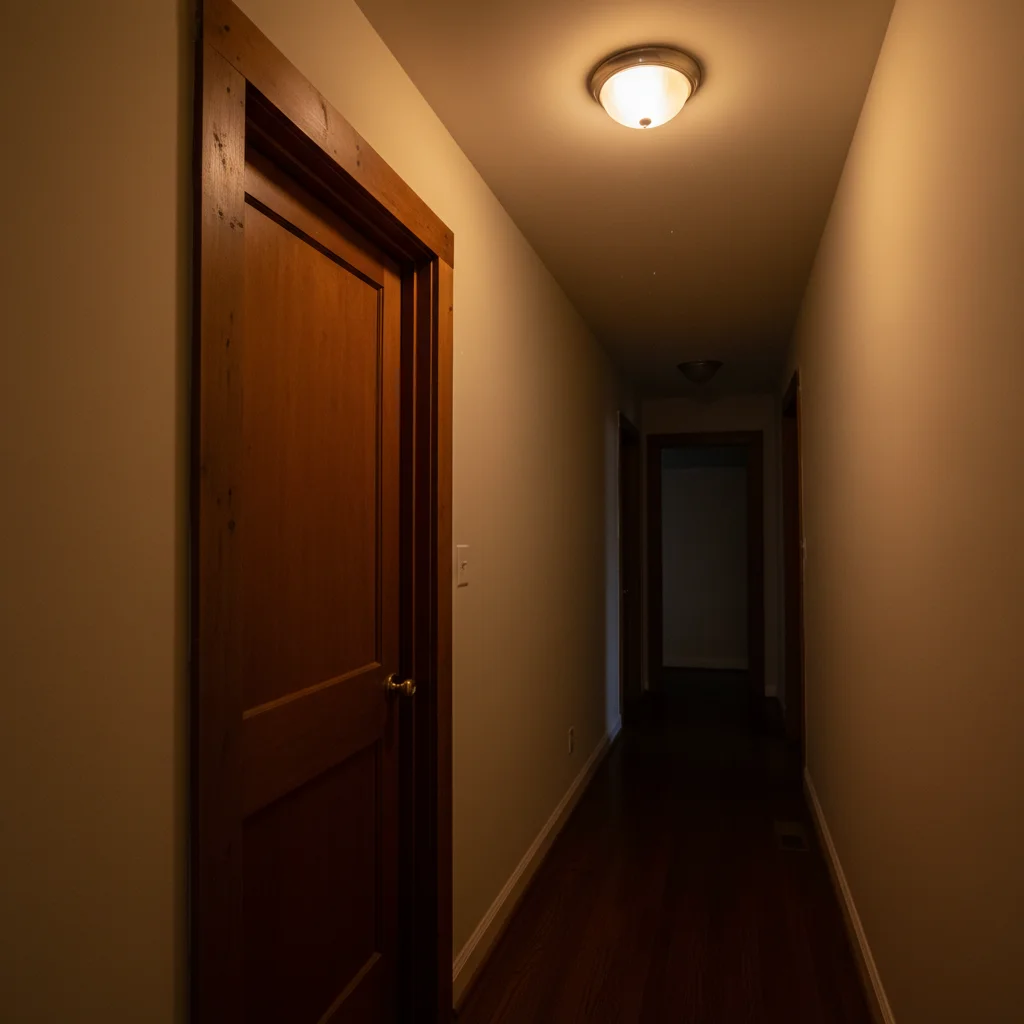
Empty hallway before intruder prank edit
Before
->
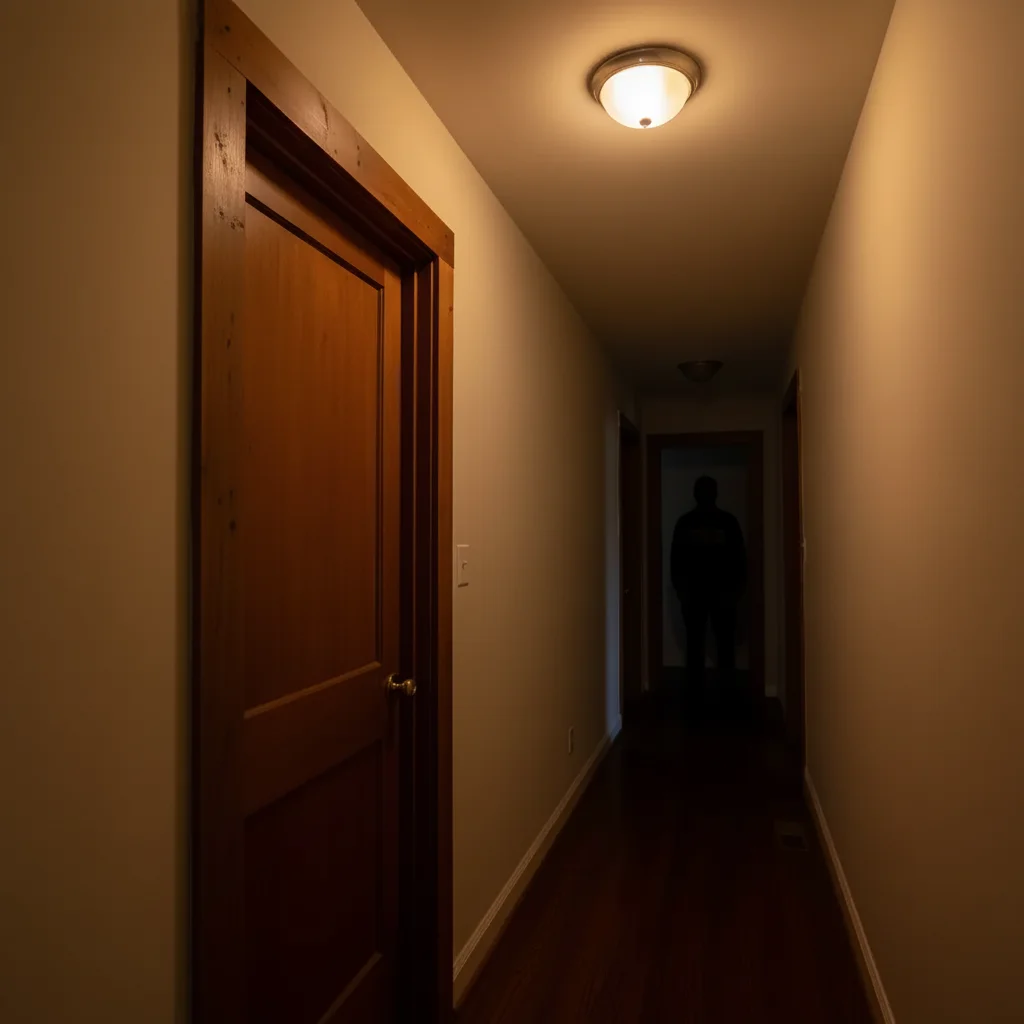
Hallway with AI-added shadowy figure in doorway
After

Hallway intruder prank

A hallway photo with an AI-added shadowy figure lurking in a doorway.

Prompt: Add a dark figure standing in the hallway doorway, partially in shadow, looking into the room

If something looks off

Added person looks pasted on or floating

Why: The AI didn't match the lighting, shadows, or perspective of the room.

Try: Add 'matching the room's lighting direction and casting natural shadows on the floor' to your prompt

Tip: Photos with even, natural lighting produce the most convincing person placements.

Person is the wrong size for the room

Why: The AI misjudged the room's depth and scale.

Try: Specify the person's position: 'sitting on the couch' or 'standing by the door frame' to give the AI a scale reference

Tip: Placing the person near existing furniture helps the AI get proportions right.

AI changed the wrong area or removed something

Why: The AI couldn't determine where to place the person from description alone.

Try: Tap a marker on the exact spot where you want the person added, then regenerate

Tip: Markers are especially helpful in busy rooms with lots of furniture.

The prank looks too obvious or fake

Why: The description was too vague for a convincing result.

Try: Add more detail: clothing color, posture, what they're doing, and 'make it look like a real photograph'

Tip: Describing what the person is wearing and doing makes the AI generate a more natural-looking figure.

Person's face looks distorted

Why: Faces are complex and the AI sometimes struggles with facial details on added figures.

Try: Try 'person facing away from the camera' or 'person looking down at their phone' to avoid face issues

Tip: Pranks where the person isn't facing the camera directly tend to look more realistic.

Quick answers

Do I need to mark where the person should go?

No β€” just describe the position in your prompt ('sitting on the couch,' 'standing in the doorway') and the AI places them naturally. You can use markers for extra precision, but most prank edits work perfectly from a description alone.

Is the AI prank photo generator free?

Yes, EditThisPic gives you one free edit per week with no signup or credit card required. For more prank photos, affordable credit packs start at $1.99.

Will people be able to tell it's fake?

The AI generates realistic lighting, shadows, and perspective matching. Most people can't tell at first glance β€” especially on a phone screen. For best results, use well-lit photos and be specific about clothing and posture.

What kind of prank photos can I create?

Anything you can describe: add strangers to rooms, shirtless plumbers in kitchens, ghostly figures, UFOs in the sky, intruders in hallways, bailiffs at doors, firefighters outside your house β€” the AI handles any scenario.

Can I use this for the TikTok stranger-in-the-house prank?

Yes β€” this is perfect for the viral AI prank trend. Upload a photo of your room, tell the AI to add a stranger, and text it to your parents or roommates. The AI generates realistic results that get genuine reactions.

Will there be a watermark on my prank photo?

No, EditThisPic never adds watermarks to your photos, even on free edits. The downloaded image is clean and ready to send.

Does this work on mobile?

Yes, EditThisPic works fully in your mobile browser β€” no app download needed. Create prank photos right from your phone and send them instantly.

Can I add multiple people to one photo?

Yes β€” describe multiple people in your prompt or do multiple rounds of editing. Each round adds to the previous result, so you can build up a scene step by step.

How much does EditThisPic cost?

You get 1 free edit per week β€” no account needed. After that, credit packs start at $1.99 for 3 edits. Monthly plans start at $4.99/mo for 15 edits with unused credits rolling over. All edits are full resolution with no watermark.

Ready to prank your friends?

Free to try. No signup required.

1 free edit included·Credit packs from $1.99