Free β€’ No signup Create Fake celebrity selfie Β· Free

Fake Celebrity Selfie Prank

Upload your selfie, describe the famous-looking person beside you, and send it to the group chat. 'Guess who I just ran into' has never been easier.

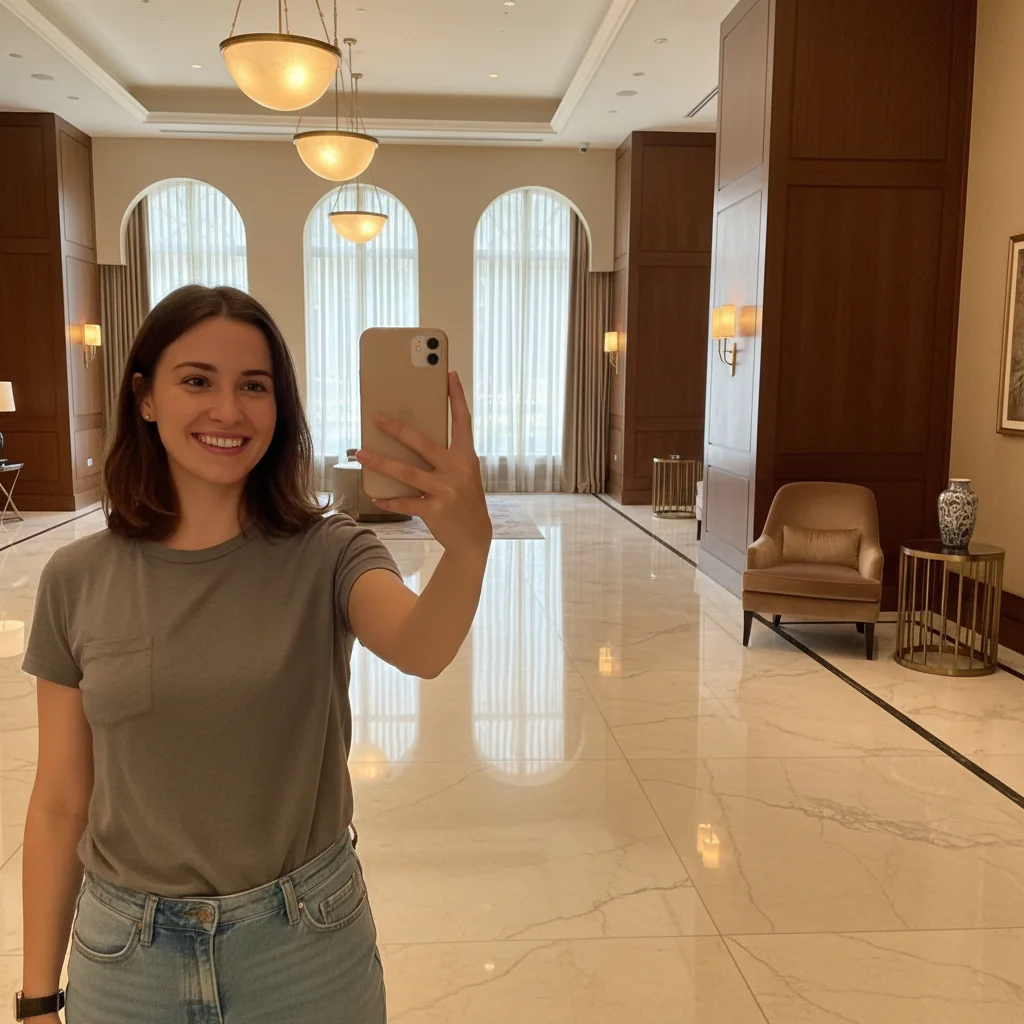
Solo selfie in a hotel lobby before the celebrity prank edit
Before
β†’
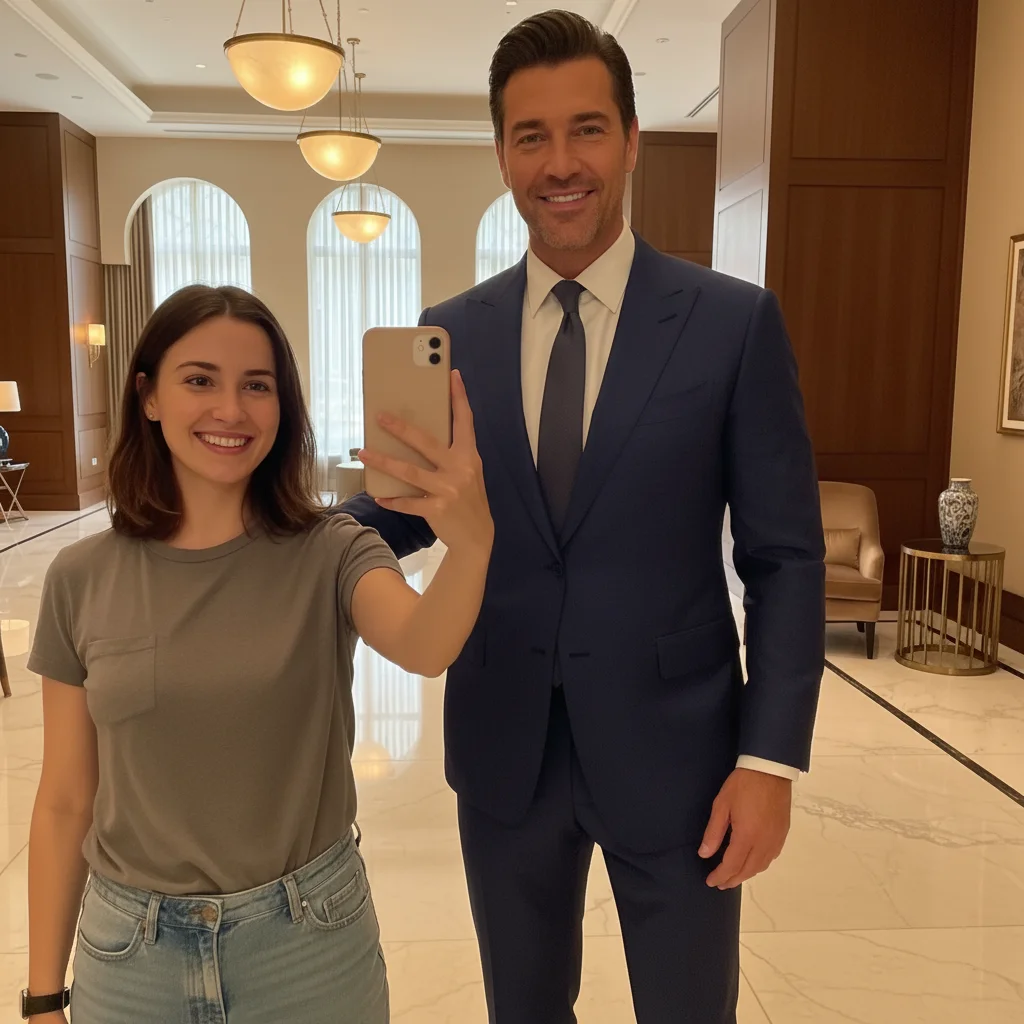
Same selfie with a tall, suited famous-looking man added beside the person
After

Fake Celebrity Selfie Prank

Upload photo to create fake celebrity selfie

Free β€’ Results in 30 seconds β€’ No signup

Release to upload

FreeNo signupNo watermark

1 free edit·then from $1.99

Popular use cases:
  • fake celebrity selfie prank
  • fake celebrity encounter photo
  • AI celebrity photo generator
  • add famous person to photo
  • celebrity selfie prank april fools
  • make it look like I met a celebrity
  • fake famous person selfie free

Cost
Free No signup required
Time
Instant results in 15-30 seconds
Works on
Any device - browser, phone, tablet, desktop
Powered by
AI-powered photo editing
Scenario Prompt Time
Classic famous person selfie Add a tall suited man beside me who looks unmistakably famous, arm around my shoulder 30s
Glamorous woman encounter Add a glamorous woman in designer sunglasses standing beside me, posing for the photo 30s
Sports star vibes Add a huge athletic man in a team tracksuit towering beside me, grinning at the camera 30s
Security detail prank Add two large men in dark suits with earpieces flanking me on both sides, scanning the crowd 15s

How it works

  1. Upload your photo

    Drop in a selfie or any photo where you want to add someone famous-looking. It works best with a clear shot of yourself with some space beside you β€” a hotel lobby, a restaurant, an airport terminal, or any location that feels plausibly star-studded.

    Expect: Upload takes a few seconds. The edit completes in 20-40 seconds.
  2. Describe the famous-looking person

    Type a description of who you want standing beside you. Focus on their look and vibe rather than a real person's name β€” 'a tall man in a tailored black suit with a confident smile and a security earpiece' or 'a glamorous woman in oversized sunglasses and designer clothes.' The AI generates a convincing-looking person; the more specific you are, the better the result.

    Tip: Add context about where they're standing, whether they have an arm around you, and what they're looking at. 'Standing beside me with their arm around my shoulder, smiling at the camera' looks far more natural than just a person standing nearby.

    Copy one of these to get started:

    Classic 'ran into someone famous' selfie Add a tall, broad-shouldered man in an expensive tailored navy suit standing to my right with his arm around my shoulder, smiling confidently at the camera β€” he looks like someone everyone would recognize
    Glamorous woman celebrity encounter Add a tall, elegant woman in oversized designer sunglasses and a white blazer standing beside me, smiling and posing β€” she has an unmistakably famous quality about her, like she just stepped off a red carpet
    Athlete or sports star vibes Add an enormous, athletic man in a team tracksuit standing beside me with his hand on my shoulder β€” he's at least 6 inches taller than me, built like a professional athlete, grinning at the camera
    Suited-up A-lister at an event Add a well-dressed man in a perfectly fitted black tuxedo standing beside me, one arm around my shoulder, giving a practiced celebrity smile β€” he looks like he belongs on a magazine cover
    4 more prompts
    Pop star energy Add a young woman with dramatic hair and stage-ready makeup standing beside me in a sparkly outfit, grinning and pointing finger-guns at the camera β€” she radiates pop star energy
    Mystery bodyguard crew Add two large men in dark suits with security earpieces flanking me on either side, looking serious and scanning the crowd β€” make it look like I'm the one being protected
    Airport terminal celebrity sighting Add a casually dressed famous-looking man standing behind me in the airport terminal β€” baseball cap, designer hoodie, sunglasses pushed up on his head β€” looking slightly like he's trying not to be noticed
    Reluctant fan photo Add a tall, famous-looking man in a casual outfit standing beside me with a polite but slightly tired smile β€” the kind of expression that says 'I take a hundred of these a day but I'm still being gracious'
  3. Send it

    Check that the lighting on the added person matches yours and the proportions look right. Download your watermark-free photo and drop it in the group chat with 'you'll never believe who I just ran into.' Let them guess for a while before coming clean.

Try it free ↓

Fake Celebrity Selfie Prank

Upload photo to create fake celebrity selfie

Free β€’ Results in 30 seconds β€’ No signup

Release to upload

Free β€’ No signup

See it in action

Solo selfie in a hotel lobby before the celebrity prank edit
Before
->
Same selfie with a tall, suited famous-looking man added beside the person
After

Hotel lobby celebrity sighting

A solo selfie in a hotel lobby, edited to add a tall, suited famous-looking man beside the person β€” convincing enough to set off a round of 'wait, who IS that' in the group chat.

Prompt: Add a tall, broad-shouldered man in an expensive tailored navy suit standing to my right with his arm around my shoulder, smiling confidently at the camera β€” he looks like someone everyone would recognize
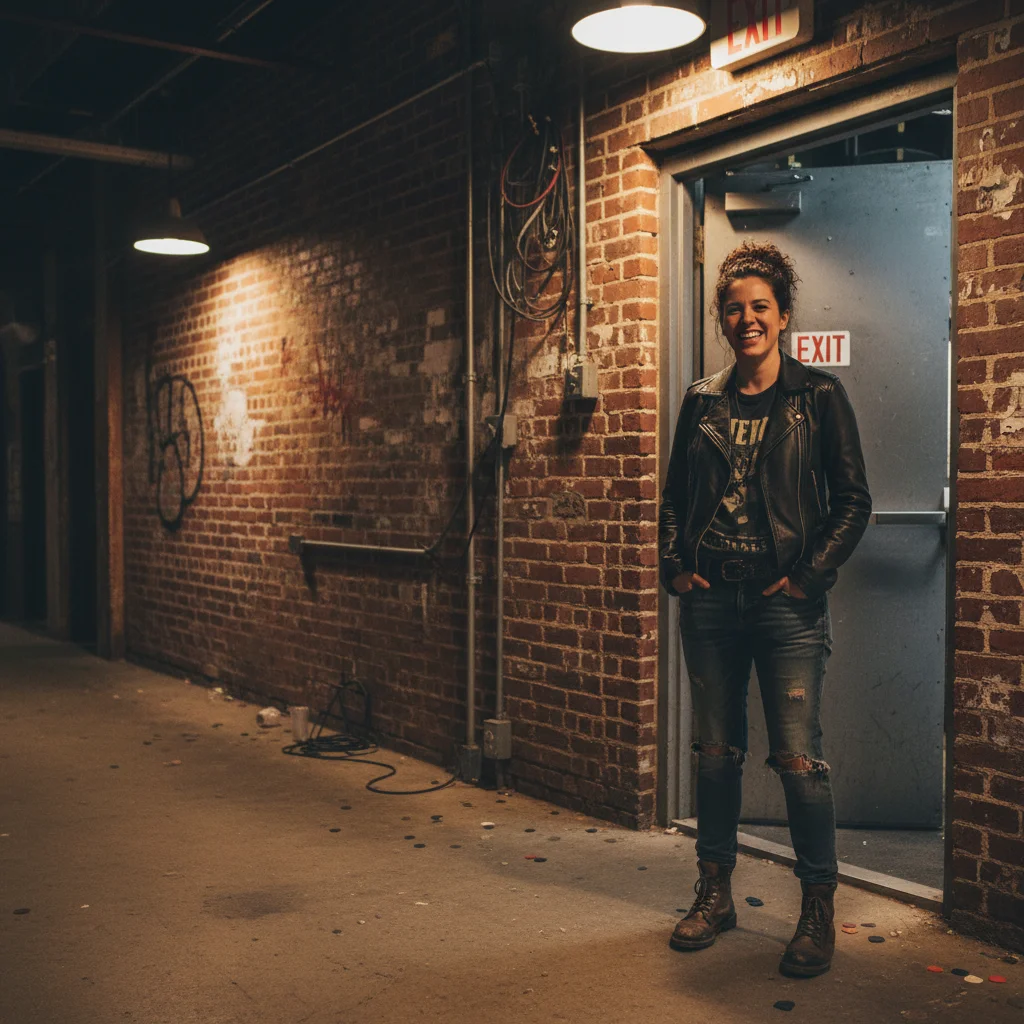
Person alone near a venue exit before the celebrity prank edit
Before
->
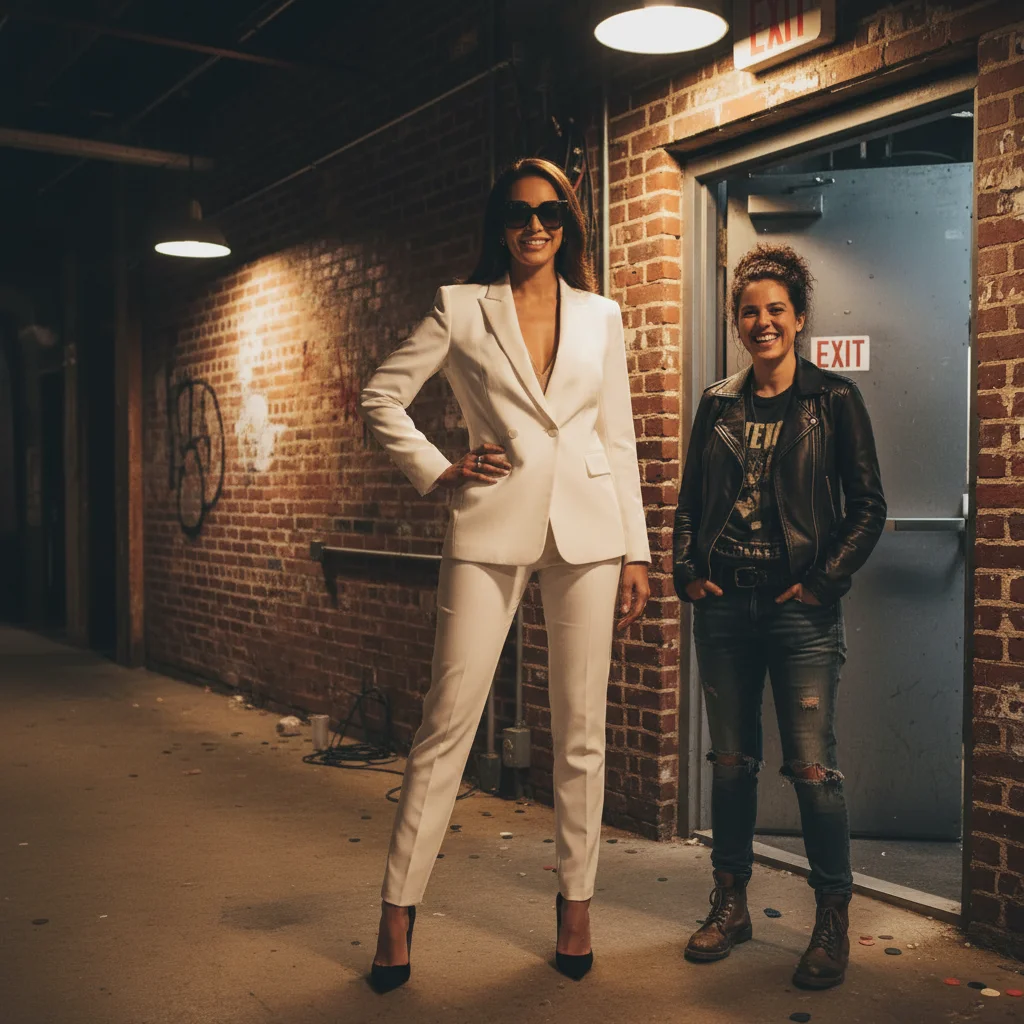
Same photo with a glamorous famous-looking woman added beside them
After

Backstage encounter vibes

A person at a venue exit, edited to add a glamorous woman in designer sunglasses beside them β€” looks like a chance encounter that definitely happened.

Prompt: Add a tall, elegant woman in oversized designer sunglasses and a white blazer standing beside me, smiling and posing β€” she has an unmistakably famous quality about her

If something looks off

The added person looks pasted in rather than really there

Why: Lighting or shadow direction between you and the added person doesn't match.

Try: Add 'lit by the same warm overhead lighting as me, casting a matching shadow to my left' β€” describe the actual lighting in your photo

Tip: Photos taken indoors with consistent overhead light produce the most natural-looking additions. Harsh outdoor backlight is the hardest to match.

The famous-looking person's face doesn't look famous enough

Why: Generic descriptions produce generic-looking results β€” you need to describe the qualities that make someone look notable.

Try: Try 'strong jaw, immaculate grooming, expensive haircut, the kind of easy confidence that comes from being recognized every day' β€” lean into the celebrity 'look' rather than specific features

Tip: Describing status markers (tailored clothes, good posture, practiced smile) tends to produce a more convincing 'famous person' impression than describing physical features.

The added person is the wrong size relative to me

Why: The AI estimated height and distance without enough context.

Try: Add 'standing shoulder to shoulder with me at the same depth in the photo, approximately 4 inches taller' to clarify scale and distance

Tip: Include a rough height comparison in your prompt β€” it dramatically improves the natural proportions of the result.

The photo looks convincing but the location feels wrong

Why: The background doesn't match where you'd plausibly encounter someone famous.

Try: Describe the background too: 'behind us is the lobby of a luxury hotel with marble columns' β€” give the AI a full scene to work with

Tip: If you're uploading a selfie taken somewhere mundane, pick a scenario that fits the location. An airport terminal, a hotel lobby, or a restaurant all work. Your couch is harder to sell.

It looks realistic but my friends aren't buying it

Why: The image is convincing but the framing doesn't sell the story.

Try: The photo is fine β€” work on the caption. Drop it into the chat with the vaguest possible opener: 'ok so this just happened' or 'I can't even explain right now'

Tip: A low-key caption sells a celebrity encounter better than an excited one. Real famous-person encounters are often described in a stunned, almost matter-of-fact tone.

Quick answers

Do I need to mark areas in the photo before describing what I want?

No β€” just describe the person and where they should be standing ('to my right,' 'behind me,' 'beside me with an arm around my shoulder') and the AI places them naturally. If your photo has a specific spot you want them in, you can tap to place a marker there before running your prompt for extra precision.

Is this free?

Yes. EditThisPic gives you 1 free edit per week with no account needed. If you want to test a few versions before sending the most convincing one, credit packs start at $1.99.

Will it look realistic enough to fool my friends?

For most people sending to a group chat on a phone screen β€” yes. The AI matches the lighting and perspective of your original photo and generates a person who looks naturally placed in the scene. The most convincing results come from well-lit photos with clear space beside you. On a small phone screen, it takes a close look to spot the difference.

Can I add a specific celebrity like a real actor or musician?

EditThisPic won't generate recognizable likenesses of specific real people. Instead, describe the type of person β€” 'a tall man who looks like an action movie star' or 'a woman who looks like she just stepped off a red carpet' β€” and the AI generates someone with that famous-person energy. The ambiguity actually helps: your friends will argue about who it is, which is half the fun.

What kind of selfie works best?

Any photo where there's clear space beside or around you. Good lighting helps β€” selfies taken in well-lit lobbies, restaurants, or event venues work better than dimly lit or busy backgrounds. The more space you have next to you, the more naturally the AI can place the added person.

Will there be a watermark on the photo?

No. EditThisPic never adds a watermark. The photo you download is clean and ready to drop in the group chat with no badge or logo that gives away the tool.

Is it safe to use? Does it store my photos?

Your uploaded photo is processed to generate the edit and is not stored long-term. No account is needed, so there's no profile or history tied to your photo. See the EditThisPic privacy policy for full details.

How is this different from a celebrity face swap app?

Face swap apps put a specific celebrity's face onto someone else's body. EditThisPic generates a brand-new convincing-looking person and adds them to your actual photo β€” they're placed in the scene, not just swapped onto someone. The result is a photo that looks like you genuinely stood next to someone famous, not a filter effect.

How much does EditThisPic cost?

You get 1 free edit per week β€” no account needed. After that, credit packs start at $1.99 for 3 edits. Monthly plans start at $4.99/mo for 15 edits with unused credits rolling over. All edits are full resolution with no watermark.

Ready to make your celebrity encounter?

Free to try. No signup required.

1 free edit included·Credit packs from $1.99