Free β€’ No signup Create Breaking news TV screenshot with your face Β· Free

AI Breaking News Photo Prank

Upload any portrait and the AI transforms it into a live TV breaking news screenshot β€” complete with a bold headline, scrolling news ticker, channel logo, and lower-third chyron. Perfect for sending to that one friend who needs to go viral.

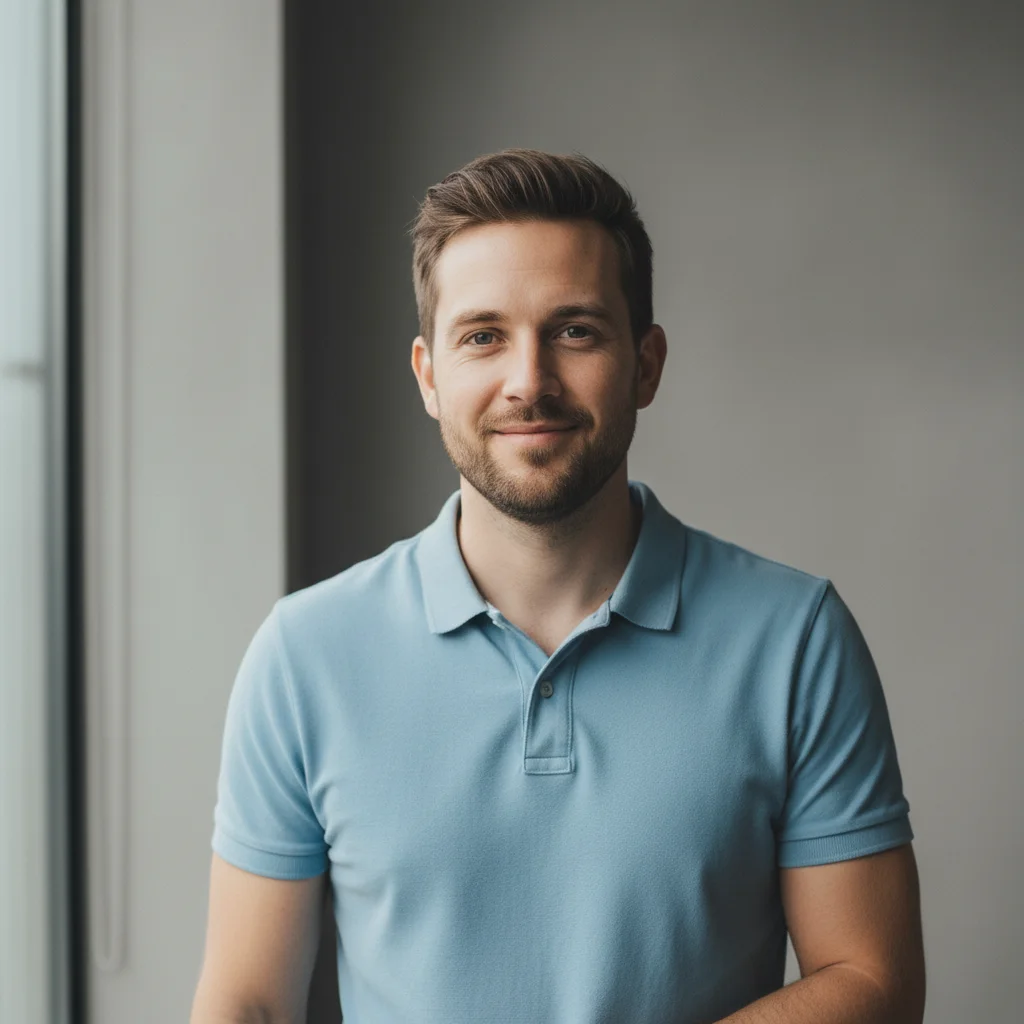
Plain portrait of a smiling man in a blue polo shirt
Before
β†’
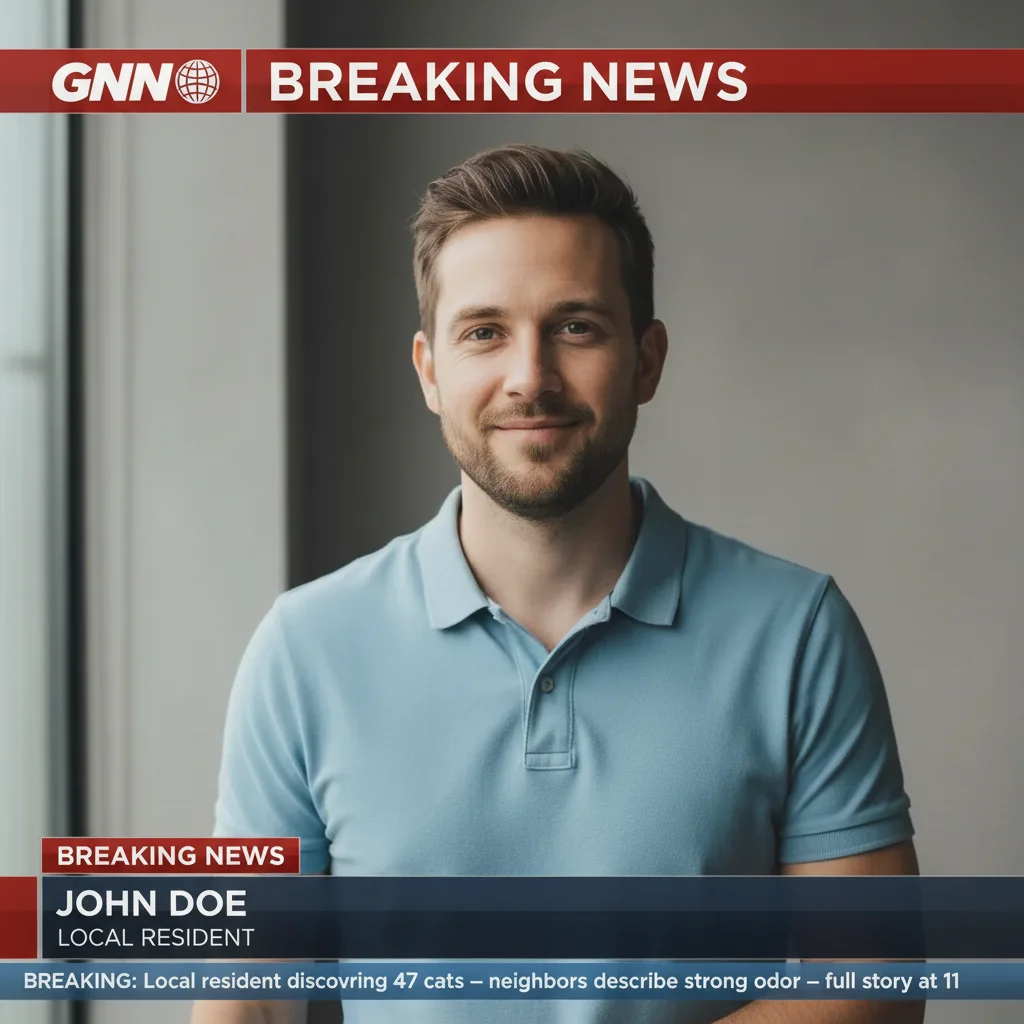
Same man's portrait transformed into a GNN breaking news broadcast with ticker and chyron
After

AI Breaking News Photo Prank

Upload photo to create breaking news TV screenshot with your face

Free β€’ Results in 30 seconds β€’ No signup

Release to upload

FreeNo signupNo watermark

1 free edit·then from $1.99

Popular use cases:
  • breaking news prank photos
  • fake news broadcast generator
  • april fools photo prank
  • funny news screenshot maker
  • fake TV news photo editor
  • news chyron prank tool
  • put friend on news broadcast
  • fake cable news screenshot

Cost
Free No signup required
Time
Instant results in 15-30 seconds
Works on
Any device - browser, phone, tablet, desktop
Powered by
AI-powered photo editing
Scenario Prompt Time
Cable news (CNN-style) BREAKING NEWS banner, red and white graphic style, scrolling ticker, lower-third chyron with name and title, fictional cable channel logo 15s
Local news (slightly cheesy) Local news aesthetic, bright blue and yellow graphics, 'CBS 12 Local News' logo, community story headline, ticker with neighborhood details 15s
International broadcast (BBC-style) Serious BBC Global aesthetic, dark blue and white graphics, formal chyron, grave international incident headline about something trivial 30s
Sports news alert ESPN-style red and white alert graphics, 'BREAKING' banner, sports network logo, sports scandal headline about something petty 30s

How it works

  1. Upload your photo

    Upload a clear portrait photo of the person you want to prank β€” your friend, partner, coworker, or yourself. A photo where they're looking straight at the camera works best since the AI uses their face as the anchor for the news broadcast frame.

    Expect: Upload takes a second. Any common photo format works. The clearer the face, the more realistic the result.
  2. Describe your breaking news story

    Type what you want the news story to say. Include the channel name, the headline, the ticker text, and the chyron label for the person. The more specific and ridiculous the better β€” "BREAKING: Local woman hoards 47 cats, city declares emergency" lands harder than a vague headline.

    Tip: Use a plausible but slightly absurd headline β€” something that could theoretically be real is funnier than pure gibberish. Give the channel a convincing fake name like 'GNN' or 'Channel 7 Action News'.

    Copy one of these to get started:

    Cat hoarder emergency Transform this photo into a live breaking news TV screenshot. Add a bold red BREAKING NEWS banner at the top. Channel logo in the top-left corner that says 'GNN' with a globe icon. Lower-third chyron at the bottom with the person's name and title 'Local Resident'. News ticker scrolling across the bottom: 'BREAKING: Local resident discovered hoarding 47 cats β€” neighbors describe strong odor β€” full story at 11'. Make it look like a real cable news broadcast mid-segment.
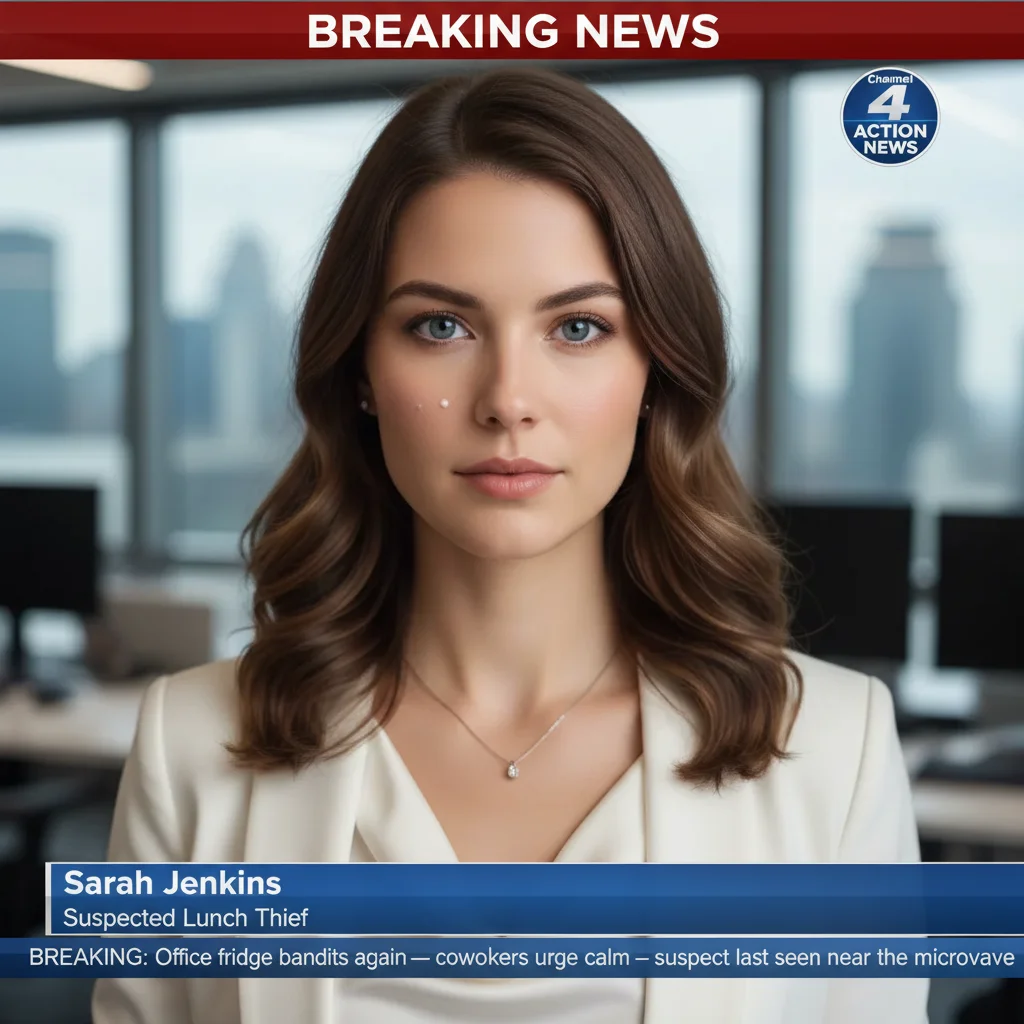
    Wanted for eating coworker's lunch Make this photo look like a breaking news broadcast. Add a red BREAKING NEWS banner, a channel logo reading 'Channel 4 Action News', and a lower-third chyron with the subject's name and label 'Suspected Lunch Thief'. Scrolling ticker text: 'BREAKING: Office fridge bandit strikes again β€” coworkers urge calm β€” suspect last seen near the microwave'. Use a realistic TV news graphic style with blue and white news bars.
    Escaped from family dinner Transform this portrait into a live TV breaking news screenshot. Add a BREAKING NEWS banner at the top in red. Create a fictional local news channel logo that says 'NewsFirst 9'. Lower-third chyron with subject's name and the label 'At Large'. Scrolling news ticker: 'BREAKING: Local man evades family holiday dinner for third consecutive year β€” relatives describe him as charming but unreliable'. Realistic broadcast style with urgent graphic treatment.
    Viral for the wrong reason Make this photo look exactly like a cable news breaking news broadcast. Add a large BREAKING banner in bold red at the top with a pulsing dot graphic. Channel logo reading 'WNN World News Network' in the corner. A lower-third chyron at the bottom with the person's name and the descriptor 'Going Viral'. News ticker scrolling below: 'BREAKING: Area woman goes viral after confidently mispronouncing the word quinoa for five years β€” the internet reacts'. Keep the TV graphic style realistic and polished.
    3 more prompts
    Neighborhood watch hero Transform this into a local TV news breaking news screenshot. Add a red BREAKING NEWS banner. Create a local channel logo saying 'CBS 12 Local News'. Lower-third chyron with the subject's name and label 'Community Hero'. News ticker at the bottom: 'BREAKING: Neighborhood watch captain reports suspicious squirrel activity β€” calls for immediate HOA emergency meeting β€” full details ahead'. Make it look like a real local news broadcast, slightly lower budget than cable.
    Sports scandal edition Make this photo look like a sports news breaking news broadcast. Add a BREAKING banner in bold red. Create a sports network logo that says 'ESPN ALERT' style in the corner. Lower-third chyron with subject's name and the label 'Under Investigation'. Scrolling ticker: 'BREAKING: Local fantasy football manager accused of trash talk exceeding league guidelines β€” commissioner to hold press conference β€” sources say he was offside'. Use bright ESPN-style graphics in red and white.
    International incident Transform this photo into a dramatic international news breaking alert. Add a large BREAKING NEWS banner at the top. Channel logo reading 'BBC Global' style in the corner. Lower-third chyron with subject's name and label 'Diplomat'. Scrolling ticker: 'BREAKING: Senior official confiscates last slice of birthday cake at office party β€” triggering walkout β€” UN monitoring situation'. Make it look very serious, like genuine international news coverage β€” that contrast is the joke.
  3. Send it

    Download the result and drop it in the group chat, text it directly to your target, or post it with a deadpan caption. Works best when sent with zero context and a straight face.

Try it free ↓

AI Breaking News Photo Prank

Upload photo to create breaking news TV screenshot with your face

Free β€’ Results in 30 seconds β€’ No signup

Release to upload

Free β€’ No signup

See it in action

Plain portrait of a smiling man in a blue polo shirt
Before
->
Same man's portrait transformed into a GNN breaking news broadcast with ticker and chyron
After

The cat hoarder story

A portrait of a smiling man in a blue polo turned into a live GNN broadcast, complete with a BREAKING NEWS banner, scrolling ticker about 47 cats, and a chyron labeling him 'Local Resident'.

Prompt: Transform this photo into a live breaking news TV screenshot. Add a bold red BREAKING NEWS banner at the top. Channel logo 'GNN' with a globe icon top-left. Lower-third chyron with person's name and title 'Local Resident'. Ticker: 'BREAKING: Local resident discovered hoarding 47 cats β€” neighbors describe strong odor β€” full story at 11'. Make it look like a real cable news broadcast mid-segment.
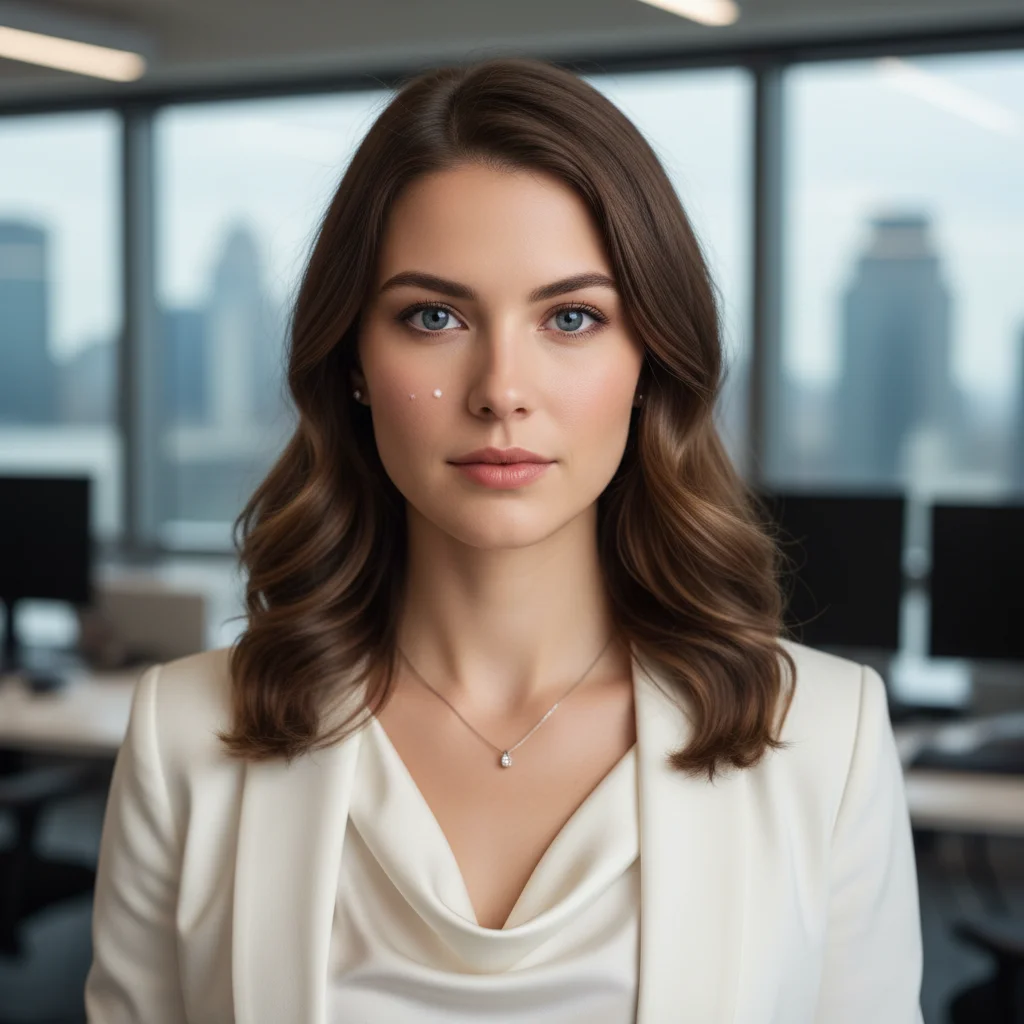
Professional headshot of a woman in a blazer
Before
->
Same photo as a Channel 4 Action News breaking news broadcast with lunch thief chyron
After

The office lunch thief

A coworker's headshot placed inside a Channel 4 Action News breaking news template, with a 'Suspected Lunch Thief' chyron and a scrolling ticker about the office fridge incident.

Prompt: Make this photo look like a breaking news broadcast. Add a red BREAKING NEWS banner, a channel logo reading 'Channel 4 Action News', and a lower-third chyron with subject's name and label 'Suspected Lunch Thief'. Ticker: 'BREAKING: Office fridge bandit strikes again β€” coworkers urge calm β€” suspect last seen near the microwave'. Use a realistic TV news graphic style with blue and white news bars.
Casual photo of a man in a gray suit jacket outdoors
Before
->
Same photo transformed into a BBC Global-style breaking news broadcast about birthday cake
After

The international incident

A casual photo of a man turned into a BBC-style international news alert, with a gravely serious broadcast aesthetic and a ticker about confiscating the last slice of birthday cake.

Prompt: Transform this photo into a dramatic international news breaking alert. Add a large BREAKING NEWS banner at the top. Channel logo reading 'BBC Global' style in the corner. Lower-third chyron with subject's name and label 'Diplomat'. Ticker: 'BREAKING: Senior official confiscates last slice of birthday cake at office party β€” triggering walkout β€” UN monitoring situation'. Make it look very serious.

If something looks off

The news graphics look generic or low-detail

Why: Vague prompts produce vague results. If you don't specify the channel name, colors, and ticker text precisely, the AI makes generic choices.

Try: Retry with more detail: 'Add a red BREAKING NEWS banner at the top, a fictional channel logo reading [specific name] in the top-left corner, a lower-third chyron with the person's name and label [specific title], and a scrolling ticker at the bottom reading exactly: [your specific ticker text]. Mimic the graphic style of real cable news broadcasts.'

Tip: Name the channel, specify the color scheme, and write the exact ticker text β€” don't leave any of these to chance.

The person's face is too small or barely visible in the result

Why: The AI may have zoomed out too far to fit the news graphics, shrinking the subject.

Try: Try: 'Keep the subject's face large and prominent in the frame, as if they're being interviewed live on camera. The news graphics should overlay the photo without obscuring their face β€” place the BREAKING NEWS banner at the top and the chyron at the bottom edge.'

Tip: Starting with a tight portrait or headshot (face filling most of the frame) gives the AI less room to shrink the subject.

The ticker text isn't what I specified

Why: Long, specific ticker text can get paraphrased or cut. The AI interprets intent rather than copying verbatim.

Try: Put the exact ticker text in quotes: 'The scrolling ticker must read exactly: "[your text here]" β€” do not change the wording.'

Tip: Keep the ticker to under 15 words for best accuracy. Longer tickers are more likely to get reworded.

It looks like a graphic overlay, not a real broadcast

Why: The result may lack the depth and lighting cues that make broadcast graphics feel embedded in the scene.

Try: Try: 'Make the news broadcast graphics look like they are actually displayed on a live TV screen β€” add subtle screen glow, slight scan lines, and integrate the chyron and ticker as if they are part of a live broadcast feed, not a flat overlay.'

Tip: Adding 'live broadcast TV aesthetic with slight screen grain' to your prompt helps the AI commit to the visual style.

The channel logo looks blurry or unprofessional

Why: Abstract logo descriptions give the AI too much latitude. Very specific instructions produce sharper results.

Try: Simplify the logo ask: 'Add a clean, professional channel logo in the top corner that reads [name] in bold white text inside a colored box β€” keep it simple, like a real news network bug.'

Tip: Real news network logos (the 'bug' in the corner) are simple β€” a short name in a colored badge. Don't ask for complex imagery in the logo.

Quick answers

Do I need to mark areas before describing what I want?

No. Just describe the breaking news broadcast you want in the text box β€” the AI reads your description and applies the news graphics to the whole image automatically. You only need to use markers if you want to target a very specific part of the photo, like adjusting just the person's expression while keeping the rest of the frame unchanged.

Is this free?

Yes. EditThisPic gives you 1 free edit per week with no account needed. If you want to run multiple versions of the prank β€” different headlines, different friends β€” you can get more edits starting from $1.99.

Will this look realistic enough to fool someone?

It depends on your prompt and the original photo. With a clear portrait and a detailed, specific prompt (naming the channel, ticker text, and chyron), results are convincingly realistic at a glance. The joke usually lands before anyone inspects it closely β€” which is exactly the point for a prank.

What kind of photo works best?

A clear, well-lit portrait where the subject is looking roughly toward the camera. Headshots and shoulder-up photos work especially well because the face stays large and prominent even after the news graphics are added. Group photos or wide shots can work, but the individual faces will be smaller in the result.

Can I choose which news channel style it uses?

Yes β€” just name it in your prompt. You can request a CNN-style layout, BBC international style, local network aesthetic (slightly lower budget), or a fictional channel with its own name and color scheme. The more specific you are about the visual style, the closer the AI gets to that look.

Is my photo stored or shared anywhere?

No. Your photo is processed to generate the edit and is not stored, shared, or used for training. EditThisPic does not retain uploaded images after your session ends.

Can I customize the headline and ticker text?

Absolutely β€” that is the whole point. Write whatever headline and ticker text you want directly in your prompt. The more specific your copy, the more accurately the AI places it. Put exact text in quotes in your prompt for best results.

How is this different from dedicated fake news generator apps?

Most dedicated tools like Media.io's fake news generator use rigid templates β€” you fill in text fields and get a fixed layout with no flexibility. EditThisPic's AI lets you describe any broadcast style, any channel aesthetic, any headline tone, and adjust the composition freely. You're not limited to one template.

How much does EditThisPic cost?

You get 1 free edit per week β€” no account needed. After that, credit packs start at $1.99 for 3 edits. Monthly plans start at $4.99/mo for 15 edits with unused credits rolling over. All edits are full resolution with no watermark.

Ready to make your friend go viral?

Free to try. No signup required.

1 free edit included·Credit packs from $1.99