Free β€’ No signup Put A face on a breaking news broadcast Β· Free

Put Your Face on Breaking News

Upload a photo of someone and the AI composites their face directly into a live breaking news broadcast β€” their face on screen, a BREAKING chyron below them, a scrolling ticker at the bottom. It's their face on the news, and it looks like a real screenshot.

Professional headshot of a man against a plain gray background
Before
β†’
Same man's face composited into a cable news breaking news broadcast with chyron and scrolling ticker
After

Put Your Face on Breaking News

Upload photo to put a face on a breaking news broadcast

Free β€’ Results in 30 seconds β€’ No signup

Release to upload

FreeNo signupNo watermark

1 free edit·then from $1.99

Popular use cases:
  • face on breaking news prank
  • fake news broadcast photo
  • news chyron face composite
  • put face on TV news
  • breaking news screenshot prank
  • news lower third face editor
  • group chat prank ideas
  • fake cable news screenshot

Cost
Free No signup required
Time
Instant results in 15-30 seconds
Works on
Any device - browser, phone, tablet, desktop
Powered by
AI-powered photo editing
Scenario Prompt Time
Cable news suspect BREAKING banner, chyron with name and absurd crime, scrolling ticker with 'developing' updates 30s
Local news segment Smaller market aesthetic, 'Area resident' in chyron, softer color palette than cable 30s
BBC international Dark formal BBC aesthetic, white lower third, deadpan ticker content 30s
ESPN sports breaking Orange and black BREAKING banner, sports free-agent chyron format, gym/fantasy stats in ticker 30s

How it works

  1. Upload your photo

    Upload a clear portrait of the person you want to put on the news β€” a selfie, a profile photo, a casual headshot, whatever you have. The AI composites their face into the broadcast scene, so a photo where their face is clearly visible works best. Front-facing is ideal but not required.

    Expect: Takes a second to upload. Any photo format works. The AI needs a reasonably clear view of the face to place it convincingly into the broadcast.
  2. Describe the breaking news scene

    Type a prompt telling the AI exactly what kind of broadcast to composite the face into. Describe the chyron text β€” that's the lower-third banner with their name and a 'crime' or headline. Add a scrolling ticker at the bottom with related nonsense. Specify the network aesthetic if you want (cable news, local news, BBC-style). The chyron text is where the joke lives, so make it specific.

    Tip: Write the chyron text like a real news lower-third: 'JOHN SMITH β€” SUSPECTED OF EATING COWORKER'S LUNCH FOR 3RD TIME THIS WEEK'. Add a ticker that says 'DEVELOPING: Office refrigerator still missing 2 yogurts'. The more on-brand with real news formatting, the funnier.

    Copy one of these to get started:

    Classic cable news suspect shot Composite this person's face into a live cable news broadcast. They appear as a headshot on the right side of the screen. Lower-third chyron reads: 'JAKE MORRISON β€” PERSON OF INTEREST IN ONGOING CHEESE THEFT INVESTIGATION'. Ticker at the bottom scrolls: 'DEVELOPING: Three refrigerators ransacked at local office... employees describe 'a distinctive smell'... full story at 11'. Cable news blue and red color scheme, BREAKING NEWS banner at the top left.
    Local evening news live-shot framing Put this person's face on screen as the subject of a local TV news segment. They appear as a live-shot image on screen while a news anchor desk is visible. Lower-third banner reads: 'SARAH JENKINS β€” NEIGHBORHOOD RESIDENT UNDER SCRUTINY FOR SUSPICIOUS PLANT WATERING SCHEDULE'. Bottom ticker: 'DEVELOPING: Neighbors report 'too cheerful' wave every morning... investigation ongoing'. Local news lower-budget aesthetic, 5pm broadcast look.
    Breaking news wanted-style broadcast Composite this person as a BREAKING NEWS subject. Large headshot taking up most of the right side of the screen against a red and black cable news background. Bold chyron: 'BREAKING: MICHAEL CHEN β€” AUTHORITIES SEEKING INFORMATION'. Sub-chyron underneath: 'Allegedly consumed colleague's clearly-labeled meal prep for 'the third consecutive Monday''. Scrolling ticker: 'Tips can be submitted anonymously... office fridge now under 24-hour surveillance'.
    International BBC-style broadcast Composite this face into a BBC World News broadcast screenshot. Person appears as a headshot on a dark studio background with a BBC-style lower third in white and red: 'DAVID THORNTON | London Correspondent'. Ticker at the bottom reads: 'MARKETS: FTSE +0.3% β€’ UPDATE: Man reportedly still hasn't replied to that email from March β€’ WEATHER: Mild with chance of excuses'. Very formal BBC visual language.
    3 more prompts
    Sports anchor breaking news Composite this person into an ESPN-style breaking news sports broadcast. Large headshot framed in the center with an orange and black 'BREAKING' banner. Chyron reads: 'TYLER BROOKS β€” FREE AGENT | SOURCES: Will not be attending gym despite 'definitely going this week' statement'. Ticker at the bottom: 'UPDATE: Brooks spotted at pizza place on the way to gym... contract talks ongoing'.
    Local news 'community concern' format Composite this face onto a local news broadcast as a community concern story. Headshot in the top-right corner, casual informal framing. Lower-third: 'AMY FOSTER β€” AREA RESIDENT | Asked to explain mystery Tupperware in shared sink'. Ticker: 'Neighbors describe her as 'seemed normal'... HOA meeting called... full details at 6'. Warm local news color palette, less polished than cable news.
    Breaking news birthday tribute Composite this person into a breaking news birthday broadcast. Cable news red and gold color scheme with a 'BREAKING' banner. Chyron reads: 'JESSICA PARK β€” TURNING 30 TODAY | Sources confirm cake has already been eaten before party starts'. Ticker at the bottom: 'DEVELOPING: Family gathering at 7pm... investigators note suspicious number of candles... full coverage tonight'. Party balloon graphics subtly in the background.
  3. Send it

    Download the finished broadcast screenshot and send it. Works best as a screenshot forwarded in a group chat with no context, or DM'd directly with 'dude is this you?' The format instantly reads as a real news screenshot on a phone screen.

Try it free ↓

Put Your Face on Breaking News

Upload photo to put a face on a breaking news broadcast

Free β€’ Results in 30 seconds β€’ No signup

Release to upload

Free β€’ No signup

See it in action

Professional headshot of a man against a plain gray background
Before
->
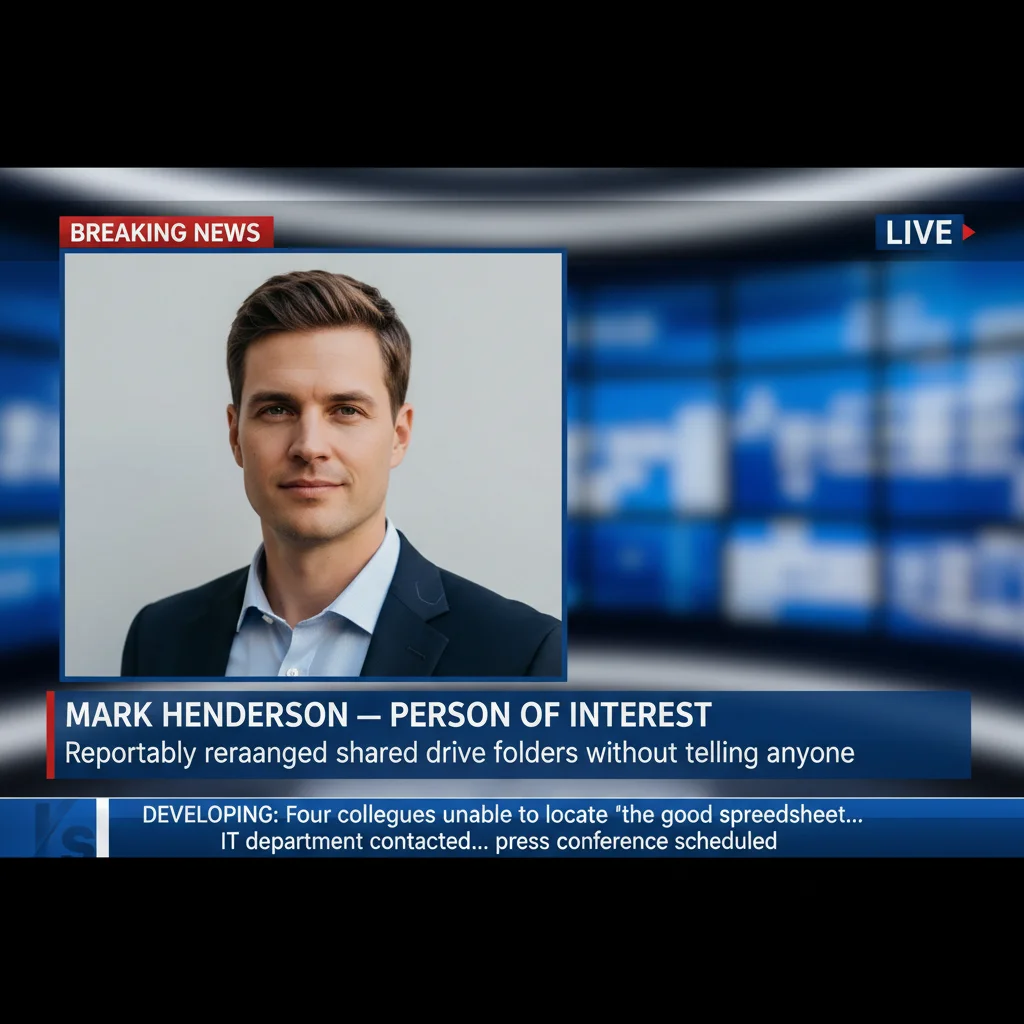
Same man's face composited into a cable news breaking news broadcast with chyron and scrolling ticker
After

Office worker becomes breaking news suspect

A standard LinkedIn-style headshot composited onto a cable news broadcast as the subject of an extremely petty 'developing story.' The chyron and ticker conspire to make a very ordinary person look like they're in serious trouble over something completely ridiculous.

Prompt: Composite this person's face into a live cable news broadcast. Their headshot appears on the right side of the screen. Chyron: 'MARK HENDERSON β€” PERSON OF INTEREST | Reportedly rearranged shared drive folders without telling anyone'. Ticker: 'DEVELOPING: Four colleagues unable to locate 'the good spreadsheet'... IT department contacted... press conference scheduled'. BREAKING NEWS banner top left, cable news blue and white color scheme.
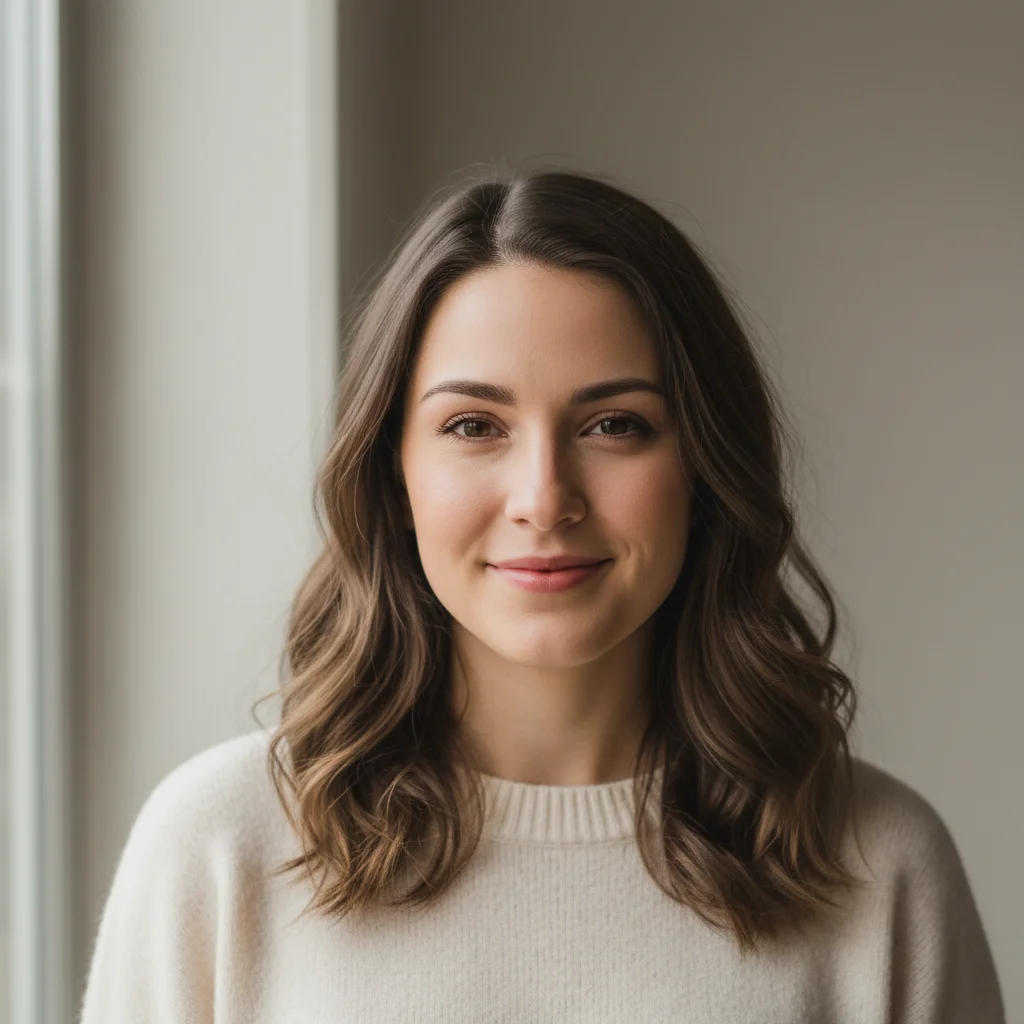
Casual portrait photo of a woman with a relaxed expression
Before
->
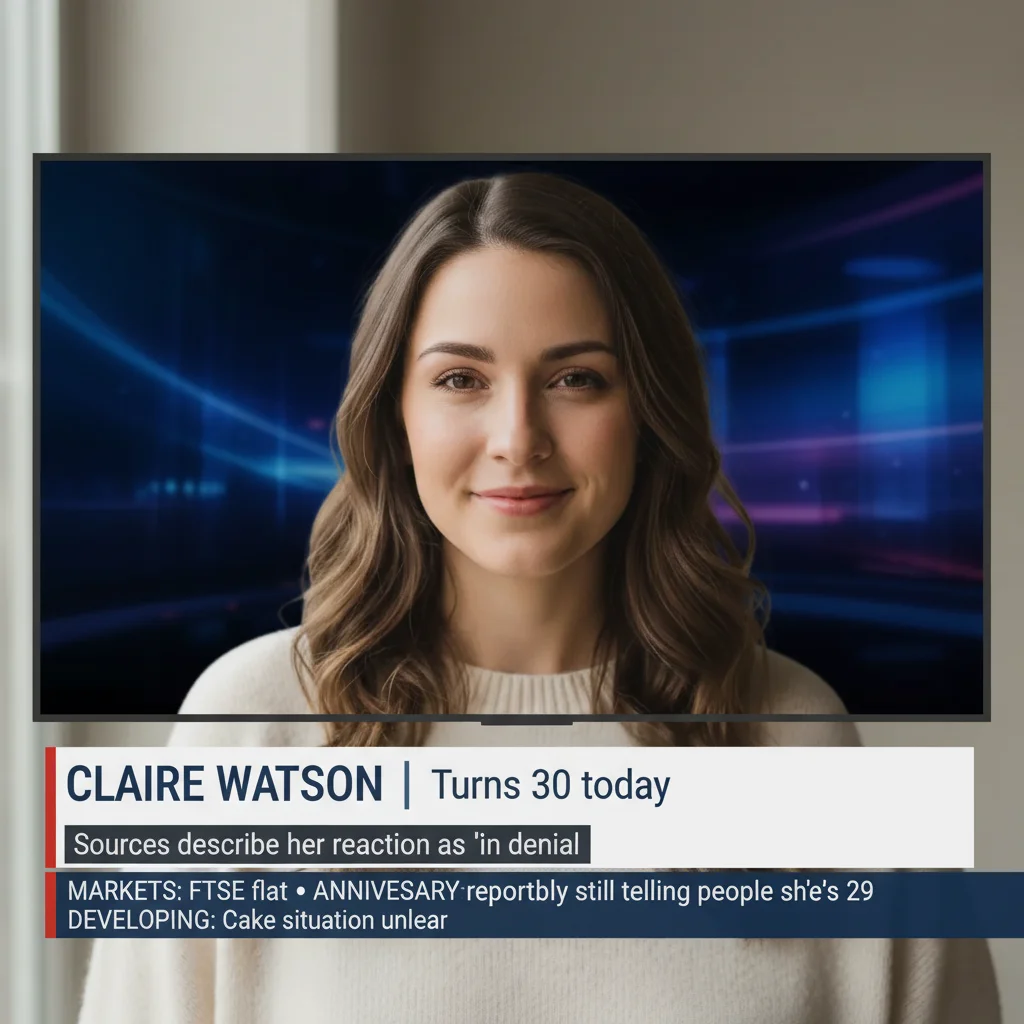
Woman's face composited into a BBC World News broadcast with formal lower-third chyron and absurd birthday-related ticker
After

Birthday prank via fake BBC broadcast

A casual photo of a woman turned into a formal BBC World News segment on the occasion of her 30th birthday. The combination of extremely stiff BBC visual language with completely absurd ticker content makes this one land hard.

Prompt: Composite this person's face into a BBC World News broadcast screenshot. Dark studio backdrop, white BBC-style lower third: 'CLAIRE WATSON | Turns 30 today'. Sub-chyron: 'Sources describe her reaction as 'in denial''. Ticker at bottom: 'MARKETS: FTSE flat β€’ ANNIVERSARY: Watson reportedly still telling people she's 29 β€’ DEVELOPING: Cake situation unclear'.
Casual gym selfie of a man in athletic clothing
Before
->
Man's face composited into an ESPN-style sports breaking news broadcast with orange chyron and ticker about gym attendance
After

ESPN sports news treatment for a non-athlete

A gym selfie turned into a sports breaking news segment about free agency. Using sports broadcast aesthetics to cover a completely non-sporting situation β€” whether someone is going to the gym or not β€” is a reliable format.

Prompt: Composite this person into an ESPN sports breaking news broadcast. Orange and black BREAKING banner at the top. Their headshot centered on screen. Chyron: 'RYAN KELLY β€” UNDECIDED FREE AGENT | 'Will start going to the gym' status unclear heading into Q2'. Ticker: 'SOURCES: Kelly seen at gym parking lot twice in January... no confirmed entries... front office monitoring situation'.

If something looks off

The face looks pasted on rather than naturally composited

Why: The AI needs specific instructions about how the face fits into the broadcast framing β€” whether it's a boxed headshot insert, a full-bleed image, or a picture-in-picture. Without that, it may just place the face awkwardly.

Try: Place this person's face as a framed headshot insert in the top-right corner of the broadcast, with a thin border around the insert box, like a standard live-shot or file-photo insert used on cable news

Tip: Specifying 'framed headshot insert' or 'boxed photo' tells the AI to treat the face as a distinct broadcast element rather than trying to blend it into the scene.

The chyron text is blurry or the wrong words appear

Why: AI-generated text in images can blur or drift, especially with long chyron strings. Complex punctuation and dashes can also throw off the rendering.

Try: Bold, clearly legible lower-third chyron text in large white sans-serif font on a dark banner: '[NAME] β€” [HEADLINE]', high contrast, crisp text, not blurry

Tip: Shorter chyron text renders more crisply than long strings. If the exact wording matters, keep the main line under 8 words and put extra detail in the ticker or sub-chyron.

The result looks like a fake graphic rather than a real broadcast screenshot

Why: Real broadcast screenshots have subtle imperfections β€” slight compression artifacts, a not-quite-perfect gradient on banners, the specific color values of each network's brand palette. If the prompt is too generic, the AI produces something that looks like a clip-art version of a news broadcast.

Try: Make this look like an actual screenshot captured from a live television broadcast β€” slight JPEG compression artifacts, the specific muted red of CNN's breaking news bar, not a clean vector graphic

Tip: Asking for 'slight compression artifacts' or 'screenshot quality' signals to the AI that imperfection is intentional and actually improves believability.

The ticker text is missing or only partially visible

Why: The scrolling ticker at the bottom of a broadcast is a small element and the AI may deprioritize it if your prompt focuses entirely on the chyron. It needs its own explicit mention.

Try: Include a scrolling news ticker at the very bottom of the frame with smaller white text on a dark background reading: '[ticker content]'

Tip: Ticker text is the secondary gag β€” it rewards whoever reads the whole screenshot. Describe it explicitly in the prompt rather than assuming it'll show up automatically.

The broadcast looks too professional to be funny β€” the joke needs more absurdity

Why: When the broadcast looks extremely polished and real, viewers may actually be alarmed for a half-second before realizing it's a joke. Sometimes that's the goal, but if you want the joke to land faster, a slightly off-network or local-news aesthetic plays better.

Try: Make this look like a mid-market local TV news broadcast β€” slightly less polished graphics than CNN, smaller market station aesthetic, the specific slightly-garish color scheme of a local 6pm news program

Tip: Local news is recognizable but slightly less threatening than national cable news. Depending on who you're pranking, the 'WKQT 6 NEWS' vibe may land better than 'CNN Breaking News.'

Quick answers

Do I need to mark areas before describing what I want?

No β€” for the breaking news composite, just describe the full scene in your prompt. EditThisPic's AI reads your description and handles the compositing: placing the face into the broadcast frame, adding the chyron, building the ticker. You only need markers if you want to target a very specific region while leaving the rest of the image untouched β€” for this kind of full composite, a detailed text prompt handles everything.

Is this free?

Yes. EditThisPic gives you 1 free edit per week with no account needed β€” no email, no credit card. If you want to try multiple chyron variations or do a few different people, paid packs start at $1.99 for 3 edits.

Will the result look realistic enough to make someone do a double-take?

Usually yes, especially on a phone screen in a messaging app where the screenshot is small and people are scrolling quickly. The key elements that sell it are the chyron (lower-third banner) and the ticker β€” those are what your brain pattern-matches to 'real news broadcast' before it reads the text. Use specific network aesthetics (cable news red-and-blue, ESPN orange) rather than a generic look, and describe the ticker content explicitly in your prompt.

What's the difference between this and the AI breaking news photo prank page?

The ai-breaking-news-photo-prank page focuses on generating the entire news graphic from a concept β€” describing the story, the scene, the broadcast elements all from scratch. This page is specifically about the compositing task: you upload a photo of a real person and the AI places their face into the broadcast as the news subject. If you have a specific person's face you want on the news, use this page. If you're building a news scene from the ground up, use that one.

What kind of photo should I upload?

Any clear photo of the person's face works. A selfie, a LinkedIn headshot, a screenshot from their Instagram β€” anything where the face is visible and reasonably in-focus. Front-facing photos produce the cleanest composite. Photos where the face is partially turned, heavily shadowed, or very small in frame will still work but the composite may look less natural.

Can I write custom chyron text and ticker text?

Yes β€” just include the exact text you want in your prompt. Describe the chyron as: 'lower-third reads: NAME β€” HEADLINE' and the ticker as: 'scrolling ticker text: ...' The more specific the text you provide, the closer the AI will match it. Shorter chyron text renders more crisply than long strings, so keep the main chyron line under 8 words and put extra detail in the ticker.

Is my photo stored or used for anything?

No. EditThisPic processes your photo to generate the edit and doesn't store, sell, or use it for training. Once your session ends, it's gone. No account is created, no data is tied to you.

What are the best situations to use this for?

The format lands best in a few scenarios: group chat pranks where you drop the screenshot with no context and let people figure it out, birthday messages (BREAKING: so-and-so turns 30), or office jokes where the 'crime' on the chyron is something very specific to that person's known behavior. The ESPN sports broadcast variant also works particularly well for gym-skippers, fantasy football rivals, or anyone whose sports takes are embarrassingly wrong.

How much does EditThisPic cost?

You get 1 free edit per week β€” no account needed. After that, credit packs start at $1.99 for 3 edits. Monthly plans start at $4.99/mo for 15 edits with unused credits rolling over. All edits are full resolution with no watermark.

Ready to put someone on breaking news?

Free to try. No signup required.

1 free edit included·Credit packs from $1.99