Free • No signup Apply Vintage filter · Free

AI Vintage Filter

Just describe the vintage style you want and AI applies it instantly.

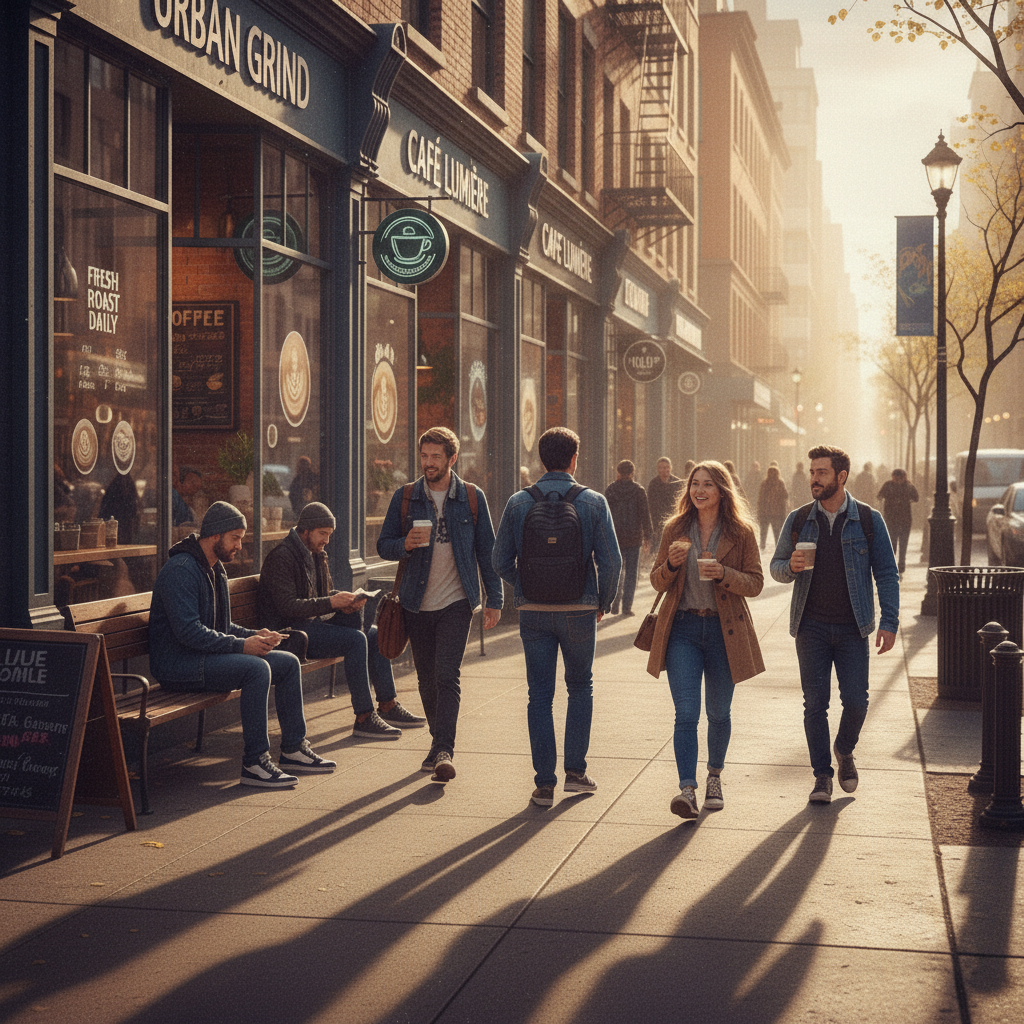
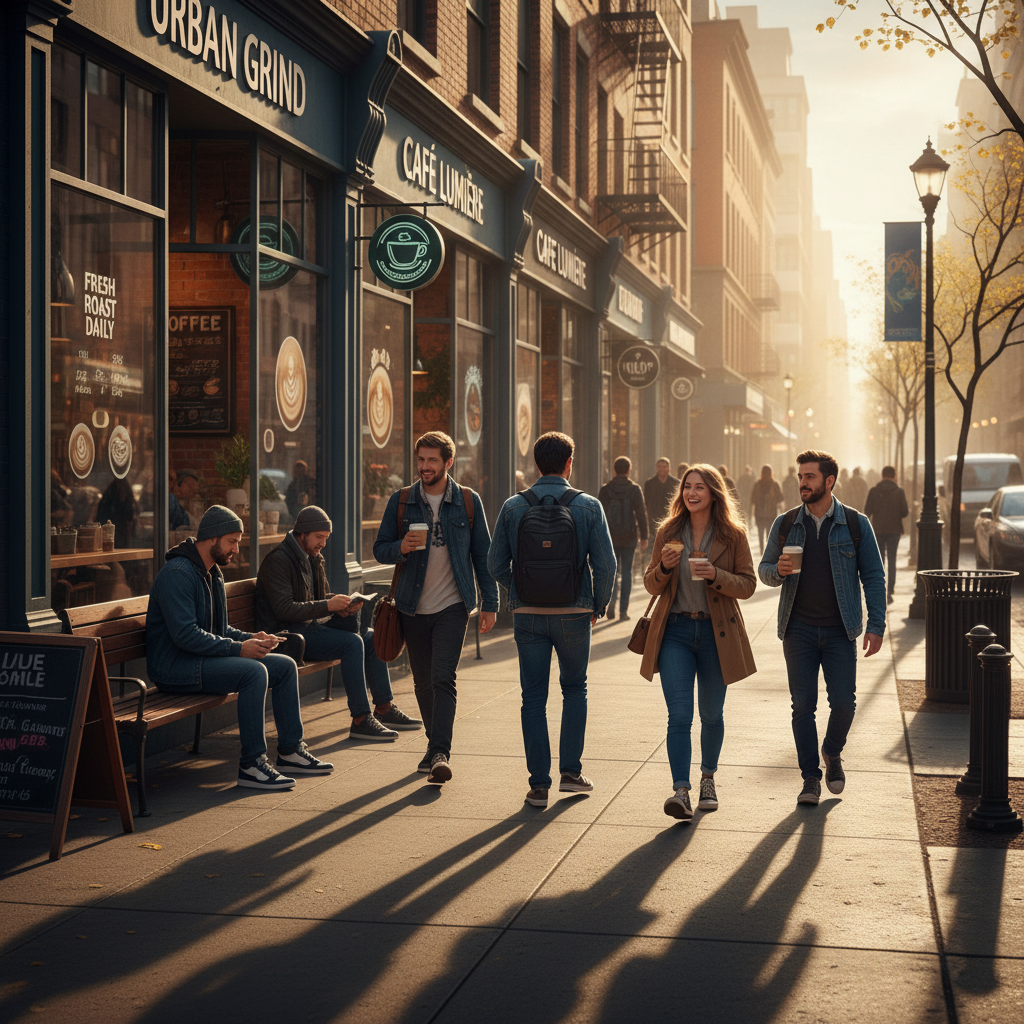
Modern street photo with sharp digital quality
Before
Same photo with warm vintage Kodachrome film aesthetic
After

Apply Vintage Filter to Photo

Drop your photo here

or click to browse

Release to upload

Free • No signup

Advertisement
Popular use cases:
  • social media posts
  • Instagram aesthetics
  • film photography simulation
  • retro branding
  • nostalgia content
  • analog look

Cost
Free No signup required
Time
Instant results in 15-30 seconds
Works on
Any device - browser, phone, tablet, desktop
Powered by
AI-powered photo editing
Scenario Prompt Time
1970s Kodachrome apply vintage 1970s Kodachrome filter with warm golden tones, medium grain, and subtle vignette 20s
Faded Polaroid make it look like a faded Polaroid from the 1980s with soft focus, muted pastel colors, and white borders 20s
Film noir B&W apply grainy black and white film noir style with high contrast and dramatic shadows 20s
Sun-faded 1960s make it look like a sun-faded photograph from the 1960s with yellowed tones and reduced saturation 15s

How it works

  1. Upload your photo

    Drop your digital image into EditThisPic. JPG, PNG, WebP up to 7MB work perfectly. Modern high-resolution photos transform best into vintage aesthetics.

    Expect: Simple filters: 15-30 seconds. Complex period-specific effects with multiple adjustments: may need 2-3 refinements to nail the exact era.
  2. Describe the vintage style you want

    Type your instruction: 'apply 1970s Kodachrome filter with warm tones' or 'make it look like faded Polaroid from the 80s with soft focus.' Be specific about the era, color palette (sepia, faded, warm), grain level, and any characteristic effects like vignetting or light leaks. The AI understands period photography styles.

    Tip: Reference specific film stocks or cameras for authentic results: 'Kodak Portra 400 look' or 'Polaroid SX-70 aesthetic'

    Copy one of these to get started:

    Classic film photography look apply vintage film filter with warm sepia tones, medium grain, and subtle vignette like 1970s Kodachrome
    Faded Polaroid aesthetic make it look like a faded Polaroid from the 1980s with soft focus, washed-out colors, and white borders
    Black and white film noir apply grainy black and white film noir style with high contrast and dramatic shadows like 1940s crime photography
    Sun-faded photo effect make it look like a sun-faded photograph from the 1960s with yellowed tones and reduced saturation
    2 more prompts
    Lomography cross-processed look apply lomography cross-processed filter with shifted colors, high contrast, and heavy vignetting
    Retro instant camera transform to instant camera aesthetic with soft edges, warm vintage tones, and characteristic color shift
  3. Generate and review

    Click Generate and watch the vintage transformation. Check the color grading, grain intensity, and overall period authenticity at full resolution. The AI adjusts colors, adds film grain, applies vignetting, and creates the characteristic look of analog photography.

  4. Refine with markers if needed

    If specific areas need more or less effect (like brightening shadowed areas or intensifying grain in the sky), tap markers on those regions and regenerate. This is optional—most vintage filters work perfectly without markers.

    Tip: Markers are for fine-tuning intensity in specific areas, not required. Try the full-image filter first.
Try it free

Apply Vintage Filter to Photo

Drop your photo here

or click to browse

Release to upload

Free • No signup

"Made my digital photos look like they were shot on film. The grain and color shift are perfect." @filmfanatic

See it in action

Modern street photo with sharp digital quality
Before
->
Same photo with warm vintage Kodachrome film aesthetic
After

Street photography to 1970s film

Modern street photo transformed into warm Kodachrome-era aesthetic with grain and natural color shift.

Prompt: apply vintage 1970s Kodachrome filter with warm golden tones, medium grain, and subtle vignette
Sharp modern portrait
Before
->
Portrait with authentic faded Polaroid look
After

Portrait to faded Polaroid

Contemporary portrait given authentic instant film characteristics with soft focus and color degradation.

Prompt: make it look like a faded Polaroid from the 1980s with soft focus, muted pastel colors, and white borders
Advertisement

If something looks off

Filter looks too strong or overdone

Why: Without specific intensity guidance, the AI applies effects at full strength which can look artificial on some images.

Try: apply subtle vintage filter with light grain and gentle sepia tones

Tip: Use modifiers like 'subtle', 'gentle', 'light' to reduce intensity, or specify percentages: 'with 30% grain'

Colors don't match the era I wanted

Why: Generic terms like 'vintage' can be interpreted in multiple ways since vintage photography spans many decades with different color characteristics.

Try: apply 1960s Kodak Ektachrome filter with saturated warm colors and cyan-blue shadows

Tip: Name the specific decade and film stock: Kodachrome (warm), Ektachrome (saturated), Portra (neutral)

AI changed the wrong area or made unwanted adjustments

Why: The filter applies globally by default. If you want selective application (like vintage sky only), the AI needs guidance on which areas.

Try: Tap markers on the specific area you want filtered (like the sky or background), then regenerate

Tip: Markers tell the AI 'apply the vintage effect only HERE.' Use them for selective filtering.

Grain is too heavy or barely visible

Why: Different film types and shooting conditions produced varying grain levels. Without specification, the AI chooses a default medium grain.

Try: apply vintage filter with fine grain like ISO 100 film or apply heavy grain like pushed ISO 1600 film

Tip: Reference ISO values: low (100-400) = fine grain, high (800-3200) = prominent grain

Quick answers

Do I need to mark areas before applying the vintage filter?

No! Just describe the vintage style you want: 'apply 1970s film filter' or 'make it look like faded Polaroid.' The filter applies to the whole image automatically. Only use markers if you want to apply the effect selectively to specific areas like just the background or sky.

How do I get an authentic film look without it looking fake?

Be specific about the film stock and era. Instead of just 'vintage filter,' try 'apply Kodak Portra 400 look with natural grain' or '1960s Ektachrome with warm saturated colors.' The AI understands these references and creates period-accurate color science. Also use modifiers like 'subtle' or 'gentle' to avoid overdoing it.

Is there a free vintage filter tool that doesn't require signup?

Yes. EditThisPic lets you apply vintage filters with AI for free, no account needed. Just upload your photo, describe the era and aesthetic you want, and download the result. No watermarks.

What's the best free AI tool for vintage photo effects?

EditThisPic's AI understands period-specific photography styles like Kodachrome, Polaroid, and film noir. Instead of generic presets, you describe exactly what you want: era, film stock, grain level, color palette. The AI creates authentic vintage aesthetics that match real analog photography characteristics.

Can I recreate specific film stocks like Kodachrome or Portra?

Yes. Name the film stock in your prompt: 'apply Kodak Kodachrome filter,' 'make it look like Fuji Velvia,' or 'Kodak Portra 400 aesthetic.' The AI recognizes these films and replicates their distinctive color rendering, contrast, and grain patterns.

Ready to apply vintage filters to your photos?

Free to try. No signup required.

Try it free