Free β€’ No signup Create Fake vacation photo Β· Free

Fake Vacation Photo Prank

Upload a photo of yourself at home, tell the AI where you want to be, and your living room selfie becomes a convincing beach shot. Text your friends "Greetings from the Maldives" β€” watch the reactions roll in.

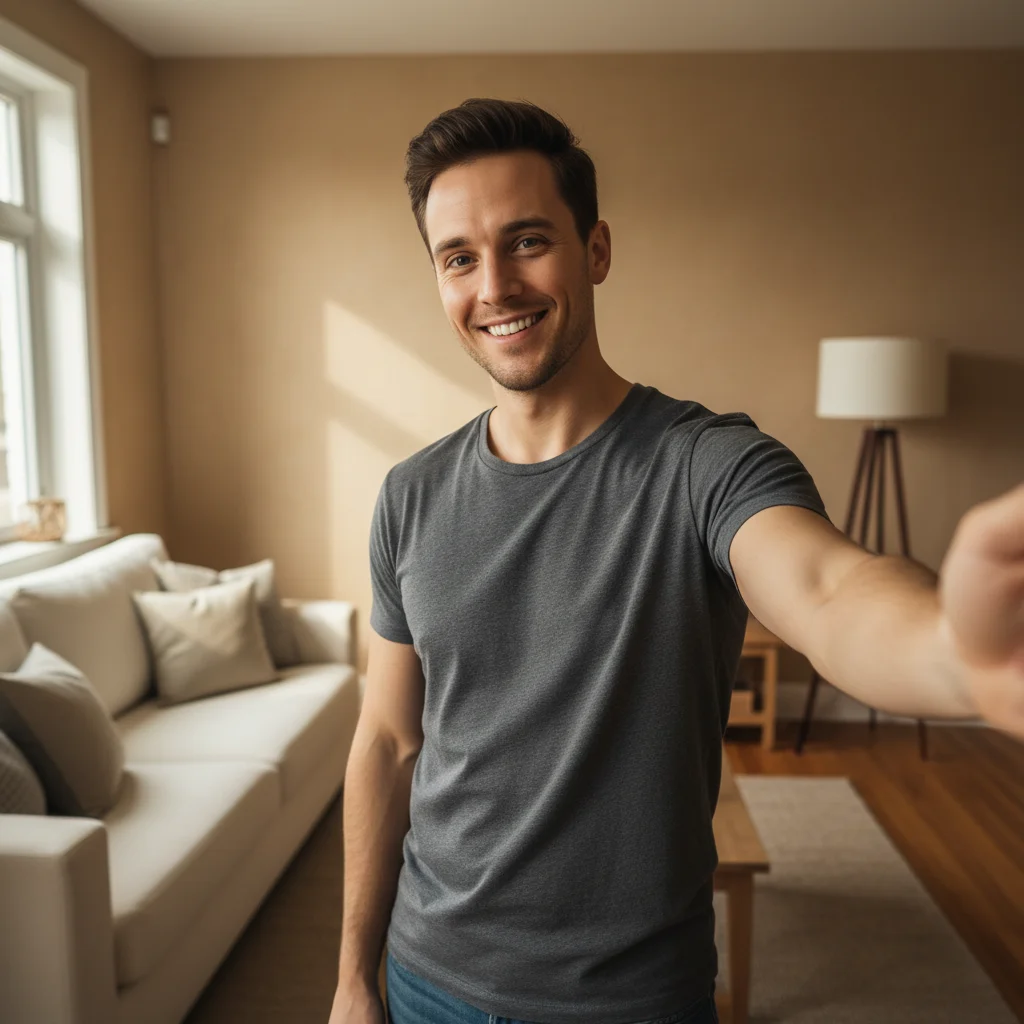
Person taking a selfie in their living room
Before
β†’
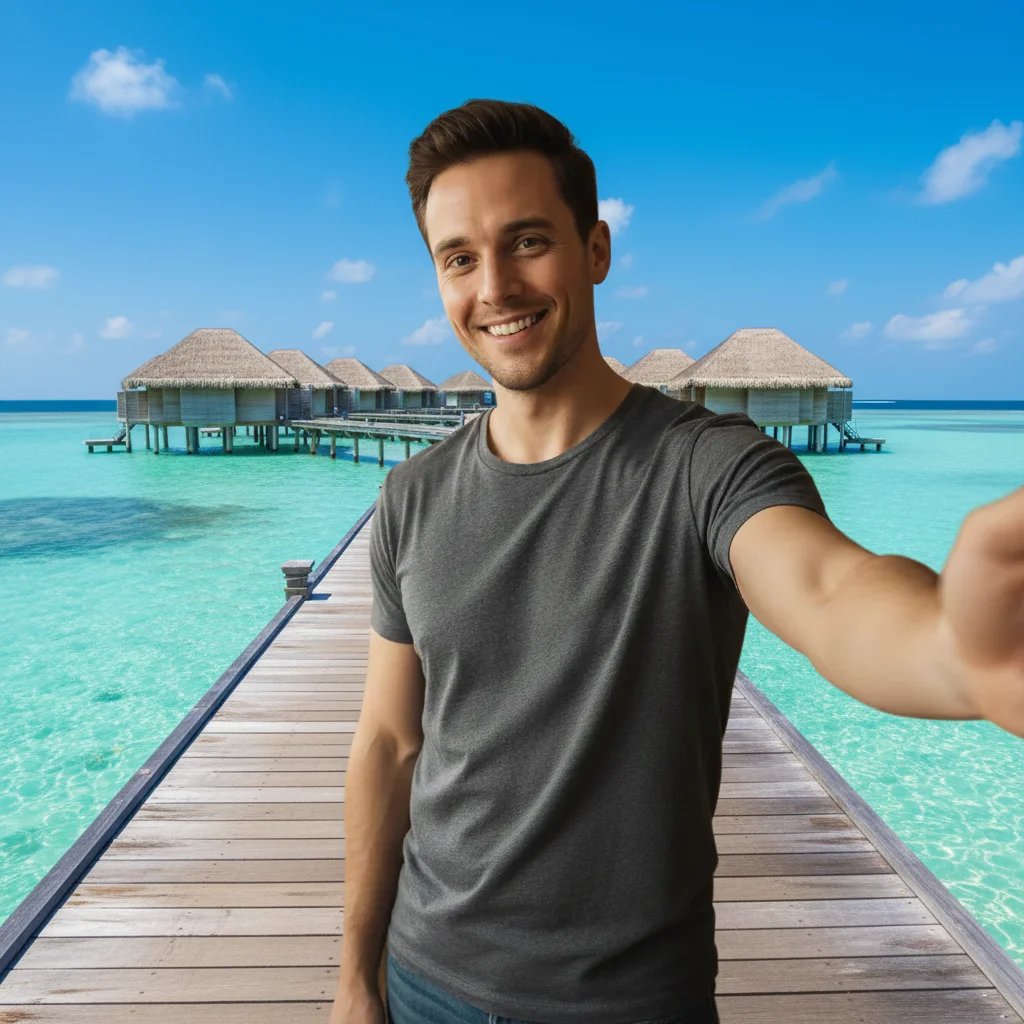
Same person appearing to stand on an overwater dock in the Maldives with turquoise water and bungalows behind them
After

Fake Vacation Photo Prank

Upload photo to create fake vacation photo

Free β€’ Results in 30 seconds β€’ No signup

Release to upload

FreeNo signupNo watermark

1 free edit·then from $1.99

Popular use cases:
  • fake vacation photo
  • prank travel photo
  • AI beach background
  • April Fools holiday prank
  • fake Maldives selfie
  • convince friends you went abroad
  • fake Instagram travel post
  • pretend vacation photo editor

Cost
Free No signup required
Time
Instant results in 15-30 seconds
Works on
Any device - browser, phone, tablet, desktop
Powered by
AI-powered photo editing
Scenario Prompt Time
Maldives beach Overwater bungalows, turquoise lagoon, white sand, blue sky 15s
Bali rice terraces Lush green terraces, morning mist, palm trees, clear sky 15s
Eiffel Tower, Paris Standing in front of the Eiffel Tower on a sunny afternoon 15s
Santorini, Greece Cliffside white-washed buildings, blue domes, Aegean Sea below 30s

How it works

  1. Upload your photo

    Use any photo where you or your friend are clearly visible β€” a selfie, a portrait, even a group shot. You don't need to be near a window or in good lighting. The AI will handle the background swap regardless.

    Expect: Upload takes a few seconds. Any common format works: JPG, PNG, HEIC.
  2. Describe your dream destination

    Type where you want to appear. Be specific for best results β€” name the place, describe the scenery, and add details like time of day or weather. "Put me on a white sand beach in the Maldives with overwater bungalows in the background at golden hour" will look far better than just "beach."

    Tip: Mention lighting that matches your original photo. If you took the selfie near a window on a bright day, ask for a sunny outdoor scene. Matching the light direction makes the prank much harder to spot.

    Copy one of these to get started:

    Maldives overwater bungalow Put me on a wooden dock with overwater bungalows stretching behind me, surrounded by impossibly clear turquoise water and a bright blue sky with a few white clouds
    Bali rice terraces Replace the background with lush green Bali rice terraces cascading down a hillside in the morning mist, with a few palm trees and a clear sky
    Eiffel Tower selfie Put me in front of the Eiffel Tower in Paris on a sunny afternoon with a clear blue sky, the tower in sharp focus behind me like I'm a tourist posing for a photo
    Caribbean beach Place me on a Caribbean beach with powdery white sand, bright turquoise shallow water, a few palm trees swaying, and a warm sunset sky turning orange and pink behind me
    4 more prompts
    Santorini cliffs Put me on the famous Santorini cliffs in Greece with white-washed buildings and blue-domed churches behind me, the Aegean Sea far below, and a bright Mediterranean sky
    Tokyo street at night Replace the background with a busy Tokyo neon-lit street at night β€” bright kanji signs, izakayas, people in the background β€” make it look like I'm standing in Shinjuku
    Amalfi Coast road Put me on the Amalfi Coast in Italy with a winding coastal road behind me, colorful cliffside buildings, and the deep blue Tyrrhenian Sea below on a bright summer day
    Safari in Africa Place me in front of an African savanna at sunset, with acacia trees on the horizon and a group of elephants walking in the distance against a golden orange sky
  3. Send it

    Review the result β€” if the AI nailed the background but your edges look off, describe the adjustment and re-run. Once it looks convincing, download and send it to your group chat, post it as a story, or text it directly to whoever you want to fool. April Fools captions optional.

Try it free ↓

Fake Vacation Photo Prank

Upload photo to create fake vacation photo

Free β€’ Results in 30 seconds β€’ No signup

Release to upload

Free β€’ No signup

See it in action

Person taking a selfie in their living room
Before
->
Same person appearing to stand on an overwater dock in the Maldives with turquoise water and bungalows behind them
After

Living Room to Maldives

A regular home selfie was transformed into a convincing Maldives overwater bungalow shot. The AI replaced the wall and furniture background with a turquoise lagoon and wooden dock while keeping the subject completely intact.

Prompt: Put me on a wooden dock with overwater bungalows stretching behind me, surrounded by impossibly clear turquoise water and a bright blue sky with a few white clouds
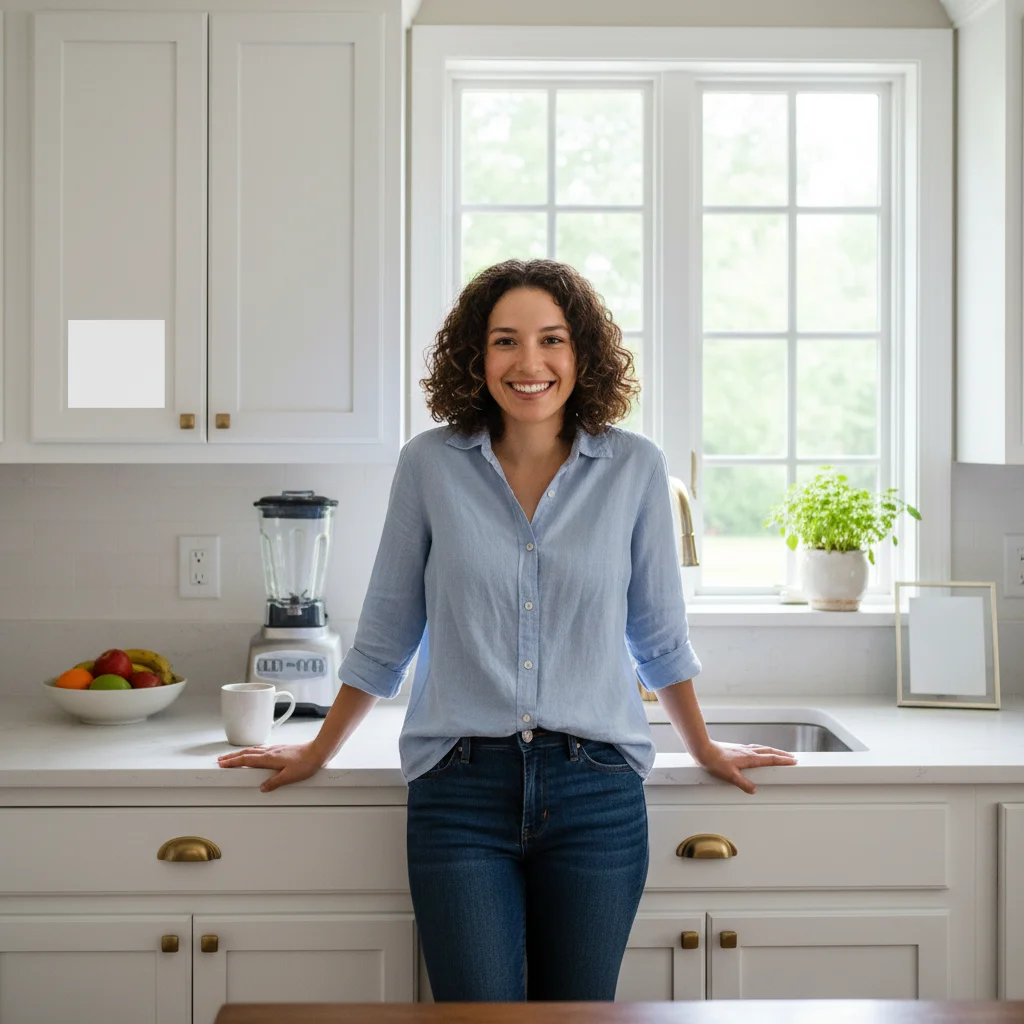
Person standing in their kitchen
Before
->
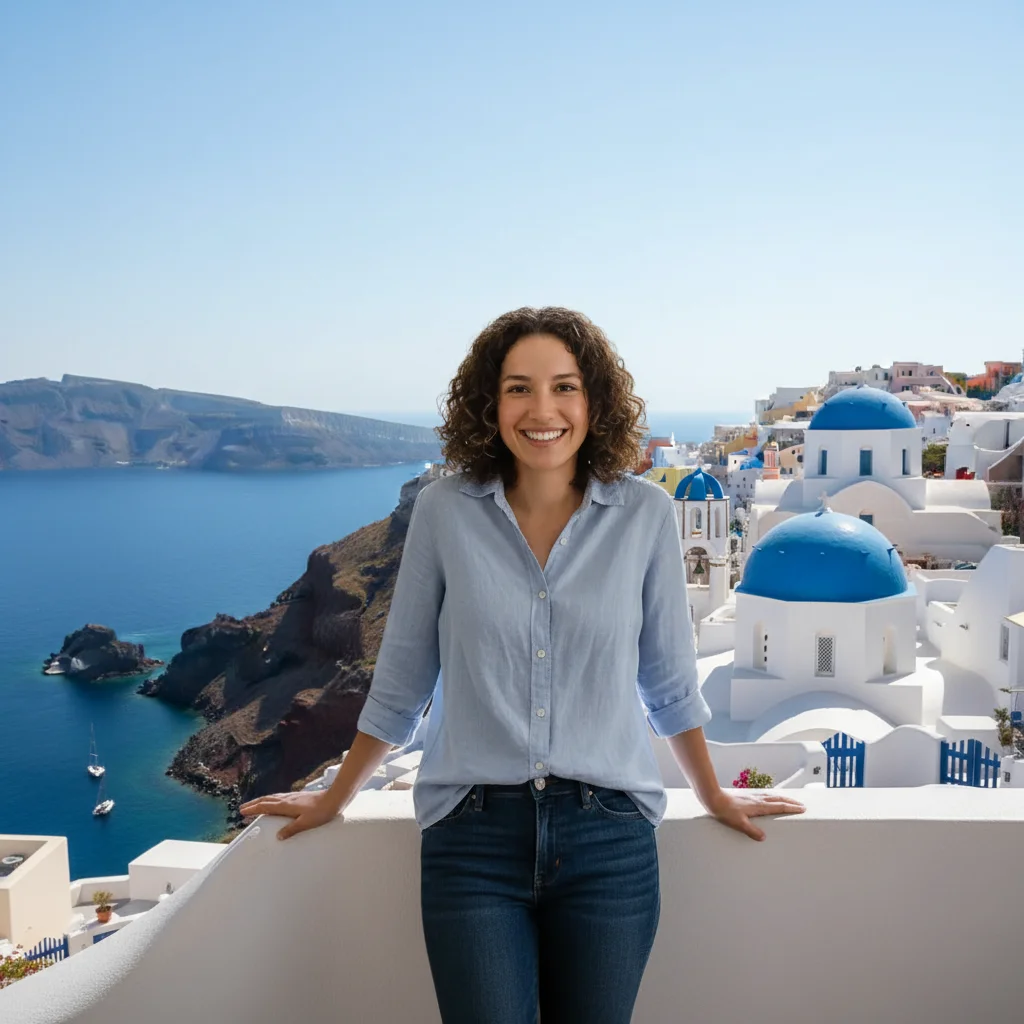
Same person standing on a Santorini cliff edge with blue-domed churches and the Aegean Sea in the background
After

Kitchen Counter to Santorini Cliffs

A quick kitchen photo became a postcard-worthy Santorini shot. The white walls of the kitchen actually helped β€” the AI transitioned naturally to the white-washed Greek architecture.

Prompt: Put me on the famous Santorini cliffs in Greece with white-washed buildings and blue-domed churches behind me, the Aegean Sea far below, and a bright Mediterranean sky
Person sitting at an office desk
Before
->
Same person appearing to stand in front of lush green Bali rice terraces on a misty morning
After

Office Desk to Bali Rice Terraces

An office selfie turned into a Bali travel shot for an April Fools post. The green terraces gave the bland office background a complete transformation.

Prompt: Replace the background with lush green Bali rice terraces cascading down a hillside in the morning mist, with a few palm trees and a clear sky

If something looks off

The edges around me look cut out or glitchy

Why: The AI uses the prompt to decide where you end and the background begins. If your clothing or hair blends into a similar-colored background, the edges get confused.

Try: Keep the background the same but clean up the edges around the person β€” make sure there is a sharp, natural-looking transition between the subject and the vacation scene

Tip: For best edges, take the original photo in front of a plain, single-color background β€” a white wall works great.

The vacation background doesn't match the lighting on my face

Why: Your original photo has a specific light source (window light, overhead lamp, flash). If the AI generates a midday sun scene but your face is lit from the side like it's indoors, the composite looks off.

Try: Adjust the lighting in the vacation background to match soft diffused light coming from the left side, like overcast natural light

Tip: Specify "overcast" or "cloudy" lighting in your prompt β€” it's the most forgiving and looks natural in almost any original photo.

The background looks amazing but I look pasted on, not in the scene

Why: The AI sometimes generates the background and subject at slightly different scales or perspectives, making you look like a cutout.

Try: Make the subject look naturally embedded in the scene β€” adjust depth of field so the background has a slight blur, and make sure the perspective matches someone standing in that location

Tip: Adding a shadow beneath you or a slight foreground element (sand, grass, cobblestones) makes the composite look grounded.

The vacation destination doesn't look recognizable enough

Why: Generic descriptions produce generic results. "Beach" could be anywhere β€” it won't trigger the "wait, are you in the Maldives?" reaction you want.

Try: Make it specifically the Maldives β€” crystal-clear turquoise lagoon, wooden overwater bungalows, white sand sandbank, and a vivid blue sky with light clouds

Tip: Use iconic landmarks or highly specific geographic features. "Eiffel Tower" will always be more convincing than "Paris street."

My whole photo changed instead of just the background

Why: If your original photo has a very busy or complex background, the AI may reinterpret the whole scene.

Try: Keep me exactly as I am in the original photo β€” same clothing, same pose, same expression β€” and only replace everything behind me with the vacation scene

Tip: Use a cleaner source photo with a simpler background. Plain walls or minimal environments give the AI much better signal about what to keep vs. replace.

Quick answers

Do I need to mark areas before describing what I want?

No. Just describe what you want in plain text β€” something like 'put me on a tropical beach in the Maldives' β€” and the AI figures out where you are in the photo and swaps the background. You only need to use markers if you want to target a very specific area, like adjusting just the sky or a corner of the background.

Is this free?

Yes. EditThisPic gives you 1 free edit per week with no account needed. If you want to try multiple destinations or run several versions of the prank, credit packs start at $1.99 for 3 edits.

Will this look realistic enough to fool someone?

For most photos, yes β€” especially when sent over text or viewed as a social story where image quality is compressed anyway. The best results come from clear photos in good lighting with a plain background. Adding destination-specific details in your prompt (overwater bungalows, specific landmarks, correct sky colors) makes it much harder to spot.

What kind of photo works best?

A clear photo of you or your subject in decent lighting with a simple background. Phone selfies work fine. The AI handles the background replacement β€” it doesn't need the original background to look like anything in particular. The cleaner your edges (hair, shoulders) in the original photo, the more convincing the result.

Can I use a group photo for a group vacation prank?

Yes. The AI will keep all the people in the photo and replace the background. Just make sure everyone is clearly visible and not blending into the original background. Group shots work especially well for 'we all went on holiday together' pranks to family group chats.

Does EditThisPic store my photos?

Your uploaded photo is processed to perform the edit and is not retained after the session. There is no account or profile tied to guest edits, so nothing is stored long-term.

Can I do multiple destinations from the same photo?

Yes β€” just run the edit again with a different destination prompt. Each run uses one credit (or your weekly free edit). This means you can generate a Maldives version, a Paris version, and a Bali version from the same original selfie and send them to different people.

How is this different from apps like Fotor or just changing a background?

Basic background-removal tools swap in a flat image behind you β€” easy to spot because the lighting and perspective never match. EditThisPic uses AI that understands context: it generates a scene that wraps around you, matches ambient lighting, and adds depth. You describe any destination in natural language instead of uploading a background stock photo.

How much does EditThisPic cost?

You get 1 free edit per week β€” no account needed. After that, credit packs start at $1.99 for 3 edits. Monthly plans start at $4.99/mo for 15 edits with unused credits rolling over. All edits are full resolution with no watermark.

Ready to create your fake vacation photo?

Free to try. No signup required.

1 free edit included·Credit packs from $1.99