Free β€’ No signup Put Coworker's face on a billboard Β· Free

Put Your Coworker's Face on a Billboard

Upload a coworker's photo and the AI drops their face onto a Times Square billboard, highway ad, or bus stop poster β€” ready to post in the office Slack channel before your next meeting.

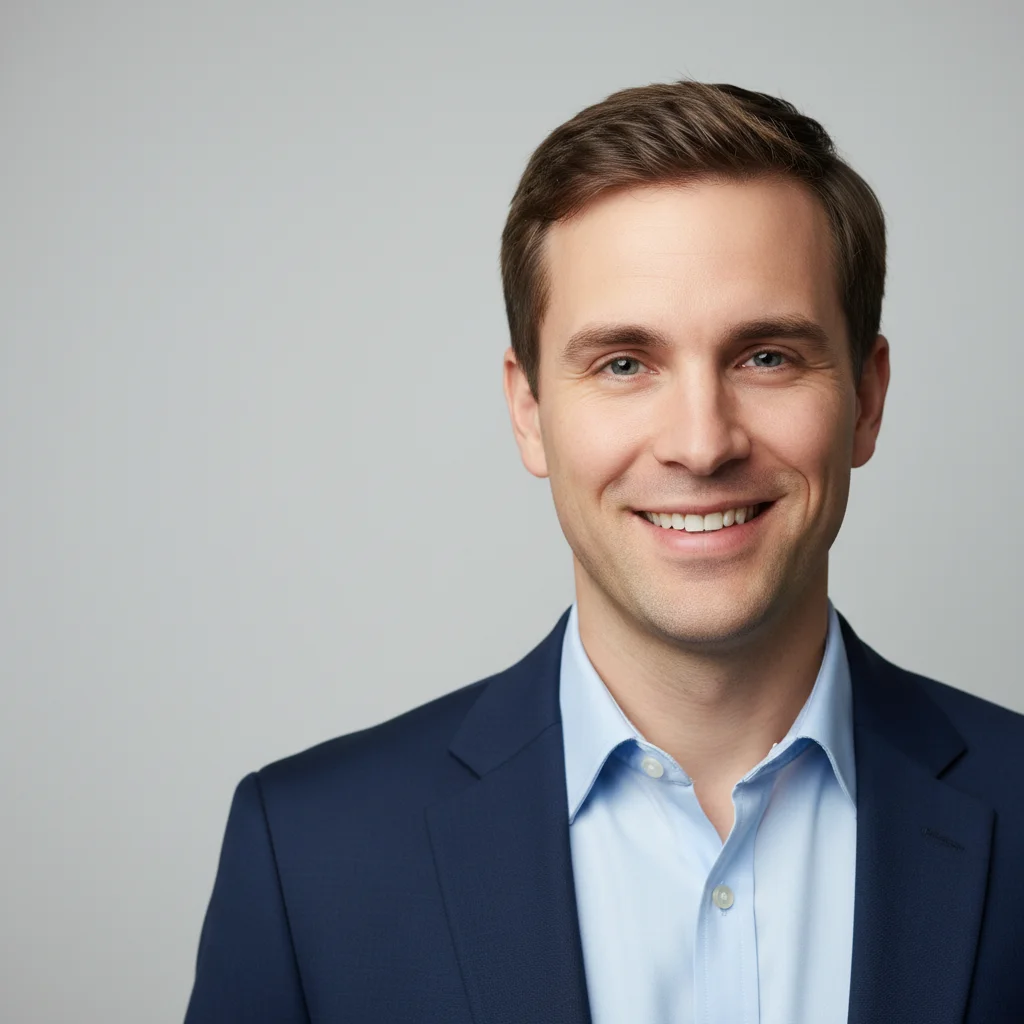
Corporate headshot of a smiling man against a gray background
Before
β†’
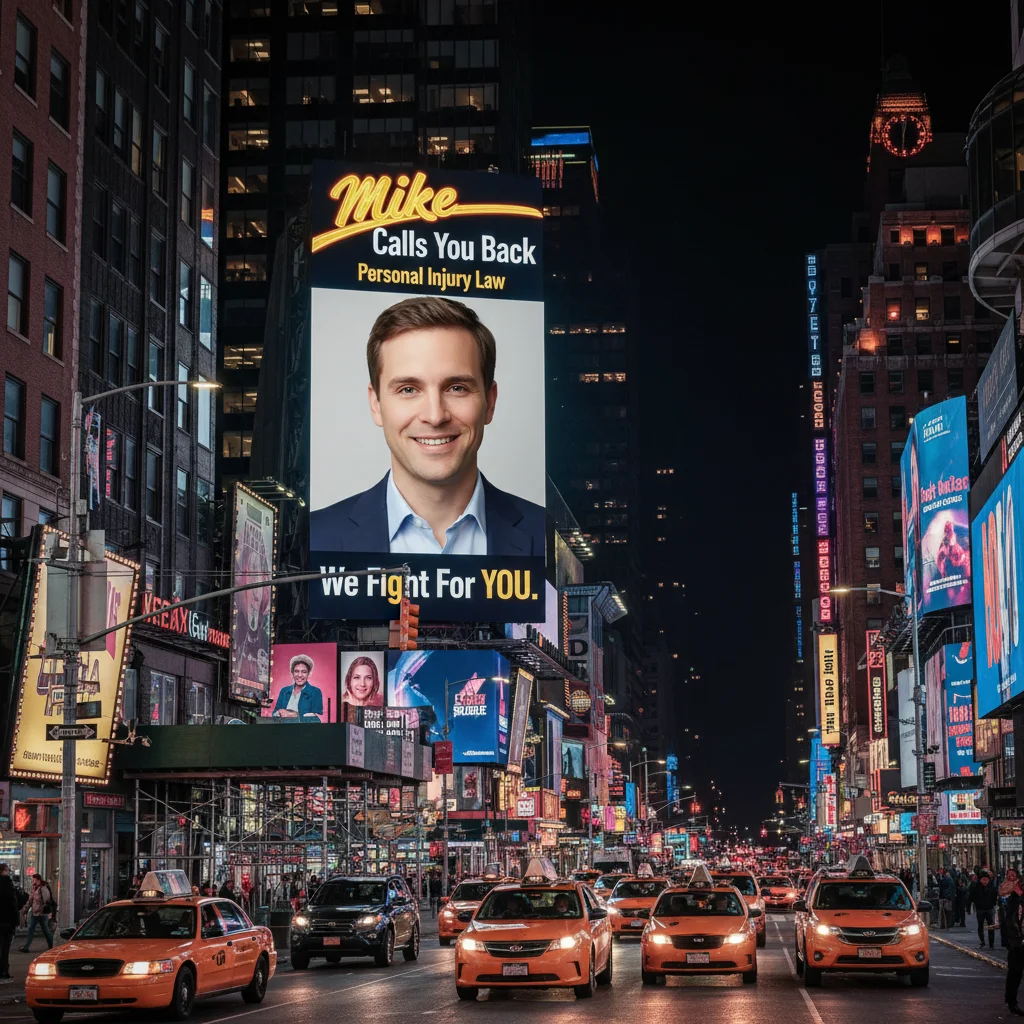
The same man's face on a glowing Times Square billboard advertising a fictional law firm at night
After

Put Coworker's Face on a Billboard

Upload photo to put coworker's face on a billboard

Free β€’ Results in 30 seconds β€’ No signup

Release to upload

FreeNo signupNo watermark

1 free edit·then from $1.99

Popular use cases:
  • coworker prank photo
  • office humor photo editor
  • billboard face editor
  • workplace Slack prank
  • put face on billboard free
  • funny coworker birthday photo
  • office prank generator
  • Times Square face billboard

Cost
Free No signup required
Time
Instant results in 15-30 seconds
Works on
Any device - browser, phone, tablet, desktop
Powered by
AI-powered photo editing
Scenario Prompt Time
Times Square night billboard Face on a glowing Times Square billboard at night with taxis below, advertising a fake law firm 30s
Highway billboard Face on a large highway billboard for a fictional mattress store, blue sky background 15s
Bus stop poster Face on a bus stop shelter poster ad for a fictional real estate agent, city street behind it 15s
Building wrap ad Face on a giant building-wrap ad for a fictional energy drink on a city skyscraper 30s

How it works

  1. Upload your photo

    Grab any photo of your coworker β€” a LinkedIn headshot, a Slack profile picture, or a candid from the last team outing all work well. A clear shot of their face gives the AI the best material to work with.

    Expect: Upload takes a second or two. The AI handles the rest β€” no cropping or prep needed on your end.
  2. Describe the billboard scene

    Type what you want: 'Put this person's face on a massive Times Square billboard at night with taxi cabs and neon lights' or 'Place their face on a highway billboard advertising a fictional law firm.' The more detail you give about the setting and the fake ad copy, the better the result.

    Tip: Add fake ad copy or a tagline to the billboard β€” something like 'Mike's Law Firm β€” Call 1-800-MIKE-LAW' makes it look like a real advertisement and gets a much bigger reaction on Slack.

    Copy one of these to get started:

    Times Square at night Put this person's face on a huge Times Square billboard at night. The billboard should advertise a personal injury law firm called 'Mike Calls You Back' with their face grinning confidently and the tagline 'We Fight For YOU.' Neon lights, yellow cabs, and tourists below.
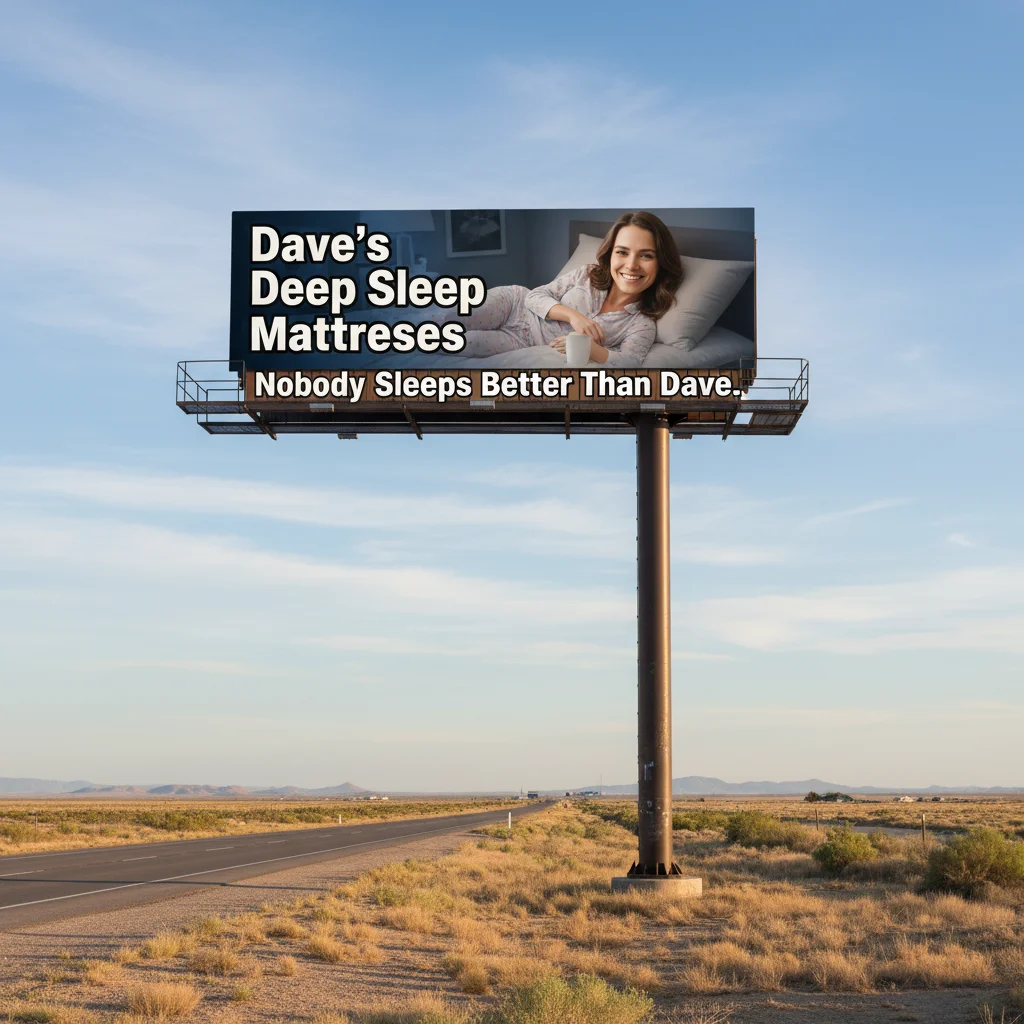
    Highway billboard Place this person's face on a large highway billboard visible from the freeway. The billboard advertises a local mattress store called 'Dave's Deep Sleep Mattresses' with their smiling face and the tagline 'Nobody Sleeps Better Than Dave.' Blue sky, flat desert landscape behind it.
    Bus stop poster ad Put this person's face on a bus stop shelter advertisement poster. The ad is for a fictional local real estate agent β€” 'The Sarah Chen Team' with the tagline 'Your Neighborhood Expert Since 2003.' Clean professional headshot style within the poster frame, city street behind the shelter.
    Big city building wrap Place this person's face on a giant building-wrap advertisement on the side of a city skyscraper. The ad promotes a fictional energy drink called 'GREG JUICE β€” Fuel Your Grind.' Their face takes up most of the building with the product name in massive bold letters. Urban skyline visible.
    3 more prompts
    Times Square crossroads Show this person's face on two separate Times Square billboards visible simultaneously in the same photo β€” one advertising a Broadway show called 'ONE NIGHT WITH KEVIN' and another for a fragrance called 'Kevin by Kevin.' Midday, busy pedestrian crossing, yellow cabs.
    London Underground poster Put this person's face on a London Underground Tube station poster. The ad is for a fictional thriller novel called 'The Accountant Who Knew Too Much' by their name. Author photo style headshot on the poster, surrounded by other posters on the tiled station wall.
    Airport departure hall ad Place this person's face on a large backlit advertisement panel inside an international airport departure terminal. The ad is for a fictional luxury watch brand called 'THORSSON' with their face wearing a dress watch and the tagline 'Time is the Only Luxury.' Marble floors, travelers in background.
  3. Send it

    Download the result and drop it into the office Slack channel. Works especially well in #general, as a reaction to someone announcing a big win, or as a surprise for a coworker's birthday. Caption it 'saw this on my commute today' for maximum effect.

Try it free ↓

Put Coworker's Face on a Billboard

Upload photo to put coworker's face on a billboard

Free β€’ Results in 30 seconds β€’ No signup

Release to upload

Free β€’ No signup

See it in action

Corporate headshot of a smiling man against a gray background
Before
->
The same man's face on a glowing Times Square billboard advertising a fictional law firm at night
After

Times Square law firm ad

A coworker's LinkedIn headshot transformed into a Times Square billboard advertising a fictional personal injury law firm β€” complete with confident smile and fake phone number.

Prompt: Put this person's face on a huge Times Square billboard at night advertising 'Mike Calls You Back β€” Personal Injury Law' with the tagline 'We Fight For YOU.' Neon lights and yellow cabs visible below.

Casual office photo of a woman smiling and holding a coffee mug
Before
->
The woman's face on a sun-drenched highway billboard advertising a fictional mattress store
After

Highway mattress store billboard

A candid office photo turned into a classic highway mattress store billboard β€” the kind with a massive grinning face and an 800 number.

Prompt: Place this person's face on a large highway billboard advertising 'Dave's Deep Sleep Mattresses' with the tagline 'Nobody Sleeps Better Than Dave.' Blue sky and flat landscape behind it.

If something looks off

The face doesn't look like my coworker β€” it's too generic

Why: Low-resolution or heavily compressed source photos lose facial detail the AI needs to accurately reproduce the person.

Try: Use a higher-resolution photo and try: 'Preserve this person's exact facial features, jawline, and eyes on the billboard. Keep their likeness accurate.'

Tip: LinkedIn profile photos tend to be the highest-resolution images of coworkers available β€” grab one from there if you only had a small Slack avatar.

The billboard text came out garbled or unreadable

Why: AI image models often struggle with precise text rendering, especially longer strings.

Try: Keep the fake ad copy short and try again: 'Billboard text reads only: MIKE LAW β€” 1-800-MIKE in large bold white letters.' Fewer words = cleaner result.

Tip: One or two words in all-caps on the billboard tends to render much more cleanly than full sentences. You can always add text yourself afterward in a basic photo editor.

The face looks pasted on rather than part of the billboard

Why: The lighting on the source photo doesn't match the lighting environment in the billboard scene.

Try: Add lighting context: 'Match the face lighting to the bright outdoor billboard illumination β€” warm yellow light from below as if lit by the billboard itself.'

Tip: Source photos taken outdoors or under bright indoor lights blend into billboard scenes more naturally than dark or moody photos.

The result shows a street scene but no visible billboard

Why: The prompt focused too much on the person and not enough on the environment.

Try: Lead with the billboard: 'Show a large rectangular illuminated billboard taking up most of the frame, with this person's face as the main advertisement image. City street visible behind it.'

Tip: Describe the billboard first, the person second. The AI prioritizes the elements you mention earliest.

The image looks realistic but the scale is wrong β€” the billboard is tiny

Why: Without a size reference, the AI may place a small sign rather than a full-scale outdoor billboard.

Try: Specify scale explicitly: 'A massive 60-foot-wide highway billboard, face large enough to be seen from 500 feet away, towering above the road.'

Tip: Comparative size references like 'larger than the buildings around it' or 'takes up the whole wall' reliably produce bigger, more dramatic results.

Quick answers

Do I need to mark areas in the photo before describing what I want?

No. Just upload the photo and describe the billboard scene β€” the AI figures out which part is the face and places it naturally. You only need to use markers if you want to isolate a specific region, like keeping only the upper half of the image unchanged.

Is this free?

Yes. EditThisPic gives you 1 free edit per week with no account needed. For more edits, paid plans start at $1.99.

Will it look realistic enough to fool someone for a moment?

Yes, for most use cases. The AI integrates the face into the billboard environment with matching lighting and perspective. A Times Square scene with a clear source photo is convincing enough that the first reaction is usually 'wait, is this real?' before the joke lands β€” which is exactly what you want.

What kind of photo of my coworker works best?

A clear, front-facing photo with decent resolution works best β€” LinkedIn headshots are ideal. Slack avatars and phone snapshots work too, but lower resolution means less facial detail preserved. Outdoor or bright indoor lighting in the source photo tends to blend more naturally into billboard scenes.

Can I choose a specific billboard location β€” like Times Square or a specific city?

Yes. Just describe the location in your prompt: 'Times Square at night,' 'a Los Angeles highway billboard,' 'a London bus stop,' or 'a Tokyo street-level ad panel.' The AI generates a scene matching your description rather than placing you inside a real photo.

Can I add fake ad copy or a tagline to the billboard?

Yes, and it makes the prank much better. Include the fake brand name, tagline, and any other text in your prompt. Keep text short for the clearest results β€” something like 'MIKE LAW β€” WE FIGHT FOR YOU' renders more cleanly than a paragraph. If the text comes out imperfect, you can touch it up in any basic photo editor.

Is my coworker's photo stored or shared anywhere?

No. EditThisPic processes images to generate the edit and does not store, share, or use your uploads for any other purpose. The image exists only for the duration of the edit.

How is this different from apps like FaceSwap or BaldBooth?

Template apps lock you into preset backgrounds and fixed formats. EditThisPic takes a natural language description, so you can specify any billboard type, location, lighting, fake brand, tagline, and scene detail you want. The result is a unique image rather than one of a few preset options everyone recognizes.

How much does EditThisPic cost?

You get 1 free edit per week β€” no account needed. After that, credit packs start at $1.99 for 3 edits. Monthly plans start at $4.99/mo for 15 edits with unused credits rolling over. All edits are full resolution with no watermark.

Ready to make your coworker famous?

Free to try. No signup required.

1 free edit included·Credit packs from $1.99