Free • No signup Transform Pet into human portrait · Free

Turn Your Pet Into a Human

Last updated

Upload your pet's photo, describe the kind of person they would be, and the AI generates a realistic human portrait that captures their exact energy. You will recognize them immediately.

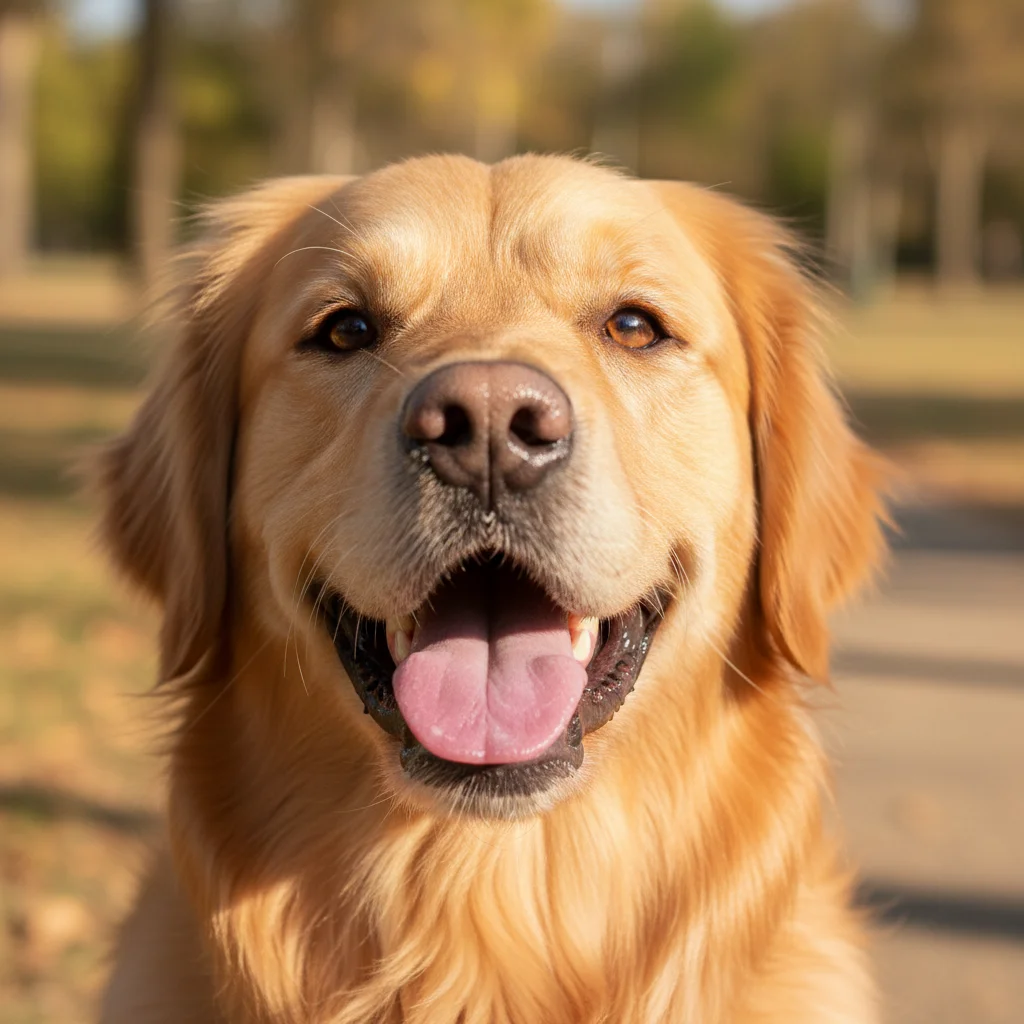
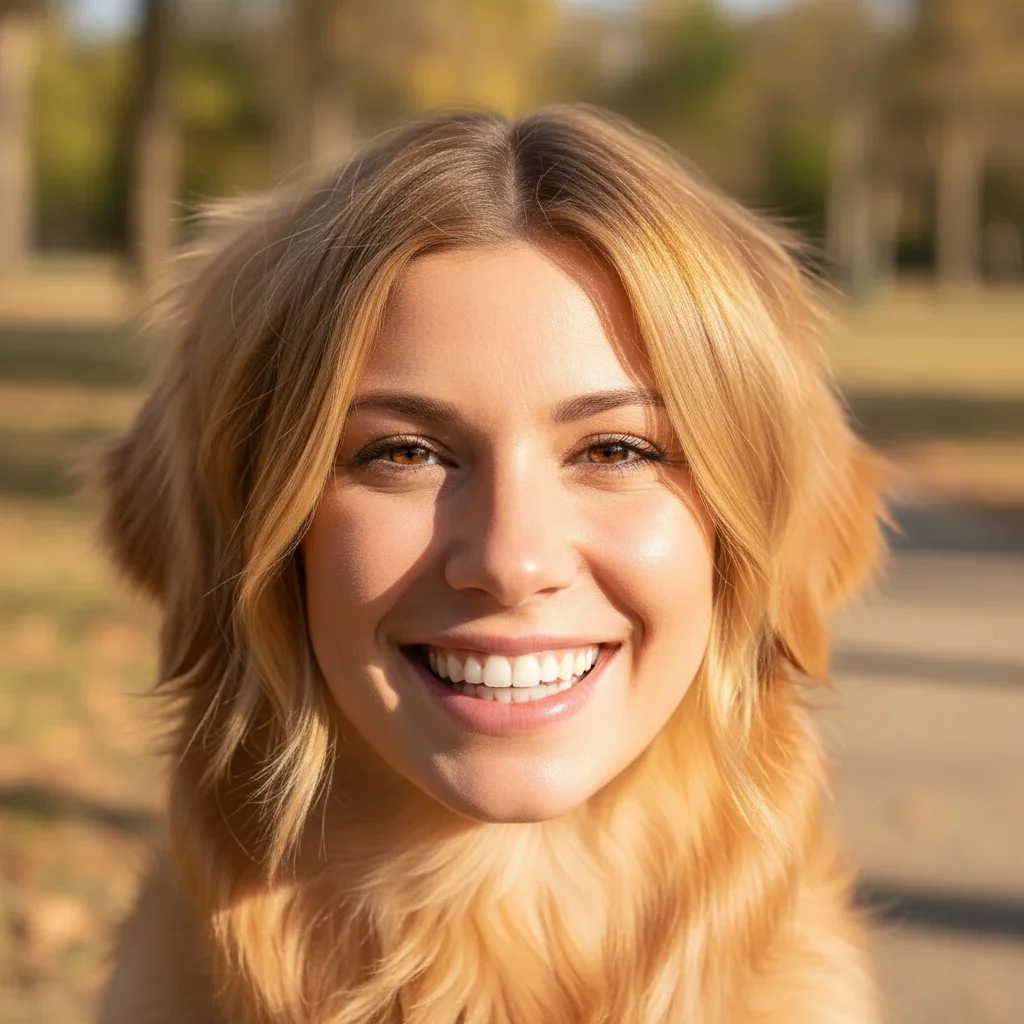
Golden retriever with a happy open-mouthed expression facing the camera Realistic human portrait of a friendly-looking person in their 30s with warm golden features and an open, genuine smile

Upload photo to transform pet into human portrait

"Transform this cat into a realistic human portrait — someone in their 40s with an expression that says they are not angry, this is just their face, slightly raised eyebrow, looks like they have strong opinions about how meetings should be run"

Release to upload

1 free edit·then from $4.99

Popular use cases:
  • pet as human photo
  • dog to human portrait AI
  • cat to human photo editor
  • what would my pet look like as human
  • AI pet humanizer free
  • dog human transformation photo
  • funny pet portrait AI
  • animal to person photo editor

Cost
Free No signup required
Time
Instant results in 15-30 seconds
Works on
Any device - browser, phone, tablet, desktop
Powered by
AI-powered photo editing
Scenario Prompt Time
Golden retriever human Friendly person in early 30s, warm golden features, open smile, genuinely nice energy 30s
Grumpy cat human Person in 40s, not angry this is just their face, slight raised eyebrow, strong meeting opinions 30s
Wise old dog Elderly person in 70s, kind tired eyes, comfortable cardigan, gives good advice without realizing it 30s
Chaotic puppy Young person early 20s, mid-laugh, slightly disheveled, runs in with big news that was not that big 30s

How it works

  1. Upload your photo

    Upload a clear photo of your pet. A face-forward photo with good lighting gives the AI the best reference for capturing their personality in the human version. The more expressive the original photo, the more recognizable the human result will be.

    Expect: Upload takes under 5 seconds. A clear face photo works best — but full-body shots with a clear face also work well.
  2. Describe the human version

    Tell the AI what kind of person your pet would be. Include age range, personality traits, setting, and any physical characteristics you want to carry over from the pet. 'A friendly person in their 30s who gives off golden retriever energy and probably owns too many fleece vests' works much better than just 'make it look human.'

    Tip: Include personality details from your actual pet — 'the kind of person who greets everyone like an old friend,' 'someone who looks very wise but is actually thinking about food,' 'a person who seems polite but judges everyone silently.' The AI picks up on these and produces a more recognizable result.

    Copy one of these to get started:

    Golden retriever as a person Transform this golden retriever into a realistic human portrait — a friendly person in their early 30s with warm golden-toned features, an open smile, the kind of person who genuinely remembers your name and means it when they ask how you are doing
    Grumpy cat energy Transform this cat into a realistic human portrait — someone in their 40s with an expression that says they are not angry, this is just their face, slightly raised eyebrow, looks like they have strong opinions about how meetings should be run
    Husky as a dramatic person Transform this husky into a realistic human portrait — someone in their late 20s who is extremely expressive, has a lot to say about everything, and looks like they would narrate every small inconvenience as a major event
    Wise old dog Transform this senior dog into a realistic human portrait — an elderly person in their 70s with kind, tired eyes that have seen a lot, comfortable in a cardigan, the type who gives very good advice without realizing it
    3 more prompts
    Dignified cat — human portrait Transform this cat into a realistic human portrait — a composed, elegant person in their 50s with an understated wardrobe, the kind of person who is always impeccably dressed and has never once been surprised by anything
    Chaotic puppy energy Transform this puppy into a realistic human portrait — a young person in their early 20s, mid-laugh, slightly disheveled in a charming way, the type who runs into rooms like they have extremely important news that turned out to be not that important
    The neighborhood cat — suspicious person Transform this cat into a realistic human portrait — someone middle-aged who watches everything from the window, has strong opinions about parking, and would describe themselves as 'just very observant'
  3. Send it

    Download the portrait and send it. Works as a 'this is what my dog would look like as a person' drop in the group chat, a joke LinkedIn headshot, a birthday card for a pet owner, or a 'I've been thinking about this' message to absolutely anyone.

See it in action

Golden retriever with a happy open-mouthed expression facing the camera
Before
->
Realistic human portrait of a friendly-looking person in their 30s with warm golden features and an open, genuine smile
After

Golden retriever becomes extremely friendly barista

A golden retriever transformed into a human portrait. The result was sent to the owner's family group chat and took about 4 minutes for anyone to stop saying 'wait' and look at the full thread.

Prompt: Transform this golden retriever into a realistic human portrait — a friendly person in their early 30s with warm golden-toned features, an open smile, the kind of person who genuinely remembers your name and means it when they ask how you are doing
Tabby cat facing camera with a calm, slightly unimpressed expression
Before
->
Realistic human portrait of a person in their 40s with a calm expression and a slightly raised eyebrow suggesting strong opinions
After

Judgmental tabby becomes HR manager

A tabby cat with a slightly disapproving expression transformed into a human portrait. The result was immediately recognizable as 'the person who sends passive-aggressive emails' to everyone who saw it.

Prompt: Transform this cat into a realistic human portrait — someone in their 40s with an expression that says they are not angry, this is just their face, slightly raised eyebrow, looks like they have strong opinions about how meetings should be run

If something looks off

The human portrait looks nothing like my pet

Why: Without clear personality guidance, the AI generates a generic human rather than one that captures the pet's specific energy.

Try: Transform this [pet] into a human portrait that captures their exact personality — [specific personality trait 1], [specific personality trait 2], a person who [specific behavior that matches your pet]. The result should feel recognizably like the same character as the animal.

Tip: The more specific the personality description, the more the human version will feel like 'yes, that is exactly who my dog would be as a person.' Generic prompts get generic results.

The result looks like an illustration rather than a realistic photo

Why: Pet-to-human transformations are complex edits that can drift toward stylized outputs without explicit direction.

Try: Transform this pet into a photorealistic human portrait — should look like an actual photograph of a real person, not an illustration or painting. Natural skin, realistic lighting, photo quality.

Tip: Adding 'photorealistic portrait, like a professional headshot' consistently pulls the result away from illustrated or painted styles.

The human version looks slightly uncanny or off

Why: Pet-to-human is a complex transformation and can produce subtle anatomy issues in facial features.

Try: Create a natural-looking human portrait inspired by this pet's personality — the person should look completely normal and realistic, with natural human proportions and features, just capturing the essence of the animal's character.

Tip: If the result looks slightly off, try regenerating with the addition of 'normal human anatomy, completely natural proportions' to anchor the AI more firmly in realistic human territory.

The human portrait has the wrong age or demographic

Why: Without specific guidance, the AI makes assumptions about the human version.

Try: Transform this pet into a human portrait of a [specific age range, e.g., 'person in their late 30s'], [specific gender if relevant], [specific background details]. Make the result photorealistic.

Tip: Being explicit about age, approximate setting, and style (casual, professional, outdoors) gives you much more predictable and consistent results.

The background in the result is completely different from what I expected

Why: Pet-to-human transformations typically change the whole image, including background.

Try: Transform this pet into a human portrait — place the person in [specific setting, e.g., 'a simple indoor background,' 'outdoors in a park'] with natural lighting.

Tip: Specifying a background setting in your prompt gives you more control over the final scene rather than the AI defaulting to whatever it infers from the pet's location.

Quick answers

Do I need to mark anything in the photo before describing the transformation?

No. Just describe the human version you want and the AI handles the transformation. The clearer and more expressive the original pet photo, the better the AI has to work with.

Is this free?

Yes. EditThisPic gives you 1 free edit per week with no account needed. For more edits, credits start at $1.99. No subscription required.

Will I recognize my pet in the human version?

If you include specific personality details in your description, often yes — in an unsettling, laugh-out-loud way. The AI cannot copy exact physical features, but it can capture the energy, expression type, and character. A grumpy cat becomes a specific type of grumpy-looking person. A chaotic puppy becomes a specific type of chaotic-looking person. The personality carries over more than the physical features.

Can I do this for any animal?

Dogs and cats work best because the AI has the most reference for their facial expressions and personality archetypes. More exotic pets can also be transformed — describe the personality clearly rather than relying on the AI to infer it from the animal type.

What makes a good source photo for this?

A clear face-forward photo with good lighting where the pet's expression is visible. Expressive photos (happy, alert, suspicious, sleepy) produce more character-rich human results than neutral or obscured photos. The photo does not need to be professional quality — a well-lit phone photo is fine.

Can I specify what my pet looks like as a human — age, appearance, style?

Yes. Include all the specifics in your description — age range, clothing style, setting, mood, hair color if relevant. The more detail you provide, the more aligned the result will be with your vision. The AI treats your description as a creative brief.

Does EditThisPic store my photos?

Photos are processed to generate your edit and not stored beyond the session. No account required means no personal data is collected by default.

How is this different from other pet-to-human apps?

Most pet-to-human tools produce a single generic output with no control over the result. EditThisPic takes a natural language description, so you can direct the personality, age, setting, expression, and style of the human version. You are not just pressing a button — you are specifying exactly who your pet would be.

How much does EditThisPic cost?

You get 1 free edit per week — no account needed. After that, credit packs start at $1.99 for 3 edits. Monthly plans start at $4.99/mo for 15 edits with unused credits rolling over. All edits are full resolution with no watermark.

Ready to see your pet as a person?

Free to try. No signup required.

1 free edit included·Credit packs from $4.99