AI Shopify Home Decor Photo Editor
Last updated
Create stunning Shopify home decor photos with room context and consistent brand styling in seconds. No staging or interior photography needed.
Drop your photo here
"place product on marble coffee table in modern minimalist living room, warm afternoon natural light from window, styled interior photography, cozy inviting atmosphere"
Release to upload


Built for Shopify Home Decor Stores
Home decor shoppers need to see products in context. A candle on a white background doesn't sell - a candle on a marble coffee table in a cozy living room does. EditThisPic lets you place your products in beautiful room settings without hiring a stylist or renting a studio.
Tools Home Decor Sellers Use Most
Change Background
Place products in room settings like living rooms, bedrooms, and kitchens
Lifestyle Scene
Add in-context room styling with matching decor and furniture
Remove Background
Create clean white backgrounds for catalog consistency
Enhance Lighting
Add warm, inviting lighting that makes home products feel cozy
How to Edit Your Shopify Home Decor Photos
-
Upload your home decor product photo
Drop your candle, pillow, vase, or art piece photo into EditThisPic. JPG, PNG, and WebP up to 7MB. Phone photos work perfectly.
White backgrounds: 15-20 seconds. Room context placement: 20-30 seconds, may need refinement. -
Describe your ideal home decor photo
Type what you want: 'place on marble coffee table in modern living room' or 'clean white background with soft shadow showing texture.' Be specific about the room setting or style you want.
For lifestyle shots, name the specific surface and room: 'wooden shelf in Scandinavian bedroom' is better than 'nice room.' -
Verify texture and context
Check that product textures (fabric weave, ceramic glaze, wax finish) are preserved. For lifestyle shots, ensure the room setting matches your brand aesthetic.
Keep a 'brand board' of room settings that work for your products. Reuse the same prompts for consistency.
Shopify Home Decor Photo Prompts
place product on marble coffee table in modern minimalist living room, warm afternoon natural light from window, styled interior photography, cozy inviting atmosphere
Living room settings are the most versatile for home decor. This prompt works for candles, vases, bowls, and decorative objects.
replace background with pure white seamless studio backdrop, preserve all product texture and detail, soft natural shadow beneath, consistent catalog photography
White backgrounds work best for your main product image. Use lifestyle shots for secondary gallery images.
place product on bed or nightstand in cozy Scandinavian bedroom, soft warm morning light, layered textiles and neutral tones, editorial interior styling
Perfect for pillows, throws, candles, and bedside decor. The Scandinavian aesthetic is universally appealing.
replace background with pure white, enhance lighting to be bright and warm, preserve all textures, consistent professional home decor photography style
Save this prompt and reuse it for every product. Consistent catalog builds brand trust.
Show 4 more prompts
place product on clean marble kitchen counter, bright natural light, modern kitchen setting, styled food and home photography aesthetic
Kitchen settings work great for canisters, cutting boards, trivets, and food-adjacent home goods.
place product on white bathroom shelf, spa-like atmosphere, eucalyptus accents, soft diffused natural light, calming minimalist aesthetic
Spa aesthetics work for candles, soap dishes, bath accessories, and wellness products.
show artwork or print hung on clean white wall in modern interior, soft gallery lighting, simple elegant room setting with minimal furniture visible
For wall art, showing it hung on a wall is essential - buyers need to imagine it in their space.
place product on outdoor patio table, warm golden hour natural light, lush garden visible in background, relaxed outdoor living aesthetic
Outdoor settings work for garden decor, outdoor candles, planters, and patio accessories.
| Edit Type | Prompt | Time | |
|---|---|---|---|
| Living room lifestyle | marble coffee table, modern living room, warm natural light |
25s | Try This → |
| Clean catalog | pure white, preserve texture, soft shadow |
15s | Try This → |
| Bedroom context | cozy Scandinavian bedroom, warm morning light |
25s | Try This → |
| Consistent brand | pure white, warm lighting, consistent home decor style |
15s | Try This → |
Shopify Home Decor Transformations
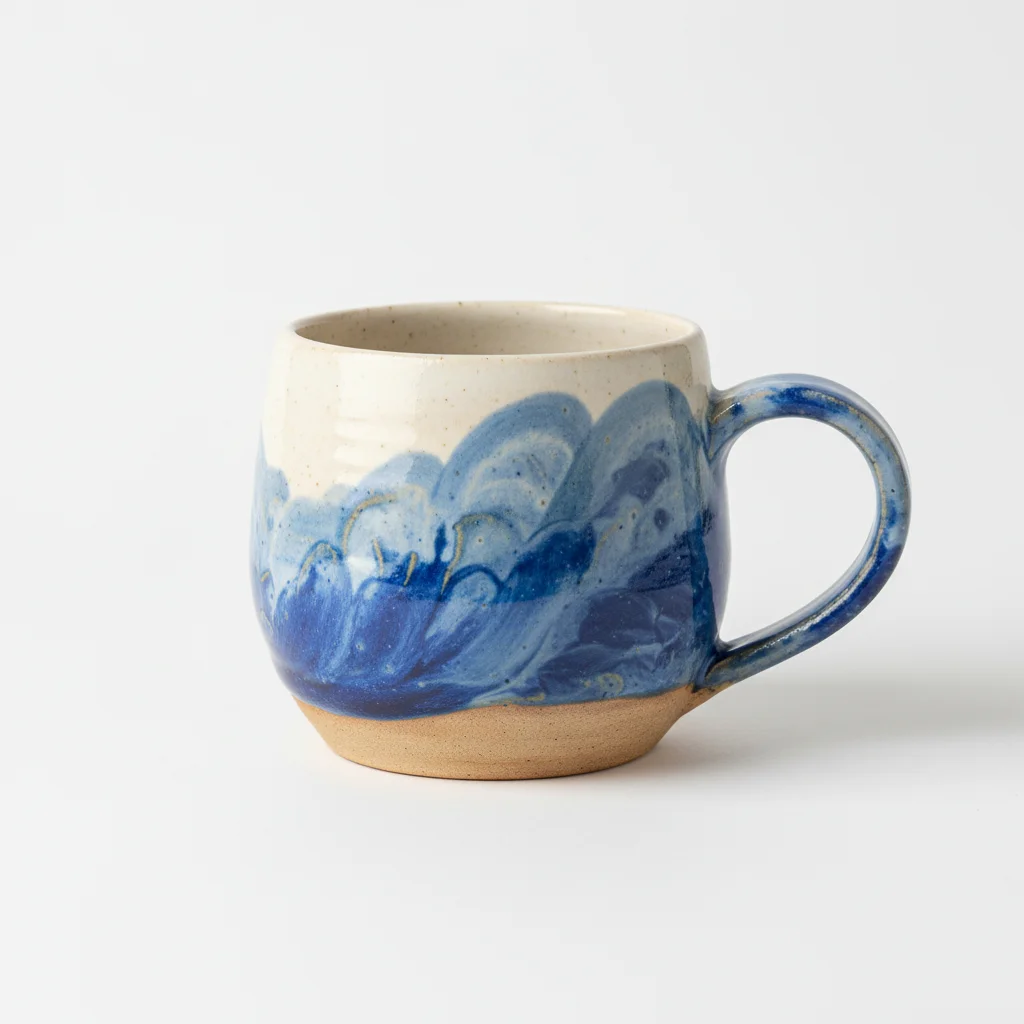
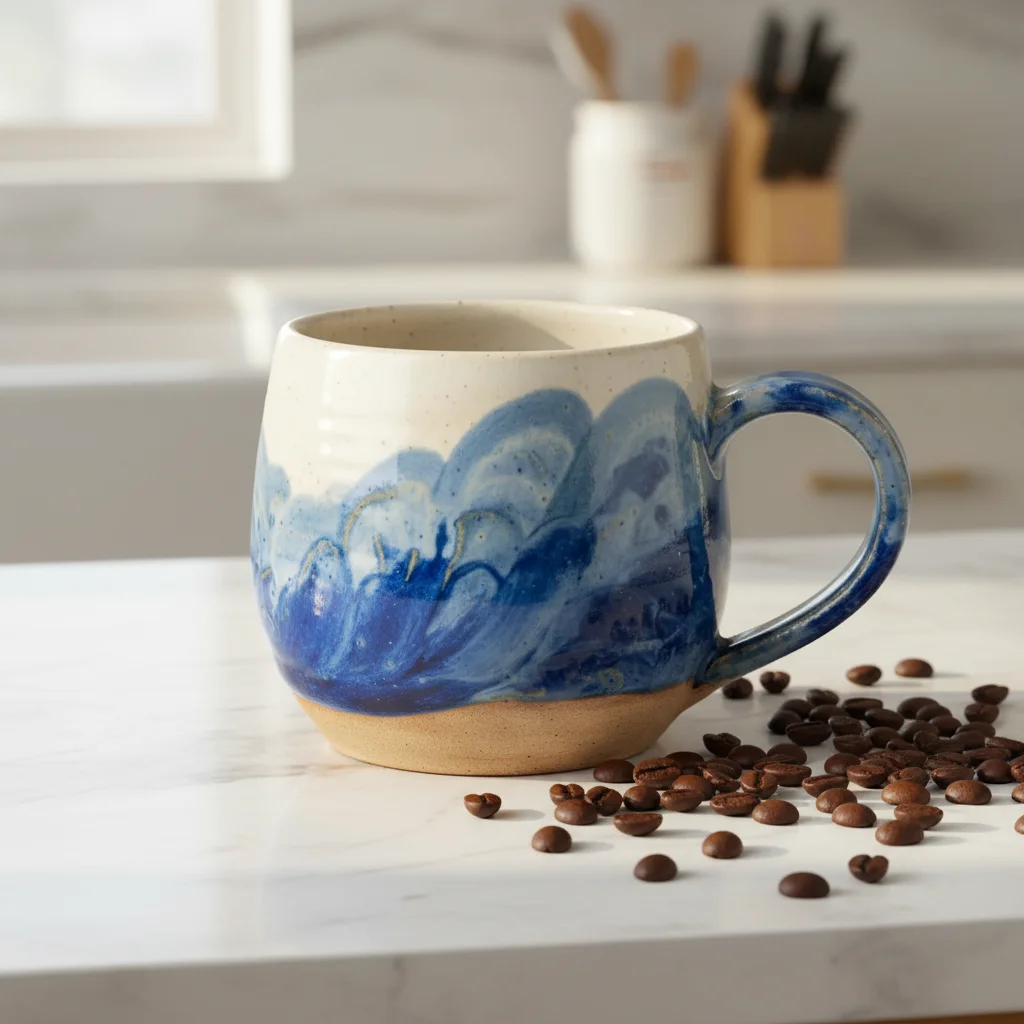
Handmade candle in living room
Candle photographed on kitchen counter. Placed in a cozy living room setting that tells the brand story.
place product on marble coffee table in modern minimalist living room, warm afternoon natural light, cozy inviting atmosphere
Decorative pillow on bed
Throw pillow on a bare floor. Transformed into a cozy bedroom setting that shows the pillow in context.
place product on bed in cozy Scandinavian bedroom, soft warm morning light, layered textiles and neutral tones
Ceramic vase clean catalog shot
Handmade vase on a cluttered desk. Created a clean, professional catalog photo with texture preserved.
replace background with pure white seamless studio backdrop, preserve all ceramic texture and glaze detail, soft natural shadow
Common Home Decor Photo Issues
Product looks out of place in the room setting
Why: The room style, lighting, or color palette doesn't match the product's aesthetic or the setting feels too generic.
Be more specific about the room: 'mid-century modern living room with warm wood tones' or 'minimal Scandinavian bedroom with white and beige.'
Name a specific interior style: Scandinavian, mid-century, bohemian, farmhouse. The AI creates more authentic settings with specific style direction.
Product scale looks wrong in the room context
Why: Without size reference, the AI may place the product at an incorrect scale relative to furniture.
Add size context: 'small candle on large coffee table' or '16-inch pillow on standard sofa' to help the AI scale correctly.
Mention the product size and the furniture it's on. The AI uses this to create realistic proportions.
Lighting on product doesn't match the room lighting
Why: The original product lighting may clash with the new room's natural light direction.
Add 'product lighting matched to room ambient light, consistent warm natural illumination throughout'
Specify light direction in your prompt: 'warm light from left window' creates more natural-looking integration.
White-on-white products disappear on white backgrounds
Why: White or cream products on white backgrounds have no contrast for edge definition.
Add 'subtle soft shadow to define white product edges against white background, slight contrast enhancement'
For white products, a subtle shadow is essential. Add 'gentle gray shadow for definition.'
Frequently Asked Questions
Should I use white backgrounds or lifestyle room shots for home decor?
Use both. White backgrounds for your main product image (for collection pages and search). Lifestyle room shots for secondary gallery images that help customers imagine the item in their home. Research shows home decor lifestyle photos drive 3x more engagement than plain white backgrounds.
How do I choose the right room setting for my product?
Match the room to your target customer. Modern minimalist for contemporary brands, cozy Scandinavian for hygge-focused products, farmhouse for rustic items. Be specific in your prompt: 'modern living room with clean lines' gives better results than just 'nice room.'
Can the AI show my product at the correct scale?
Yes, when you give size context. Add 'small 4-inch candle on large coffee table' or '20-inch pillow on standard sofa' to help the AI scale the product correctly relative to furniture.
How do I preserve texture in candles, ceramics, and fabrics?
Add 'preserve all texture detail' to your prompt.
Can I create consistent lifestyle shots across my entire catalog?
Yes. Save your prompt and reuse it: 'place on marble coffee table in modern living room, warm natural light.' Same prompt for every product creates a cohesive brand story.
Is this better than hiring an interior stylist?
For standard product and lifestyle shots, EditThisPic is far more affordable and faster. Professional interior styling costs $500+ per shoot. EditThisPic delivers results in 20 seconds for free. For brand campaigns or magazine-quality editorial shoots, professional styling still offers unique value.
Is EditThisPic's AI shopify home decor photo editor really free?
Yes — you get 1 free edit per week, no account needed. Plans start at $4.99/month for 15 edits.
Can I shopify home decor on my phone?
Yes. EditThisPic works in any mobile browser — iPhone, Android, tablet. No app download needed.
Popular use cases
Ready to create stunning home decor photos?
Professional lifestyle photos without staging or stylists. Free to try.
Start Editing Your PhotosTrusted by 15,000+ users