Free โ€ข No signup Enhance Halloween costume photos ยท Free

Halloween Costume Photo Editor

Transform home costume shots into spooky masterpieces with simple descriptions
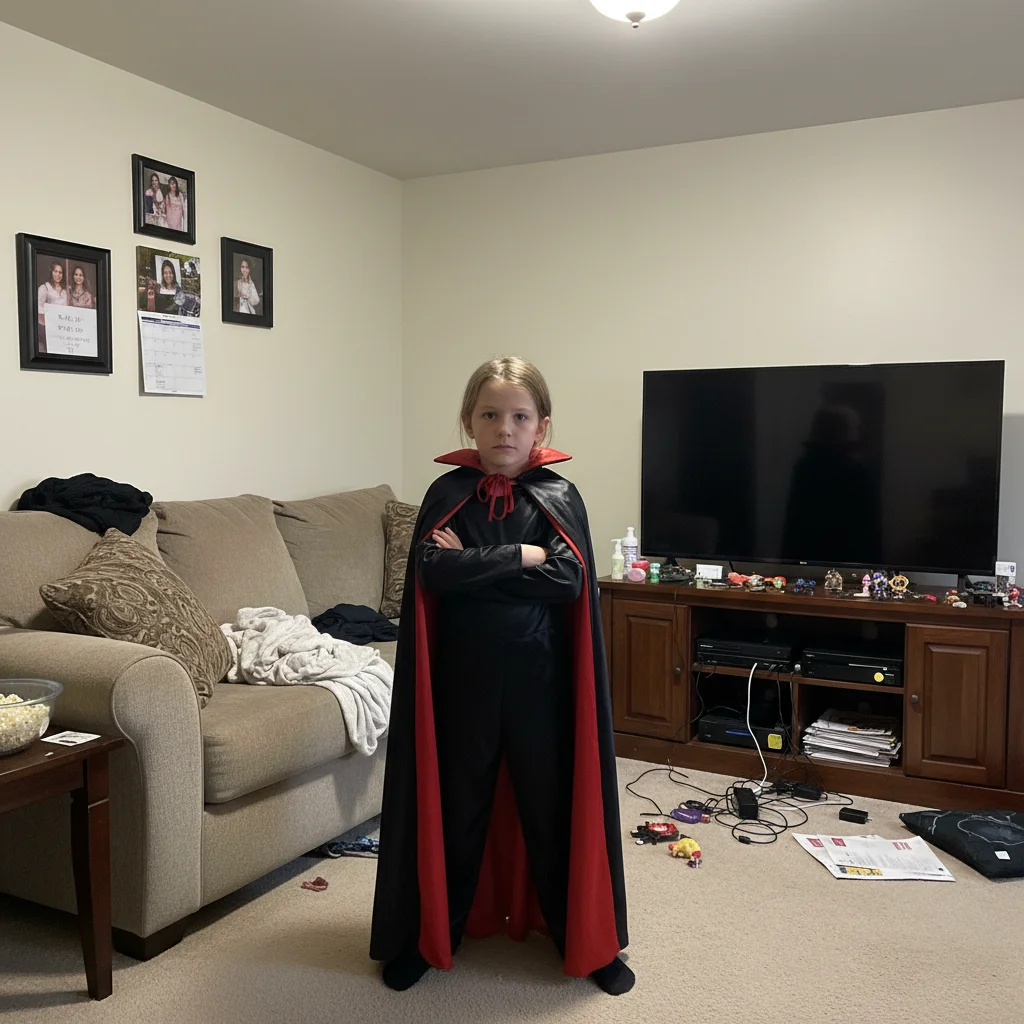
Child in vampire costume in cluttered living room
Before
โ†’
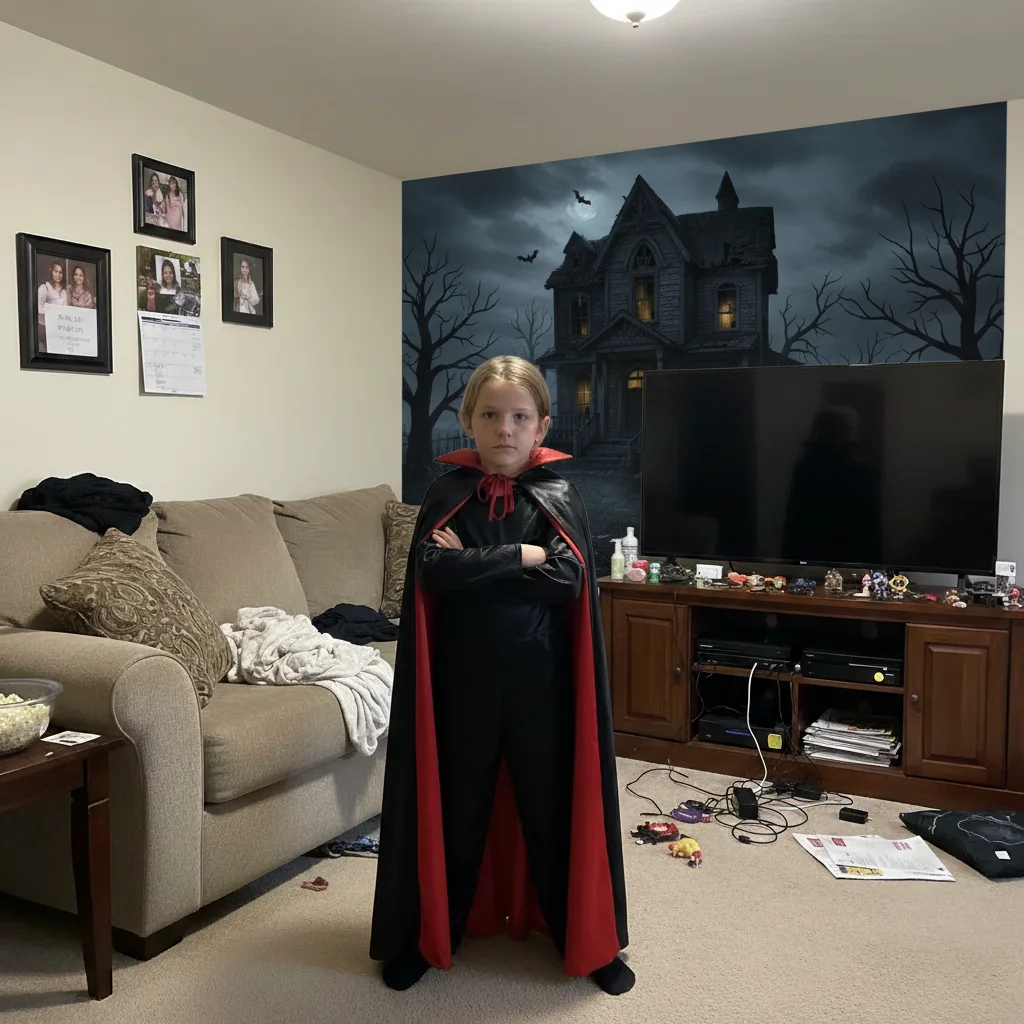
Same child with dark Victorian haunted mansion backdrop
After

Halloween Costume Photo Editor

Drop your photo here

or click to browse

Release to upload

Free โ€ข No signup

Advertisement
Popular use cases:
  • Halloween costume photos
  • kids costume pictures
  • Halloween party photos
  • trick or treat photos
  • group costume shots
  • Halloween social media
  • costume contest photos
  • family Halloween pictures

Cost
Free No signup required
Time
Instant results in 15-30 seconds
Works on
Any device - browser, phone, tablet, desktop
Powered by
AI-powered photo editing
Scenario Prompt Time
Haunted house replace background with spooky haunted house at night 35s
Enhance costume enhance the costume colors to pop more 20s
Add fog add spooky fog and moonlight to the background 25s
Remove clutter remove the background clutter and add dark spooky setting 40s

How it works

  1. Upload your costume photo

    Drop your Halloween costume photo into EditThisPic. Home photos, party shots, or outdoor trick-or-treat pics all work. JPG, PNG, WebP up to 7MB.

    Expect: Simple color enhancements: 20-25 seconds. Spooky background replacements: 35-45 seconds, may need refinement for complex hair or costumes.
  2. Describe the Halloween transformation

    Type what you want: 'replace background with spooky haunted house' or 'enhance the costume colors and remove the clutter.' Be specific about the spooky atmosphere or fixes you need. The AI understands Halloween concepts like 'haunted,' 'foggy graveyard,' and 'costume details' without requiring you to mark anything.

    Tip: For backgrounds, describe the mood: 'creepy and dark' vs 'playful Halloween fun' creates very different results

    Copy one of these to get started:

    Home costume photo with messy background replace background with spooky haunted house at night
    Costume colors look dull or washed out enhance the costume colors to pop more and brighten the scene
    Want atmospheric spooky effect add spooky fog and moonlight to the background
    Party photo with random people in background remove the other people in the background
    3 more prompts
    Outdoor parking lot or plain setting replace with creepy forest with pumpkins and autumn leaves
    Harsh flash ruined the photo fix the harsh flash lighting and add warm Halloween glow
    Group costume photo needs cleanup remove the furniture and add foggy graveyard atmosphere
  3. Review your spooky photo

    Check the costume details and background blend. Make sure the spooky atmosphere matches what you imagined. If something needs adjustment, describe the change in a follow-up prompt.

  4. Refine with markers if needed

    If the AI changed the wrong area or you want to specify exactly which clutter to remove, tap markers on those spots and regenerate. This is optional - most Halloween photo edits work well without markers.

    Tip: Markers help when you have multiple similar objects and want to remove specific ones, or need precise edge work around elaborate costumes
Try it free โ†“

Halloween Costume Photo Editor

Drop your photo here

or click to browse

Release to upload

Free โ€ข No signup

"Turned our living room vampire photo into a haunted mansion shot. The kids were so excited to share it!" @halloween_mom

See it in action

Child in vampire costume in cluttered living room
Before
->
Same child with dark Victorian haunted mansion backdrop
After

Added Haunted Mansion Background

Child's vampire costume in living room transformed with spooky Victorian mansion backdrop.

Prompt: replace background with spooky haunted house at night
Witch costume with dull colors and home clutter visible
Before
->
Same costume with vibrant purple, clean dark background
After

Enhanced Costume Colors and Removed Clutter

Witch costume looked dull in home lighting. Enhanced colors and cleaned up background.

Prompt: enhance the costume colors to pop more and remove the background clutter
Costume group with random party guests in background
Before
->
Same group with foggy atmospheric background, no photobombers
After

Added Fog and Removed Photobombers

Group costume photo at party cleaned up with spooky fog effect.

Prompt: remove the other people in the background and add spooky fog
Advertisement

If something looks off

AI changed the wrong area or removed part of the costume

Why: With elaborate costumes, the AI might confuse costume elements with background clutter

Try: Tap markers on the costume to protect it, then use 'keep costume intact, only change background'

Tip: Markers tell the AI what to preserve when costume and background are similar colors or complex

Spooky background looks fake or doesn't match the lighting

Why: Original photo had different lighting direction than the generated spooky scene

Try: Add 'match the lighting to look natural' or specify direction: 'with moonlight from upper left'

Tip: Describe lighting source in spooky backgrounds: 'lit by full moon' or 'candlelit glow'

Enhanced colors made costume look cartoonish or oversaturated

Why: The AI interpreted 'enhance' as maximum saturation boost

Try: Use 'subtly enhance costume colors' or 'make colors richer but natural looking'

Tip: Words like 'subtle,' 'natural,' and 'slightly' help control intensity of enhancements

Fog or atmospheric effects cover the costume subjects

Why: The AI added fog in front of subjects instead of just in background

Try: Specify 'add fog only in the background, keep subjects clear and sharp'

Tip: Always specify 'background fog' or 'fog behind them' to avoid covering costumes

Removed people but left odd shadows or artifacts

Why: People removal left behind shadows or partial elements

Try: Follow up with 'clean up the remaining shadows and artifacts from removal'

Tip: Person removal works best when they're at edges or against simple backgrounds

Background changed but hair or costume edges look rough

Why: Complex hair, fur, or costume details make edge detection difficult

Try: Use 'refine the edges to blend more naturally' or tap markers along problem edges for precision

Tip: Photos with clear separation between costume and background produce cleaner edges

Quick answers

Do I need to mark the background before adding spooky scenes?

No! Just describe what you want: 'replace background with haunted house.' The AI automatically detects the costume subject and separates it from the background. Markers are only needed for precision refinements if edges aren't perfect or you have very elaborate costumes.

Is there a free Halloween photo editor that doesn't require signup?

Yes! EditThisPic is completely free to try with no account needed. You can add spooky backgrounds, enhance costume colors, and remove clutter without signing up or entering payment information.

What Halloween backgrounds work best for costume photos?

Popular choices: haunted houses, foggy graveyards, creepy forests with pumpkins, abandoned mansions, or misty night scenes. Be specific about mood - 'playful Halloween' vs 'truly creepy' creates very different atmospheres.

Can I enhance costume details that got lost in poor lighting?

Yes! Use prompts like 'enhance the costume colors to pop more' or 'brighten costume details and sharpen the image.' This brings out details and colors that party or home lighting washed out.

Will this work on group costume photos?

Absolutely. The AI can detect multiple people and preserve all costumes while changing backgrounds or adding effects. Try 'add foggy graveyard behind the group' or 'enhance all costumes and add spooky lighting.'

How do I remove messy backgrounds from home costume photos?

Two approaches: (1) 'remove the clutter and add dark spooky background' for simple cleanup, or (2) 'replace background with haunted forest' for complete transformation. Name specific items if the AI misses some: 'remove the toys, furniture, and coat rack.'

Ready to perfect your Halloween costume photos?

Free to try. No signup required. Spooky results in 20-40 seconds.

Try it free โ†’