Free β€’ No signup Transform Minecraft-style pixel art Β· Free

Minecraft Style Photo Filter

Upload your photo and get a Minecraft-inspired blocky pixel art transformation in 15 seconds. Great for gaming profiles, Discord avatars, and fan art. Creates stylized artwork, not game-ready skin files.

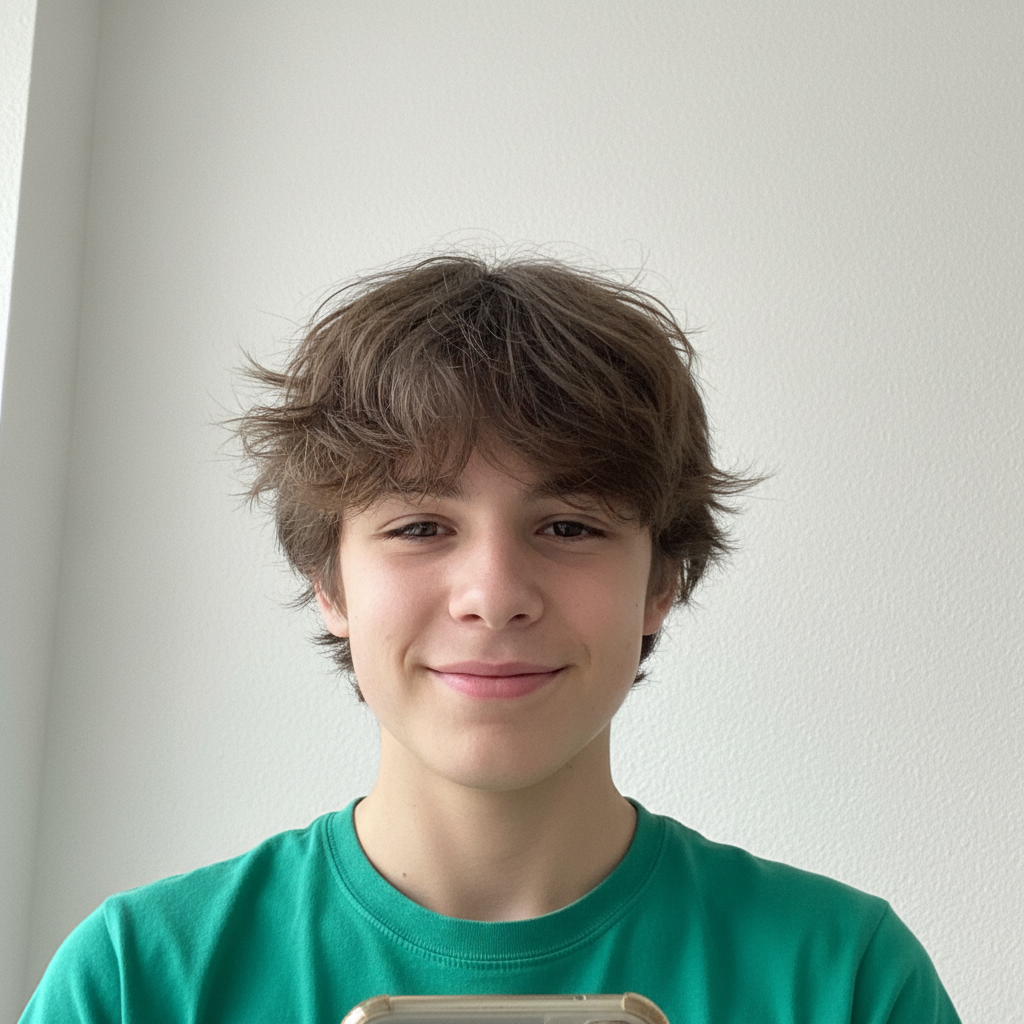
Casual selfie of teenage boy in green t-shirt
Before
β†’
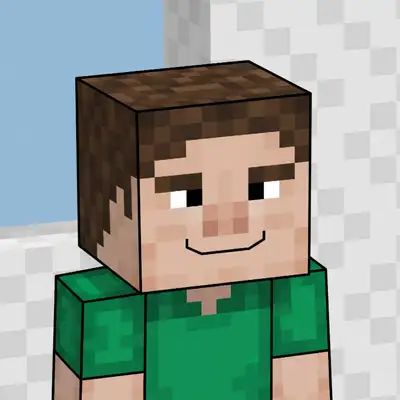
Same person as blocky Minecraft-style pixel art with square shapes
After

Minecraft Style Photo Filter

Upload photo to create Minecraft skin

Pixel-perfect skin β€’ Instant result

Release to upload

FreeNo signupNo watermark
Popular use cases:
  • Minecraft-style profile pictures
  • Gaming avatars
  • Gamer profile art
  • Minecraft fan art
  • Discord gaming avatars
  • Twitch profile pictures
  • YouTube gaming thumbnails

Cost
Free No signup required
Time
Instant results in 15-30 seconds
Works on
Any device - browser, phone, tablet, desktop
Powered by
AI-powered photo editing
Scenario Prompt Time
Classic pixel art Minecraft-style pixel art with blocky shapes and flat colors 15s
With armor Minecraft pixel art with diamond armor elements 20s
Profile avatar Blocky Minecraft pixel art portrait for gaming avatar 15s
World scene Minecraft pixel art with blocky world background 25s

How it works

  1. Upload your photo

    Upload a clear, front-facing portrait. Good lighting on the face and visible facial features give the AI the best foundation for the pixel art transformation. JPG, PNG, WebP up to 7MB.

    Expect: Simple portraits: 15-25 seconds. Complex photos: may need refinement for best pixel art results.
  2. Describe the Minecraft style you want

    Type your instruction: 'convert this photo to Minecraft-inspired blocky pixel art style' or 'make this photo look like Minecraft with square pixels and blocky shapes.' The AI applies pixelation, blocky geometry, and that classic low-resolution aesthetic. No selection or marking needed.

    Tip: Mention specific details like 'with a Minecraft world background' or 'in diamond armor style' to customize the artwork further.

    Copy one of these to get started:

    Classic Minecraft pixel art convert this photo to Minecraft-inspired blocky pixel art with visible square pixels, flat colors, and that classic low-resolution game aesthetic
    Minecraft with diamond armor transform this photo into Minecraft-style pixel art wearing diamond armor, blocky pixelated aesthetic with game-inspired elements
    Blocky portrait for profile pic convert this face into Minecraft-style pixel art β€” blocky square shapes, visible pixels, flat colors, perfect for a gaming avatar
    Minecraft with custom outfit colors convert this photo to Minecraft-style pixel art, keep my current outfit colors but make everything blocky with visible square pixels
    2 more prompts
    Minecraft world scene transform this photo into Minecraft-style pixel art with a blocky Minecraft world background β€” grass blocks, trees, and pixelated sky
    Dramatic Minecraft art convert this photo to epic Minecraft-style pixel art with dramatic lighting, blocky geometry, and a moody game-inspired atmosphere
  3. Generate and review

    Tap generate and check that the pixelated, blocky style came through β€” visible pixel grid, square shapes, and that classic Minecraft aesthetic.

  4. Refine with markers if needed

    If specific features need adjustment β€” like colors or background elements β€” tap markers on those areas and regenerate. Most Minecraft-style transformations look great on the first try.

    Tip: Markers help if you want specific details like outfit colors translated to pixel art.
Try it free ↓

Minecraft Style Photo Filter

Upload photo to create Minecraft skin

Pixel-perfect skin β€’ Instant result

Release to upload

Free β€’ No signup

See it in action

Casual selfie of teenage boy in green t-shirt
Before
->
Same person as blocky Minecraft-style pixel art with square shapes
After

Portrait to Minecraft pixel art

A casual selfie transformed into blocky Minecraft-style pixel art with visible square shapes and flat colors.

Prompt: convert this photo to Minecraft-inspired blocky pixel art with visible square pixels, flat colors, and that classic low-resolution game aesthetic
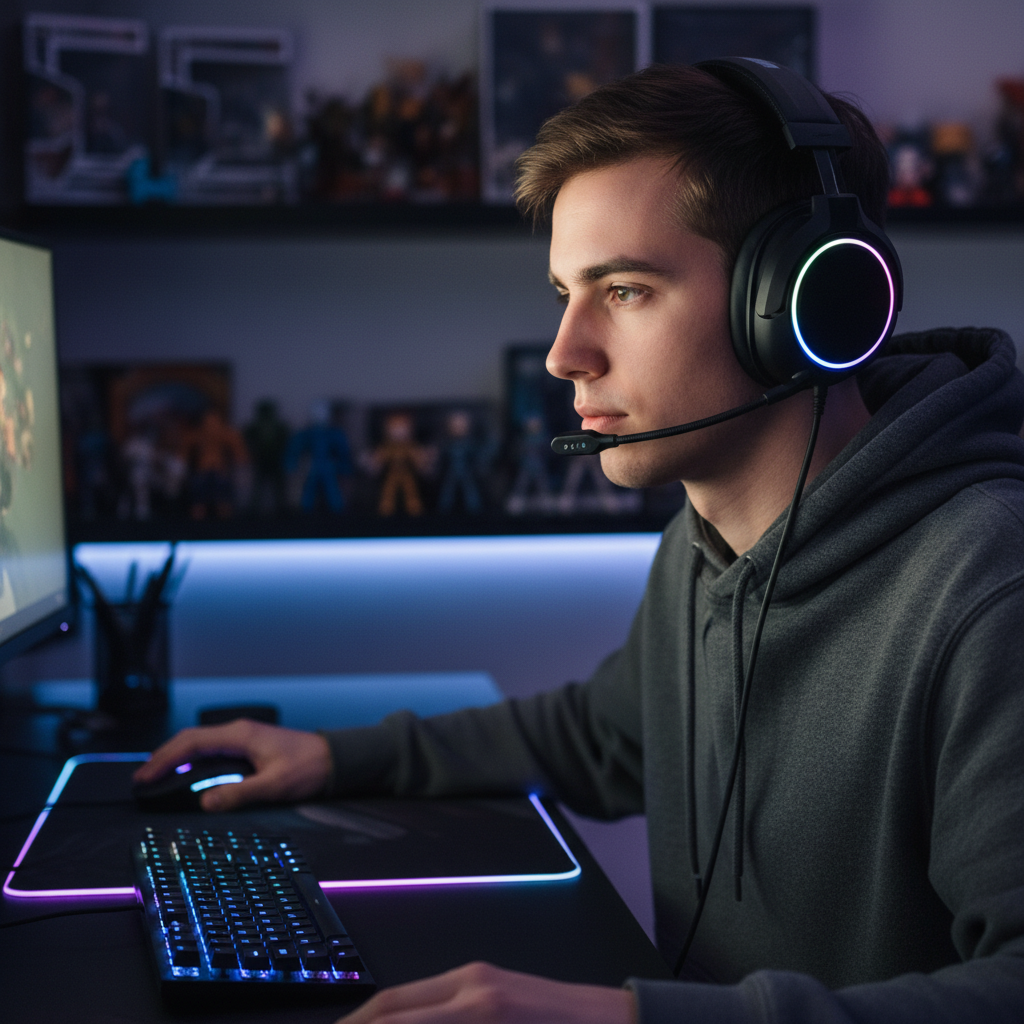
Person wearing gaming headset
Before
->
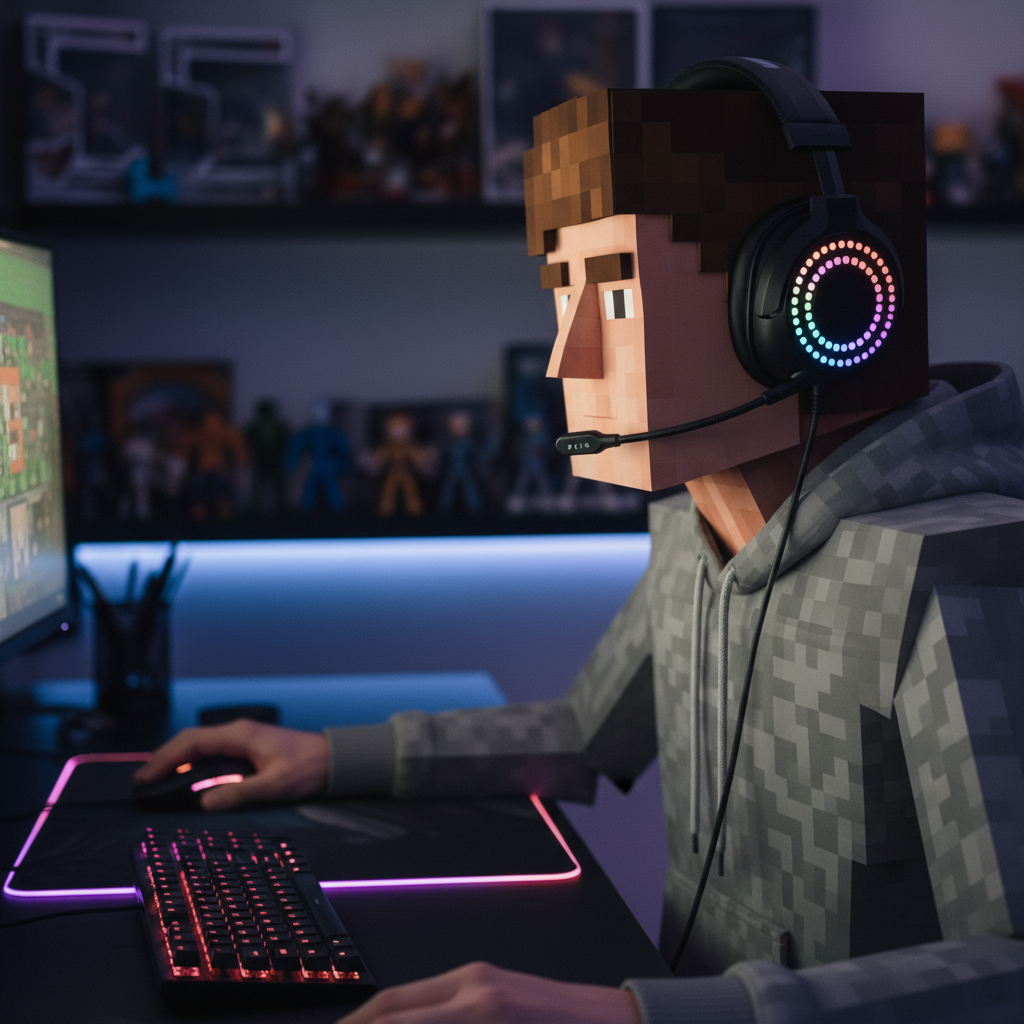
Same person as Minecraft-style pixel art with blocky headset
After

Gamer to Minecraft-style avatar

A gaming setup photo converted into Minecraft-style pixel art, preserving the headset as a recognizable detail.

Prompt: convert this photo to Minecraft-style pixel art keeping gaming headset, blocky pixels, flat colors, visible pixel grid

Detailed Guides by Scenario

πŸ“·

Gaming Profile Pictures & Avatars

Transform your photos into Minecraft-style pixel art for gaming profiles on Discord, Twitch, Steam, and other platforms.

Common Scenarios

  • Creating a unique Minecraft-style avatar for your Discord server profile
  • Making a pixelated gaming profile picture for Twitch or YouTube
  • Designing matching Minecraft-style avatars for your gaming squad

Best Practices

  • Use a clear headshot for the best pixel art avatar results
  • For Discord avatars, the cropped square format works perfectly with pixel art
  • Try adding game elements like 'diamond armor' or 'sword' for a more gaming-focused look
πŸ“·

Fan Art & Social Media

Create Minecraft-inspired pixel art from your photos for social media posts, fan art collections, and creative projects.

Common Scenarios

  • Turning a group photo into Minecraft-style pixel art for a fun social media post
  • Creating a series of Minecraft pixel art portraits for a themed Instagram collection
  • Making Minecraft-style fan art of pets, friends, or family members

Best Practices

  • Experiment freely β€” AI editing lets you try bold ideas with no risk to the original
  • For social content, pair the pixel art with a gaming-themed caption for more engagement
  • Process several photos with the same prompt to get a consistent pixel art style across a series
πŸ“·

Prints & Gifts for Gamers

Turn photos into Minecraft-style pixel art for printed gifts, posters, and party decorations β€” perfect for Minecraft fans.

Common Scenarios

  • Creating a Minecraft pixel art portrait as a birthday gift for a gamer friend
  • Making pixel art decorations for a Minecraft-themed birthday party
  • Designing Minecraft-style poster art from a favorite photo

Best Practices

  • Use high-resolution source photos for the sharpest printed pixel art
  • For party decorations, request 'bright saturated colors' so they stand out at a distance
  • Pixel art style actually looks great printed large β€” the blocky shapes scale well

If something looks off

AI changed the wrong area or something I didn't want changed

Why: The AI couldn't determine exactly which area you meant from description alone. This happens with ambiguous requests.

Try: Tap a marker on the specific area you want to change, then regenerate with the same prompt

Tip: Markers tell the AI 'I mean THIS one specifically.' Use them when description alone is ambiguous.

Pixels aren't blocky enough, looks too smooth

Why: The AI may have applied too much smoothing. Minecraft style needs visible, sharp pixel edges.

Try: convert to Minecraft pixel art style with very visible large square pixels, no smoothing, sharp blocky edges, flat colors with no gradients

Tip: Emphasizing 'no smoothing' and 'sharp edges' preserves the authentic pixelated look.

I wanted an actual game-ready Minecraft skin file

Why: EditThisPic is an AI image editor that creates artistic style transformations. It cannot generate a properly formatted .png Minecraft skin file with the correct UV layout, 64x64 pixel grid, or unwrapped body panels that Minecraft requires for importing.

Try: For Minecraft-style artwork, try: 'convert this photo to blocky Minecraft pixel art.' For actual game-ready skins, use a dedicated Minecraft skin editor like Skindex or Nova Skin.

Tip: The AI excels at creating Minecraft-inspired artwork. For actual in-game skin files, you need a tool specifically designed for Minecraft's skin format.

Colors don't look like Minecraft palette

Why: Minecraft has a distinctive color palette with limited, saturated colors.

Try: convert to Minecraft pixel art style with Minecraft game color palette, saturated blocky colors, no gradients, flat pixel colors

Tip: Minecraft uses flat, saturated colors without gradients β€” mention this for authenticity.

Quick answers

Do I need to mark anything before converting to Minecraft style?

No. Just describe what you want: 'convert this photo to Minecraft-style pixel art.' The AI understands Minecraft's blocky pixel aesthetic and applies square shapes, visible pixel grids, and flat colors automatically. Markers are only needed if you want specific areas handled differently.

How do I turn my photo into Minecraft-style art for free?

Upload your photo to EditThisPic and type 'convert to Minecraft-style blocky pixel art.' The AI transforms your image in 15-30 seconds with that iconic pixelated look. No account, no login, no watermarks. Perfect for gaming profile pictures and fan art.

Does this create actual game-ready Minecraft skin files?

No. EditThisPic creates Minecraft-style pixel art from your photo β€” a stylized image with blocky shapes and visible pixels. It does not generate a game-ready .png skin file with the correct 64x64 UV layout that Minecraft requires for importing. For actual in-game skins, use a dedicated Minecraft skin editor. You could use the artwork from EditThisPic as visual inspiration for creating a skin in those tools.

Is there a free Minecraft-style photo filter that doesn't require login?

Yes. EditThisPic converts photos to Minecraft-style pixel art without requiring signup or login. Just upload, describe the style you want, and download your blocky pixel art result. No watermarks, no account needed.

What is the best free AI tool for making Minecraft-style pixel art from photos?

EditThisPic lets you customize the exact pixel art style β€” classic blocky, diamond armor, dramatic lighting, or Minecraft world backgrounds. Unlike basic pixelation filters that just reduce resolution, the AI creates genuine Minecraft-inspired artwork with flat colors, square shapes, and that iconic game aesthetic. Free, no login, results in 15-30 seconds.

Is EditThisPic's Minecraft-style filter really free?

Yes β€” you get 1 free edit per week, no account needed. For unlimited edits, plans start at $3.99/month.

Can I create Minecraft-style art on my phone?

Yes. EditThisPic works in any mobile browser β€” iPhone, Android, tablet. No app download needed.

What photo formats does the Minecraft-style filter support?

JPG, PNG, WebP, and HEIC. Upload any common photo format and EditThisPic handles the rest.

How long does the Minecraft-style transformation take?

Usually 15-30 seconds. Upload your photo, describe what you want, and the AI delivers the pixelated result.
Turn your photo into Minecraft-style pixel art now

Upload a photo and get your blocky pixel art in 15 seconds. Free, no signup.