Free β€’ No signup Transform Portrait into a vampire photo Β· Free

Vampire Filter Photo Prank

Upload any portrait and the AI adds vampire fangs, pale skin, glowing red eyes, and a blood drip β€” convincing enough to terrify your group chat.

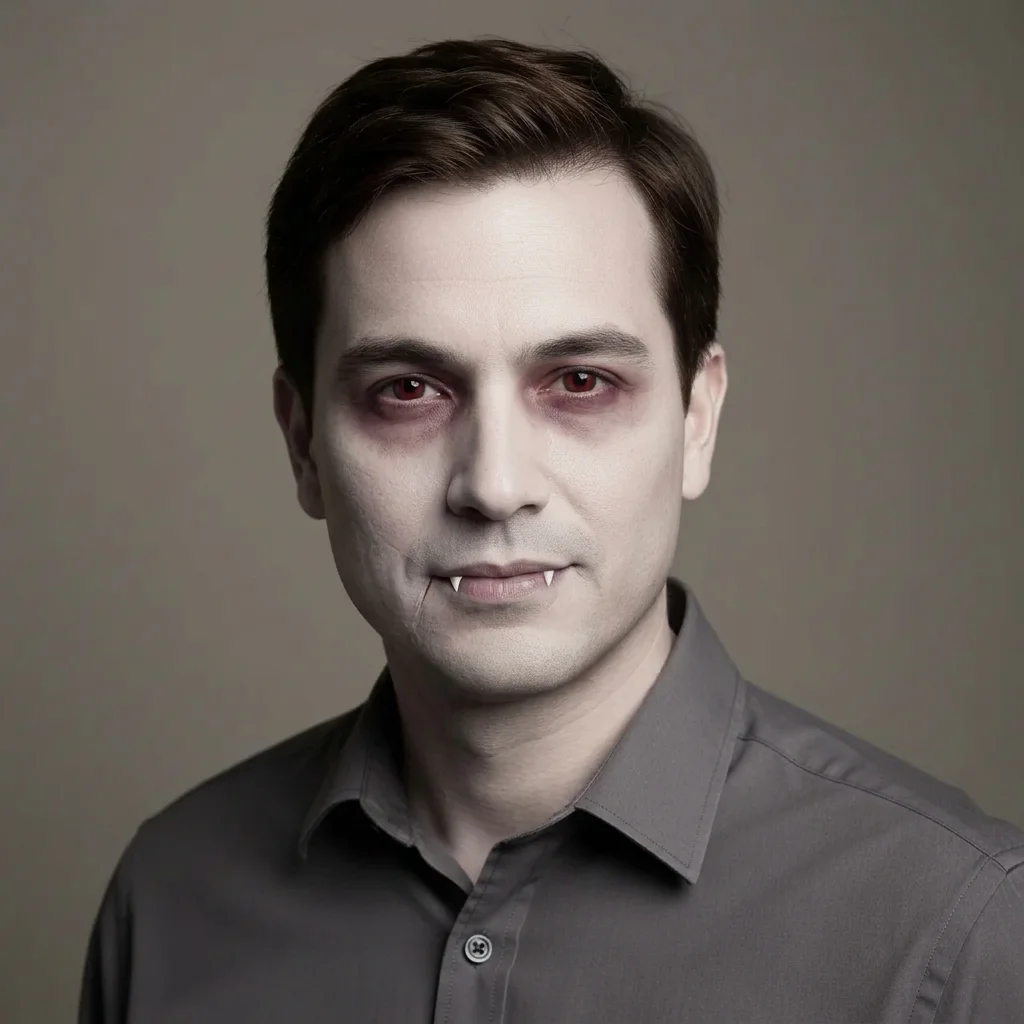
Normal professional headshot of a man with natural skin tone and a slight smile
Before
β†’
Same man transformed into a vampire with pale skin, red eyes, and visible fangs
After

Vampire Filter Photo Prank

Upload photo to transform portrait into a vampire photo

Free β€’ Results in 30 seconds β€’ No signup

Release to upload

FreeNo signupNo watermark

1 free edit·then from $1.99

Popular use cases:
  • vampire prank photos
  • Halloween photo edits
  • horror face transformation
  • scary photo filter online
  • vampire selfie prank
  • AI Halloween photo editor
  • free vampire photo filter

Cost
Free No signup required
Time
Instant results in 15-30 seconds
Works on
Any device - browser, phone, tablet, desktop
Powered by
AI-powered photo editing
Scenario Prompt Time
Subtle (most believable) Slightly pale skin, barely visible fangs, deep red irises β€” keep it realistic 15s
Classic Halloween Pale skin, sharp fangs, glowing red eyes, blood drip at corner of mouth 15s
Full horror Chalk-white skin, dark veins, blood smeared on chin, wild red eyes, fangs bared wide 30s
Victorian aristocrat 19th century vampire look, imperious cold expression, stone wall background, dark cape collar 30s

How it works

  1. Upload your photo

    Upload a clear portrait or selfie β€” a photo where the face is well-lit and visible works best. A front-facing shot gives the AI the most to work with for fangs, eye color, and skin tone.

    Expect: Upload takes 2-3 seconds. Any common format (JPG, PNG, HEIC) works.
  2. Describe your vampire

    Type what you want. Be specific to get great results β€” mention the pale skin, glowing red eyes, sharp fangs, and blood drip. You can also add a dark gothic background or dramatic lighting to sell the effect.

    Tip: Include 'dramatic shadows under the eyes' and 'veins visible on skin' to make the result look more unsettling. The more detail you give, the more realistic and creepy the output.

    Copy one of these to get started:

    Classic Halloween vampire Transform this person into a classic vampire with sharp white fangs, deathly pale skin, bright glowing red eyes, and a thin trickle of blood running from the corner of the mouth. Keep their face recognizable.
    Victorian aristocrat vampire Make this person look like a 19th century vampire aristocrat β€” chalk-white skin, sharp fangs slightly showing, hollow dark eyes with red irises, dark circles, and an imperious cold expression. Add a faint gothic stone wall behind them.
    Bloodthirsty after feeding Transform this person into a vampire who just fed β€” blood smeared around the mouth and dripping down the chin, wild red eyes, fangs visible and wet, pale skin with dark veins visible at the temples.
    Subtle office vampire Give this person a very subtle vampire transformation β€” slightly pale skin, a hint of elongated canine teeth, faint dark circles under their eyes, and irises that are a deep unnatural red. Keep it realistic enough that someone might not notice immediately.
    4 more prompts
    Vampire profile picture swap Transform this person into a dramatic vampire portrait: pale grey skin, sharp fangs bared in a slight grin, glowing red eyes, dark veins visible on the neck and forehead, hair swept back dramatically. Make it look like a professional portrait.
    Halloween party invitation photo Turn this person into a vampire for a Halloween party invite look β€” deathly pale skin, vivid red eyes, fangs just visible in a smile, wearing a dark collar. Add a dramatic dark red and black atmospheric glow behind them.
    Child-friendly cartoon vampire Turn this person into a friendly cartoon-style Halloween vampire β€” exaggerated pale skin, big comical fangs, wide bright red eyes, a classic black cape collar visible at the shoulder. Keep it fun and not too scary.
    Vampire in daylight (burning) Show this person as a vampire caught in daylight β€” pale skin beginning to smoke at the edges, red eyes squinting in agony, fangs bared, slight wisps of smoke rising from their shoulders, dramatic harsh sunlight from one side.
  3. Send it

    Review the transformed photo and download it. Send it to your roommate at midnight, drop it in the family Halloween group chat, or use it as your profile picture for the week. Works best when sent without context.

Try it free ↓

Vampire Filter Photo Prank

Upload photo to transform portrait into a vampire photo

Free β€’ Results in 30 seconds β€’ No signup

Release to upload

Free β€’ No signup

See it in action

Normal professional headshot of a man with natural skin tone and a slight smile
Before
->
Same man transformed into a vampire with pale skin, red eyes, and visible fangs
After

Office coworker becomes undead

A standard office headshot transformed into a convincing vampire portrait. Pale grey skin, sharp fangs just visible in a closed-mouth smile, and subtle red irises that you only notice when you look closely.

Prompt: Transform this person into a vampire with deathly pale skin, sharp white fangs just visible at the corner of the mouth, subtle red irises, and dark circles under the eyes. Keep it realistic and keep their face recognizable.
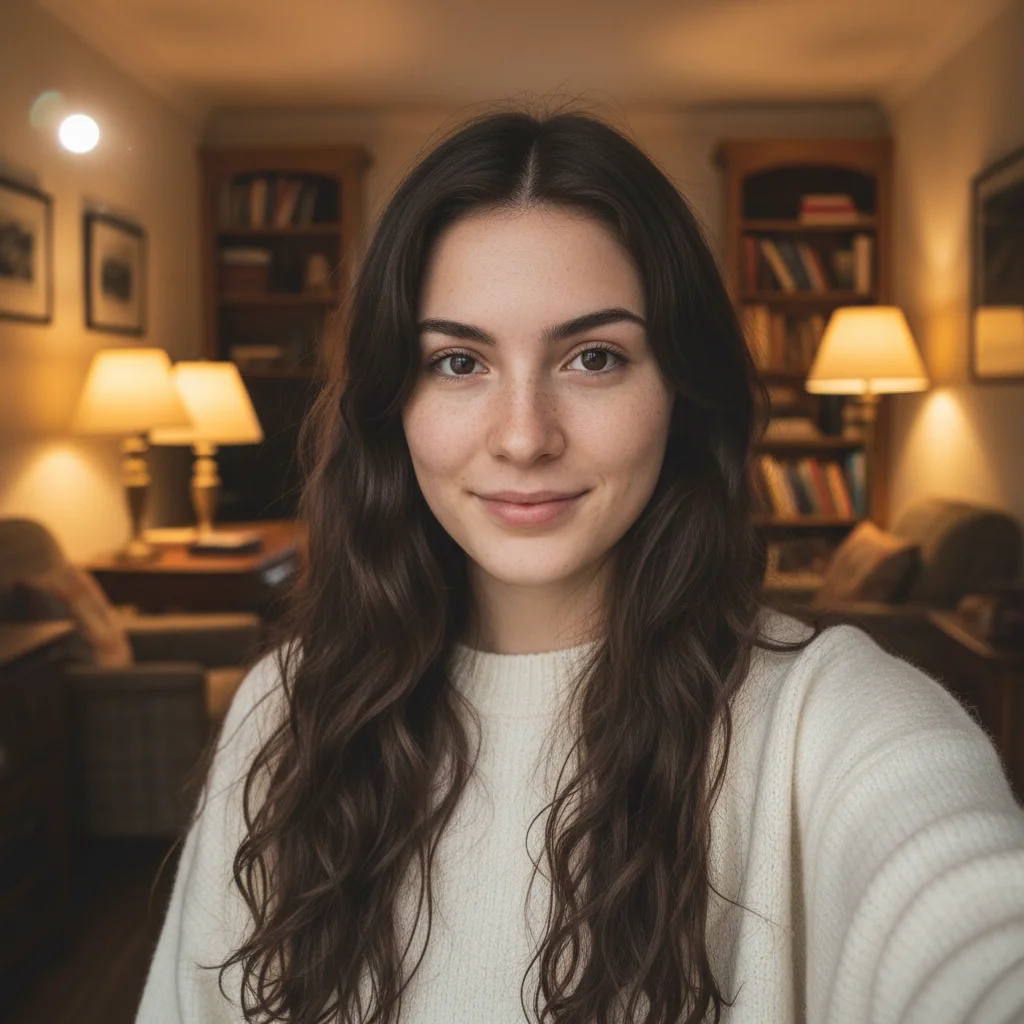
Casual selfie of a young woman with natural skin and relaxed expression
Before
->
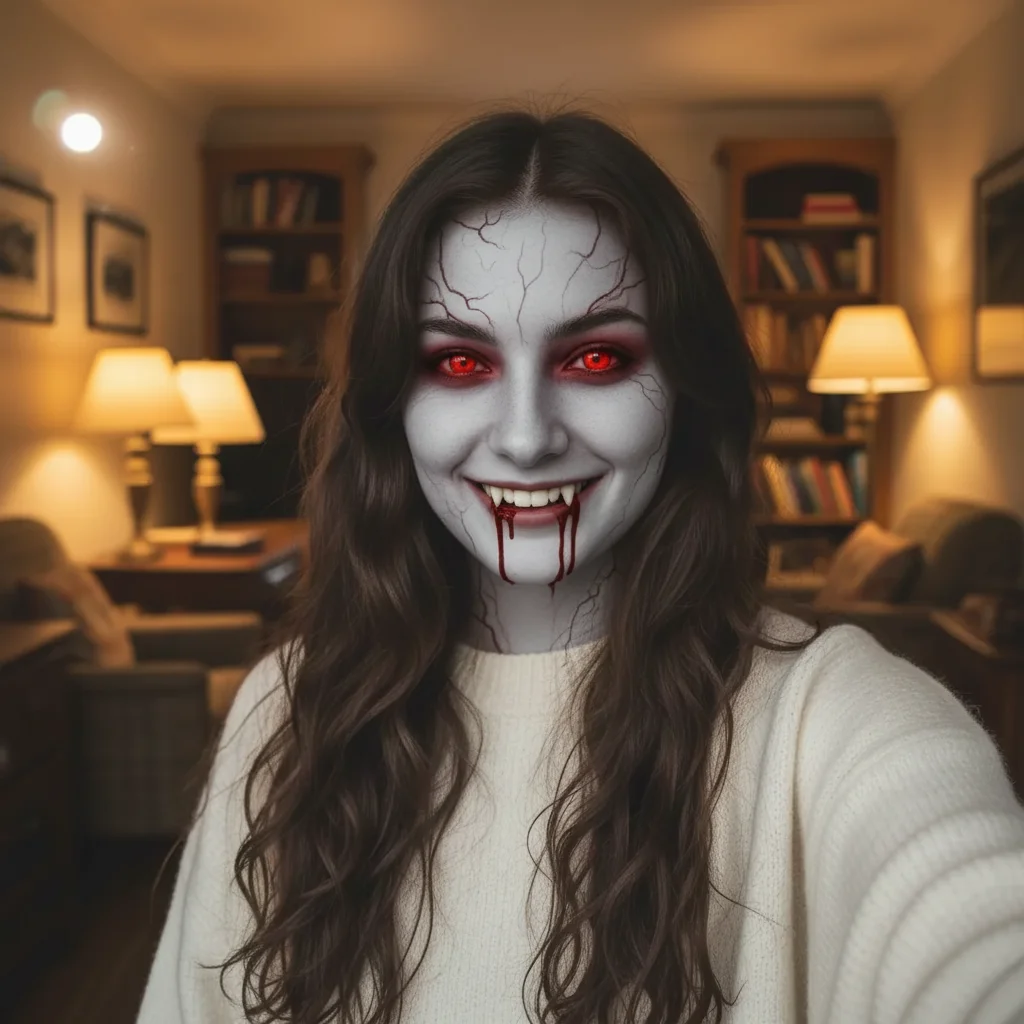
Same woman with vampire transformation showing pale skin, red glowing eyes, fangs, and blood drip
After

Halloween selfie turns terrifying

A casual selfie with the full Hollywood vampire treatment β€” glowing red eyes, dripping blood, pale veined skin, and sharp fangs bared wide. The contrast with the relaxed original makes it even more unsettling.

Prompt: Transform this person into a dramatic Halloween vampire: chalk-white skin with dark veins visible at the temples, glowing red eyes, sharp white fangs bared, a trickle of blood dripping from the corner of the mouth. Make it look like a horror movie still.
Three friends posing together outdoors with natural expressions
Before
->
Same group photo where one person has been vampirized while the others remain normal
After

Group photo vampire surprise

One person singled out in a group photo and transformed into a vampire while everyone else remains normal. The best prank format β€” your friend has to find themselves in the photo, then realize what happened.

Prompt: Transform only the person on the left into a vampire β€” give them pale skin, red glowing eyes, and visible fangs. Leave all the other people in the photo completely normal.

If something looks off

The fangs look small or barely visible

Why: Without explicit instructions, the AI tends to add subtle, polite fangs. It's being considerate β€” you have to push it.

Try: Add large, sharp, prominent vampire fangs β€” elongated upper canines clearly visible and slightly wet-looking. Make them unmistakably vampiric.

Tip: If you want dramatic fangs, also specify an open-mouth expression: 'with the mouth slightly open to show the fangs clearly.'

Skin looks grey instead of vampire-pale

Why: Grey and pale aren't quite the same thing. The AI may interpret 'pale' broadly.

Try: Make the skin deathly white with a cold blue-grey undertone β€” like someone who hasn't seen sunlight in centuries. Not grey, but genuinely pale.

Tip: Adding the phrase 'with dark veins faintly visible under the skin' alongside the pallor instruction usually produces a more cohesive vampire effect.

The red eyes look pink or faded instead of glowing

Why: The AI may be toning down the eye color to keep it looking natural. Override this explicitly.

Try: Give the eyes vivid, brightly glowing red irises β€” the color should be intense and unnatural, like a vampire's eyes in a horror film.

Tip: Try specifying 'crimson' or 'blood red' instead of just 'red' for a richer result.

Blood drip looks fake or too clean

Why: A single clean line of blood can look cartoonish. Real blood is more irregular.

Try: Add a realistic blood drip β€” dark red, slightly irregular at the edges, running from the corner of the mouth down toward the chin. Small droplet at the end.

Tip: Specifying 'partially dried blood' gives it a more unsettling lived-in quality versus a fresh clean drip.

The person's face changed too much and they're unrecognizable

Why: Heavy transformations like skin tone changes can alter perceived facial structure. Anchor the edit to the face explicitly.

Try: Apply the vampire transformation while keeping the person's face shape, features, and overall appearance clearly recognizable. Only change skin tone, eyes, and add fangs.

Tip: The prank only works if your friend recognizes themselves. Specify 'keep the face fully recognizable' every time.

Quick answers

Do I need to mark areas before describing what I want?

No. Just describe what you want and the AI handles the rest. Type something like 'transform this person into a vampire with pale skin, red eyes, and fangs' and it will apply all the changes automatically. You only need to use markers if you want to target a very specific area, like 'just change the eyes on the person on the left.'

Is this free?

Yes. EditThisPic gives you 1 free edit per week with no account needed. If you want more edits, you can get a small credit pack starting at $1.99 or subscribe for unlimited monthly edits. No signup is required to try it.

Will the vampire photo look realistic enough to fool someone?

Often yes, especially for subtle versions with understated fangs and pale skin. The more dramatic the transformation (blood dripping, glowing eyes), the more obviously edited it looks β€” which can still be hilarious as a prank. For maximum believability, ask for a subtle transformation and send it without comment.

Can I use this on a group photo and only vampirize one person?

Yes. Specify the person you want to transform in your prompt β€” for example, 'transform only the person on the right into a vampire, leave everyone else normal.' The AI can apply changes to a single subject in a group photo.

What kind of photo works best for this?

A clear, well-lit portrait or selfie where the face takes up most of the frame. Front-facing photos work best β€” profile shots can make fangs and eye color harder to render accurately. Indoor photos with decent lighting work well; dark blurry photos may produce inconsistent results.

Does EditThisPic save my photos?

Photos are processed to generate your edit and not stored permanently. You can optionally save edited images to your account if you create one, but that's entirely optional. Your uploaded photo is not used for training or shared.

Can I choose which vampire features to add?

Completely. Just describe exactly what you want. You can ask for only fangs and skip the blood, add veins but keep normal eye color, or go full classic horror with every effect. The AI follows your description β€” more detail in your prompt means more precise results.

How is this different from vampire filter apps like FaceApp or Snapchat?

Apps like FaceApp and Snapchat use fixed templates β€” you get one preset vampire look applied the same way to every photo. EditThisPic uses AI that follows your specific description, so you can request a subtle office-appropriate vampire, a Victorian aristocrat style, a full horror-movie blood-covered look, or anything in between. The result is unique to your prompt.

How much does EditThisPic cost?

You get 1 free edit per week β€” no account needed. After that, credit packs start at $1.99 for 3 edits. Monthly plans start at $4.99/mo for 15 edits with unused credits rolling over. All edits are full resolution with no watermark.

Ready to transform your photos?

Free to try. No signup required.

1 free edit included·Credit packs from $1.99