Free β€’ No signup Add Ghost to photo Β· Free

Add Ghost to Photo Prank

Upload any photo. AI adds a ghostly transparent figure. Scare your friends year-round β€” or save it for Halloween.

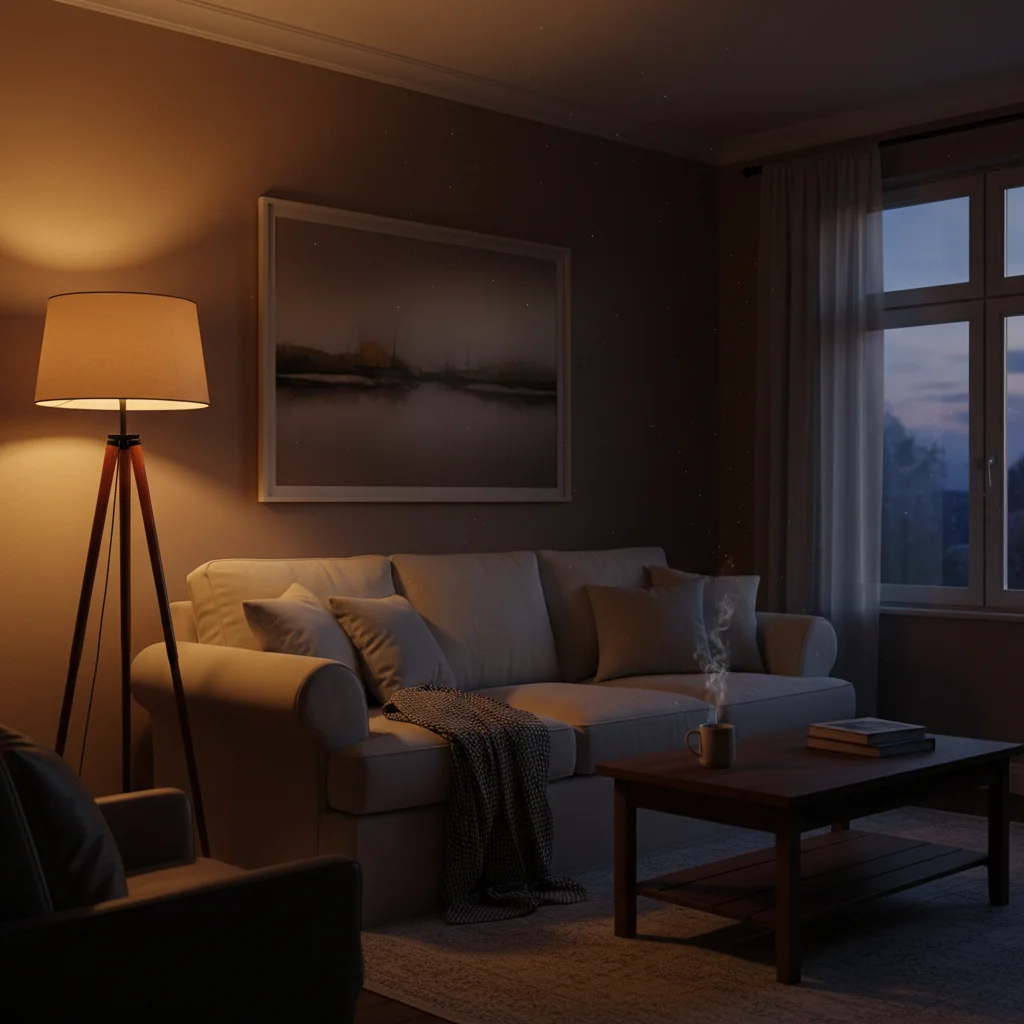
Dimly lit room before ghost prank
Before
β†’
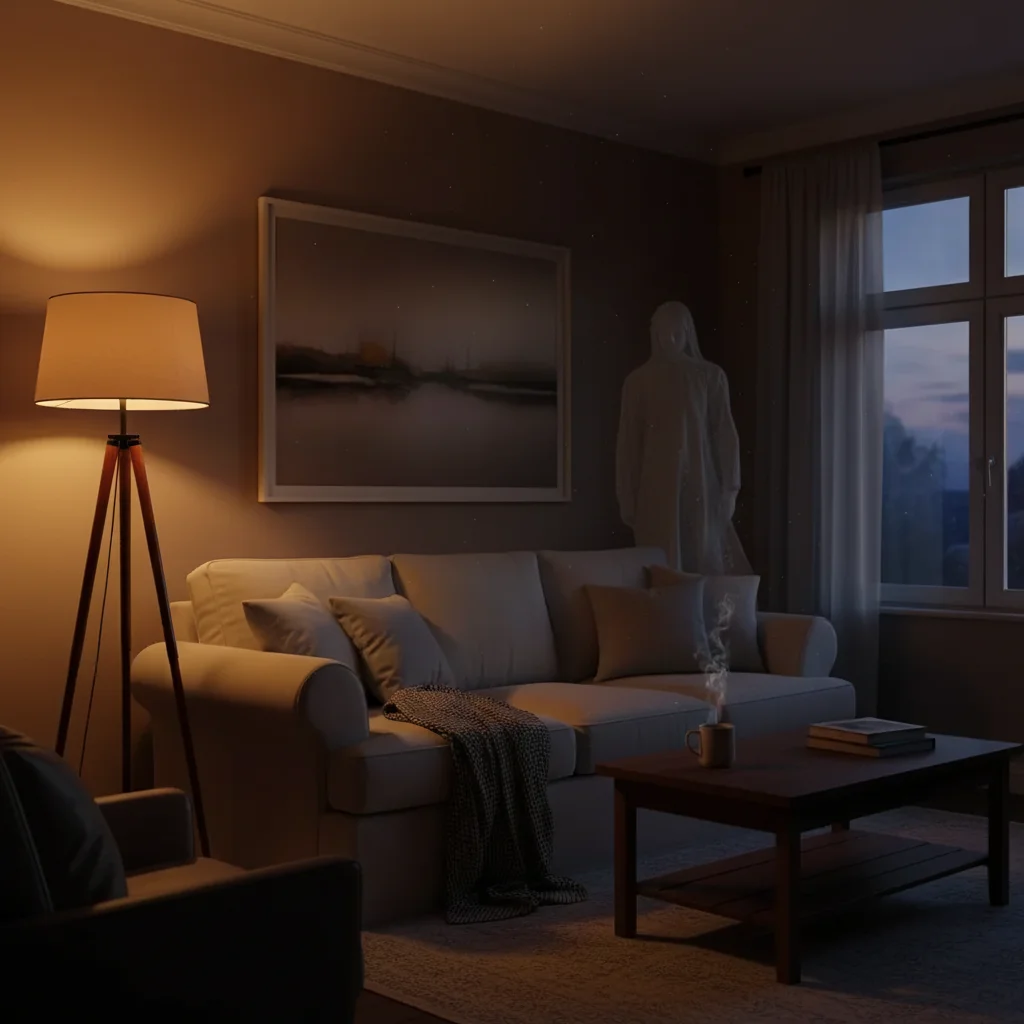
Room with AI-added transparent ghost in corner
After

Add Ghost to Photo Prank

Upload photo to add ghost

Free β€’ Results in 30 seconds β€’ No signup

Release to upload

FreeNo signupNo watermark

1 free edit·then from $1.99

Popular use cases:
  • add ghost to photo prank
  • ghost photo generator AI
  • add spirit to photo
  • transparent ghost in photo
  • halloween ghost photo tool
  • AI ghost prank

Cost
Free No signup required
Time
Instant results in 15-30 seconds
Works on
Any device - browser, phone, tablet, desktop
Powered by
AI-powered photo editing
Scenario Prompt Time
Subtle background ghost Faint translucent figure in corner, barely visible 30-45 sec
Mirror ghost Ghostly face in mirror behind the photographer 30-60 sec
Halloween ghost Glowing translucent figure in flowing white robes 30-45 sec

How it works

  1. Upload your photo

    Drop any photo into EditThisPic. JPG, PNG, WebP up to 7MB. Dimly lit rooms, staircases, mirrors, and old buildings work best for ghost effects. But bright selfies work too β€” the ghost in the background is equally scary.

    Expect: Most edits complete in 20-45 seconds. Ghost effects may need 1-2 tries to get the right transparency level.
  2. Describe the ghost

    Type: 'Add a transparent ghostly figure standing in the background, semi-visible and eerie' or 'Add a faint ghost of a woman in a white dress at the end of the hallway.' Describe how transparent and how visible the ghost should be.

    Tip: Less visible = scarier. 'Barely visible transparent figure that you have to look twice to see' creates the best scare because people discover it themselves. Use words like 'translucent,' 'faint,' and 'semi-transparent.'

    Copy one of these to get started:

    Classic background ghost Add a faint, translucent ghostly figure of a person standing in the background corner of the room, barely visible, looking straight at the camera
    Ghost in the mirror Add a transparent ghostly face visible in the mirror behind me, faint and blurry but clearly a person's face that shouldn't be there
    Hallway ghost Add a translucent ghost of a woman in a white dress standing at the far end of the hallway, semi-transparent, with a faint glow
    Ghost behind the selfie Add a faint ghostly figure standing directly behind me in this selfie, barely visible but clearly there, translucent and unsettling
    4 more prompts
    Child ghost Add a small translucent child-like ghostly figure standing in the doorway, facing away from the camera, faint and barely visible
    Outdoor ghost Add a transparent ghostly figure standing among the trees in the background of this outdoor photo, barely visible between the trunks
    Staircase ghost Add a transparent ghost sitting on the stairs, hunched over with their head in their hands, faint and sorrowful
    Halloween party ghost Add a very obvious ghost β€” glowing translucent figure in flowing white robes, floating slightly above the ground, dramatic and clearly supernatural
  3. Share and terrify

    Check the ghost is visible enough to eventually notice but subtle enough not to be immediately obvious. Send the photo casually β€” about something else entirely β€” and wait for the terrified response when they spot it.

Try it free ↓

Add Ghost to Photo Prank

Upload photo to add ghost

Free β€’ Results in 30 seconds β€’ No signup

Release to upload

Free β€’ No signup

See it in action

Dimly lit room before ghost prank
Before
->
Room with AI-added transparent ghost in corner
After

Subtle background ghost

A room photo with a barely visible ghostly figure in the corner.

Prompt: Add a faint, translucent ghostly figure standing in the background corner, barely visible, looking at the camera
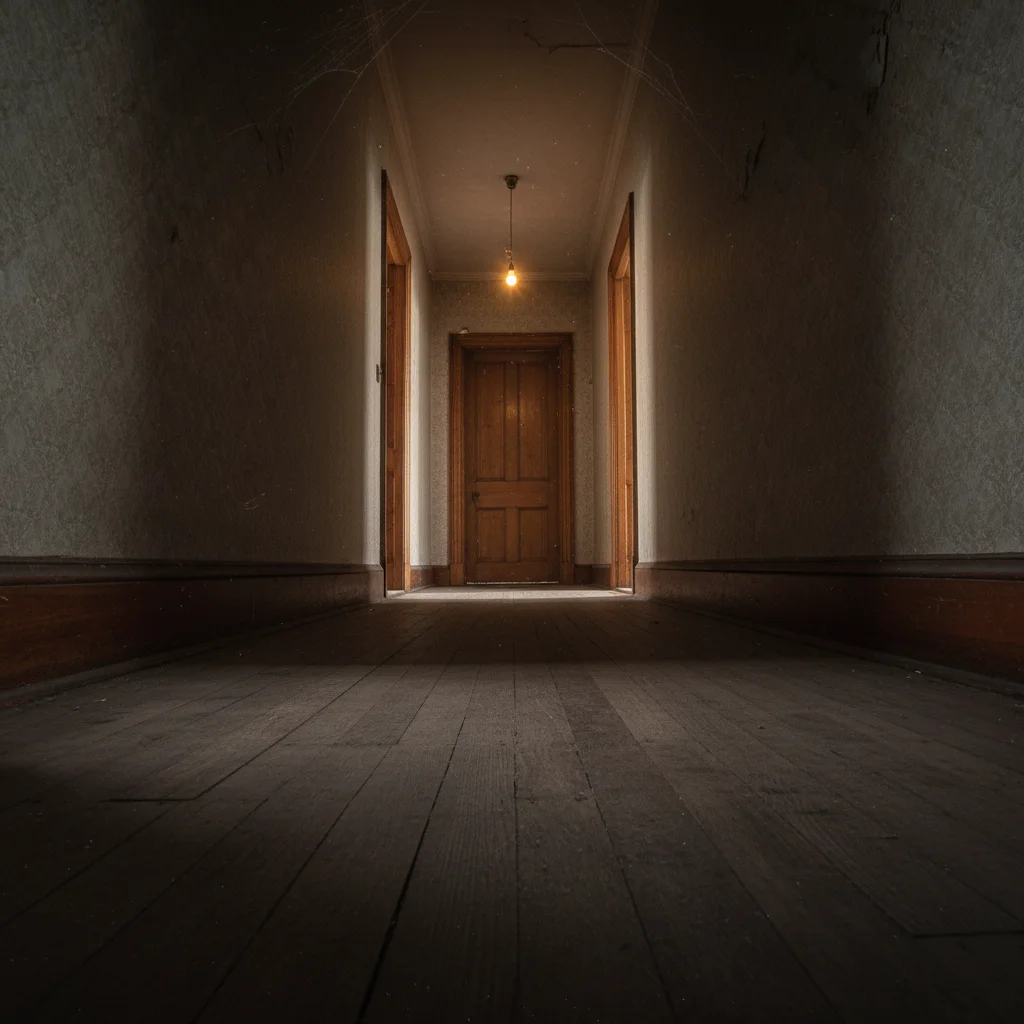
Empty hallway before ghost prank
Before
->
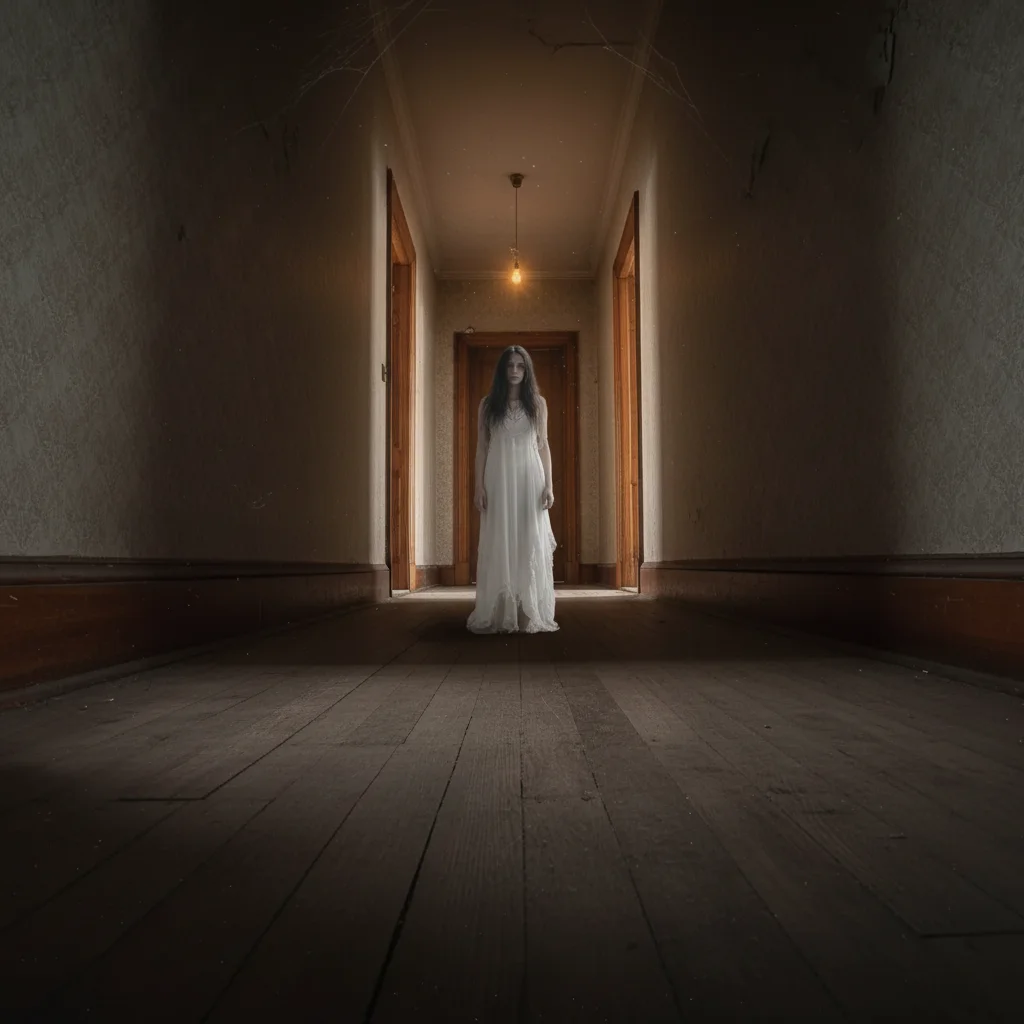
Hallway with AI-added translucent ghost figure
After

Hallway ghost

A hallway photo with a translucent ghost at the far end.

Prompt: Add a translucent ghost of a woman in white standing at the far end of the hallway

If something looks off

Ghost is too visible β€” looks like a real person, not a ghost

Why: The AI made the figure too opaque and solid.

Try: Emphasize transparency: 'very faint, barely visible, translucent, ghostly transparency where you can see through them'

Tip: Using 'translucent,' 'faint,' 'barely visible,' and 'see-through' multiple times helps the AI commit to the ghost effect.

Ghost is invisible β€” can't see it at all

Why: The AI made the figure too transparent.

Try: Dial it back: 'semi-transparent ghost, visible but clearly not solid β€” about 50% opacity'

Tip: The sweet spot is visible enough to notice on a second look but transparent enough to clearly be a ghost.

Doesn't look ghostly β€” just looks like a faded person

Why: The AI reduced opacity without adding eerie qualities.

Try: Add ethereal details: 'ghostly white glow, flowing translucent clothing, slightly blurred edges, supernatural appearance'

Tip: Words like 'ethereal,' 'supernatural,' 'glowing,' and 'otherworldly' trigger the ghost aesthetic.

Ghost placed in wrong location

Why: Multiple possible spots in the scene.

Try: Tap a marker on the exact spot β€” corner, doorway, mirror area β€” and regenerate

Tip: Background corners, doorways, and mirror reflections are the most natural ghost placements.

Ghost looks cartoonish

Why: The AI went stylized instead of photorealistic.

Try: Add 'photorealistic ghost effect, matching the photograph's grain and quality, not cartoon or illustrated'

Tip: Mentioning 'photorealistic' and 'matching the photograph' keeps the AI grounded in reality.

Quick answers

What photos work best for ghost pranks?

Dimly lit rooms, hallways, staircases, and mirrors create the creepiest results. But any photo works β€” even bright selfies with a ghost barely visible in the background are effective because of the unexpected contrast.

Is this free?

Yes, one free edit per week with no signup. Credit packs start at $1.99 for more ghost photos.

Can I control how transparent the ghost is?

Yes β€” describe the transparency level. 'Barely visible' creates a subtle ghost. 'Semi-transparent' creates a clearly visible but ghostly figure. 'Glowing translucent' creates a dramatic, obvious ghost for Halloween content.

Does this work for Halloween posts?

Absolutely β€” it's one of the most popular use cases. Create ghost selfies, haunted house photos, or add ghosts to group photos for Halloween social media content.

Can I add a ghost to a selfie?

Yes β€” upload your selfie and describe a ghost behind you or in the background. 'Translucent ghostly figure standing behind me' works perfectly.

Will there be a watermark?

No, EditThisPic never adds watermarks.

Does this work on mobile?

Yes, fully works in any mobile browser. No app needed.

How much does EditThisPic cost?

You get 1 free edit per week β€” no account needed. After that, credit packs start at $1.99 for 3 edits. Monthly plans start at $4.99/mo for 15 edits with unused credits rolling over. All edits are full resolution with no watermark.

Ready to haunt your photos?

Free to try. No signup required.

1 free edit included·Credit packs from $1.99