Free • No signup Change Background · Free

Great Smile, Wrong Background? Replace It

Just describe the background you want—AI handles the rest
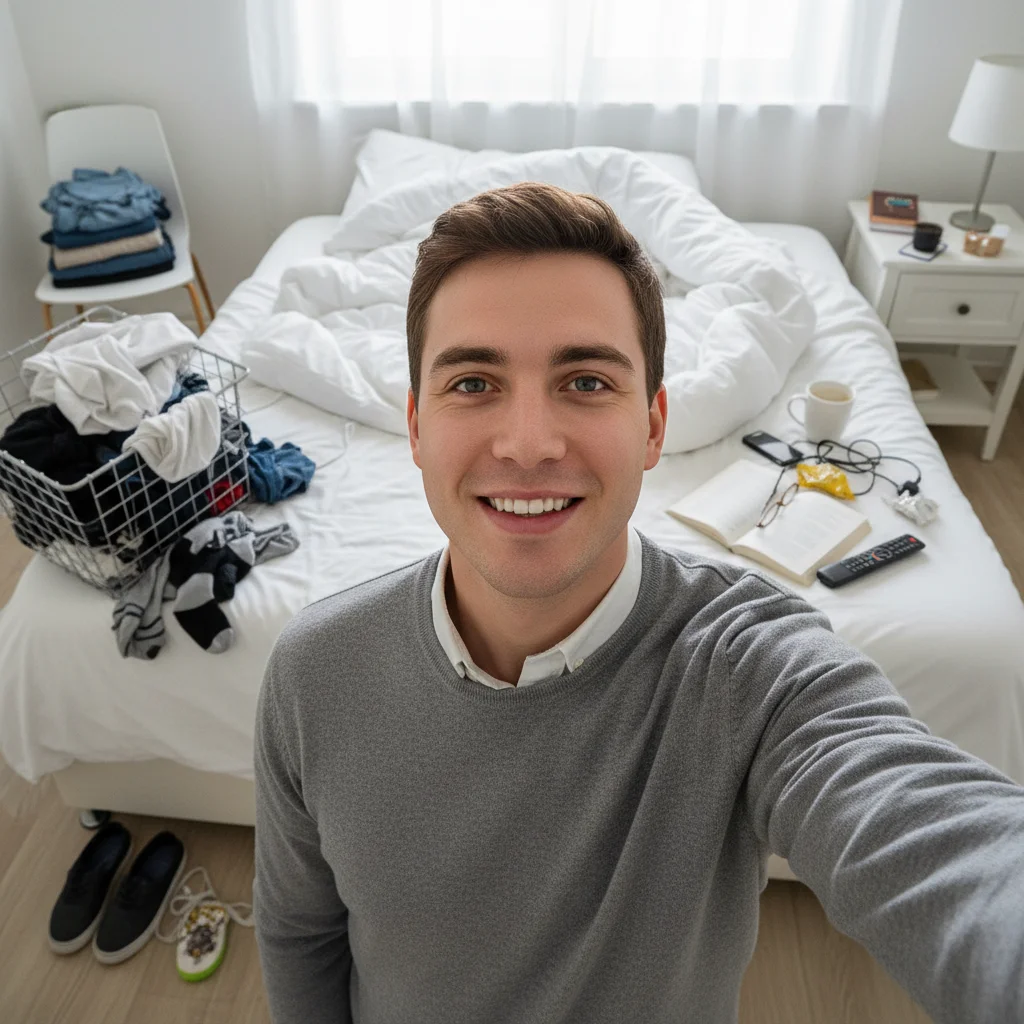
Professional headshot with messy bedroom visible in background
Before
Same person with clean neutral gray professional backdrop
After

Replace Background in Photos

Drop your photo here

or click to browse

Release to upload

Free • No signup

Advertisement
Popular use cases:
  • LinkedIn headshots
  • dating profile photos
  • messy room backgrounds
  • bathroom mirror selfies
  • apartment hallway photos
  • cluttered backgrounds
  • professional headshots
  • social media profiles
  • outfit photos
  • home office backgrounds
  • virtual backgrounds
  • profile pictures
  • Instagram posts
  • Facebook photos

Cost
Free No signup required
Time
Instant results in 15-30 seconds
Works on
Any device - browser, phone, tablet, desktop
Powered by
AI-powered photo editing
Scenario Prompt Time
Clean white backdrop replace background with pure white backdrop 20s
Professional gray replace background with clean neutral gray studio backdrop 22s
Blur everything blur everything behind me completely 18s
Specific scene replace background with modern coffee shop setting 30s

How it works

  1. Upload your photo

    Drop in that photo with the great smile but terrible background. JPG, PNG, WebP up to 7MB. No account needed, works in your browser.

    Expect: Simple background replacements (white backdrop, blur): 20-30 seconds. Complex scene replacements (specific locations with lighting match): may need 2-3 refinements.
  2. Describe what background you want

    Type your instruction: 'replace background with clean white studio backdrop' or 'blur everything behind me completely' or 'change to a coffee shop setting.' Be specific about the style—professional, blurred, specific location. No marking needed—the AI knows what's background versus foreground.

    Tip: For professional photos, specify 'soft neutral gray backdrop' or 'subtle blur.' For creative edits, mention lighting: 'park setting with natural afternoon light'

    Copy one of these to get started:

    Messy room to professional backdrop replace the messy background with a clean neutral gray studio backdrop
    Any background to simple blur blur everything behind me completely so focus stays on my face
    Cluttered space to clean white replace the cluttered background with a pure white backdrop
    Indoor to outdoor setting replace the indoor background with a park setting with greenery
    4 more prompts
    Bathroom to professional office replace the bathroom background with a professional office setting
    Apartment to upscale location change the background to an upscale restaurant patio setting
    Generic to branded/themed replace background with a modern minimalist interior with plants
    Full removal for transparency remove the background completely and make it transparent
  3. AI replaces the background

    AI separates you from the background, removes everything behind you, and adds the new setting with matching lighting and shadows. Check edges carefully, especially hair and clothing details.

  4. Refine edges with markers if needed

    If edge details aren't perfect (flyaway hair, complex clothing edges), tap markers on those specific areas and regenerate. This is optional—most background replacements work without markers.

    Tip: Markers help refine tricky edges like curly hair against complex backgrounds. Try without them first.
Try it free

Replace Background in Photos

Drop your photo here

or click to browse

Release to upload

Free • No signup

"Perfect smile, messy bedroom in the background. This made it LinkedIn-worthy in 30 seconds. Actually using it as my headshot now." @jason_k

See it in action

Professional headshot with messy bedroom visible in background
Before
->
Same person with clean neutral gray professional backdrop
After

Messy Bedroom to Clean Studio

Perfect LinkedIn headshot ruined by unmade bed and laundry in frame. Replaced with clean professional neutral backdrop.

Prompt: replace the messy background with a clean neutral gray studio backdrop
Outfit photo with bathroom mirror and toiletries visible
Before
->
Same photo with background beautifully blurred out
After

Bathroom Mirror to Blurred Background

Great outfit photo taken in bathroom mirror—tiles, towels, and toiletries visible. Background blurred to pure professional bokeh.

Prompt: blur everything behind me completely so focus stays on my outfit
Home selfie with cluttered apartment visible in background
Before
->
Same person in trendy coffee shop setting with plants
After

Apartment to Coffee Shop

Dating profile photo with apartment clutter—needed something that looked like 'out and about' lifestyle. Changed to trendy cafe.

Prompt: replace the apartment background with a modern coffee shop with plants and natural light
Professional photo with apartment hallway and exit sign visible
Before
->
Same person in polished office setting with window light
After

Hallway to Professional Office

Only good photo but taken in apartment hallway with fire extinguisher and exit sign. Transformed to polished office setting.

Prompt: replace the hallway background with a professional office with soft window light
Advertisement

If something looks off

AI removed part of my hair or clothing along with the background

Why: Complex edges (curly hair, flowing fabric) against busy backgrounds are hard to distinguish. The AI's automatic separation wasn't perfect.

Try: Tap markers on the hair/clothing that got removed, then regenerate with 'keep all hair and clothing intact'

Tip: For fine hair details, try 'preserve all flyaway hair and edges' in your prompt

New background lighting doesn't match my face lighting

Why: You specified a background without mentioning lighting direction. The AI used default lighting that may not match your original photo.

Try: replace background with [setting] and match the lighting to my face

Tip: Mention light direction if you can see it: 'with soft light from the left' or 'with natural window light'

Background looks fake or pasted on

Why: The AI didn't blend the edges naturally, or the new background is too detailed/busy for the simple foreground.

Try: replace background with [setting] and blend the edges naturally with soft shadows

Tip: Simpler backgrounds (solid colors, subtle blur) look more natural than busy detailed scenes

AI kept some of the old background around the edges

Why: Similar colors between your clothing/hair and the old background confused the separation algorithm.

Try: Tap markers on the leftover background bits, then use 'remove all remaining background completely'

Tip: Markers help the AI understand what's background vs. subject in ambiguous areas

New background is wrong (wanted blur, got a scene)

Why: The prompt was ambiguous or the AI interpreted 'professional' as meaning an office scene rather than a clean backdrop.

Try: Be ultra-specific: 'replace with solid neutral gray, no objects or scenes' or 'blur to pure bokeh effect'

Tip: Use words like 'only', 'solid', 'simple', 'pure blur' to avoid scene generation

Shadows missing or wrong under my feet in new background

Why: The AI didn't add a ground shadow, or added one that doesn't match the new background's implied lighting.

Try: add a natural shadow under me that matches the background lighting

Tip: Grounding shadows make composites look real—mention them if they're missing

Quick answers

Do I need to mark or select myself before describing the background?

No! Just describe what you want: 'replace background with white' or 'blur everything behind me.' The AI automatically separates you from the background. Only use markers if the AI makes a mistake on edges—like removing part of your hair or keeping part of the old background. Try without markers first.

Is there a free background remover that doesn't require login?

Yes. EditThisPic lets you replace or remove backgrounds with AI, no login required. Upload your photo, type 'remove background' or 'replace background with [what you want]', and download the result. First edit is free, then you can purchase credits or subscribe for unlimited background replacements.

Can I change the background to a specific location like a beach or office?

Yes. Use prompts like 'replace background with a beach sunset setting' or 'change to a professional office with bookshelves.' The AI generates the new background and composites you into it with matching lighting. The more specific you are, the better the result.

Will people be able to tell I changed the background?

It depends on the complexity. Simple backgrounds (white, gray, blur) look completely natural. Scene replacements (park, office, cafe) can be very realistic if you match lighting and keep backgrounds slightly blurred. Avoid overly detailed or dramatic scenes for the most believable results.

What's the best free AI tool for replacing photo backgrounds?

EditThisPic specializes in AI background replacement. Unlike basic cutout tools that just remove the background, this replaces it with what you describe—solid colors, blurred bokeh, specific scenes—with lighting and shadow matching. Free to try, no download or account required.

Can this work on group photos or just individual portraits?

It works on both. For groups, use prompts like 'replace background with white for all people in the photo.' Edge detection works on multiple subjects, though individual portraits usually have cleaner results due to simpler foreground shapes.

Ready to replace that messy background?

Free to try. No signup required. Just describe what you want.

Try it free