Free • No signup Change Setting · Free

Love the Outfit, Hate the Setting? Change It

Just describe where you wish you were standing—AI does the rest
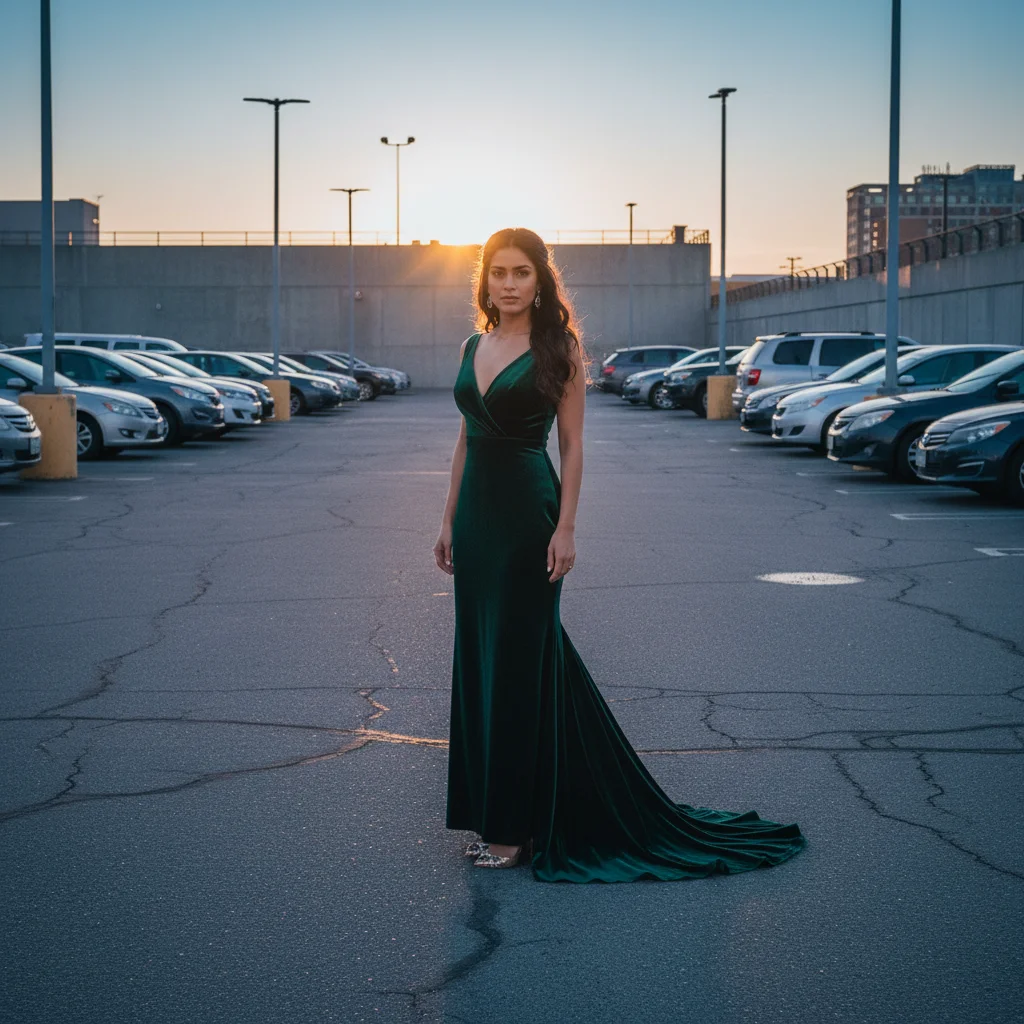
Date night outfit in parking lot with cars behind
Before
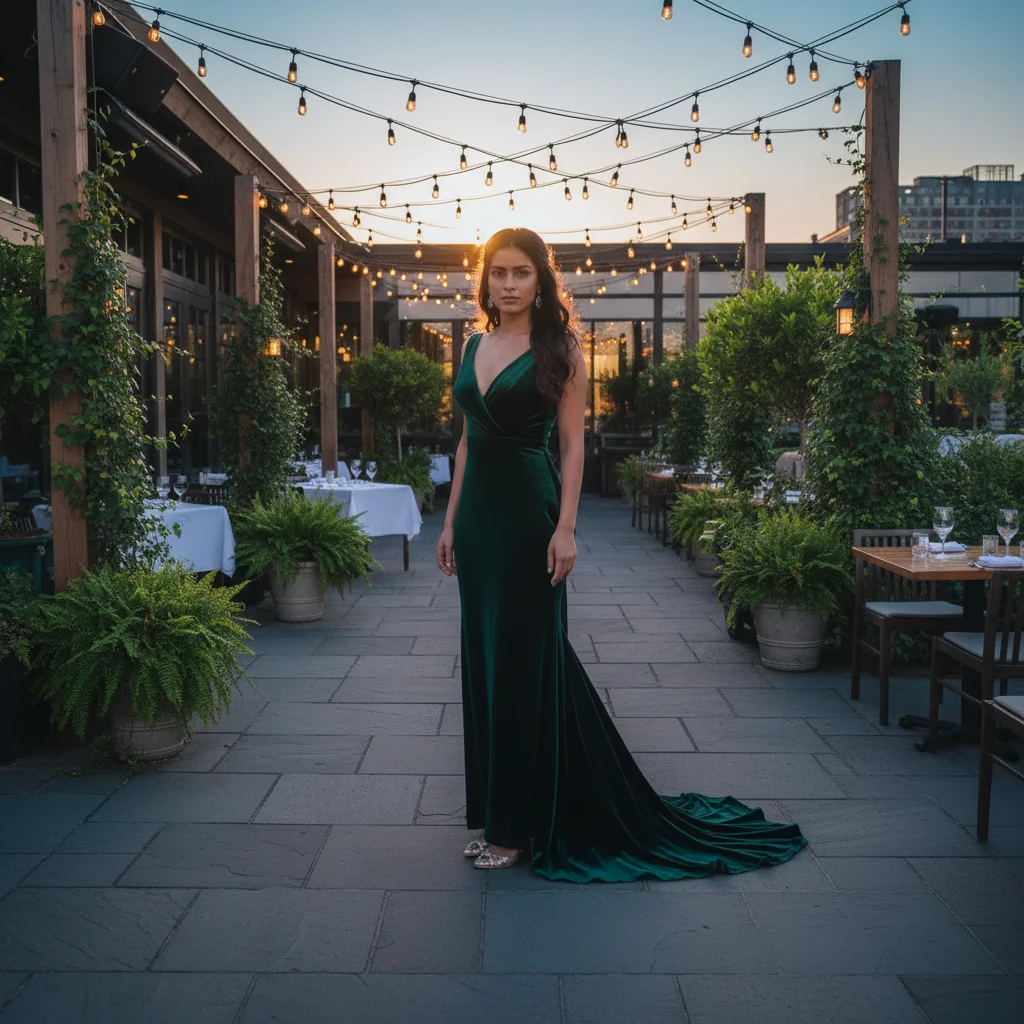
Same outfit at upscale restaurant patio with string lights
After

Change Photo Setting

Drop your photo here

or click to browse

Release to upload

Free • No signup

Advertisement
Popular use cases:
  • outfit photos
  • OOTD pictures
  • fashion photos
  • date night outfits
  • dating app photos
  • Instagram fashion
  • style blogging
  • outfit of the day
  • social media outfits
  • parking lot photos
  • hallway selfies
  • bathroom mirror photos
  • strip mall photos
  • casual outfit pics

Cost
Free No signup required
Time
Instant results in 15-30 seconds
Works on
Any device - browser, phone, tablet, desktop
Powered by
AI-powered photo editing
Scenario Prompt Time
Parking lot to restaurant replace parking lot with upscale restaurant patio 28s
Hallway to cityscape change hallway to chic cityscape at golden hour 26s
Strip mall to boutique replace strip mall with boutique storefront on cobblestone street 30s
Bathroom to cafe replace bathroom with trendy cafe with plants 24s

How it works

  1. Upload your outfit photo

    Drop in that OOTD shot with the wrong background. JPG, PNG, WebP up to 7MB. No account needed, works in your browser.

    Expect: Simple setting changes (generic restaurant, cafe, cityscape): 25-30 seconds. Specific detailed locations with custom lighting: may need 2-3 refinements.
  2. Describe the setting you want

    Type your instruction: 'replace the parking lot with an upscale restaurant patio' or 'change the hallway to a chic cityscape at golden hour.' Be specific about the vibe—upscale, trendy, urban, elegant. No marking needed—the AI separates you from the background automatically.

    Tip: Mention time of day for lighting: 'at golden hour' or 'with evening ambiance' helps the AI match your outfit's lighting

    Copy one of these to get started:

    Parking lot to upscale dining replace the parking lot with an upscale restaurant patio with string lights and greenery
    Hallway to urban backdrop change the hallway background to a chic cityscape at golden hour
    Strip mall to boutique street replace the strip mall with a charming boutique storefront on a cobblestone street
    Bathroom to trendy cafe replace the bathroom with a trendy cafe with plants and natural light
    4 more prompts
    Apartment to rooftop bar change the background to a rooftop bar setting at sunset
    Generic to beachfront replace the background with a beachfront boardwalk with palm trees
    Indoor to garden patio change to an outdoor garden patio with flowers and afternoon light
    Plain to modern loft replace with a modern loft exterior with industrial brick and large windows
  3. AI changes the setting

    AI removes the old background, generates the new location, and composites you in with matching perspective and lighting. Check that the vibe matches your outfit style.

  4. Refine details with markers if needed

    If edge blending isn't perfect or parts of the old setting remain visible, tap markers on those areas and regenerate. This is optional—most setting changes work without markers.

    Tip: Markers help when outfit edges (like flowing fabric) blend with the background. Try without them first.
Try it free

Change Photo Setting

Drop your photo here

or click to browse

Release to upload

Free • No signup

"Date night outfit was perfect. Parking lot behind me was not. Changed it to a restaurant patio and it actually looks like we went somewhere nice." @rachel_m

See it in action

Date night outfit in parking lot with cars behind
Before
->
Same outfit at upscale restaurant patio with string lights
After

Parking Lot to Restaurant Patio

Date night outfit photographed next to the car in parking lot. Transformed to elegant outdoor dining setting that matches the outfit vibe.

Prompt: replace the parking lot with an upscale restaurant patio with string lights and greenery
Chic outfit in apartment hallway with doors visible
Before
->
Same outfit with modern city skyline at golden hour
After

Hallway to City Skyline

Chic fashion-forward outfit captured in bland apartment hallway. Changed to urban cityscape backdrop with golden hour lighting.

Prompt: change the hallway background to a chic cityscape at golden hour
Stylish outfit in front of strip mall stores
Before
->
Same outfit on charming European cobblestone street with boutiques
After

Strip Mall to Boutique Street

Shopping trip outfit in front of generic strip mall stores. Replaced with charming European-style boutique street setting.

Prompt: replace the strip mall with a charming boutique storefront on a cobblestone street
Formal outfit in bathroom mirror with sink visible
Before
->
Same outfit in trendy cafe with plants and natural light
After

Bathroom to Trendy Cafe

Wedding guest attire photographed in hotel bathroom mirror. Transformed to minimalist trendy cafe interior with plants.

Prompt: replace the bathroom with a trendy cafe with plants and natural light
Advertisement

If something looks off

New setting doesn't match my outfit's style (too casual/formal)

Why: The prompt didn't specify the vibe or aesthetic level. Generic terms like 'restaurant' could mean anything from diner to five-star.

Try: Be more specific: use 'upscale', 'trendy', 'elegant', 'casual chic', or 'high-end' to set the tone

Tip: Match descriptors to your outfit: dressy outfit = 'upscale/elegant', streetwear = 'urban/edgy', casual = 'cozy/laid-back'

Lighting in new setting doesn't match my face/outfit lighting

Why: The AI generated a setting without considering your original lighting direction and quality.

Try: Add to your prompt: 'with lighting that matches my face' or specify time: 'at golden hour' or 'with natural afternoon light'

Tip: If you were photographed in daylight, add 'natural light' or time of day to the new setting description

New background looks obviously fake or pasted

Why: Too much detail in the generated background, or perspective doesn't match your body position and camera angle.

Try: Ask for 'slightly blurred background' or 'soft focus on background' to make the composite more believable

Tip: Simpler backgrounds with subtle blur look more realistic than hyper-detailed scenes

Parts of the old setting are still visible around my edges

Why: Complex outfit edges (flowing dress, jacket lapels) against busy backgrounds confused the separation.

Try: Tap markers on the leftover bits of old background, then regenerate with 'remove all old background completely'

Tip: Markers help AI understand exactly where outfit ends and background begins in ambiguous areas

My outfit got cut off or cropped in the new setting

Why: The AI changed the framing when generating the new background.

Try: Add 'keep the same framing and show my full outfit' to preserve the original composition

Tip: Specify 'full-body' or 'keep original framing' if the crop matters for your photo

Ground/floor doesn't make sense (floating, wrong shadow)

Why: The new setting didn't generate proper ground plane or shadow to anchor you in the scene.

Try: add a natural shadow under me on the ground that matches the lighting direction

Tip: Ground shadows are critical for realistic composites—mention them if they're missing or wrong

Quick answers

Do I need to mark or outline myself before changing the setting?

No! Just describe where you want to be: 'replace parking lot with restaurant' or 'change to city backdrop.' The AI automatically separates you from the background and changes the setting. Only use markers if something goes wrong with the edges—like part of your outfit getting removed or old background remaining. Try without markers first.

How do I change photo setting for free?

Upload your photo to EditThisPic, type where you wish you were ('replace with upscale restaurant', 'change to cafe setting', 'put me in front of city skyline'), and download the result. No login required. First edit is free, then you can purchase credits or subscribe for unlimited setting changes.

Can I change the setting to a specific type of restaurant or location?

Yes. The more specific you are, the better. Instead of just 'restaurant,' try 'upscale Italian restaurant patio with string lights' or 'modern rooftop bar at sunset.' The AI uses your description to generate the appropriate setting.

Will it look realistic or obviously edited?

It depends on how you prompt. Generic settings with slight blur (restaurant patio, city backdrop, cafe) look quite realistic. Hyper-specific or dramatic scenes (Eiffel Tower, famous landmarks) can look obviously composited. Keep settings relatable and slightly out of focus for best realism.

What if my outfit photo is indoors but I want an outdoor setting?

It works, but lighting may need adjustment. If you were photographed under indoor lighting, mention outdoor lighting in your prompt: 'outdoor cafe with natural afternoon light.' This helps the AI adjust for the lighting change.

Can I use this for dating app photos or social media?

Absolutely. That's a primary use case. Change parking lots to restaurants, bathrooms to cafes, hallways to cityscapes—make your outfit photos look like you actually went somewhere. The edited photo is yours to use wherever you want.

Ready to change your photo setting?

Free to try. No signup required. Just describe where you wish you were.

Try it free