Free • No signup Fix Wrinkled clothing · Free

Perfect pose but wrinkled clothing?

Perfect photo ruined by wrinkled clothes? AI irons them digitally—looks freshly pressed.
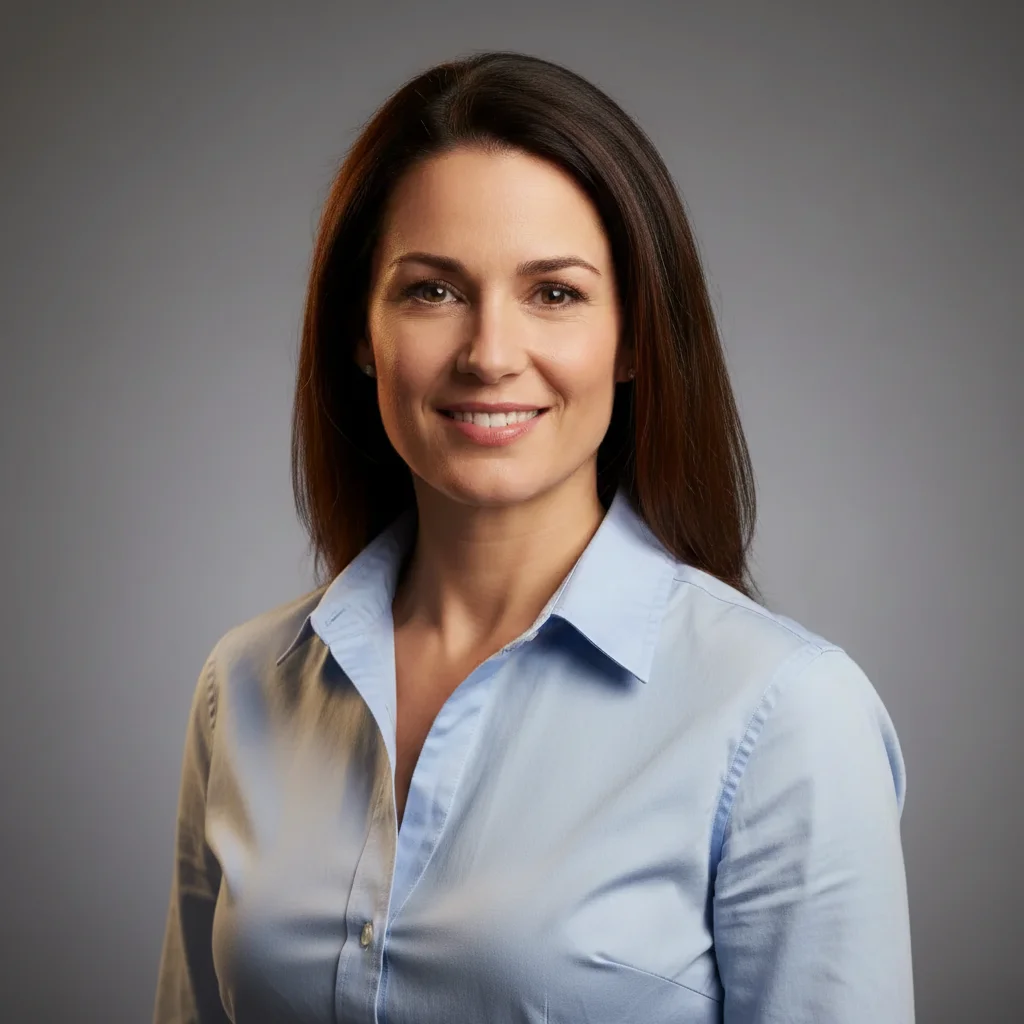
Professional headshot with visibly wrinkled dress shirt
Before
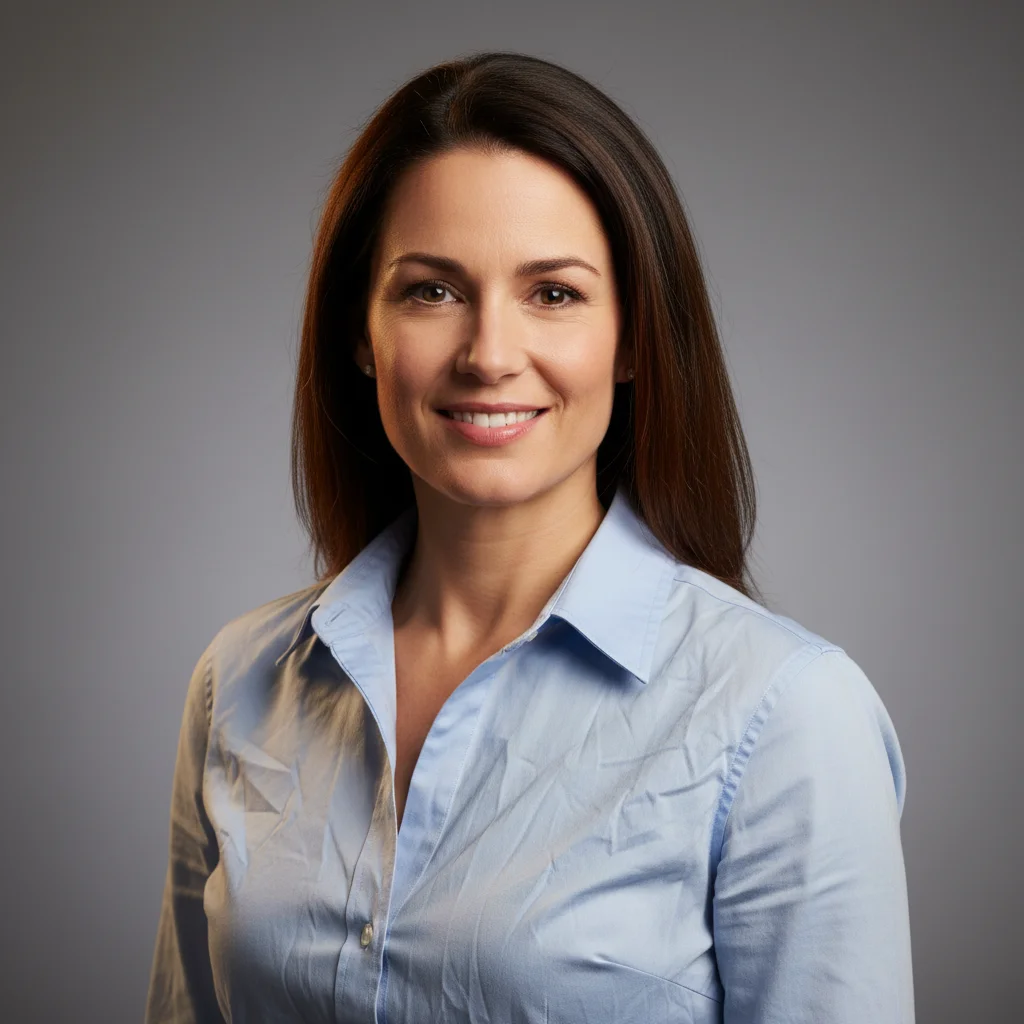
Same headshot with shirt smoothed and freshly pressed
After

Perfect Pose But Wrinkled Clothing? Smooth | EditThisPic

Drop your photo here

or click to browse

Release to upload

Free • No signup

Advertisement
Popular use cases:
  • Remove wrinkles from clothing
  • Iron shirt in photo
  • Smooth fabric wrinkles
  • Professional headshot clothing fix
  • LinkedIn photo clothing
  • Event photo wrinkle removal
  • Digital ironing AI

Cost
Free No signup required
Time
Instant results in 15-30 seconds
Works on
Any device - browser, phone, tablet, desktop
Powered by
AI-powered photo editing
Scenario Prompt Time
Professional headshot shirt smooth wrinkles from shirt, make it freshly pressed 22s
Event photo dress or suit iron clothing digitally, remove all wrinkles 28s
Collar or neckline area smooth wrinkles from collar and neckline area 18s
Patterned clothing remove wrinkles, keep fabric pattern intact 25s

How it works

  1. Upload your photo

    Drop your image into EditThisPic. JPG, PNG, WebP up to 7MB. Works on any photo with wrinkled or creased clothing—headshots, portraits, event photos, selfies, full-body shots.

    Expect: Simple wrinkle smoothing: 20-30 seconds. Complex fabric patterns or multiple garments: 35-45 seconds.
  2. Describe what you want

    Type 'smooth the wrinkles from my shirt' or 'iron the clothing and make it look pressed.' The AI identifies fabric wrinkles and creases, smooths them naturally, and preserves the clothing's color, pattern, and style. No marking needed—the AI understands 'wrinkles' and 'clothing.'

    Tip: Be specific about garment if multiple: 'smooth the wrinkles from the dress' or 'iron the jacket but leave the shirt as is.'

    Copy one of these to get started:

    Professional photo with wrinkled shirt or blouse smooth the wrinkles from my shirt and make it look freshly pressed
    Event photo with creased dress or suit iron the clothing digitally, remove all visible wrinkles and creases
    Headshot with wrinkled collar or neckline smooth the wrinkles from the collar and neckline area
    Casual photo with overall wrinkled appearance remove wrinkles from clothing but keep natural fabric texture
    3 more prompts
    Formal wear with multiple wrinkled garments smooth wrinkles from the jacket, shirt, and pants, make them all look pressed
    Patterned clothing with wrinkles remove wrinkles but keep the fabric pattern intact and aligned
    Travel photo where clothes got wrinkled from luggage smooth out travel wrinkles from clothing, make it look neat and fresh
  3. Review the result

    Check that wrinkles are gone and clothing looks naturally pressed. Zoom in to verify fabric texture is preserved, patterns stay aligned, and the garment still looks realistic—not over-smoothed or plastic.

  4. Refine if needed (optional)

    If some wrinkles remain or fabric looks too smooth/artificial, try 'remove remaining wrinkles but keep natural fabric texture' or tap markers on specific creased areas and regenerate.

    Tip: If the AI over-smoothed and made clothing look fake, add 'keep natural fabric texture and drape' to maintain realism.
Try it free

Perfect Pose But Wrinkled Clothing? Smooth | EditThisPic

Drop your photo here

or click to browse

Release to upload

Free • No signup

"Perfect LinkedIn headshot but my shirt was super wrinkled from the car ride. This smoothed it out beautifully—looks professionally pressed now. Saved me from looking unprofessional." @ProfessionalReady

See it in action

Professional headshot with visibly wrinkled dress shirt
Before
->
Same headshot with shirt smoothed and freshly pressed
After

LinkedIn headshot with wrinkled button-down shirt

Professional headshot with perfect lighting and expression, but dress shirt was visibly wrinkled from being in the car. AI smoothed it to look freshly pressed and professional.
Prompt: smooth the wrinkles from my shirt and make it look freshly pressed
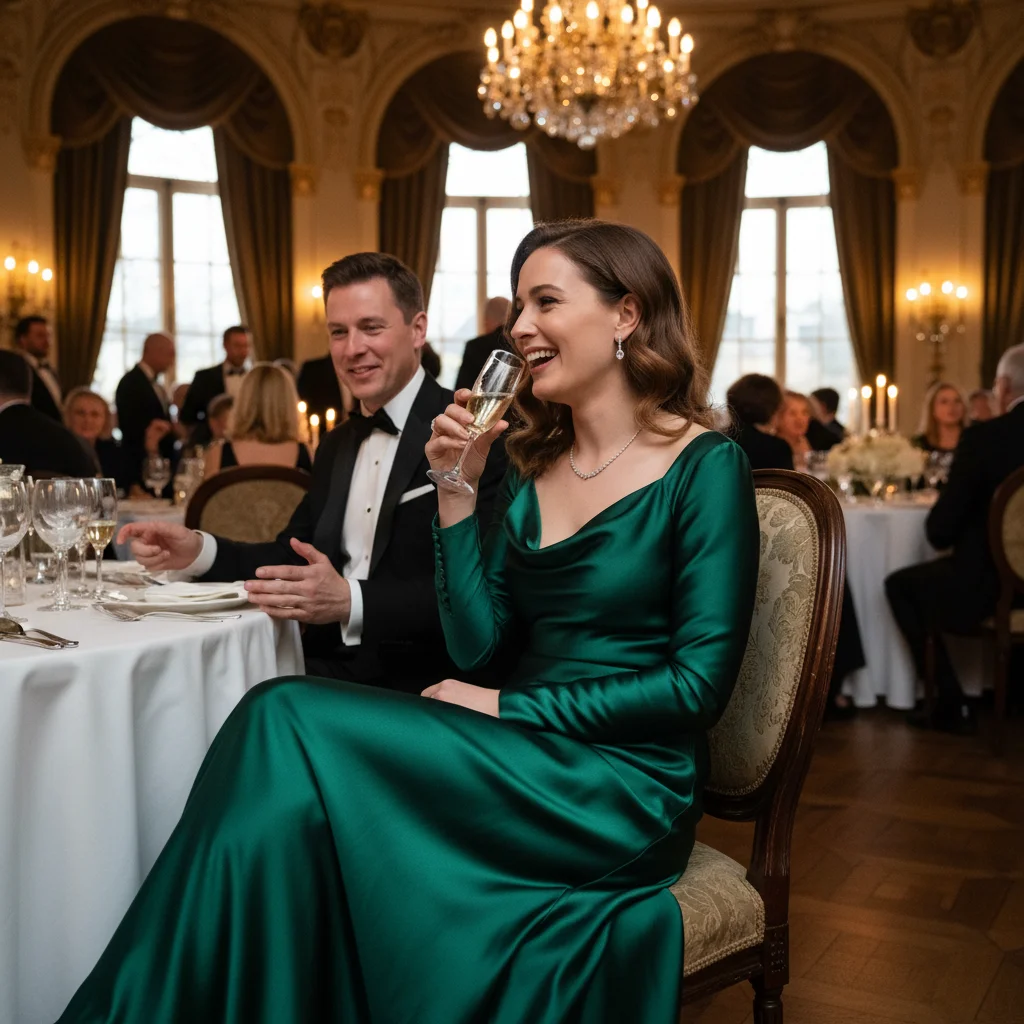
Formal event photo with creased dress
Before
->
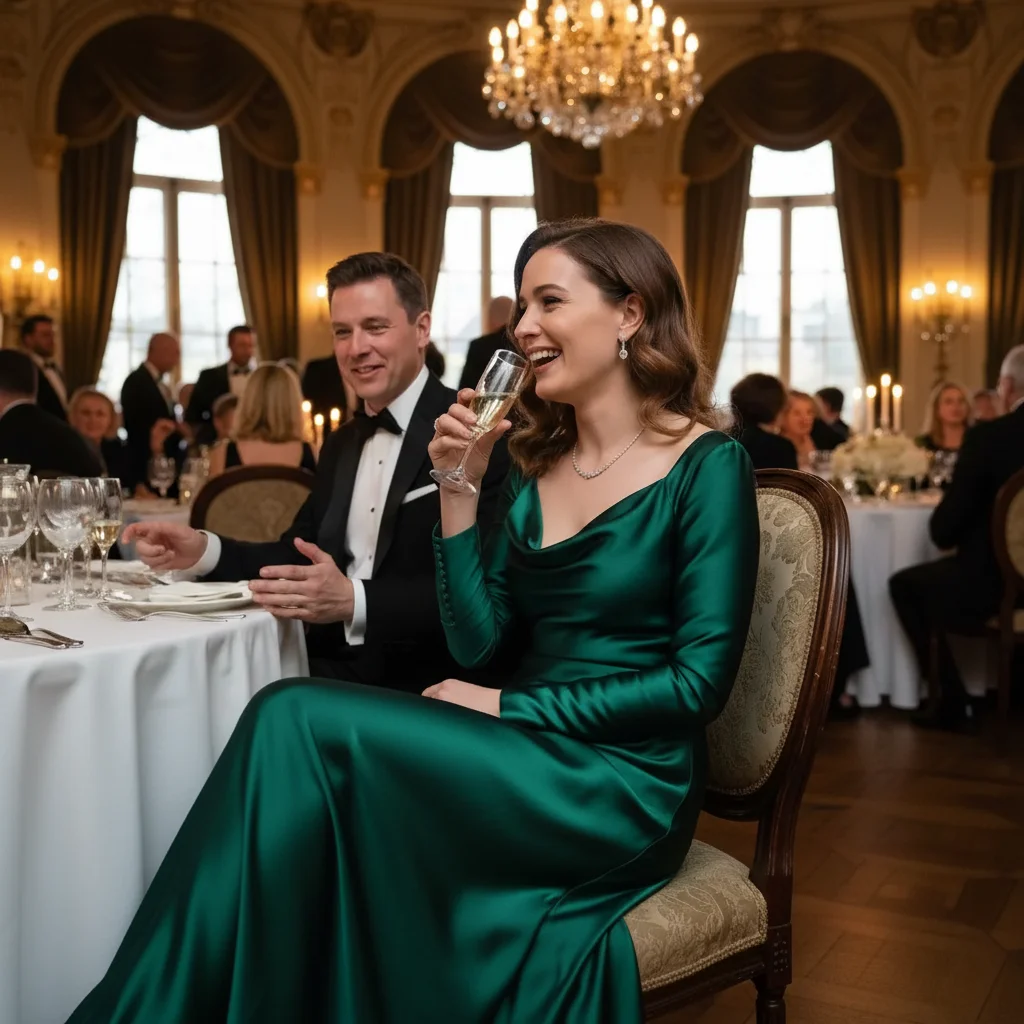
Same photo with dress smoothed, elegant drape preserved
After

Event photo with creased formal dress

Beautiful photo at a wedding or formal event but the dress had creases from sitting. One prompt removed all wrinkles while preserving the elegant fabric drape and flow.

Prompt: iron the clothing digitally, remove all visible wrinkles and creases
Advertisement

If something looks off

Clothing looks too smooth, plastic, or artificial—lost fabric texture

Why: The AI over-smoothed wrinkles and flattened all fabric texture, making clothing look fake or like painted-on fabric.

Try: smooth wrinkles but keep natural fabric texture and weave visible

Tip: 'Keep fabric texture' or 'preserve natural drape' prevents the plastic, unrealistic look.

Patterns or stripes became distorted or misaligned

Why: Smoothing wrinkles on patterned fabric can accidentally warp or shift the pattern if not done carefully.

Try: remove wrinkles but keep the fabric pattern perfectly aligned and undistorted

Tip: Be explicit about preserving patterns, especially with stripes, checks, or geometric prints.

Some wrinkles or creases still visible

Why: The AI missed deep creases or wrinkles in shadowed areas, or didn't recognize subtle fabric bunching.

Try: tap marker on remaining wrinkled areas, then 'smooth all wrinkles from this section'

Tip: Markers target stubborn creases the AI missed, especially useful for deep fold lines.

Clothing color or shading changed after smoothing

Why: Wrinkles create natural shadows and highlights on fabric. Removing them can alter the appearance of color and depth.

Try: smooth wrinkles but keep the natural shading and color of the fabric

Tip: 'Keep natural shading' preserves the dimensional look of fabric even when wrinkles are gone.

Fabric drape or fall looks unnatural after wrinkle removal

Why: Some wrinkles are part of how fabric naturally drapes. Removing all of them can make clothing hang unnaturally.

Try: remove obvious wrinkles and creases but keep natural fabric drape and flow

Tip: Distinguish between bad wrinkles (creases, bunching) and natural drape (how fabric falls). You want to fix the former, not the latter.

Quick answers

Do I need to mark the wrinkled areas before describing them?

No. Just type 'smooth the wrinkles from my shirt' or 'iron the clothing' and the AI identifies and smooths wrinkles automatically. Markers are only needed for stubborn deep creases or when you want to target a very specific area of a garment.

Will this work on patterned clothing like stripes or checks?

Yes, but add 'keep the fabric pattern intact and aligned' to your prompt. This ensures wrinkle removal doesn't distort or warp patterns. The AI needs guidance to preserve pattern alignment while smoothing fabric.

Will clothing still look natural and realistic after wrinkle removal?

Yes, when done correctly. Always add 'keep natural fabric texture' to avoid over-smoothing. The goal is to look freshly pressed, not artificially perfect or painted-on. Natural fabric texture and drape should remain visible.

Can I use this for professional headshots and LinkedIn photos?

Absolutely. Use 'smooth wrinkles from shirt, make it look freshly pressed' for professional, polished results. This is perfect for business contexts where wrinkled clothing looks unprofessional but you don't have time for a wardrobe change or re-shoot.

What if my entire outfit is wrinkled—jacket, shirt, pants?

You can handle all at once: 'smooth wrinkles from the jacket, shirt, and pants, make them all look pressed.' Or do one garment at a time for more control. Multiple garments at once works but may need refinement.

Ready to iron your photo and look polished?

Free to try. No signup required.

Try it free