Free • No signup Convert Simpsons style · Free

Convert Photo to Simpsons Style

Type what you want. Become a Springfield resident in seconds.

Casual selfie of man with brown hair
Before
Same man as yellow-skinned Simpsons cartoon character
After

Convert Photo to Simpsons Style

Drop your photo here

or click to browse

Release to upload

Free • No signup

Advertisement
Popular use cases:
  • Simpsons profile pictures
  • Fan art transformations
  • Simpsons family portraits
  • Social media avatars
  • Birthday party decorations
  • TV show tribute art

Cost
Free No signup required
Time
Instant results in 15-30 seconds
Works on
Any device - browser, phone, tablet, desktop
Powered by
AI-powered photo editing
Scenario Prompt Time
Classic Simpsons convert to Simpsons style with yellow skin and bold outlines 15s
Springfield family Simpsons cartoon style with living room background 25s
Detailed features Simpsons with overbite, four fingers, round eyes 20s
Pet Simpsons Simpsons style like Santa's Little Helper 15s

How it works

  1. Upload your photo

    Drop your image into EditThisPic. JPG, PNG, and WebP up to 7MB all work. Clear portraits with visible faces produce the best Simpsons transformations.

    Expect: Simple portraits: 15-25 seconds. Group photos: may need 1-2 refinements for consistent style.
  2. Describe the Simpsons style you want

    Type your instruction: 'convert this photo to Simpsons cartoon style with yellow skin and bold outlines' or 'transform into a Springfield character like from The Simpsons show.' The AI understands the distinctive Simpsons aesthetic - yellow skin, overbites, round eyes. No selection or marking needed.

    Tip: Mention specific features like 'overbite' or 'four-fingered hands' for more authentic Simpsons details.

    Copy one of these to get started:

    Classic Simpsons character convert this photo to Simpsons cartoon style with yellow skin, round eyes, overbite, and bold black outlines like characters from The Simpsons TV show
    Springfield family portrait transform this family photo into Simpsons cartoon style - yellow skin, characteristic features, living room background like the Simpsons house
    Simpsons with detailed features convert to Simpsons style with yellow skin, four fingers, overbite, bulging round eyes, and Matt Groening cartoon aesthetic
    Simpsons work/school portrait transform this headshot into Simpsons cartoon character like a Springfield Elementary or Nuclear Plant employee, yellow skin, bold outlines
    2 more prompts
    Pet as Simpsons character convert this pet photo to Simpsons cartoon style like Santa's Little Helper or Snowball - characteristic Simpsons animal design with bold outlines
    Simpsons couch scene transform into Simpsons cartoon style sitting on the famous Simpsons couch, yellow skin, living room background with TV visible
  3. Generate and review

    Tap generate and check that the distinctive Simpsons features are present - yellow skin tone, characteristic eye shape, bold black outlines. Your recognizable features should still come through.

  4. Refine with markers if needed

    If specific features need adjustment or you want certain details preserved, tap markers on those spots and regenerate. Most Simpsons conversions capture the style on the first try.

    Tip: Markers help if you want to keep specific accessories like glasses or hairstyle more recognizable.
Try it free

Convert Photo to Simpsons Style

Drop your photo here

or click to browse

Release to upload

Free • No signup

"Made my whole family into Simpsons characters for our holiday card. Even got my dog looking like Santa's Little Helper!" @SpringfieldFan_Dan

See it in action

Casual selfie of man with brown hair
Before
->
Same man as yellow-skinned Simpsons cartoon character
After

Portrait to Springfield resident

A casual selfie transformed into an authentic Simpsons character with yellow skin and characteristic features.

Prompt: convert this photo to Simpsons cartoon style with yellow skin, round eyes, overbite, and bold black outlines like characters from The Simpsons TV show
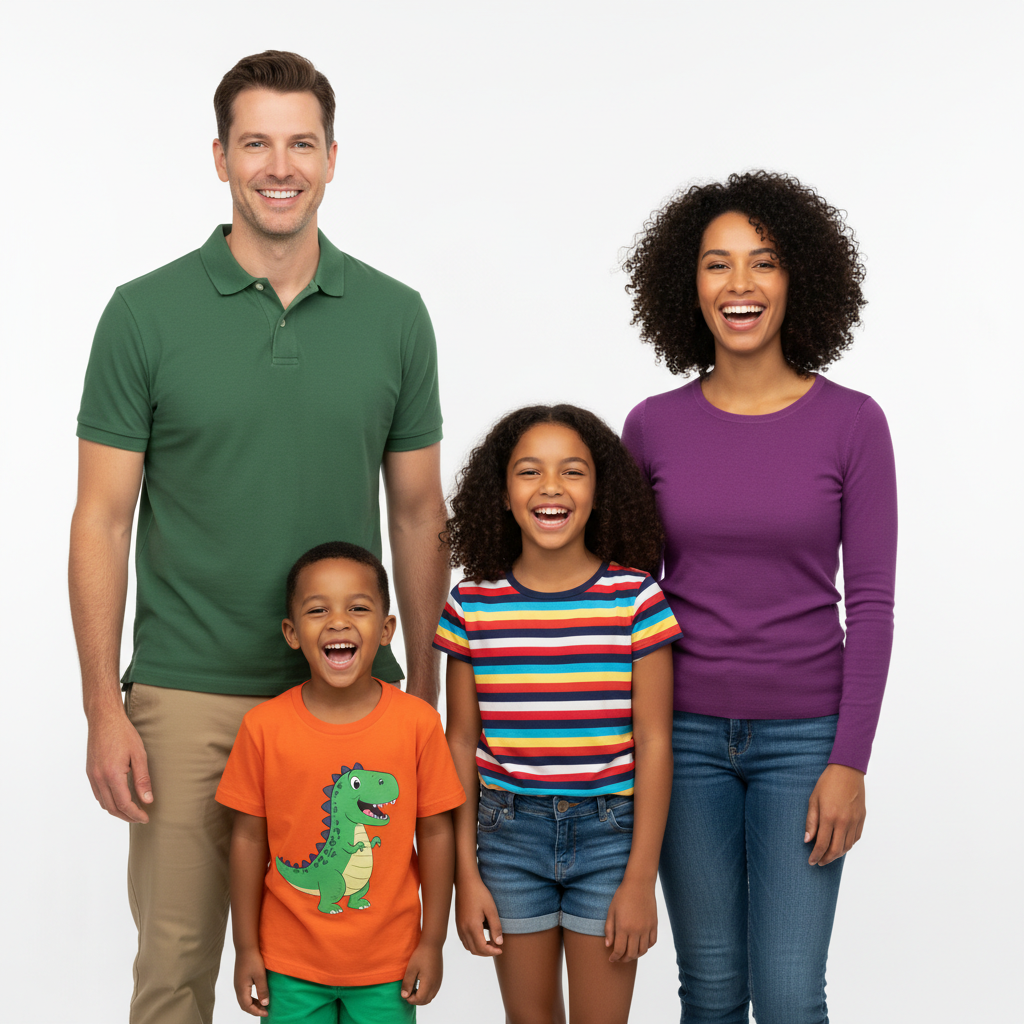
Family of four posing together
Before
->
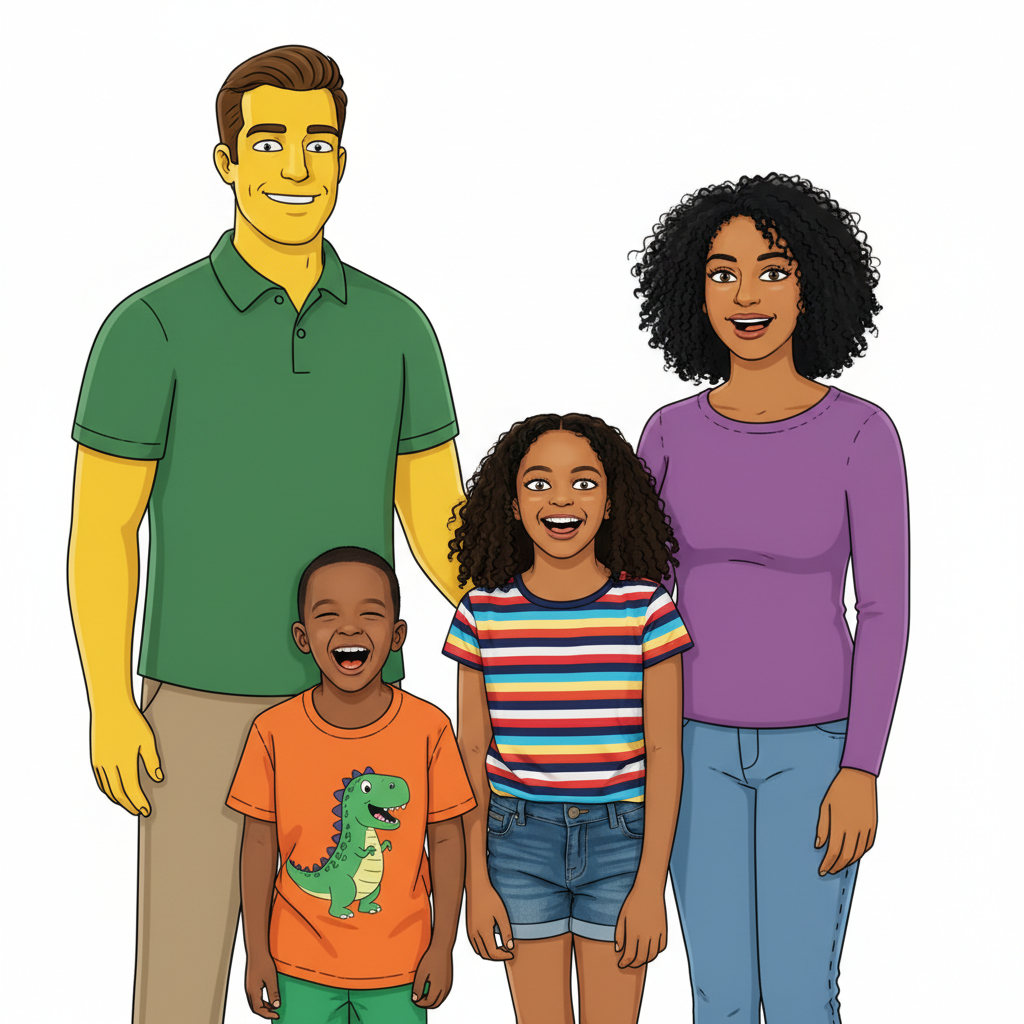
Same family as Simpsons cartoon characters with yellow skin
After

Family to Simpsons family

A family photo converted to look like they could be Springfield neighbors to the Simpsons.

Prompt: transform this family photo into Simpsons cartoon style - yellow skin, characteristic features, bold outlines like The Simpsons TV show
Advertisement

If something looks off

AI changed the wrong area or something I didn't want changed

Why: The AI couldn't determine exactly which area you meant from description alone. This happens with ambiguous requests.

Try: Tap a marker on the specific area you want to change, then regenerate with the same prompt

Tip: Markers tell the AI 'I mean THIS one specifically.' Use them when description alone is ambiguous.

Skin isn't the right shade of yellow

Why: Simpsons yellow is a very specific shade. Generic yellow can look wrong.

Try: convert to Simpsons style with the distinctive Simpsons yellow skin tone (not orange, not pale yellow), bold black outlines

Tip: Specifying 'Simpsons yellow' or 'Springfield yellow' helps nail that exact shade.

Result looks like generic cartoon, not Simpsons

Why: The AI created a general cartoon style instead of the specific Simpsons aesthetic.

Try: transform to authentic Simpsons cartoon style from the TV show - yellow skin, overbite, bulging eyes, Matt Groening art style

Tip: Mentioning 'Matt Groening' or 'The Simpsons TV show' helps target the exact style.

Features don't look like me anymore

Why: The Simpsons style transformation was too aggressive and lost distinctive features.

Try: convert to Simpsons style while keeping my distinctive features recognizable - same hair style, glasses, facial structure but in yellow Simpsons cartoon form

Tip: List specific features you want preserved: 'keep my beard' or 'keep my hairstyle'.

Quick answers

Do I need to mark anything before converting to Simpsons style?

No. Just describe what you want: 'convert this photo to Simpsons cartoon style.' The AI understands the Simpsons aesthetic and applies yellow skin, bold outlines, and characteristic features automatically. Markers are only needed if you want specific areas handled differently.

How do I turn my photo into a Simpsons character for free?

Upload your photo to EditThisPic and type 'convert to Simpsons cartoon style with yellow skin and bold outlines.' The AI transforms your image in 15-30 seconds. No account, no login, no watermarks. Works on portraits, family photos, and pets.

Is there a free Simpsons filter that doesn't need an account?

Yes. EditThisPic converts photos to Simpsons style without requiring signup or login. Just upload, describe the style you want, and download your Springfield character version. No watermarks on results.

Will I still be recognizable as a Simpsons character?

Yes. The AI preserves your key features - hair style, glasses, facial structure - while applying Simpsons stylization. If results are too different, add 'keep my features recognizable' to your prompt for a closer match.

Ready to become a Springfield resident?

Free to try. No signup required.

Try it free