Free • No signup Preview Balayage hair color · Free

AI Balayage Preview

Upload your photo and describe the balayage you want. AI renders realistic hair color results in seconds.
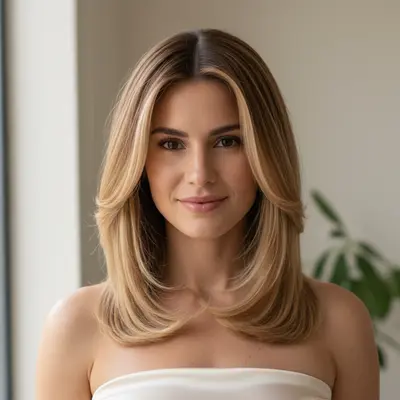
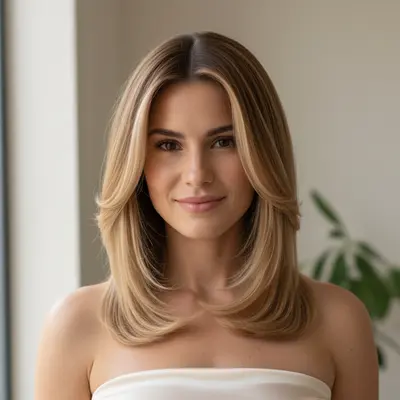
Photo before balayage hair color
Before
Same photo with natural balayage hair color applied
After

AI Balayage Preview

Drop your photo here

or click to browse

Release to upload

Free • No signup

Popular use cases:
  • balayage hair color preview
  • balayage hair color simulator
  • balayage hair color visualization
  • balayage hair color before and after
  • balayage hair color tool

Cost
Free No signup required
Time
Instant results in 15-30 seconds
Works on
Any device - browser, phone, tablet, desktop
Powered by
AI-powered photo editing
Scenario Prompt Time
Natural balayage hair color show natural-looking balayage hair color that enhances appea 25s
Subtle balayage hair color preview subtle balayage hair color — barely noticeable enhan 25s
Medium intensity balayage hair color show moderate balayage hair color with visible but natural-l 25s

How it works

  1. Upload your photo

    Drop a well-lit photo into EditThisPic. Clear photos with the target area visible produce the most realistic balayage hair color previews. JPG, PNG, WebP up to 7MB.

    Expect: Standard balayage hair color preview: 20-30 seconds. Complex styles: may need 1-2 refinements.
  2. Describe the balayage hair color you want

    Type your instruction describing the balayage hair color style, intensity, and look you want. Be specific about the result. No marking needed — the AI understands from your description.

    Tip: The more specific your description, the more accurate the balayage hair color preview. Include style, color, and intensity details.

    Copy one of these to get started:

    Natural balayage hair color show natural-looking balayage hair color that enhances appearance while keeping the result realistic and flattering
    Subtle balayage hair color preview subtle balayage hair color — barely noticeable enhancement that looks effortless
    Medium intensity balayage hair color show moderate balayage hair color with visible but natural-looking enhancement
    Dramatic balayage hair color preview dramatic balayage hair color with bold, statement-making results — still realistic but noticeably enhanced
    3 more prompts
    Customized balayage hair color show balayage hair color customized for my face shape and features — proportionate and flattering
    Professional balayage hair color preview professional-quality balayage hair color suitable for a special event or photoshoot
    Comparing balayage hair color styles show a different style of balayage hair color — an alternative approach for comparison
  3. Review the preview

    Check that the result looks natural and realistic. Use the before/after slider to compare. Zoom in to verify details.

  4. Refine with markers if needed

    If the AI changed the wrong area, tap markers on the target area and regenerate. This is optional — most edits work without markers.

    Tip: Markers are for precision refinement. Try without them first.
Try it free

AI Balayage Preview

Drop your photo here

or click to browse

Release to upload

Free • No signup

"I showed my colorist exactly the balayage placement I wanted using EditThisPic. She said it saved 20 minutes of consultation and the result was perfect." @BalayageDreams_MIA

See it in action

Photo before balayage hair color
Before
->
Same photo with natural balayage hair color applied
After

Natural balayage hair color preview

Previewing natural-looking balayage hair color to see the result before committing.

Prompt: show natural-looking balayage hair color that enhances appearance while keeping realistic results
Photo before moderate balayage hair color
Before
->
Same photo with moderate balayage hair color results
After

Moderate balayage hair color enhancement

A more visible balayage hair color result to compare against the subtle version.

Prompt: show moderate balayage hair color with visible but natural enhancement
Photo before dramatic balayage hair color
Before
->
Same photo with dramatic balayage hair color results
After

Consultation balayage hair color comparison

Multiple balayage hair color options were previewed during a consultation to find the ideal look.

Prompt: preview dramatic balayage hair color with bold statement-making results — realistic but noticeably enhanced

Detailed Guides by Scenario

📷

Pre-Appointment Visualization

Preview balayage hair color results on your own photo before your appointment. Arrive with clear visual references.

Common Scenarios

  • Comparing subtle vs dramatic balayage hair color on your photo
  • Testing different balayage hair color styles and intensities
  • Generating previews to show your stylist or provider

Best Practices

  • Take a well-lit photo with the target area clearly visible
  • Try subtle styles first, then increase intensity
  • Save multiple variations to bring to your appointment
📷

Client Consultation Tool

Stylists and providers can use AI previews to show clients balayage hair color options during consultations.

Common Scenarios

  • Showing clients different balayage hair color intensities on their own photo
  • Comparing subtle vs dramatic options
  • Setting realistic expectations with visual references

Best Practices

  • Show conservative options first
  • Clarify that previews are approximations
  • Use the client's actual photo
📷

Provider Marketing

Create balayage hair color preview content for social media and marketing materials.

Common Scenarios

  • Creating before/after previews for Instagram
  • Showing balayage hair color on diverse clients

Best Practices

  • Disclose AI-generated previews
  • Show diverse clients
  • Pair with actual results

If something looks off

Result looks too dramatic or unnatural

Why: The AI applied aggressive balayage hair color changes because the prompt didn't specify subtlety.

Try: Add 'subtle and natural-looking' to your prompt to constrain the AI's modifications

Tip: Start with 'subtle' for balayage hair color previews. You can always request more change in the next edit.

AI changed the wrong area or something I didn't want changed

Why: The AI couldn't determine exactly which area you meant from description alone.

Try: Tap a marker on the specific area you want to change, then regenerate with the same prompt

Tip: Markers tell the AI 'I mean THIS one specifically.' Use them when description alone is ambiguous.

Balayage Hair Color looks asymmetrical

Why: Uneven lighting or a slight pose angle caused the AI to apply changes unevenly.

Try: Use a front-facing photo with even, symmetrical lighting on both sides

Tip: Symmetrical lighting produces the most balanced results.

Changes aren't visible enough

Why: The AI made very subtle changes that are hard to see.

Try: Be more specific and slightly increase intensity: 'show clearly visible balayage hair color enhancement'

Tip: If the change is too subtle, specify 'moderate' or 'clearly visible' intensity.

Other features changed along with the target

Why: The AI interpreted the prompt broadly, affecting areas beyond balayage hair color.

Try: Specify: 'change only the balayage hair color area — keep everything else exactly the same'

Tip: Naming areas to preserve prevents unintended changes.

Quick answers

Do I need to mark the area before describing the balayage hair color I want?

No! Just describe what you want. The AI understands from your description. Only use markers if the AI changes the wrong area.

Can I preview different balayage hair color styles on the same photo?

Yes. Upload your photo once, then run separate edits with different descriptions. Compare each result side by side before committing.

Is there a free balayage hair color simulator that doesn't require login?

Yes. EditThisPic is free to try with no account needed. Upload your photo, describe the balayage hair color, and get a preview in 30 seconds. One free edit per week, credit packs from $1.99.

How realistic is an AI balayage hair color preview?

AI previews show a useful approximation. Use them to communicate your goals and compare options, but remember that actual results may vary based on technique and your individual features.

What is the best free AI tool to preview balayage hair color?

EditThisPic lets you describe any balayage hair color style and see it on your actual photo in 30 seconds. No app, no account, no watermark.

Can stylists/providers use this during consultations?

Yes. Upload the client's photo, generate previews of different balayage hair color options, and discuss preferences together. Great for setting expectations.

Is this accurate enough for professional use?

EditThisPic is a visualization tool, not a professional simulation system. It shows approximate results to facilitate communication between clients and providers.

Can I preview balayage hair color on my phone?

Yes. EditThisPic works in any mobile browser. Take a photo and preview results right from your phone.

Ready to preview balayage hair color?

Free to try. No signup required.

Try it free