Free β€’ No signup Create Business headshots Β· Free

Create Business Headshots from Photos

Transform any photo into a business-ready headshot in seconds
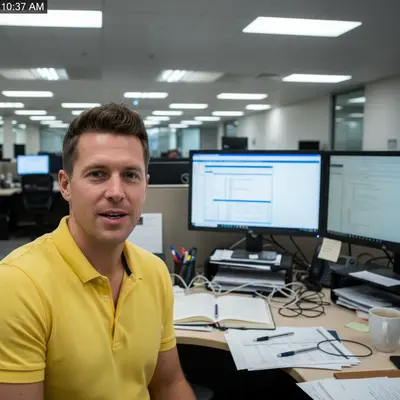
Man in bright yellow polo at messy office desk with cluttered background
Before
β†’
Same man in navy business suit with confident expression against grey background
After

Create Business Headshots from Photos

Drop your photo here

or click to browse

Release to upload

Free β€’ No signup


Cost
Free No signup required
Time
Instant results in 15-30 seconds
Works on
Any device - browser, phone, tablet, desktop
Powered by
AI-powered photo editing

How it works

  1. Upload your photo

    Choose any photo where the face is clearly visible. Office selfies, casual photos, or existing headshots all work. The AI will adapt the style to match professional business standards.

    Expect: Standard business headshots: 25-35 seconds. Executive-level portraits with complex backgrounds: 45-60 seconds and may need one refinement.
  2. Describe what you want

    Type your business headshot requirementsβ€”no marking needed. Specify business attire like business suit or business casual, background preference like corporate grey or office environment, and any industry-specific elements. The AI understands business photography conventions automatically.

    Tip: Mention your industry or company culture for best results: 'tech startup business headshot' yields different results than 'law firm executive portrait'

    Copy one of these to get started:

    Corporate business headshot Create professional corporate business headshot with dark navy suit, white shirt, confident expression, neutral grey background
    Tech industry business casual Generate modern tech business headshot with smart casual blazer, open collar, approachable smile, soft white background
    Finance executive portrait Create executive business portrait in dark suit with tie, authoritative yet approachable expression, sophisticated dark background
    Team directory consistency Generate team directory headshot with business professional attire, natural smile, consistent grey background for company website
    2 more prompts
    Sales professional headshot Create approachable sales professional headshot with blue or grey suit, warm genuine smile, clean bright background
    Consultant or advisor portrait Generate trusted advisor business portrait with professional blazer, confident competent expression, subtle office background
  3. Review the result

    Verify the business attire looks appropriate for your industry. Check that facial features remain natural and authentic. Examine the background to ensure it matches corporate standards for your use case.

  4. Refine with markers if needed

    Optional precision step. If the AI needs help identifying specific elements to preserve or change like company logo visibility or specific accessories, tap markers on those areas and regenerate. Most business headshots work without markers.

    Tip: Markers help when you need to preserve specific details like branded clothing or company colors
Try it free ↓

Create Business Headshots from Photos

Drop your photo here

or click to browse

Release to upload

Free β€’ No signup

"Our startup needed headshots for the whole team. Instead of booking a photographer, we used this for everyone's photos. Consistent, professional, and ready in minutes." @StartupFounderMike

See it in action

Man in bright yellow polo at messy office desk with cluttered background
Before
->
Same man in navy business suit with confident expression against grey background
After

Office selfie to corporate headshot

Transformed a quick desk selfie into a polished corporate business headshot suitable for company directory

Prompt: Create professional corporate business headshot with dark navy suit, white shirt, confident expression, neutral grey background
Woman in bright lime sweater at home with family photos in background
Before
->
Same woman in professional dark suit with executive presence against sophisticated dark background
After

Casual photo to executive portrait

Elevated a casual weekend photo into an executive-level business portrait for board member introduction

Prompt: Create executive business portrait in dark suit with tie, authoritative yet approachable expression, sophisticated dark background

If something looks off

The business attire doesn't match my company's dress code

Why: The AI uses general business conventions. Your company may have specific standards that differ from typical corporate attire.

Try: Be very specific about your company culture: 'tech startup business casual' or 'investment banking formal' gives better context

Tip: Reference a specific dress code level: business formal, business professional, or business casual

The background looks too generic or doesn't match our brand

Why: Standard prompts generate neutral backgrounds. Brand-specific styling requires explicit description.

Try: Describe your preferred background explicitly: 'subtle office background with warm wood tones' or 'modern minimalist white background'

Tip: For brand consistency, use the same background description for all team members

The lighting makes the photo look too formal or too casual

Why: Lighting significantly affects perceived formality. The AI may interpret your industry context differently than intended.

Try: Specify lighting style: 'soft natural lighting for approachable look' vs 'crisp studio lighting for formal presentation'

Tip: Financial and legal: crisp lighting. Creative and tech: softer natural lighting

The headshot doesn't look consistent with other team members

Why: Variations in prompt wording create different styles even for the same intent.

Try: Use identical prompt wording for all team members, only varying the source photo

Tip: Save your working prompt in a doc and use it verbatim for every team member's photo

Quick answers

Do I need to mark areas before describing the business headshot I want?

No! Just describe the business headshot style you need. The AI understands business photography conventions from description alone. Only use markers if you need to preserve or adjust specific details after seeing the initial result.

How do I create business headshots for free?

Upload your photo and describe your business headshot requirements including attire level, industry context, and background preference. EditThisPic processes one free business headshot per week with no signup required and no watermark.

Can I use these for our company website and business cards?

Yes. These business headshots are suitable for all professional uses including company websites, team directories, business cards, email signatures, and marketing materials. They meet professional standards for most industries.

How do I ensure consistency across multiple team members?

Use identical prompt wording for every team member. The consistent description ensures matching attire, backgrounds, and lighting across all headshots even though the source photos differ.

What if our company has specific brand colors or background requirements?

Include those details in your prompt: 'create business headshot with navy suit matching company brand, subtle office background with warm wood tones.' The AI will incorporate brand-specific elements you describe.

Ready to create your business headshot?

Free to try. No signup required.

Try it free β†’